插件中文资料库
中文说明、玩家点评、适用场景和替代推荐,方便快速判断是否适合你。
- 任务路线、地图标记和野外探索
- 界面布局、头像框、姓名板和动作条优化
- 伤害、治疗、仇恨和战斗数据统计
 Details! Mythic+ Scoreboard
 BagSync
 RightClickSelfCast
The White Rabbit's Sequencer 插件下载与使用指南
本页整理了 The White Rabbit's Sequencer 的功能用途、适用人群、安装方法和常见问题,方便玩家快速判断是否需要安装。
适合谁用
The White Rabbit's Sequencer 是一款 动作条 / 战斗 / 任务与升级 / 其他插件 / 唤魔师 类插件,适合需要优化界面、提升操作效率或补充游戏信息提示的魔兽世界玩家。
基本信息
- 插件作者:taudier
- 插件分类:动作条 / 战斗 / 任务与升级 / 其他插件 / 唤魔师
- 适配版本:4.4.2,3.4.5,1.15.8,2.5.5,5.5.4,12.1.0,2.5.6,1.15.9
- 累计下载:0
安装方法
- 点击上方下载按钮获取 The White Rabbit's Sequencer插件文件。
- 解压后将插件文件夹放入 World of Warcraft/_retail_/Interface/AddOns 目录。
- 重启游戏或在角色界面点击插件,确认 The White Rabbit's Sequencer 已启用。
- 如果插件不生效,请检查版本是否匹配,或关闭同类冲突插件后重试。
使用建议
The White Rabbit's Sequencer 安装后建议先在角色界面确认已启用,进入游戏后根据插件提供的命令、小地图按钮或设置面板进行调整。如遇到报错,可先单独启用该插件排查冲突。
The White Rabbit's Sequencer 常见问题
The White Rabbit's Sequencer 适合需要 动作条 / 战斗 / 任务与升级 / 其他插件 / 唤魔师 类功能的玩家,特别是希望提升游戏便利性、界面管理或战斗信息获取效率的用户。
下载后解压到 Interface/AddOns 目录,然后重启游戏并在角色界面启用插件。
常见原因是目录多套一层、游戏版本不匹配、依赖插件缺失或同类插件冲突。
可以查看本页的替代插件推荐和相关插件区域,按下载量和分类选择同类工具。
插件 AI 问答
可以问:这个插件正式服能用吗、和 DBM 冲突吗、怎么设置、有没有替代插件。
The White Rabbit's Sequencer 是一款魔兽世界插件,主要用于伤害统计、输出循环或战斗表现分析、地图、区域、任务路线或交通提醒。建议根据自己的版本和插件环境先测试兼容性。
插件用途
The White Rabbit's Sequencer 主要面向需要任务与升级功能的玩家,用来改善游戏体验、减少重复操作或补充默认界面没有直接提供的信息。
适用场景
- 伤害统计、输出循环或战斗表现分析
- 地图、区域、任务路线或交通提醒
使用建议
安装后建议先在角色选择界面或插件管理器中确认已启用,再进入游戏测试是否与现有整合包、WA 和其他插件冲突。如遇报错,可以先禁用同类插件排查。
NEW DIscord : https://discord.gg/xhxFCnZH
Version 1.43 : IMPORTANT : added a new way to configure the spell cooldown and cast time. You can enter the BASE time (without haste) and select if the parameter is affected by the haste or not.
TOC update for WoW FOREVER.
the spellbook now display the base cooldown and cast time is they are function of haste and if there are enough data.
fixed minor UI issue where the spellbook was not refreshed.
fixed micro timing issue where in rare occasion the charge cooldown could be negative.
the selected step is now memorized per sequence in the UI.
version 1.41 : added a Spellbook feature. It should simplify the programmation of sequences by providing the 4 basic spell parameters (cooldown, charges, cast time and aura duration).
The values are more accurate than the ones displayed in the tooltips.
The haste is now properly computed as a speed increase.
Fixed a bug with the aura duration on multiple targets.
version 1.35 :
added an new step feature "Buff or debuff duration" : this allow you to maintain dots, hots and evoker buffs on multiple targets, with the pandemic effect taken into account.
improvement of the clock calibration.
added an option around the end of cast time and gcd, to avoid step skipped or casted twice.
twrs now ignores the keypress in the CVar SpellQueueWindow.
fixed an ui bug when right click deleting an action with the focus on an editbox.
if there is no availidable step, twrs hold (was returning to first step).
Description
What it is and what it is not
The White Rabbit's Sequencer is not an addon for dummy that will tell you which key to press in real time. In fact it is the opposite, with twrs you are the puppet master !
You craft a sequence of actions (spell/macro/item) with the proper time values, then you press a keybinding and your character should play the sequence harmoniously.
It is not an addon made for "programmers" filled with rabbit holes, but TWRS is realy powerful and fun to use ! The interface is very intuitive and practical, and it is very satisfying to experiment and see your character playing the sequence.
How does it work ?
Basically there is just a clock inside.
How powerful it is ?
The only random action-related-event accessible to the addon in combat is the time of your keystroke. All the rest are called "proc" and are unknown and are many in mainline. If a proc happen and you really want to unleash it you will have to press an other keybinding.
However, the White Rabbit try to get the most of its clock, and the following things are taken into account : cooldown, charge, gcd, castime.
Plus there are "spell FXs" that can reproduce complex mechanics like for example Apotheosis and Serenity of holy priest, Riptide of shaman, or haste…
Not to mention the possibility to insert a sub-sequence at a step, to jump backward when your mighty spell is out of cooldown, and to cast your actions on different targets.
How does it compete versus other "action sequencers" addons ?
The White Rabbit's Sequencer is an original addon, it is superior by far to every other macro-based action sequencer addons in term of action sequencing. So for example with TWRS you cannot miss a step because you pressed a keybinding too early, or you cannot step on an unusable spell on cooldown, and that is because TWRS tracks time accurately.
To open the menu, type /twrs or /rabbit or use the addon loader near the minimap
- You can have 30 sequences of 24 action steps (spells, macros and items).
- a sequence profile system depending on the instance you are in (outside, raid, party, pvp, arena)
- Sub-sequences : sequence inside sequence inside sequence inside sequence etc etc etc…
- Spell FXs to reproduce time dependant mecahnisms like riptide, shield slam, serenity
- Cast your spell onto a specific unit at each step with SortUnitFrames support
- Press and hold for channeling spells
- You can have multiple sequences on a keybinding, and one is chosen depending on a macro conditional, this is the Dispatcher part.
- Folders! to organize your sequences
- it can play sound also.
- Masque support for the action buttons
- export/import sequences
- maintain dots and hots on multiple targets with the pandemic effect taken into account
- QueueWindow mechanism to cycle your spell without any dead time
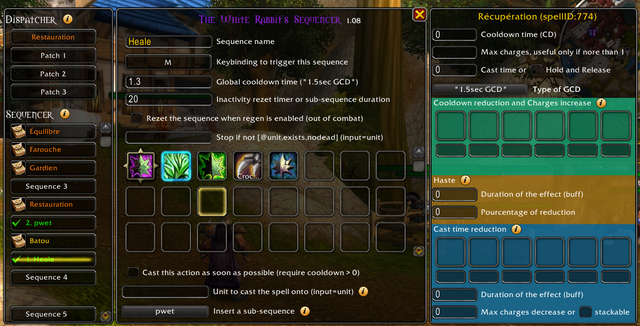

User Manual
Active sequences
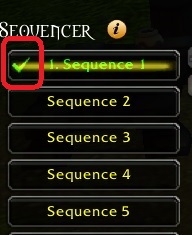
A green checkmark means "the sequence is active" : it is non empty and reachable by a click or a keybinding (directly or via the Dispatcher or is a subs-sequence of).
The cooldowns, the spell charges and the spell FXs are saved per-sequence and shared accross the active sequences. A spell may very well be contained in two different sequences, in this case the addon will pick the spell data from the sequence with the lowest ID, and for the other sequences the spell will have these options greyed.
Cast time, channeling and empower
The cast time input is stored per-step, two identical spells can have different cast time at different time.
When the option "press and hold" is checked the cast time is ignored since it depends on the key release. This option is meant for empower spells and channeling spells.
Cooldowns and charges
For a given spellID, macro name or item name, the cooldown and charges are shared among all actives sequences.
A macro containing the spell X, and a spell X from your spellbook do not share the same cooldown and charges in TWRS, even if it is the case in the real game. This allow you to create "proc" macro with zero cooldown to mimic a proc shield slam for example.
When out of combat or when the clock is recalibrating, the cooldowns alive and charges are re-synchronized if they have a cooldown time set in TWRS, but not the total duration nor the total charges.
Sequence HUD
The sequence HUDs are toggled by shift+click on the sequences of the left panel.

The top action button is the next action. You can start to cast it when its cooldown vanishes.
The bottom action button is the action that was pressed. On click it will revert TWRS to its previous state and recast the last action, not necessarily the one you clicked on. It should be used when the top action cast failled which will desynchronize TWRS with the real game state.
A word of caution : The cooldown times assigned by TWRS when you put a spell are probably wrong, i don't have a good solution yet.
CurseForge: https://www.curseforge.com/wow/addons/the-white-rabbits-sequencer用户评价
暂无 / 5,0 条评价相关推荐
继续看看这些内容
