插件中文资料库
中文说明、玩家点评、适用场景和替代推荐,方便快速判断是否适合你。
- 副本、团队本和大秘境战斗提醒
- 界面布局、头像框、姓名板和动作条优化
 Details! Mythic+ Scoreboard
 Copy Anything
 BagSync
Timber's Raid Summoner 插件下载与使用指南
本页整理了 Timber's Raid Summoner 的功能用途、适用人群、安装方法和常见问题,方便玩家快速判断是否需要安装。
适合谁用
Timber's Raid Summoner 是一款 团队框架 / 术士 类插件,适合需要优化界面、提升操作效率或补充游戏信息提示的魔兽世界玩家。
基本信息
- 插件作者:Timberwind
- 插件分类:团队框架 / 术士
- 适配版本:1.15.8,2.5.5
- 累计下载:50
安装方法
- 点击上方下载按钮获取 Timber's Raid Summoner插件文件。
- 解压后将插件文件夹放入 World of Warcraft/_retail_/Interface/AddOns 目录。
- 重启游戏或在角色界面点击插件,确认 Timber's Raid Summoner 已启用。
- 如果插件不生效,请检查版本是否匹配,或关闭同类冲突插件后重试。
使用建议
Timber's Raid Summoner 安装后建议先在角色界面确认已启用,进入游戏后根据插件提供的命令、小地图按钮或设置面板进行调整。如遇到报错,可先单独启用该插件排查冲突。
Timber's Raid Summoner 常见问题
Timber's Raid Summoner 适合需要 团队框架 / 术士 类功能的玩家,特别是希望提升游戏便利性、界面管理或战斗信息获取效率的用户。
下载后解压到 Interface/AddOns 目录,然后重启游戏并在角色界面启用插件。
常见原因是目录多套一层、游戏版本不匹配、依赖插件缺失或同类插件冲突。
可以查看本页的替代插件推荐和相关插件区域,按下载量和分类选择同类工具。
插件 AI 问答
可以问:这个插件正式服能用吗、和 DBM 冲突吗、怎么设置、有没有替代插件。
Timber's Raid Summoner 是一款魔兽世界插件,主要用于界面框架、头像、动作条或冷却显示优化、副本、团本、大秘境或钥石辅助。建议根据自己的版本和插件环境先测试兼容性。
插件用途
Timber's Raid Summoner 主要面向需要团队框架功能的玩家,用来改善游戏体验、减少重复操作或补充默认界面没有直接提供的信息。
适用场景
- 界面框架、头像、动作条或冷却显示优化
- 副本、团本、大秘境或钥石辅助
使用建议
安装后建议先在角色选择界面或插件管理器中确认已启用,再进入游戏测试是否与现有整合包、WA 和其他插件冲突。如遇报错,可以先禁用同类插件排查。
Provides an interface for easily selecting and coordinating summons of raid members. Summon via a list of raid members, or with the summoning queue. Many more features not seen elsewhere.
To open, type "/trs" or "/timbersraidsummoner". You can also add a keybind for the addon in the "Options > Keybindings > AddOns" menu.
Multiple settings can be managed by clicking the gear icon in the top right of the addon window.
This addon communicates between characters in the same raid/party that also have the addon. In order to see in-progress summons and a decentralized summoning queue, one or more players will need the addon. The more people (especially warlocks) in your group with the addon, the more usefulness you'll get out of the addon.
Characters in the summon queue have a timeout of 5 minutes. Once a character has been sitting in the queue for 5 minutes, all users with the addon will get a message about the user timing out, and the character will be removed from the queue. This prevents stale queues. If you want to manually remove a character from the queue, simply middle click their name. To summon a character in the queue, left click on the name in the queue to target the character, and then right click to begin casting the summon.
TBC Compatible: This addon now works with TBC, and while addons can't directly interact with meeting stones, you can use the addon to manually target party/raid members and then right click on the meeting stone to begin the summon. The addon maintains warlock Ritual of Summoning functionality on TBC, as well.
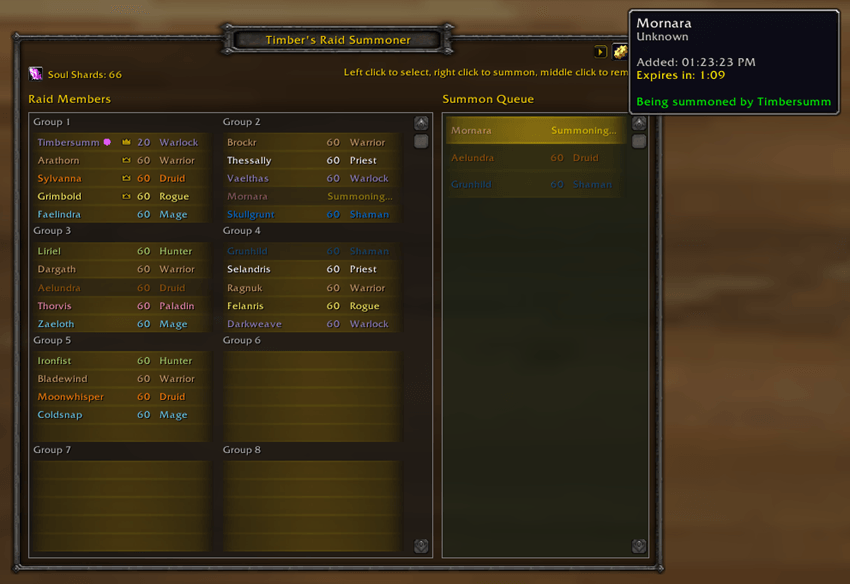
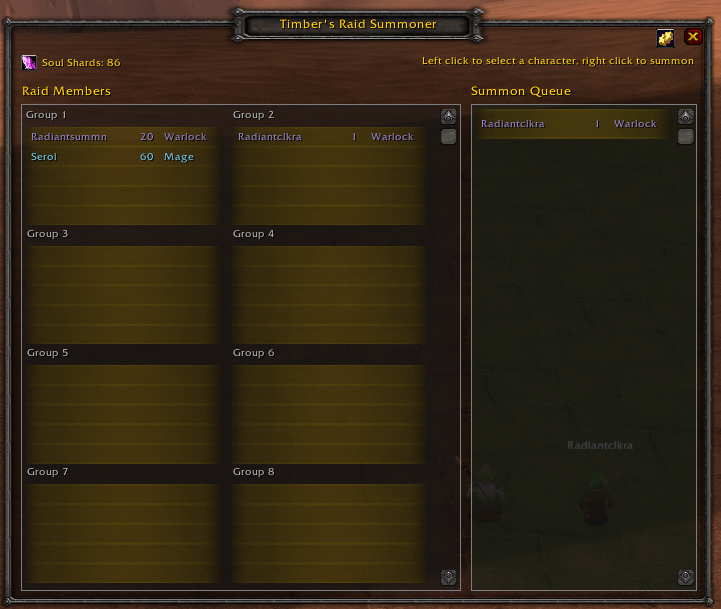
Main Interface Features
Raid Members Panel
- Displays all members of your current raid or party group
- Shows player name, level, and class for each member
- Class colors are displayed for easy identification
- Crown icon displayed for party/raid leader
- Left-click a player to target them
- Right-click a player to cast Ritual of Summoning on them (summons without sending messages)
- Out-of-range/offline players can be displayed with reduced opacity (configurable)
- Hover tooltip shows player's current zone/subzone location
Summon Queue Panel
- Displays players who have requested a summon (in chronological order)
- Players are automatically added when they type a keyword (configurable) in raid/party chat
- Left-click to target the player
- Right-click to summon the player from the queue
- Middle-click to remove a player from the queue
- Queue entries automatically expire after 5 minutes
Avoid Duplicate Summons
- If a character is being summoned, the hover tooltip will show which character is summoning them
- Players being summoned show "Summoning…" status in yellow
Manual Summon Detection
- Detects when you manually cast Ritual of Summoning (without using the addon UI)
- Automatically broadcasts your summoning status to other addon users
- Other players will see "Summoning…" for your target
Meeting Stone Support
- Detects Meeting Stone summons for players in the queue
- Tracks summon completion based on channel duration
Cross-Addon Synchronization
- Summon queue is shared with other raid members who have the addon
- When you join a group, the queue automatically syncs with other addon users
- "Summoning…" status is broadcast to all addon users in real-time
- Players who join mid-summon will see the current summoning status
Soul Shard Count
- Keep track of how many soul shards you have so you aren't caught off guard
- A count in the top left corner of the addon window shows how many Soul Shards are in your bags
Keyword Detection
- Automatically detects summon requests in party and raid chat
- Default keywords:
*123(matches any message containing "123")
- Supports multiple keyword formats:
*keyword- Matches if the message contains "keyword" anywherekeyword- Matches if the entire message equals "keyword" exactly^patternor$pattern- Regex pattern matching
- Add, remove, and manage keywords in the settings panel
- "Restore Defaults" button to reset the keywords list
Notifications
Sound Notification
- Plays a sound when a player is added to the summon queue
- Can be enabled/disabled in settings
- Test button to preview the sound
Toast Notification
- Shows a popup notification when a player requests a summon
- Displays the player's name
- Click the toast to open the addon window
- Automatically fades after 5 seconds
- Can be enabled/disabled in settings
- Test button to preview the notification
Automated Messages
Raid/Party Message
- Automatically sends a message to raid or party chat when summoning
- Default: "Summoning %s, please help click!"
%sis replaced with the target player's name- Can be enabled/disabled and customized
- Enabled by default
Say Message
- Optionally sends a
/saymessage when summoning - Default: "Summoning %s, please help click!"
- Useful for alerting nearby players to help click the portal
- Can be enabled/disabled and customized
- Disabled by default
Whisper Message
- Optionally whispers the summoned player
- Default: "Summons incoming. Be ready to accept it. If you don't receive it within 30 seconds, let me know!"
- Can be enabled/disabled and customized
- Disabled by default
Interface Options
Shaman Class Color
- Choose how Shaman class colors are displayed:
- Expansion Default - Pink in Classic Era, Blue in TBC+
- Blue - Always use blue
- Pink - Always use pink
Range Opacity
- Adjust the opacity of out-of-range and offline raid members (10% - 100%)
- Helps visually identify who is nearby and summonable
- Default: 50%
- To disable, set to 100%
Additional Features
Minimap Button
- Toggle the addon window from the minimap
- Button can be shown/hidden via
/trs minimapor via the settings panel - Draggable to any position around the minimap
Keybinding Support
- Bind a key to toggle the addon window to access it quickly and easily
- Configure in Game Menu > Key Bindings > Timber's Raid Summoner
Slash Commands
/trsor/timbersraidsummoner- Toggle the addon window/trs minimap- Toggle the minimap button visibility
Technical Details
- Supported Game Versions: WoW Classic Era (1.15.x), TBC Classic (2.5.x)
- SavedVariables: Settings persist per-account
- Addon Communication: Uses addon message channel for cross-player sync
用户评价
暂无 / 5,0 条评价相关推荐
继续看看这些内容
