插件中文资料库
中文说明、玩家点评、适用场景和替代推荐,方便快速判断是否适合你。
- 背包、银行和物品整理
- 任务路线、地图标记和野外探索
 Details! Mythic+ Scoreboard
 BagSync
 RightClickSelfCast
Quest Weaver 插件下载与使用指南
本页整理了 Quest Weaver 的功能用途、适用人群、安装方法和常见问题,方便玩家快速判断是否需要安装。
适合谁用
Quest Weaver 是一款 任务与升级 / 其他插件 类插件,适合需要优化界面、提升操作效率或补充游戏信息提示的魔兽世界玩家。
基本信息
- 插件作者:QuestWvr
- 插件分类:任务与升级 / 其他插件
- 适配版本:1.15.8,2.5.5
- 累计下载:0
安装方法
- 点击上方下载按钮获取 Quest Weaver插件文件。
- 解压后将插件文件夹放入 World of Warcraft/_retail_/Interface/AddOns 目录。
- 重启游戏或在角色界面点击插件,确认 Quest Weaver 已启用。
- 如果插件不生效,请检查版本是否匹配,或关闭同类冲突插件后重试。
使用建议
Quest Weaver 安装后建议先在角色界面确认已启用,进入游戏后根据插件提供的命令、小地图按钮或设置面板进行调整。如遇到报错,可先单独启用该插件排查冲突。
Quest Weaver 常见问题
Quest Weaver 适合需要 任务与升级 / 其他插件 类功能的玩家,特别是希望提升游戏便利性、界面管理或战斗信息获取效率的用户。
下载后解压到 Interface/AddOns 目录,然后重启游戏并在角色界面启用插件。
常见原因是目录多套一层、游戏版本不匹配、依赖插件缺失或同类插件冲突。
可以查看本页的替代插件推荐和相关插件区域,按下载量和分类选择同类工具。
插件 AI 问答
可以问:这个插件正式服能用吗、和 DBM 冲突吗、怎么设置、有没有替代插件。
Quest Weaver 是一款魔兽世界插件,主要用于背包、银行、专业制造或物品整理、地图、区域、任务路线或交通提醒,适合对应经典服或周年服版本使用。建议根据自己的版本和插件环境先测试兼容性。
插件用途
Quest Weaver 主要面向需要任务与升级功能的玩家,用来改善游戏体验、减少重复操作或补充默认界面没有直接提供的信息。
适用场景
- 背包、银行、专业制造或物品整理
- 地图、区域、任务路线或交通提醒
使用建议
安装后建议先在角色选择界面或插件管理器中确认已启用,再进入游戏测试是否与现有整合包、WA 和其他插件冲突。如遇报错,可以先禁用同类插件排查。
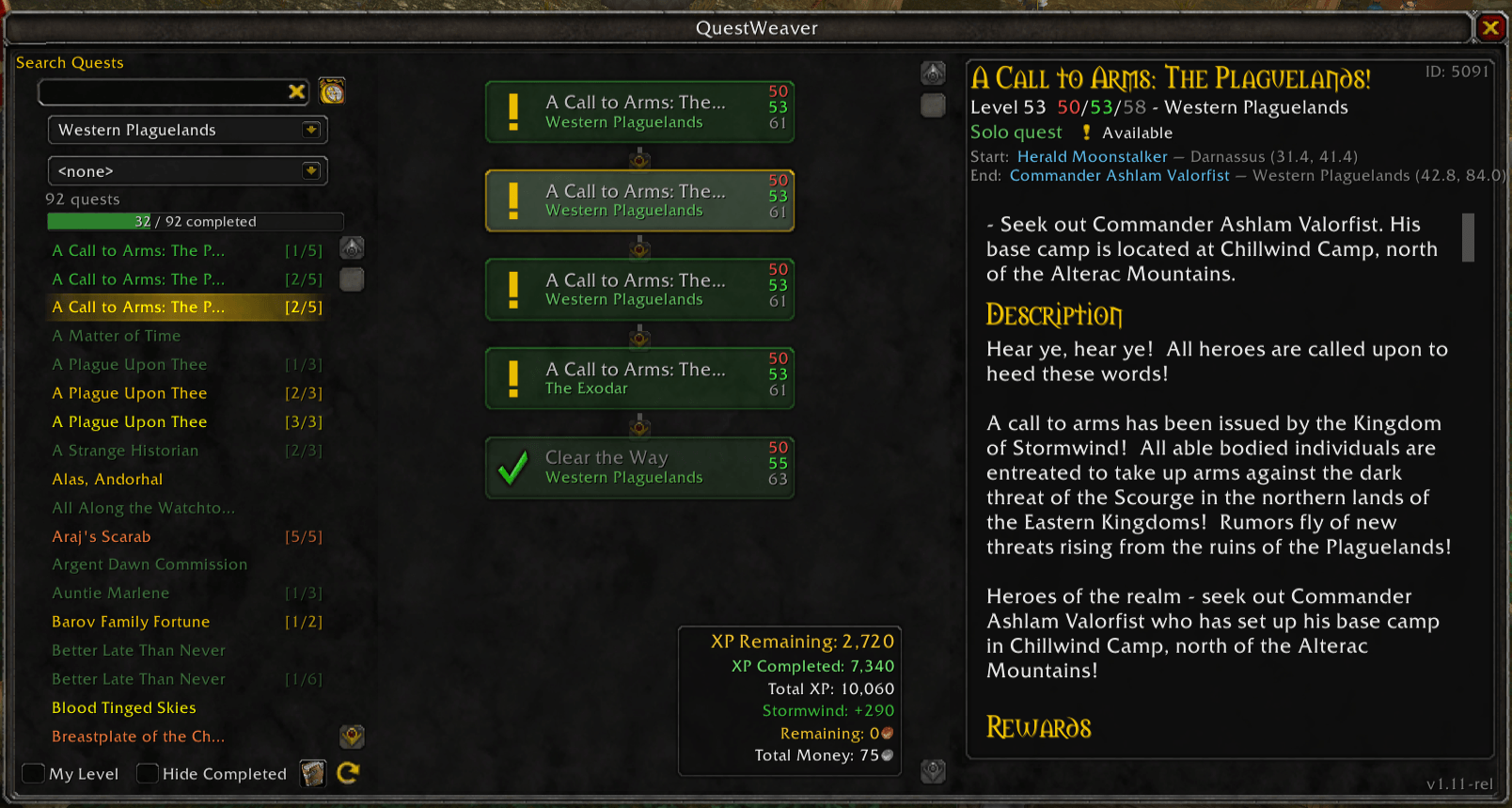
QuestWeaver - a quest chain viewer
Turn messy quest chains into clear, visual node maps. No more guessing what comes next.
QuestWeaver shows you every quest in a chain before you start it. See which quests you've completed, which you're on, and what's coming next. Check if the final rewards match your class and spec before you commit. No more alt-tabbing to a browser, that's sooo 2007.
Compatibility
- Classic - TBC (v1.01+)
- Classic Era (v1.08+)
- Classic Era - SoD (v1.08+)
Visual Chain Maps
- Quest chains displayed as connected node graphs—see the entire storyline at once
- Color-coded quest suitability: dangerous (red), yellow (feasible), green (ideal), gray (low value)
- Difficulty-tinted node cards matching quest list colors
- Dungeon and raid icons on zone dropdown and node cards
- Level warnings for high-level quests in the chain graph
- Show incomplete quest chains
- Show recently viewed quests
Quest Discovery & Search
- Browse 4000+ Classic & TBC quests by zone, name, or level range
- "My Level" filter - hide quests that are too hard or trivial with one click
- "Hide Completed" checkbox to focus on unfinished content
- Faction reputation filter dropdown to find faction-specific quest chains
- Reset All Filters button for quick search refresh
- Find quests you've missed or follow-ups you didn't know existed
- Now supports, French, German, and Spanish (EU).
- NPC Map viewer. See the locations of Quest givers and turn ins conveniently
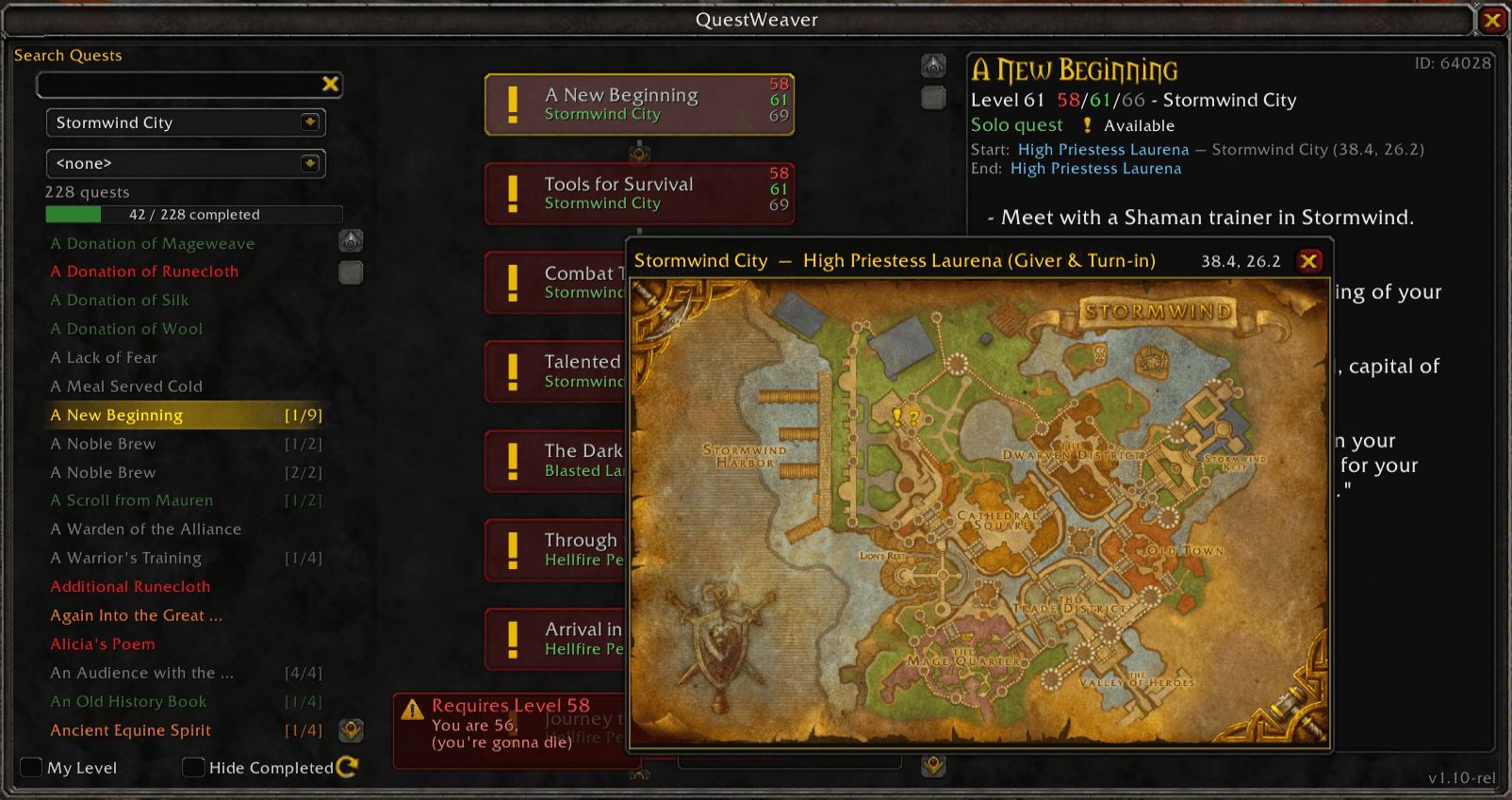
Smarter Quest Reward Planning
- See final quest rewards before starting a chain
- Evaluate if end-game items match your class and spec
- Compare total XP across different quest paths
- Avoid wasting time on chains with irrelevant rewards
- See NPC quest giver on customised maps.
In-Game Quest Details
- Full quest information: objectives, descriptions, NPCs, rewards, and locations
- NPC zone and coordinates shown for both start and end NPCs
- XP values and reputation rewards
- Quest chain position (e.g., "Quest 3 of 5")
Smart Integration
- Quest offer detection with auto-open hint in chat
- Quest log integration: quickly jump to the chain for your current quest
- Auto-scroll to selected quest (toggle with
/qw auto on|off) - Version broadcast alerts you if your addon is outdated
- Minimap control :
/qw map off/onto toggle QuestWeaver button on the minimap. (1.09+)
Multi-Language Support
- UI available in 10 languages.
- Quest data available in English, French, German, and Spanish (EU). Additional languages are in progress.
- Addon UI Supports: English, Deutsch, Español, Français, Português, Русский, 한국어, 简体中文, 繁體中文
Installation
Automatic:
- Install via CurseForge app or WowUp
- Restart WoW if it's running
- Done—minimap button will appear on login
Manual:
- Download the latest release
- Extract the QuestWeaver folder to
World of Warcraft\_anniversary_\Interface\AddOns - Type
/reloadin the chat, or restart WoW - Verify it's loaded: Character Selection screen → AddOns → check QuestWeaver is enabled
How to Use
- Click the minimap button or type
/qwto open QuestWeaver - Search for quests by name or browse by zone
- Use filters: "My Level", "Hide Completed", or reputation factions
- View quest chains as visual node maps in the center panel
- Click any quest to see full details, NPC locations, and rewards
- Quest log integration: quickly jump to the chain for your current quest
Why QuestWeaver?
Built for players who want smoother leveling and less frustration. Stop dropping important follow-up quests. Stop abandoning chains halfway because you didn't know what the reward was. Stop alt-tabbing to figure out which quest comes next.
QuestWeaver doesn't tell you where to go—it shows you your options so you can make informed decisions about which chains to pursue.
Important Notes
- Version Compatibility: Built for WoW Classic TBC Anniversary (2.5.4/2.5.5). Not tested on retail or other Classic versions.
- Database Status: This is a beta release for public testing. The quest database covers 4000+ quests across Classic and TBC zones but is actively being refined. If you find missing quests or incorrect chain data, please report them via CurseForge issues. Your feedback helps improve the addon for everyone.
- Faction Support: Separate Alliance and Horde quest databases ensure you only see quests available to your faction.
Support Development and Donations
QuestWeaver is free and always will be. If you find it useful and want to support continued development and database updates.
Donations are appreciated and can be made via Ko-fi (The "Donations" Link is on this page, a few coins are appreciated).
Questions or Feedback?
Use the CurseForge comments or issues tracker. Bug reports with quest IDs help us improve the database quickly.
CurseForge: https://www.curseforge.com/wow/addons/quest-weaver
用户评价
暂无 / 5,0 条评价相关推荐
继续看看这些内容
