插件中文资料库
中文说明、玩家点评、适用场景和替代推荐,方便快速判断是否适合你。
- 界面布局、头像框、姓名板和动作条优化
 Details! Mythic+ Scoreboard
 Questie
 GearInsight
kkComboTextAll 插件下载与使用指南
本页整理了 kkComboTextAll 的功能用途、适用人群、安装方法和常见问题,方便玩家快速判断是否需要安装。
适合谁用
kkComboTextAll 是一款 其他插件 类插件,适合需要优化界面、提升操作效率或补充游戏信息提示的魔兽世界玩家。
基本信息
- 插件作者:kkG
- 插件分类:其他插件
- 适配版本:12.0.0
- 累计下载:51
安装方法
- 点击上方下载按钮获取 kkComboTextAll插件文件。
- 解压后将插件文件夹放入 World of Warcraft/_retail_/Interface/AddOns 目录。
- 重启游戏或在角色界面点击插件,确认 kkComboTextAll 已启用。
- 如果插件不生效,请检查版本是否匹配,或关闭同类冲突插件后重试。
使用建议
kkComboTextAll 安装后建议先在角色界面确认已启用,进入游戏后根据插件提供的命令、小地图按钮或设置面板进行调整。如遇到报错,可先单独启用该插件排查冲突。
kkComboTextAll 常见问题
kkComboTextAll 适合需要 其他插件 类功能的玩家,特别是希望提升游戏便利性、界面管理或战斗信息获取效率的用户。
下载后解压到 Interface/AddOns 目录,然后重启游戏并在角色界面启用插件。
常见原因是目录多套一层、游戏版本不匹配、依赖插件缺失或同类插件冲突。
可以查看本页的替代插件推荐和相关插件区域,按下载量和分类选择同类工具。
插件 AI 问答
可以问:这个插件正式服能用吗、和 DBM 冲突吗、怎么设置、有没有替代插件。
kkComboTextAll 是一款魔兽世界插件,主要用于其他插件相关功能。建议根据自己的版本和插件环境先测试兼容性。
插件用途
kkComboTextAll 主要面向需要其他插件功能的玩家,用来改善游戏体验、减少重复操作或补充默认界面没有直接提供的信息。
适用场景
- 其他插件相关功能
使用建议
安装后建议先在角色选择界面或插件管理器中确认已启用,再进入游戏测试是否与现有整合包、WA 和其他插件冲突。如遇报错,可以先禁用同类插件排查。
kkComboTextAll
kkComboTextAll is a lightweight addon that displays your character’s primary resource (combo points–style power) as a large, clear number on the screen.
It is designed as a simple alternative to WeakAuras, focusing on readability, performance, and minimal UI clutter.
Features
-
Automatic class & specialization detection
-
Rogue / Feral Druid – Combo Points
-
Paladin – Holy Power
-
Monk – Chi
-
Evoker – Essence
-
Mage – Arcane Charges
-
Warlock – Soul Shards
-
-
Displays current resource count in large, centered text
-
Flashing effect when resource is at maximum
-
Automatically colored by class
-
Hides itself when the current specialization does not use a supported resource
Move & Positioning
-
Frame is locked by default
-
Hover the frame and hold CTRL to show the Move Settings button
-
Click the button to unlock movement
-
Drag the frame to reposition it anywhere on the screen
-
Position is automatically saved and restored between sessions
Why kkComboTextAll?
-
No WeakAura dependency
-
Extremely lightweight and performance-friendly
-
Clean, minimal design
-
Safe to use in combat
-
Perfect for players who want a clear resource indicator without extra visuals
If you want, I can also:
-
Shorten this for a compact CurseForge summary
-
Write a one-line tagline
-
Create an installation / usage section
-
Provide a fully polished professional version
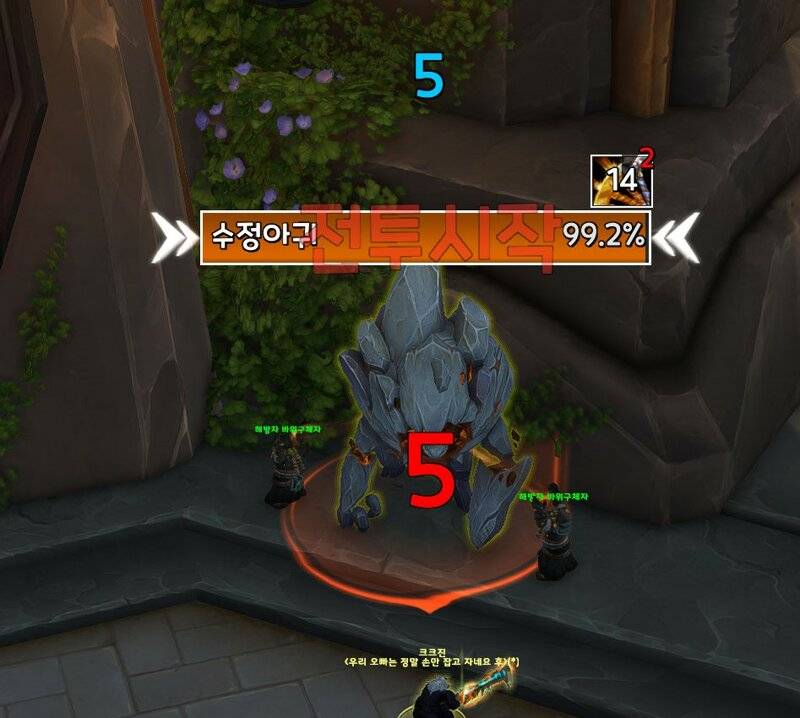
글자위에서 ctrl 누르면 "이동버튼" 생김
클릭하면 드레그 이동 가능
원하는 위치 이동후
다시 "이동버튼" 누르면 잠금
用户评价
暂无 / 5,0 条评价相关推荐
继续看看这些内容
