插件中文资料库
中文说明、玩家点评、适用场景和替代推荐,方便快速判断是否适合你。
- 界面布局、头像框、姓名板和动作条优化
 Details! Mythic+ Scoreboard
 FollowerLocationInfo
 Sleek XP Bubbles
GroupFinder 插件下载与使用指南
本页整理了 GroupFinder 的功能用途、适用人群、安装方法和常见问题,方便玩家快速判断是否需要安装。
适合谁用
GroupFinder 是一款 战斗 / 聊天与通讯 / HUD界面 类插件,适合需要优化界面、提升操作效率或补充游戏信息提示的魔兽世界玩家。
基本信息
- 插件作者:gaicas
- 插件分类:战斗 / 聊天与通讯 / HUD界面
- 适配版本:12.0.0,12.0.1,12.0.5,12.0.7
- 累计下载:81
安装方法
- 点击上方下载按钮获取 GroupFinder插件文件。
- 解压后将插件文件夹放入 World of Warcraft/_retail_/Interface/AddOns 目录。
- 重启游戏或在角色界面点击插件,确认 GroupFinder 已启用。
- 如果插件不生效,请检查版本是否匹配,或关闭同类冲突插件后重试。
使用建议
GroupFinder 安装后建议先在角色界面确认已启用,进入游戏后根据插件提供的命令、小地图按钮或设置面板进行调整。如遇到报错,可先单独启用该插件排查冲突。
GroupFinder 常见问题
GroupFinder 适合需要 战斗 / 聊天与通讯 / HUD界面 类功能的玩家,特别是希望提升游戏便利性、界面管理或战斗信息获取效率的用户。
下载后解压到 Interface/AddOns 目录,然后重启游戏并在角色界面启用插件。
常见原因是目录多套一层、游戏版本不匹配、依赖插件缺失或同类插件冲突。
可以查看本页的替代插件推荐和相关插件区域,按下载量和分类选择同类工具。
插件 AI 问答
可以问:这个插件正式服能用吗、和 DBM 冲突吗、怎么设置、有没有替代插件。
队伍查找器 是一款专为《魔兽世界》正式服设计的跨服组队招募平台,整合系统原生“队伍查找器”功能,通过队伍搜索、招募发布、申请管理、高级过滤与黑名单屏蔽功能,帮助玩家快速查找目标队伍、管理招募流程,并更精准地匹配合适的队友。
系统原生队伍查找器优化:无广告、无弹窗、无报错、低占用、迅速响应、战斗静默。
快捷命令:/GF
寻找队伍・精准锁定目标车队
全活动分类无缝适配:赛季地下城、团队副本、地下堡、PvP、任务及自定义活动,分类清晰一键切换。
紧凑化队伍列表,核心信息一览无余:招募标题、副本 / 活动、队伍类型、成员职责分布、入队要求、队长、大米评分、招募备注,无需额外点开详情。
内置搜索、刷新、重置、申请全套快捷操作,双击队伍一键投递申请,省去重复点击。
多维高级筛选自由组合:职责空位、当前专精匹配、评分门槛、装等要求、发布时长、战争模式、跨阵营、语音车队,按需过滤精准匹配。
已申请、已拒绝、已下架、已满员等状态高亮区分,避免无效重复操作。
悬浮详情提示完整展示队伍成员、职责、评分、装等、队长信息,一秒判断队伍适配度。
创建招募・团长一站式开组工具
完整覆盖开组全流程,无需反复切换原生界面,招募发布与申请者管理一站搞定。
支持创建、更新、解散、重新发布招募,队伍名称、组队说明、队伍风格、最低装等、最低评分、语音要求,以及阵营可见、好友可见权限均可自由定制。
活跃招募状态下,申请者列表实时同步:角色名、职责专精、评分等级、装等、个人留言清晰展示,配套邀请、拒绝、整队邀请、整队拒绝快捷操作。
特殊身份自动标记:好友、公会成员、副本逃兵、黑名单玩家高亮区分,风险队友一眼甄别。
多人组队申请拆分展示全员配置,整队实力直观可判;自动邀请、团队转换、权限判定严格遵循游戏原生规则,杜绝误操作与异常报错。
黑名单・自主净化组队环境
专为屏蔽广告、避雷糟心玩家设计,打造干净的队伍列表。
支持右键一键屏蔽队长,也可按招募标题批量屏蔽同源广告队伍,举报广告同步纳入黑名单分类。
黑名单条目完整记录玩家 ID、屏蔽分类、自定义备注、更新时间,支持行内编辑备注,随时记录避雷缘由。
屏蔽规则实时作用于队伍列表,符合规则的招募自动隐藏;仅含黑名单成员的队伍将添加醒目警示标记,去留由你自主判断。
悬浮窗・组队状态随身掌握
轻量化悬浮入口,无需打开主界面即可掌握组队动态,不错过任何申请。
无活跃招募时,一键直达寻队或创建招募面板;有招募进行时,自动跳转招募管理页,随时查看申请者。
实时显示当前队伍数量与申请者人数,新申请到来时附带动态提示,优质队友不遗漏。
支持自由拖动摆放位置,可在设置中随时开关;与小地图图标、系统原生绿眼睛入口联动,多路径快速触达,组队操作更顺手。
功能反馈:
欢迎各位玩家针对插件的功能提出建议,如果有好的功能反馈会在后续版本进行更新。
你可以通过新手盒子“用户评论”针对插件的功能提出建议或反馈。
或者你可以访问作者的主页进行反馈:https://www.gaicas.com/wow-groupfinder.html
CurseForge: https://www.curseforge.com/wow/addons/groupfinder
GroupFinder
GroupFinder is a cross-realm group recruitment addon designed for the retail version of World of Warcraft. It enhances the native Group Finder system by providing group search, listing creation, applicant management, advanced filtering, and blacklist features, helping players find groups, manage listings, and match with suitable teammates more efficiently.
Enhanced native Group Finder experience: No ads, No pop-ups, Lightweight, Fast response, Silent during combat, Stable and reliable
Slash Command: /GF
Find Groups・Quickly Locate the Right Group
GroupFinder supports all major activity categories, including seasonal dungeons, raids, delves, PvP, quests, and custom activities. Categories are clearly organized and can be switched with one click, making it easy to find the type of group you need.
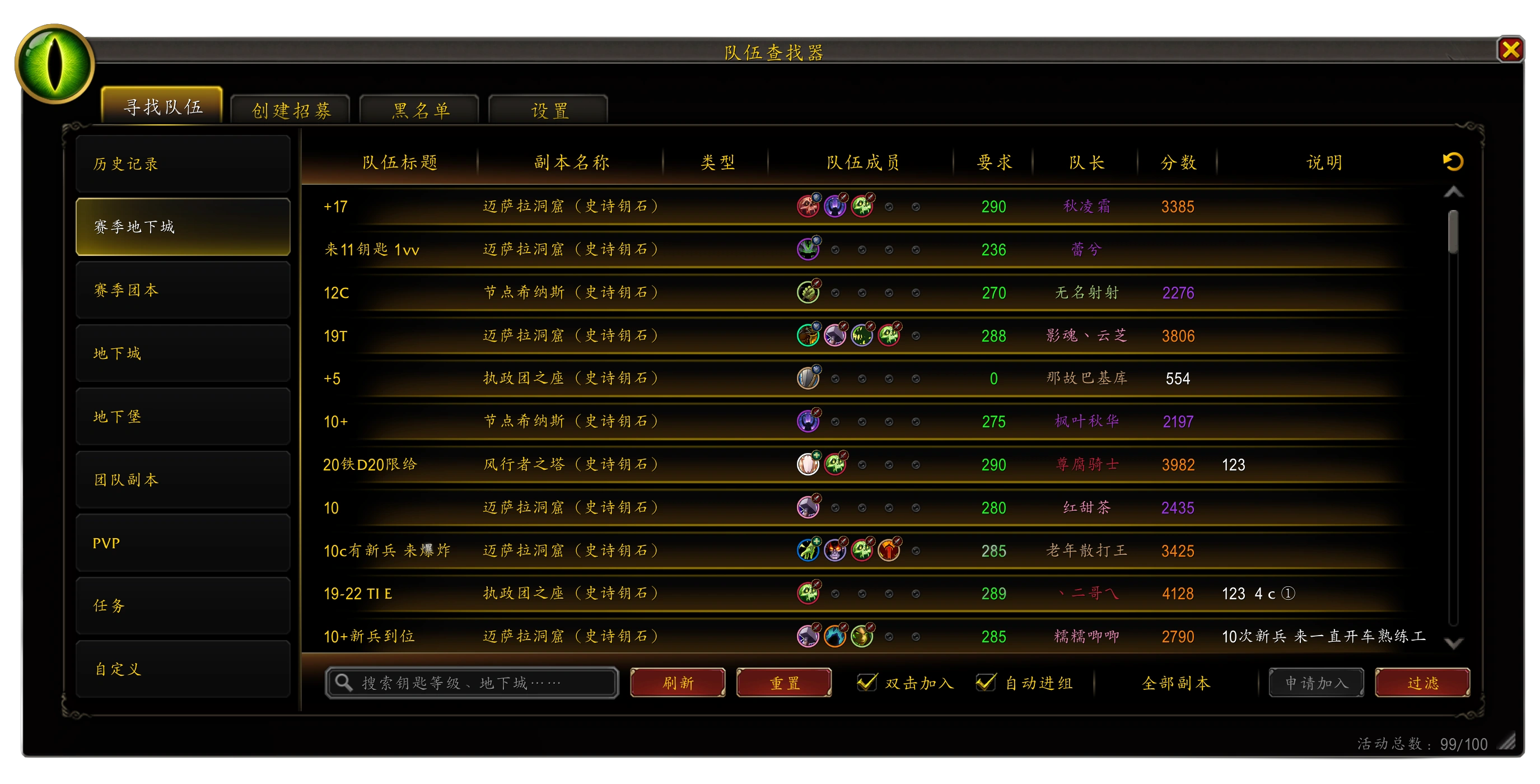
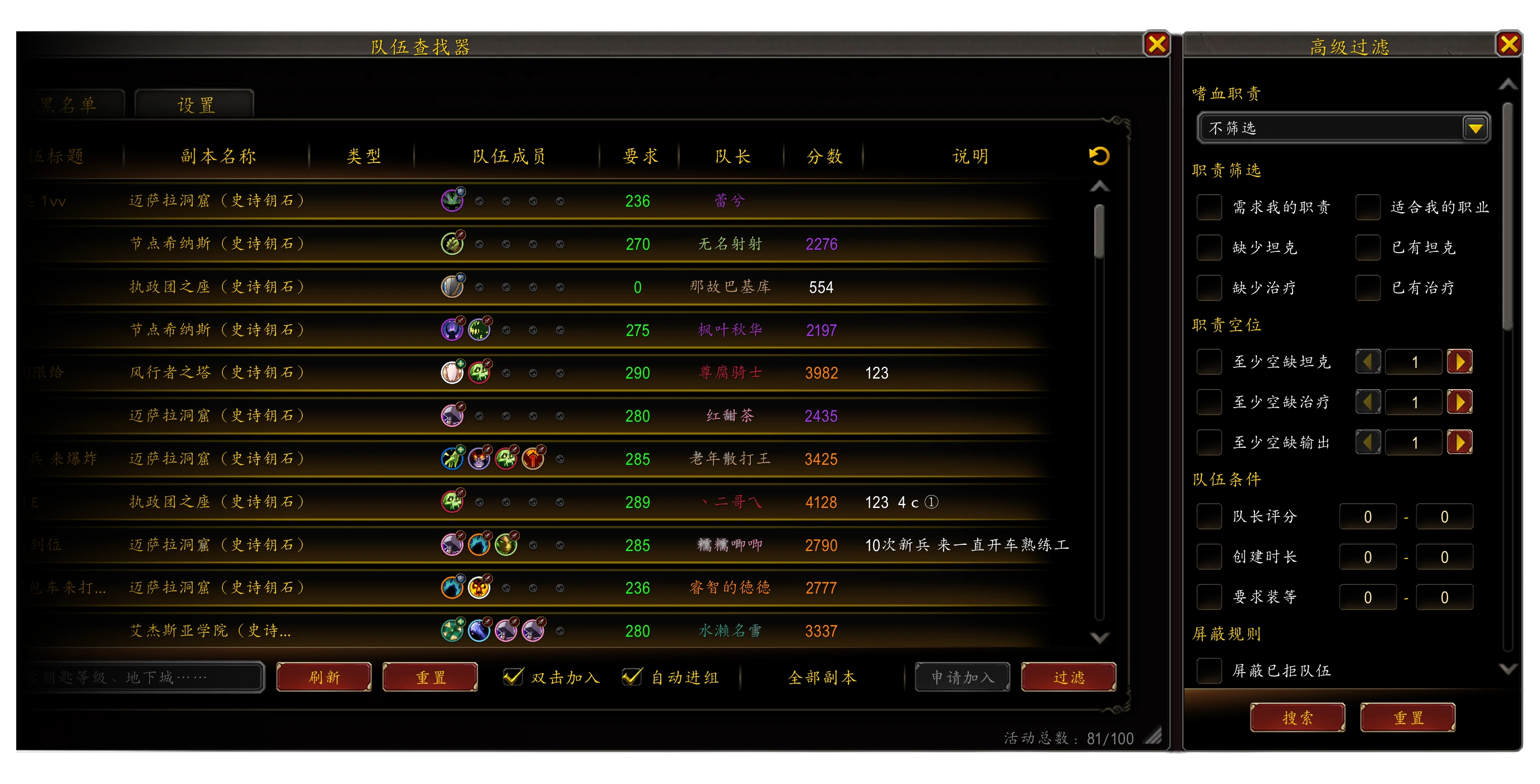
- A compact group list displays key information at a glance, including listing title, dungeon / activity, group type, role distribution, entry requirements, leader, Mythic+ rating, and listing notes, without needing to open extra detail panels.
- Built-in quick actions for search, refresh, reset, and application. Double-click a group to apply quickly and reduce repeated clicks.
- Supports multi-dimensional advanced filtering, including role vacancies, current specialization matching, rating requirements, item level requirements, listing age, War Mode, cross-faction groups, and voice-chat groups.
- Clearly highlights group states such as applied, declined, delisted, and full, helping avoid repeated applications and invalid actions.
- Hover tooltips show complete group details, including members, roles, ratings, item levels, and leader information, helping you quickly decide whether a group is a good fit.
Create Listings・All-in-One Group Management for Leaders
GroupFinder covers the full group creation and management flow, allowing leaders to publish listings, manage applicants, and handle recruitment without constantly switching between native UI panels.
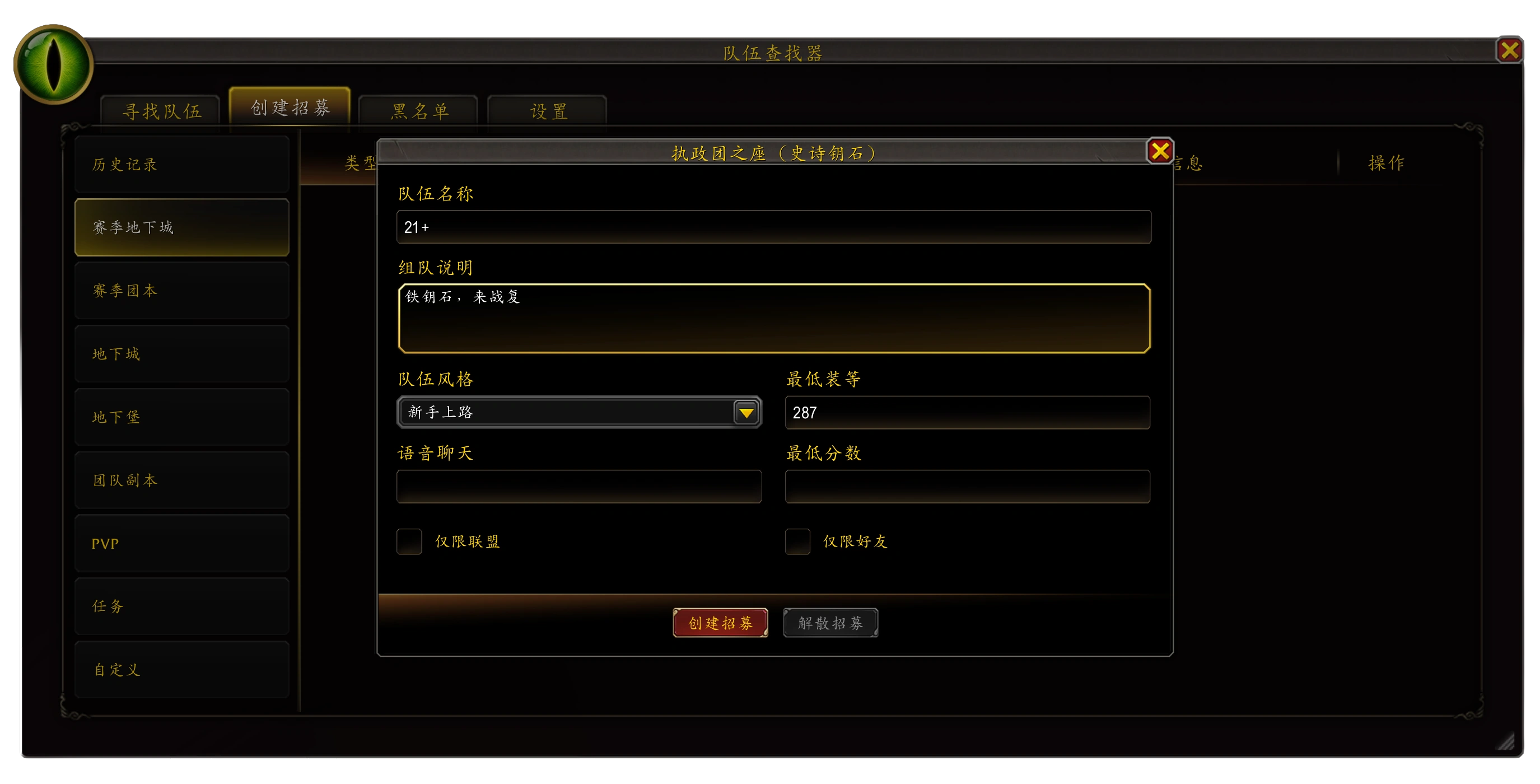
- Supports creating, updating, delisting, and reposting group listings. Group title, description, playstyle, minimum item level, minimum rating, voice-chat requirement, faction visibility, and friend visibility can all be configured freely.
- During an active listing, the applicant list stays synchronized in real time and clearly displays character name, role specialization, rating, item level, and application message.
- Provides quick actions such as invite, decline, invite all, and decline all to improve applicant handling efficiency.
- Automatically marks special player identities such as friends, guild members, dungeon deserters, and blacklisted players, helping leaders identify potential risks at a glance.
- Multi-player applications are split and displayed with the full party composition, making group strength and role setup easier to evaluate.
- Auto-invite, raid conversion, and permission checks follow the game’s native rules to reduce misclicks and avoid unexpected errors.
Blacklist・Keep Your Group List Clean
The blacklist system is designed to help filter advertisement listings, avoid problematic players, and reduce unwanted recruitment noise, giving you a cleaner and more controllable group list.
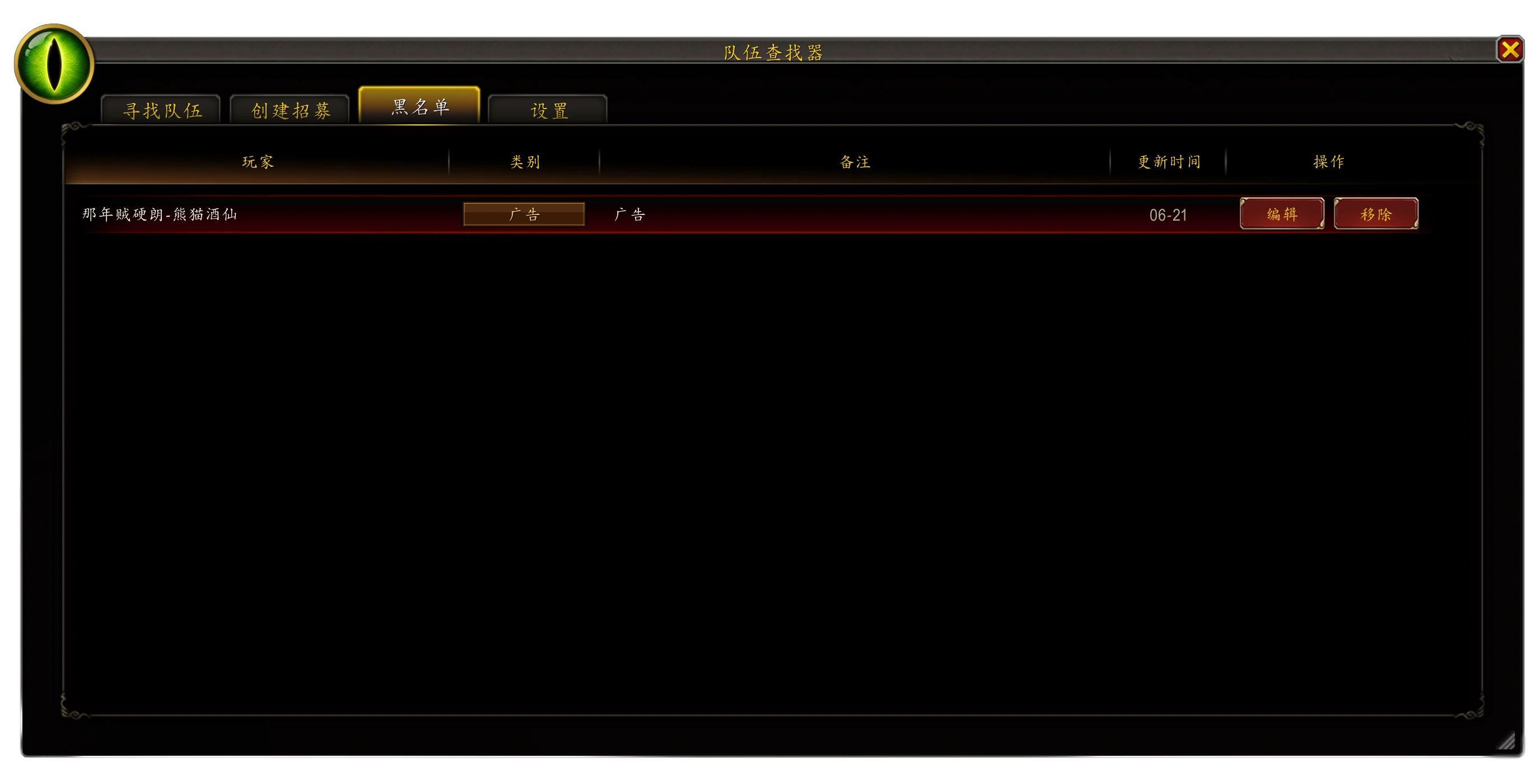
- Right-click to blacklist a group leader, or block groups with the same listing title to filter related advertisement listings in bulk.
- Reported advertisement listings can also be added to the blacklist category for future filtering.
- Blacklist entries record player ID, blacklist category, custom notes, and update time. Notes can be edited inline at any time to record the reason for blacklisting.
- Blacklist rules are applied to the group list in real time, automatically hiding listings that match your rules.
- Groups containing only blacklisted members will be clearly marked, allowing you to decide whether to continue interacting with them.
Floating Window・Track Group Status Anywhere
The lightweight floating window gives you quick access to group and recruitment status without opening the main addon panel.

- When no active listing exists, you can quickly open the Find Groups or Create Listing panel.
- When a listing is active, the floating window opens the listing management page directly, allowing you to check and handle applicants at any time.
- Displays the current number of groups and applicants in real time. New applicants trigger dynamic feedback, helping you avoid missing suitable teammates.
- Supports free dragging and positioning, and can be enabled or disabled from the settings.
- Works together with the minimap icon and the native green-eye Group Finder entrance, providing multiple quick access paths for smoother group management.
Feedback
Player feedback and feature suggestions are welcome. Valuable suggestions may be considered for future updates.
You can submit feedback through the NewBeeBox user comments section, or visit the author’s homepage:
https://www.gaicas.com/wow-groupfinder.html
· - · - · - · - · - · - · - · - · - · - · - · - · - · - · - · - · - · - · - · - · - · - · - · - · - · - · - · - · - · - · - · - · - · -
队伍查找器 是一款专为《魔兽世界》正式服设计的跨服组队招募平台,整合系统原生“队伍查找器”功能,通过队伍搜索、招募发布、申请管理、高级过滤与黑名单屏蔽功能,帮助玩家快速查找目标队伍、管理招募流程,并更精准地匹配合适的队友。
系统原生队伍查找器优化:无广告、无弹窗、无报错、低占用、迅速响应、战斗静默。
快捷命令:/GF
寻找队伍・精准锁定目标车队
全活动分类无缝适配:赛季地下城、团队副本、地下堡、PvP、任务及自定义活动,分类清晰一键切换。
- 紧凑化队伍列表,核心信息一览无余:招募标题、副本 / 活动、队伍类型、成员职责分布、入队要求、队长、大米评分、招募备注,无需额外点开详情。
- 内置搜索、刷新、重置、申请全套快捷操作,双击队伍一键投递申请,省去重复点击。
- 多维高级筛选自由组合:职责空位、当前专精匹配、评分门槛、装等要求、发布时长、战争模式、跨阵营、语音车队,按需过滤精准匹配。
- 已申请、已拒绝、已下架、已满员等状态高亮区分,避免无效重复操作。
- 悬浮详情提示完整展示队伍成员、职责、评分、装等、队长信息,一秒判断队伍适配度。
创建招募・团长一站式开组工具
完整覆盖开组全流程,无需反复切换原生界面,招募发布与申请者管理一站搞定。
- 支持创建、更新、解散、重新发布招募,队伍名称、组队说明、队伍风格、最低装等、最低评分、语音要求,以及阵营可见、好友可见权限均可自由定制。
- 活跃招募状态下,申请者列表实时同步:角色名、职责专精、评分等级、装等、个人留言清晰展示,配套邀请、拒绝、整队邀请、整队拒绝快捷操作。
- 特殊身份自动标记:好友、公会成员、副本逃兵、黑名单玩家高亮区分,风险队友一眼甄别。
- 多人组队申请拆分展示全员配置,整队实力直观可判;自动邀请、团队转换、权限判定严格遵循游戏原生规则,杜绝误操作与异常报错。
黑名单・自主净化组队环境
专为屏蔽广告、避雷糟心玩家设计,打造干净的队伍列表。
- 支持右键一键屏蔽队长,也可按招募标题批量屏蔽同源广告队伍,举报广告同步纳入黑名单分类。
- 黑名单条目完整记录玩家 ID、屏蔽分类、自定义备注、更新时间,支持行内编辑备注,随时记录避雷缘由。
- 屏蔽规则实时作用于队伍列表,符合规则的招募自动隐藏;仅含黑名单成员的队伍将添加醒目警示标记,去留由你自主判断。
悬浮窗・组队状态随身掌握
轻量化悬浮入口,无需打开主界面即可掌握组队动态,不错过任何申请。
- 无活跃招募时,一键直达寻队或创建招募面板;有招募进行时,自动跳转招募管理页,随时查看申请者。
- 实时显示当前队伍数量与申请者人数,新申请到来时附带动态提示,优质队友不遗漏。
- 支持自由拖动摆放位置,可在设置中随时开关;与小地图图标、系统原生绿眼睛入口联动,多路径快速触达,组队操作更顺手。
功能反馈:
欢迎各位玩家针对插件的功能提出建议,如果有好的功能反馈会在后续版本进行更新。
你可以通过新手盒子“用户评论”针对插件的功能提出建议或反馈。
或者你可以访问作者的主页进行反馈:https://www.gaicas.com/wow-groupfinder.html
CurseForge: https://www.curseforge.com/wow/addons/groupfinder用户评价
暂无 / 5,0 条评价相关推荐
继续看看这些内容
