插件中文资料库
中文说明、玩家点评、适用场景和替代推荐,方便快速判断是否适合你。
- 界面布局、头像框、姓名板和动作条优化
 Mind-seekers Tracker
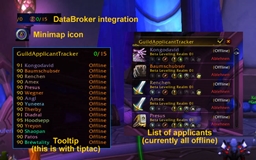 GuildApplicantTracker
 PoisonBars
Cooldown Master 插件下载与使用指南
本页整理了 Cooldown Master 的功能用途、适用人群、安装方法和常见问题,方便玩家快速判断是否需要安装。
适合谁用
Cooldown Master 是一款 动作条 / HUD界面 / 其他插件 类插件,适合需要优化界面、提升操作效率或补充游戏信息提示的魔兽世界玩家。
基本信息
- 插件作者:Wheelbarrel00
- 插件分类:动作条 / HUD界面 / 其他插件
- 适配版本:2.5.4,1.15.7,12.0.1,12.0.5,12.0.7
- 累计下载:41
安装方法
- 点击上方下载按钮获取 Cooldown Master插件文件。
- 解压后将插件文件夹放入 World of Warcraft/_retail_/Interface/AddOns 目录。
- 重启游戏或在角色界面点击插件,确认 Cooldown Master 已启用。
- 如果插件不生效,请检查版本是否匹配,或关闭同类冲突插件后重试。
使用建议
Cooldown Master 安装后建议先在角色界面确认已启用,进入游戏后根据插件提供的命令、小地图按钮或设置面板进行调整。如遇到报错,可先单独启用该插件排查冲突。
Cooldown Master 常见问题
Cooldown Master 适合需要 动作条 / HUD界面 / 其他插件 类功能的玩家,特别是希望提升游戏便利性、界面管理或战斗信息获取效率的用户。
下载后解压到 Interface/AddOns 目录,然后重启游戏并在角色界面启用插件。
常见原因是目录多套一层、游戏版本不匹配、依赖插件缺失或同类插件冲突。
可以查看本页的替代插件推荐和相关插件区域,按下载量和分类选择同类工具。
插件 AI 问答
可以问:这个插件正式服能用吗、和 DBM 冲突吗、怎么设置、有没有替代插件。
一款适用于魔兽世界的时间轴式冷却追踪器——你的法术、物品、药水和饰品会沿着轨道滑向“就绪”边缘,冷却一好就会弹出提示。这是暴雪内置冷却管理器的可视化伴侣。安装后即可直接使用:你的冷却会自动显示,如果需要也可以进行深度自定义。
工作原理(以及为什么几次施法后会趋于稳定)
Cooldown Master 会根据每个冷却的时长将图标放置在时间轴上——因此它需要知道每个法术经过天赋和急速调整后的真实冷却时间。在 Midnight 版本中,暴雪会在战斗中隐藏该数值,所以插件需要自行学习。非战斗状态下它会直接读取你的真实冷却时间并永久记住——数据保存到你的角色上,所以每个法术只需学习一次。战斗中数值被隐藏时,它会从开始到结束计时每个冷却,以补全尚未见过的内容。
这对你意味着:新安装时——或者新角色、切换专精后——给它一点时间。最初几次施法时,部分图标可能会在轨道上位置不准,因为它还在计算真实冷却时间。每次使用冷却都会让它更精确,一旦某个法术被学会,它就会跨会话保留。重要一点:每个图标上的倒计时数字和冷却扫光动画始终是精确的——这些直接来自暴雪自己的冷却组件。只有图标在轨道上的位置会随着学习而逐步校准。
(在经典旧世版本中,冷却数值在战斗中可读,所以没有学习期——这适用于 Midnight/正式服。)
一览
时间轴轨道——最多 3 条轨道,横向或纵向,技能按就绪时间远近展开
四种轨道模式——线性、共享时间轴、对数或分段(通过控制点自行调整时间曲线)
就绪通知弹窗——最多 3 个弹框,在冷却就绪的瞬间弹出图标、停留并淡出
轨道图标高亮——通过边框、发光、闪烁或边框+闪烁(自选颜色)让关键法术更醒目
法术、物品、药水和饰品——药水和合剂自动从背包中识别;使用型饰品自动追踪
按类别过滤——法术、功能、增益、减益、药水、饰品,支持单个法术覆盖设置
深度自定义——图标缩放、字体、材质、颜色、堆叠、可编辑标签——或者保留默认设置
按专精配置——切换专精时自动切换,并支持导入/导出为可复制字符串
面板插件兼容——LibDataBroker 启动器和小地图按钮,Titan Panel、Bazooka、ChocolateBar 可自动识别
开箱即用——与暴雪冷却管理器追踪相同的技能。可通过小地图按钮或 /cdmaster 打开。
正式服 + 经典服——Midnight(12.0)、经典旧世、燃烧的远征经典服
功能介绍
冷却时间轴,而不仅仅是一排图标。Cooldown Master 的标志性显示是一条轨道——横向或纵向——每个技能的图标以自身冷却时间决定的速度滑向“就绪”端。长冷却靠后,即将就绪的聚集在就绪边缘,所有内容按紧迫程度展开,让你一眼读懂完整循环。可选择线性、共享时间轴或对数间距,或使用分段模式放置最多三个控制点,自行塑造时间曲线。图标以亚像素级平滑移动,即使慢速冷却也能顺畅移动,而不是逐像素跳动。
冷却一好立即提醒。最多三个就绪通知框会在技能或物品冷却结束的瞬间弹出图标、停留片刻再淡出。将关键技能标记为“重要”,即可让它们在就绪弹框和轨道上以边框、发光、闪烁或边框+闪烁(自选颜色)的方式突出显示。可以钉住不想错过的技能、添加音效,并让它们在战斗结束后多停留一拍。
追踪法术、物品、药水和饰品。Cooldown Master 读取与暴雪内置冷却管理器相同的类别集合,所以你的追踪技能会自动显示,无需任何设置。药水和合剂会从背包中自动识别,已装备的使用型饰品也会被追踪。可以按类别过滤——法术、功能、增益、减益、药水、饰品——并覆盖任何一个法术的可见性、轨道、就绪弹框和高亮。
打造属于你的界面。一个游戏内选项窗口控制整体外观:图标缩放、不可用图标着色或去色、可配置倒计时字体、冷却扫光着色、LibSharedMedia 背景和边框材质、可编辑轨道标签,以及图标堆叠(分组排列或分散布局),让密集的冷却保持可读。或者什么都不改——默认设置已经很完善。
跟随专精的配置。按专精配置会在你切换专精时自动切换,你可以将任意配置导入或导出为可复制字符串,以便分享设置或在角色间转移。底层采用标准 AceDB 配置管理。
为 Midnight 而生。在 Midnight 版本下,冷却数值是受保护的值,战斗中无法读取。Cooldown Master 利用暴雪自身的组件提供精确的扫光计时和倒计时文本,并根据非战斗时学到的持续时间推算每个图标在轨道上的位置——所以即使战斗中也能保持计时准确。
面板插件集成。LibDataBroker 启动器和 LibDBIcon 小地图按钮,Titan Panel、Bazooka、ChocolateBar 可自动识别——只需在你的面板插件的插件列表中启用“Cooldown Master”即可。
点击
作用
左键
打开选项面板
右键
锁定/解锁框架
中键
切换测试模式
斜杠命令
/cdmaster — 打开或关闭选项面板
/cdmaster lock — 锁定所有框架
/cdmaster unlock — 解锁所有框架以便重新定位
/cdmaster test — 切换测试模式(用于布局的模拟冷却)
/cdmaster reset — 重置所有设置(需要 /reload)
/cdmaster version — 打印版本和版本类型
/cooldownmaster 也可作为完整命令使用。
补充说明
无需其他插件。Cooldown Master 完全独立——所有库均已内置。
它与暴雪的冷却管理器互补而非替代——它增加了内置管理器所没有的时间轴视图和就绪提醒。
支持 LibSharedMedia——你已安装的任何字体和材质都会自动出现在选择器中。
正式服和经典服——Midnight(12.0)、经典旧世、燃烧的远征经典服。
默认安全——它只显示信息,绝不会施法或自动执行任何操作。
致谢
Cooldown Master 延续了 cliffclive 的 CooldownTimeline2(CDTL2)背后的理念——正是这个时间轴冷却插件启发了本作。当 Midnight 改变了冷却机制、CDTL2 无法在新限制下运行时,我为 12.0 从头重建了这一概念,并在发布前联系了 cliffclive。他慷慨地同意我延续这一理念。原始时间轴冷却概念的全部功劳归于他。谢谢你,cliffclive!
发现 Bug 或有想法?
请在 GitHub Issues 页面提交——如果方便请附上错误文本(用 BugSack/BugGrabber 很容易获取)以及当时正在进行的操作。
为 Midnight 资料片精心打造。有问题或想了解更新?加入 Discord!如果你喜欢这个插件,也可以看看我的其他作品——Everything Quests、Everything Delves 和 Loot Pro。以 MIT 许可证发布。
CurseForge:https://www.curseforge.com/wow/addons/cooldown-master
Cooldown Master
A timeline-style cooldown tracker for WoW — your spells, items, potions, and trinkets glide along lanes toward a ready edge, with pop-up alerts the moment they come up. The visual companion to Blizzard's built-in Cooldown Manager. Install it and it just works: your cooldowns show up automatically, with deep customization there if you want it.
How it works (and why it settles in after a few casts)
Cooldown Master places each icon on the timeline by how long its cooldown is — so it needs to know each spell's real, talent- and haste-adjusted cooldown length. Under Midnight, Blizzard hides that number during combat, so the addon learns it. Out of combat it reads your true cooldowns directly and remembers them for good — saved to your character, so a spell is only ever learned once. In combat, where the number is hidden, it clocks each cooldown from start to finish to fill in anything it hasn't seen yet.
What that means for you: on a fresh install — or a new character, or after a spec change — give it a minute. For the first few casts some icons may sit in the wrong spot on the lane while it figures out their true timing. It sharpens with every cooldown you use, and once a spell is learned it stays learned across sessions. Important part: the countdown number and swipe on every icon are always exact — those come straight from Blizzard's own cooldown widgets. It's only the icon's position along the lane that settles in as it learns.
(On Classic, cooldown numbers are readable in combat, so there's no learning period there — this applies to Midnight/Retail.)
At a glance
- Timeline lanes — up to 3 lanes, horizontal or vertical, with your abilities fanning out by how soon they're ready
- Four lane modes — Linear, Shared-timeline, Logarithmic, or Split (shape the time curve yourself with control points)
- Ready-notification pop-ups — up to 3 boxes that pop an icon the moment a cooldown is up, hold it, and fade
- Lane icon highlights — make key spells stand out with a Border, Glow, Flash, or Border + Flash in a color you pick
- Spells, items, potions & trinkets — potions and flasks auto-discovered from your bags; on-use trinkets tracked automatically
- Per-category filters — spells, utility, buffs, debuffs, potions, trinkets, with per-spell overrides
- Deep customization — icon zoom, fonts, textures, colors, stacking, editable labels — or leave the defaults alone
- Per-spec profiles — auto-switch when you change spec, plus import/export to a copy-paste string
- Panel-addon ready — a LibDataBroker launcher and minimap button that Titan Panel, Bazooka, and ChocolateBar pick up automatically
- Works out of the box — tracks the same abilities as Blizzard's Cooldown Manager. Open it with the minimap button or
/cdmaster. - Retail + Classic — Midnight (12.0), Classic Era, and Burning Crusade Classic
What it does
A cooldown timeline, not just a row of icons. Cooldown Master's signature display is a lane — horizontal or vertical — where each ability's icon travels toward the "ready" end at a speed set by its own cooldown. Long cooldowns sit at the back, imminent ones crowd the ready edge, and everything fans out by urgency so you can read your whole rotation at a glance. Pick Linear, Shared-timeline, or Logarithmic spacing, or use Split mode to place up to three control points and shape the time curve yourself. Icons glide at sub-pixel smoothness, so even slow cooldowns move cleanly instead of stepping pixel by pixel.
Alerts the moment something's ready. Up to three ready-notification boxes pop a spell or item icon the instant it comes off cooldown, hold it, then fade it out. Flag your key abilities as "important" to make them pop with a Border, Glow, Flash, or Border + Flash in a color you choose — on the ready boxes and right on the lane. Pin the ones you never want to miss, add a sound, and let them linger a beat after combat ends.
Tracks spells, items, potions, and trinkets. Cooldown Master reads the same category sets as Blizzard's built-in Cooldown Manager, so your tracked abilities show up automatically with nothing to set up. Potions and flasks are auto-discovered from your bags, and your equipped on-use trinkets are tracked too. Filter by category — spells, utility, buffs, debuffs, potions, trinkets — and override any individual spell's visibility, lane, ready box, and highlight.
Make it yours. One in-game Options window controls the whole look: icon zoom, an unusable-icon tint or desaturate, a configurable countdown font, cooldown-swipe tint, LibSharedMedia background and border textures, editable lane labels, and icon stacking (grouped rows or spread apart) so clustered cooldowns stay readable. Or change nothing — the defaults stand on their own.
Profiles that follow your spec. Per-spec profiles switch automatically when you change specialization, and you can import or export any profile as a copy-paste string to share a setup or carry it between characters. Standard AceDB profile management underneath.
Built for Midnight. Under Midnight, cooldown numbers are protected values that can't be read during combat. Cooldown Master feeds Blizzard's own widgets for exact swipe timers and countdown text, and extrapolates each icon's lane position from durations it learns out of combat — so your timers stay accurate even mid-fight.
Panel-addon integration. A LibDataBroker launcher and LibDBIcon minimap button that Titan Panel, Bazooka, and ChocolateBar pick up automatically — just enable "Cooldown Master" in your panel addon's plugin list.
| Click | What happens |
|---|---|
| Left | Open the options panel |
| Right | Lock / unlock frames |
| Middle | Toggle test mode |
Slash commands
/cdmaster— open or close the options panel/cdmaster lock— lock all frames/cdmaster unlock— unlock all frames for repositioning/cdmaster test— toggle test mode (fake cooldowns for layout)/cdmaster reset— reset all settings (requires/reload)/cdmaster version— print version and flavor
/cooldownmaster also works as the long form.
Good to know
- No other addons required. Cooldown Master is completely standalone — all libraries are bundled.
- It complements Blizzard's Cooldown Manager rather than replacing it — it adds the timeline view and ready alerts the built-in one doesn't have.
- LibSharedMedia-aware — any fonts and textures you have installed show up in the pickers automatically.
- Retail and Classic — Midnight (12.0), Classic Era, and Burning Crusade Classic.
- Safe by default — it only displays information; it never casts or automates anything.
Credits
Cooldown Master carries forward the idea behind CooldownTimeline2 (CDTL2) by cliffclive — the timeline-cooldown addon that inspired this one. When Midnight changed how cooldowns work and CDTL2 could no longer run under the new restrictions, I rebuilt the concept from the ground up for 12.0 and reached out to cliffclive before publishing anything. He kindly gave his blessing to carry the idea forward. Full credit for the original timeline-cooldown concept goes to him. Thank you, cliffclive!
Found a bug or have an idea?
Report it on the GitHub Issues page — include the error text if you can grab it (BugSack/BugGrabber makes that easy) and what you were doing when it happened.
Made with care for the Midnight expansion. Got a question or want to hear about updates? Join the Discord! If you like this one, check out my other addons — Everything Quests, Everything Delves, and Loot Pro. Released under the MIT License.
CurseForge: https://www.curseforge.com/wow/addons/cooldown-master用户评价
暂无 / 5,0 条评价相关推荐
继续看看这些内容
