插件中文资料库
中文说明、玩家点评、适用场景和替代推荐,方便快速判断是否适合你。
- 背包、银行和物品整理
- 拍卖行、交易和金币管理
- 任务路线、地图标记和野外探索
 Details! Mythic+ Scoreboard
 GearInsight
 TankMD Misdirect
GoldCraftForever 插件下载与使用指南
本页整理了 GoldCraftForever 的功能用途、适用人群、安装方法和常见问题,方便玩家快速判断是否需要安装。
适合谁用
GoldCraftForever 是一款 拍卖与商业 / 鼠标提示 / 专业技能 类插件,适合需要优化界面、提升操作效率或补充游戏信息提示的魔兽世界玩家。
基本信息
- 插件作者:extrajanky
- 插件分类:拍卖与商业 / 鼠标提示 / 专业技能
- 适配版本:1.60.1
- 累计下载:0
安装方法
- 点击上方下载按钮获取 GoldCraftForever插件文件。
- 解压后将插件文件夹放入 World of Warcraft/_retail_/Interface/AddOns 目录。
- 重启游戏或在角色界面点击插件,确认 GoldCraftForever 已启用。
- 如果插件不生效,请检查版本是否匹配,或关闭同类冲突插件后重试。
使用建议
GoldCraftForever 安装后建议先在角色界面确认已启用,进入游戏后根据插件提供的命令、小地图按钮或设置面板进行调整。如遇到报错,可先单独启用该插件排查冲突。
GoldCraftForever 常见问题
GoldCraftForever 适合需要 拍卖与商业 / 鼠标提示 / 专业技能 类功能的玩家,特别是希望提升游戏便利性、界面管理或战斗信息获取效率的用户。
下载后解压到 Interface/AddOns 目录,然后重启游戏并在角色界面启用插件。
常见原因是目录多套一层、游戏版本不匹配、依赖插件缺失或同类插件冲突。
可以查看本页的替代插件推荐和相关插件区域,按下载量和分类选择同类工具。
插件 AI 问答
可以问:这个插件正式服能用吗、和 DBM 冲突吗、怎么设置、有没有替代插件。
在 WoW Forever 中,知道该做什么、该卖什么、该采集什么,覆盖全部三个拍卖行。
GoldCraftForever 把你的拍卖行扫描、背包和专业转化为直白的答案:制造、出售、购买、采集或分解。它为 WoW Forever 打造,不需要其他插件,它显示的每个数字都来自你自己的扫描和你自己的游戏过程。
为什么选择 GoldCraftForever?
全部三个拍卖行。联盟、部落和中立拍卖行分别扫描并单独保存,各自使用正确的手续费(阵营 5%,中立 15%)。你只会看到你的角色实际能使用的拍卖行的买卖建议。
诚实的利润。你已经拥有的材料按其出售价格计算,因此“利润”指的是相比直接卖掉它们你多赚的部分。自己采集的材料是免费的;商人出售的物品如瓶子和线不是。
实测,而非猜测。采集速度、掉落几率和出售速率来自你自己的拾取、邮件和扫描。当数据还不够时,它会如实说明,而不是编造。
每个专业,每个配方。所有 2,400 多个 Forever 配方都已内置,因此你可以在学习之前看到任何专业能赚多少。
功能
主页:一目了然地查看你的一天
游戏时长、净金币、每游戏小时金币和每赚钱小时金币:今天对比昨天对比你的平均水平。天数按速率比较,因此短时间的游戏不会被拿来和长时间的游戏比较。
本周图表、你最畅销的材料和制造物品、你能制造的最快出售品、当前最佳配方、最大的日常用品价格变动以及你朋友们的最佳发现。
接下来做这个:最多 5 条基于实测数据的建议,例如“制造 8 个青铜锭,你有材料”、“在联盟以 40 个 Wool Cloth 买入,在中立转售:+3 银”、“再 1 个 Heavy Stone 解锁 3 个有利可图的配方”或“你的 Mooncloth 冷却已就绪:+12 银”。点击一条即可前往。
金币目标:设置每日和每周目标并查看你的进度。
天数从服务器午夜开始,因此你和你的朋友共享相同的天数。窗口会打开适合你当前所在位置的标签页:在拍卖行打开市场,在专业训练师处打开配方,在邮箱处打开账本。
导出给 AI:一次粘贴完成每周回顾
一键生成你最近 7、14 或 30 天的报告,粘贴到 Claude、ChatGPT 或任何 AI 中:收入和时长、最佳配方、你的销售、市场变动、日常用品趋势、采集速率和朋友们的发现。
为 AI 阅读而写:它会解释自己的数字,说明每行数据的可信度,将朋友的数据标记为他们的,并在结尾列出要问的问题。
保留你最近 4 份报告,每份新报告都会以自上一份以来的变化开头。
配方:每个配方能赚多少
每个专业的每个配方,包含购买成本、自己采集材料的成本、售价以及两种方式的利润。
点击任意列标题进行排序。按名称筛选。仅显示已学会的配方、仅显示有利可图的配方,或仅显示你有材料的配方,并显示你现在能制造多少个。
设置“数量”,准确查看你会购买什么、花费多少,以及使用了你哪些自己的材料。
制造材料(布卷、锭、油)在制造成本低于购买价格时,按其自身制造成本计价。
配方详情:每种材料在每个拍卖行的价格、在哪里学习该配方及其费用、多少次制造才能回本,以及你的哪些角色已学会它。
市场:价格、趋势和采集
你扫描过的每种制造物品:当前价格、通常价格、变动幅度、每日销量和挂单数量。排序以找到便宜货、价格飙升和真正流通的物品。
点击物品查看其最近几天在每个拍卖行的价格图表,并附有每日销量柱状图。
倒卖:挂单价格远低于其可靠售价的物品,附市场能消化多少以及扣除手续费和押金风险后的利润。
日常用品:草药、矿石、皮革、布料、鱼、元素和附魔材料保留 30 天历史,并附趋势列,让你看到什么在慢慢变便宜或变贵。
采集视图:采集原材料并直接出售的每小时金币,基于你自己实测的采集速度。
自动扫描:当拍卖行 15 分钟未扫描或今天尚未扫描时,打开拍卖行会自动扫描。
出售速率和每小时金币
比较你的拍卖行扫描,估算每种物品在每个拍卖行每小时、每天和每周的销量。
每个配方的每小时金币:你花在采集(实测)和制造上的时间,上限为市场实际购买量,因此列表顶部就是对你时间的最佳利用。
预算:“我有 40 银。我该制造什么?”
读取你的金币(或输入金额,如 40s 或 2.5g),并构建你能负担的最有利可图的制造计划。
优先使用你背包和银行中的材料,然后从最便宜的地方购买其余部分。
保持现实:大额购买使用平均价格,绝不会计划购买超过挂单数量,也绝不会计划出售超过约一天的实际销量。
一键将计划发送到购物标签页。
材料:“我有这个。我该拿它怎么办?”
列出你的角色拥有的制造材料,并给出明确结论:烹饪 → Longjaw Mud Snapper,缝制 → Bolt of Linen Cloth,或出售(拍卖行)。
搜索任何材料,或从背包中 Shift 点击一个,查看它在每个配方中的价值与直接出售的对比。
只有当制造比出售高出你选择的利润幅度(默认 10%)时,才推荐制造。
购物:队列和购物清单
将配方加入队列,然后获得一份包含所有内容的购物清单:你需要什么、你背包里有什么、你的小号上有什么(邮寄过来),以及还缺什么。
每种材料:购买(以及哪里最便宜)或采集(以及你需要多长时间,在哪个区域)。
拍卖行打开时,双击材料进行搜索。制造会使队列倒计数。
购买或采集:采集值得你的时间吗?
计时你在每个区域的专注采集(草药、矿石、钓鱼、剥皮和怪物掉落;地下城和任务不会稀释它),并学习每种生物的掉落几率。
根据你每赚钱小时的实际收入(采集、制造、交易)计算你的时间价值,或者你可以自己设置。
然后比较两者:“花 6 银购买 40 个,或在艾尔文森林花 18 分钟采集它们。”
升级:最便宜的提升方式
从你当前技能到任何目标的最便宜路线,使用真实的技能提升几率(黄色之前 100%,灰色时降至 0)。
计算你能出售制造品的价格,并加上你需要购买的配方价格。
一键将整条路线加入队列。
分解:出售还是分解?
对于你背包中的每件绿色、蓝色和紫色物品:它卖多少、分解它给什么,以及明确的结论。
仅当你的某个角色有附魔时才显示。
从标准分解表开始,一旦你分解了足够多的同类物品,就切换为你自己的结果。
账本:实际卖出了什么
读取拍卖邮件(销售、购买、过期拍卖),并记录商人销售和购买。
最近 7 天和 30 天的总计、每种物品的出售速率、你所有角色的金币,以及你的每小时收入。
你的市场:你的拍卖在哪些类型的物品上卖得最好和最差,让你知道该关注哪里。
值得信赖的价格
当前价格忽略诱饵:少数远低于其余单位的挂单不会决定价格,提示信息会说明跳过了什么。
价格按新旧着色,并在挂单很少(!)、远离通常价格(?)或扫描过旧(~)时标记。
保留制造材料和产品 10 天的价格历史以计算通常价格(原材料 30 天)。
显示挂单押金,并可以减去你可能损失的押金。
提示信息
默认简短:你能使用的最便宜拍卖价格、商人价格、堆叠价值和每个角色拥有多少。
按住 Shift 查看全部:所有三个拍卖行的价格、通常价格、它由什么制成和用于制造什么、它的最佳用途、分解价值,以及你已
GoldCraftForever
Know what to craft, what to sell, and what to gather on WoW Forever, across all three auction houses.
GoldCraftForever turns your auction house scans, your bags and your professions into plain answers: CRAFT, SELL, BUY, GATHER or DISENCHANT. It's built for WoW Forever, needs no other addons, and every number it shows comes from your own scans and your own play.
Why GoldCraftForever?
- All three auction houses. Alliance, Horde and the Neutral auction house are scanned and kept separately, with the right cut for each (5% faction, 15% Neutral). You only see buy and sell advice for houses your character can actually use.
- Honest profit. Materials you already own count at what they'd sell for, so "profit" means what you gain over just selling them. Farmed materials are free; vendor items like vials and thread are not.
- Measured, not guessed. Gathering speed, drop chances and sell rates come from your own looting, mail and scans. When there isn't enough data yet, it says so instead of making something up.
- Every profession, every recipe. All 2,400+ Forever recipes are built in, so you can see what any profession would earn before you train it.
Features
Home: your day at a glance
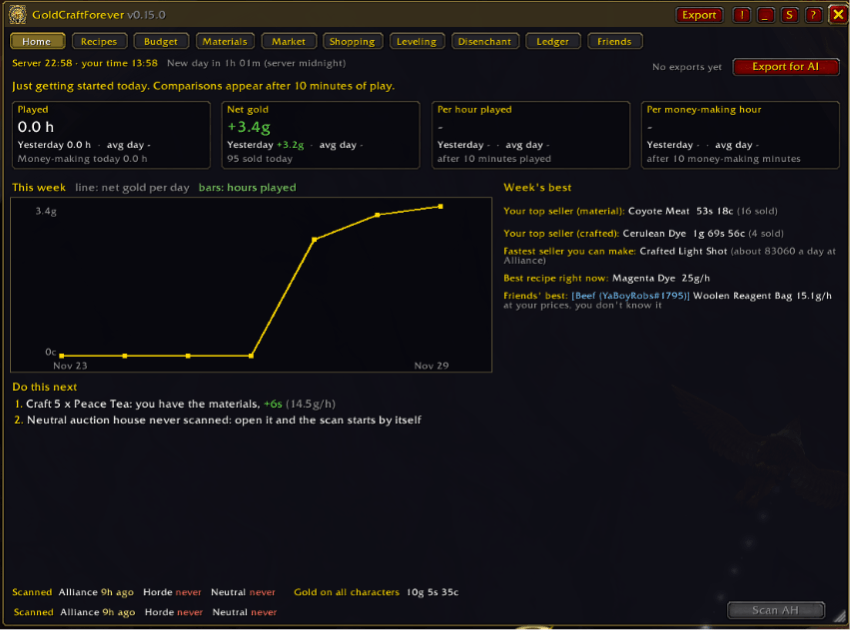
- Hours played, net gold, gold per hour played and gold per money-making hour: today vs yesterday vs your average day. Days are compared by rate, so a short session isn't judged against a long one.
- This week's chart, your top-selling material and crafted item, the fastest seller you can make, the best recipe right now, the biggest staple price move and your friends' best find.
- Do this next: up to 5 suggestions built from measured data, like "Craft 8 Bronze Bars, you have the materials", "Buy 40 Wool Cloth at Alliance, resell at Neutral: +3s", "1 more Heavy Stone unlocks 3 profitable recipes" or "Your Mooncloth cooldown is ready: +12s". Click one to go there.
- Gold goals: set a daily and weekly target and watch your progress.
- Days start at server midnight, so you and your friends share the same days. The window opens on the tab that fits where you are: Market at an auction house, Recipes at a profession, Ledger at the mailbox.
Export for AI: a weekly review in one paste
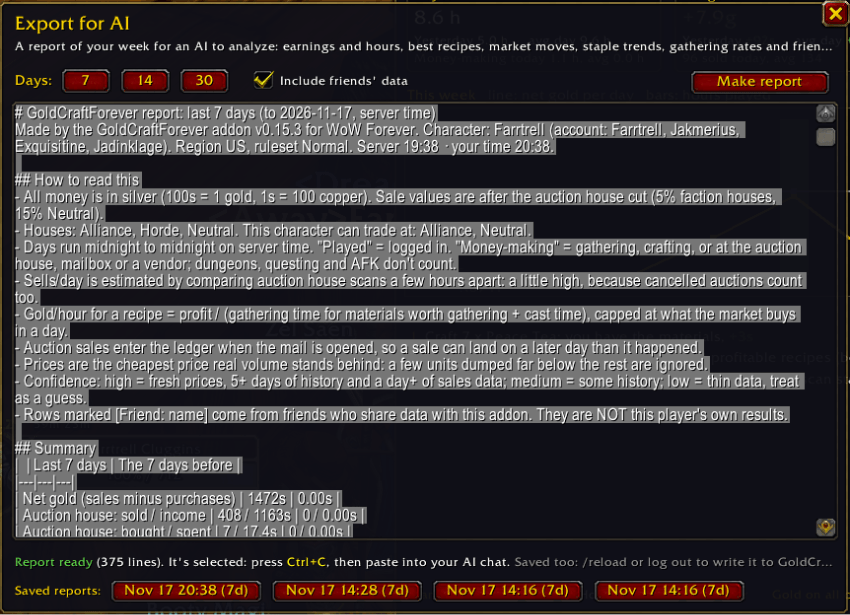
- One click makes a report of your last 7, 14 or 30 days to paste into Claude, ChatGPT or any AI: earnings and hours, best recipes, your sales, market moves, staple trends, gathering rates and friends' finds.
- Written for an AI to read: it explains its own numbers, says how much to trust each row, marks friends' data as theirs, and ends with the questions to ask.
- Keeps your last 4 reports, and each new one starts with what changed since the last.
Recipes: what every recipe earns
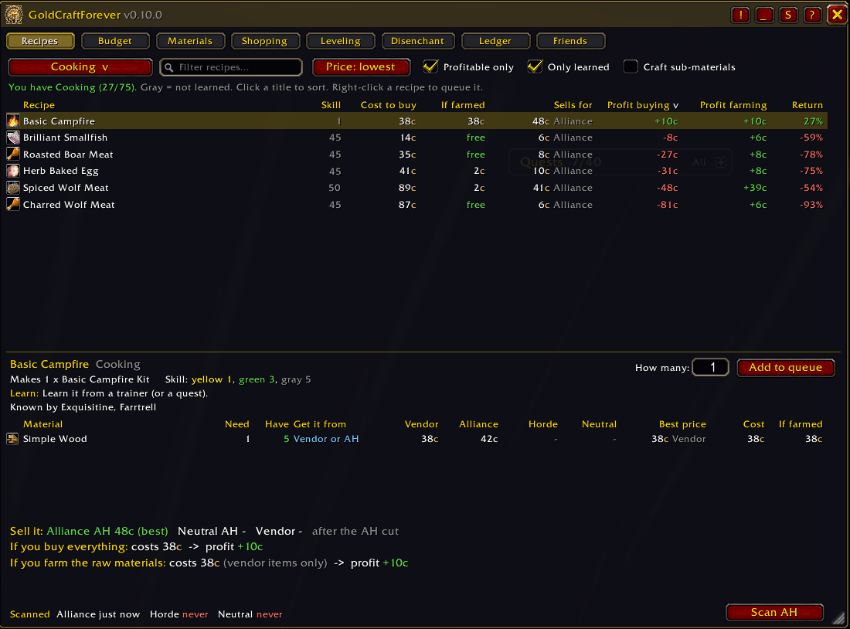
- Every recipe of every profession, with cost to buy, cost if you farm the materials yourself, sale price and profit both ways.
- Click any column title to sort. Filter by name. Show only learned recipes, only profitable ones, or only ones you have materials for, with how many you can make right now.
- Set "How many" and see exactly what you'd buy, what you'd spend, and which of your own materials it uses.
- Crafted materials (bolts, bars, oils) are priced at their own crafting cost when that's cheaper than buying them.
- Recipe details: every material's price at each house, where to learn the recipe and what it costs, how many crafts until it pays for itself, and which of your characters know it.
Market: prices, trends and farming
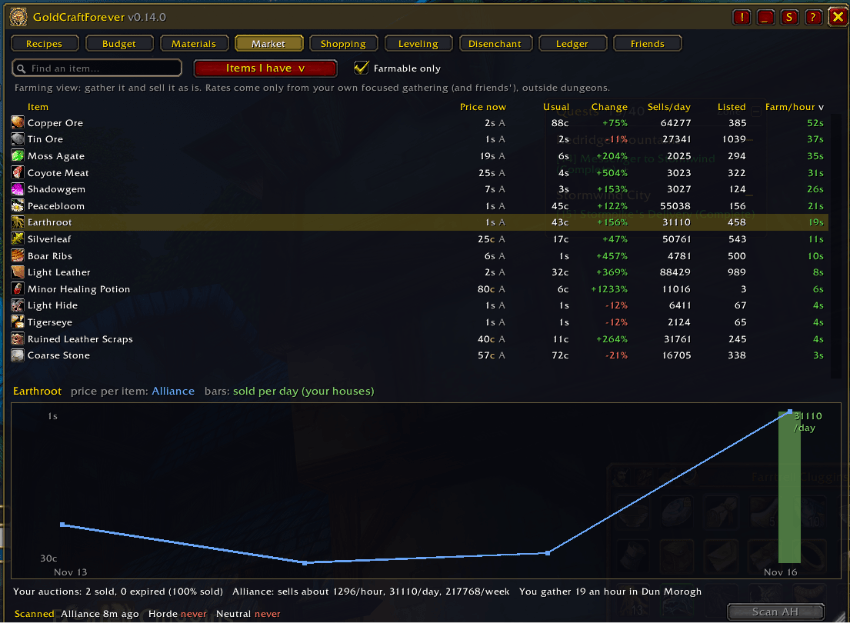
- Every crafting item you've scanned: price now, usual price, how much it changed, sales per day and how many are listed. Sort to find bargains, spikes and what actually moves.
- Click an item for a chart of its price at each house over recent days, with bars for sales per day.
- Flips: items listed well under what they reliably sell for, with how many the market will take and the profit after the cut and deposit risk.
- Staples: herbs, ore, leather, cloth, fish, elemental and enchanting materials keep 30 days of history, with a trend column so you can see what's slowly getting cheaper or more expensive.
- Farming view: gold per hour for gathering raw materials and selling them as they are, from your own measured gathering speed.
- Auto-scan: opening an auction house scans it by itself when it hasn't been scanned for 15 minutes or not yet today.
Sales rates and gold per hour
- Compares your auction house scans to estimate how many of each item sell per hour, day and week at each house.
- Gold per hour for every recipe: your time spent gathering (measured) and crafting, capped at what the market actually buys, so the top of the list is the best use of your time.
Budget: "I have 40 silver. What should I craft?"
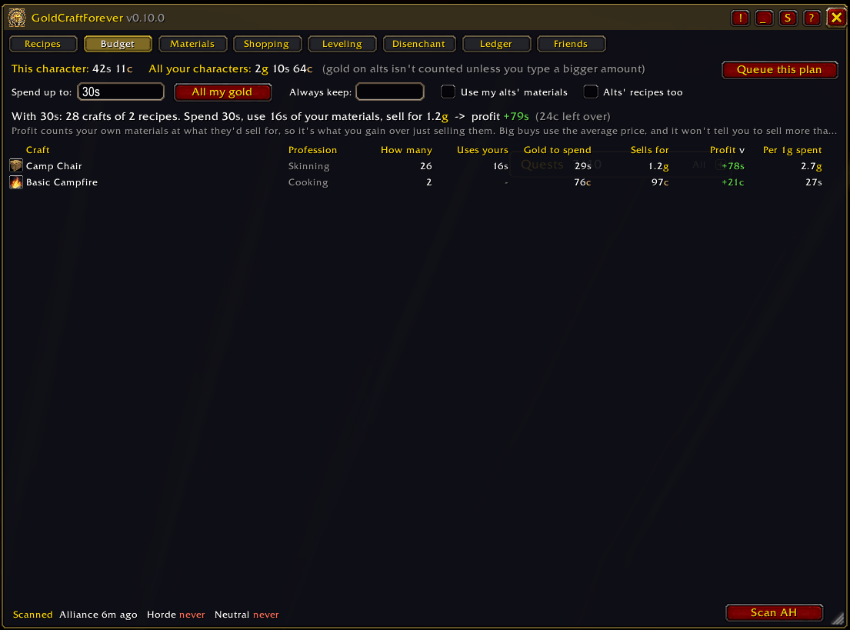
- Reads your gold (or type an amount like
40sor2.5g) and builds the most profitable crafting plan you can afford. - Uses the materials in your bags and bank first, then buys the rest from the cheapest place.
- Stays realistic: big buys use the average price, it never plans to buy more than is listed, and never plans to sell more than about a day of real sales.
- One click sends the plan to the Shopping tab.
Materials: "I have this. What do I do with it?"
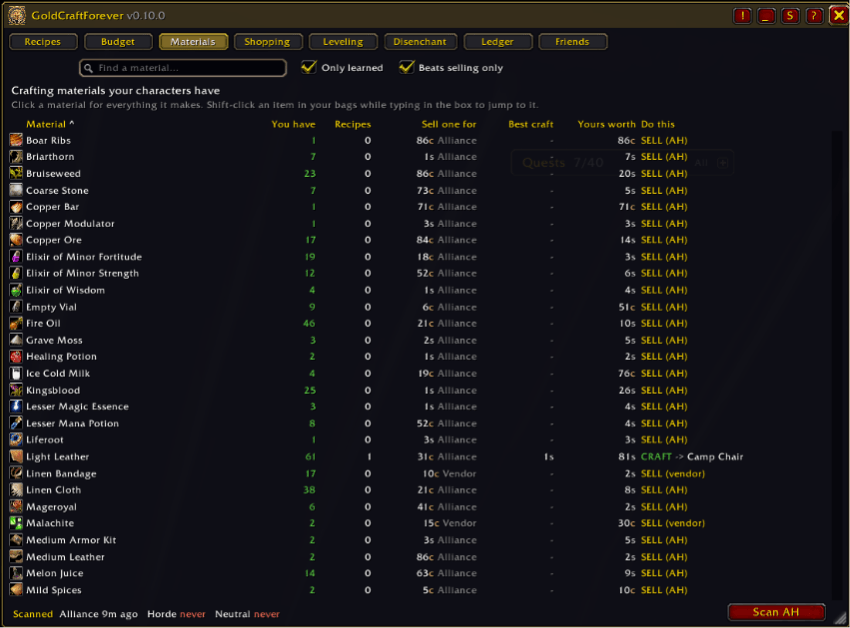
- Lists the crafting materials your characters own, with a clear verdict: COOK → Longjaw Mud Snapper, SEW → Bolt of Linen Cloth, or SELL (AH).
- Search any material, or Shift-click one from your bags, to see what one is worth in every recipe compared with selling it.
- Crafting is only recommended when it beats selling by a margin you choose (10% by default).
Shopping: queue and shopping list
- Queue recipes, then get one shopping list for everything: what you need, what's in your bags, what's on your alts (mail it over), and what's left.
- For each material: BUY (and where it's cheapest) or GATHER (and how long it takes you, in which zone).
- With the auction house open, double-click a material to search for it. Crafting counts the queue down.
Buy or gather: is farming worth your time?
- Times your focused gathering per zone (herbs, ore, fishing, skinning and mob drops; dungeons and questing don't water it down) and learns drop chances per creature.
- Works out what your time is worth from what you actually earn per money-making hour (gathering, crafting, trading), or you can set it yourself.
- Then compares the two: "Buy 40 for 6s, or gather them in 18 minutes in Elwynn Forest."
Leveling: the cheapest way up
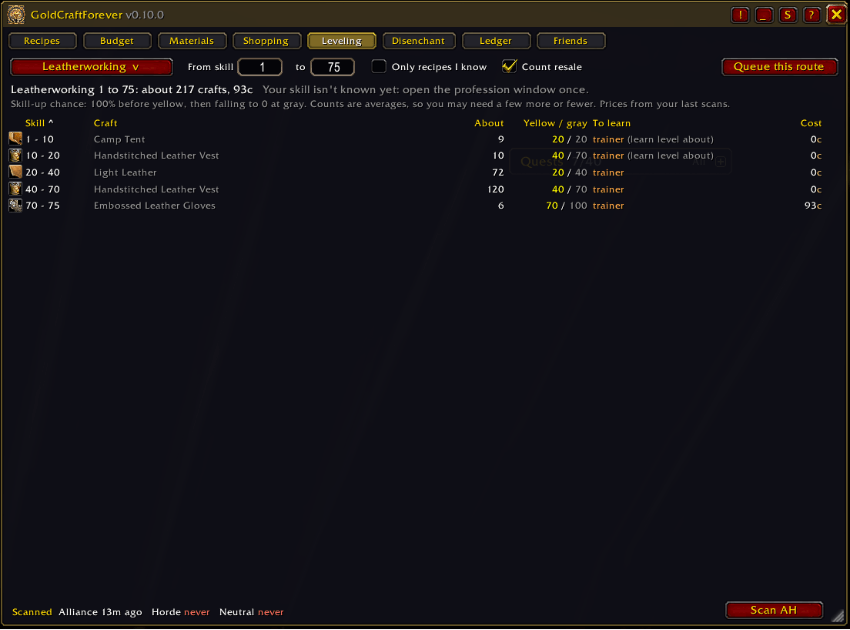
- The cheapest route from your current skill to any target, using real skill-up chances (100% before yellow, falling to 0 at gray).
- Counts what you can sell the crafts for, and adds the price of recipes you'd need to buy.
- Queue the whole route in one click.
Disenchant: sell it or disenchant it?
- For every green, blue and purple item in your bags: what it sells for, what disenchanting it gives, and a clear verdict.
- Only shown when one of your characters has Enchanting.
- Starts from the standard disenchant table and switches to your own results once you've disenchanted enough of a kind.
Ledger: what actually sold
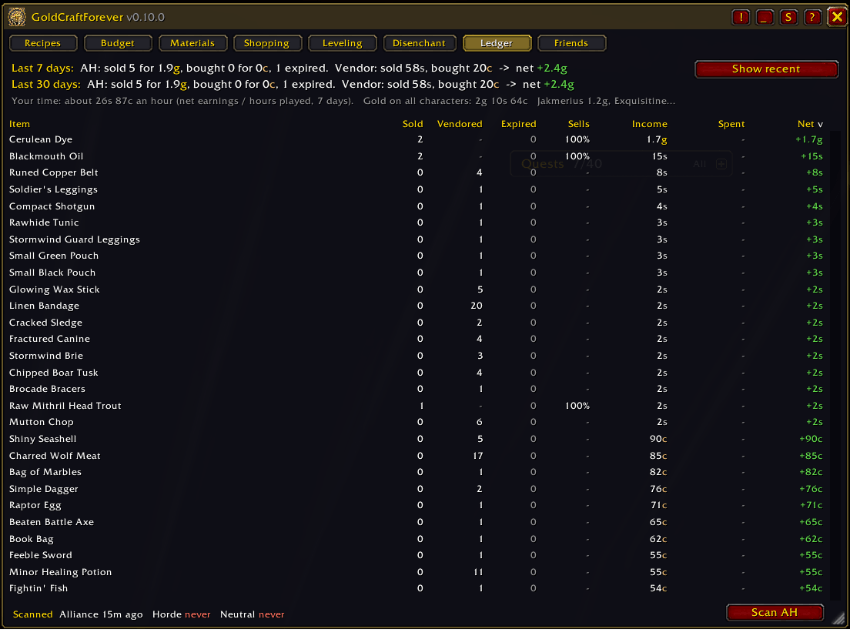
- Reads auction mail (sales, purchases, expired auctions) and records vendor sales and purchases.
- Totals for the last 7 and 30 days, sell rates per item, gold across all your characters, and your earnings per hour.
- Your markets: which kinds of items your auctions sell best and worst, so you know where to focus.
Prices you can trust
- Price now ignores bait: a few units dumped far below the rest don't set the price, and the tooltip says what was stepped over.
- Prices are colored by age, and marked when few are listed (
!), when they're far from their usual price (?), or when the scan is old (~). - Keeps 10 days of price history for crafting materials and products to work out the usual price (30 days for raw materials).
- Shows listing deposits, and can subtract the deposit you're likely to lose.
Tooltips
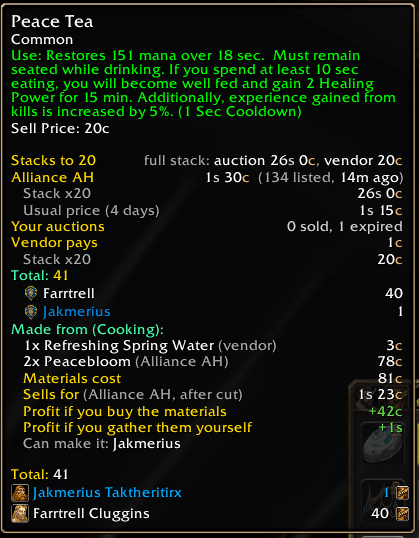
- Short by default: the cheapest auction price you can use, the vendor price, stack value and how many each character has.
- Hold Shift for everything: prices at all three houses, usual price, what it's made from and used to make, its best use, disenchant value, and where you've gathered it.
- Each section can be turned on or off.
Friends
- Share scans, known recipes, loot sources, gathering rates and disenchant results with friends who also use the addon.
- Works between characters on the same faction, and between Battle.net friends on either faction. There's also an export/import text as a backup.
- Each house keeps whichever scan is newer, so a group of friends keeps all three houses fresh.
Item locks
- Alt + left-click an item in your bags to lock it (works with Bagnon too). Locked items get a lock icon.
- If a locked item gets sold by a misclick or a junk-selling addon, it's bought straight back with a warning.
Comfort
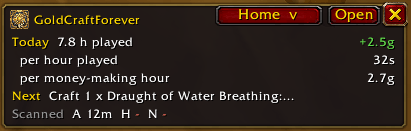
- Mini mode: a small window showing a short version of the tab you're on (today's numbers, your best crafts, the item you're watching, what's left to buy), plus cooldowns and scan ages.
- Minimap button and addon tray entry, key bindings, resizable window, opacity, scale, fade when the mouse is away, lock, close with Escape.
- Cooldown tracking (Mooncloth, transmutes) across your characters.
- A step-by-step tutorial the first time you open it (replay it with the ? button), and What's new after every update.
Getting started
- Type /gcf or click the minimap button. The tutorial walks you through the window.
- Open an auction house: it scans by itself (or click Scan AH). Scan your faction's house and the Neutral house in Gadgetzan, Booty Bay or Everlook.
- Open each of your profession windows once so the addon knows your recipes and skill.
- Open your mailbox after auction sales so the Ledger can record them.
Commands: /gcf window · /gcf export · /gcf mini · /gcf budget · /gcf settings · /gcf tutorial · /gcf use <item> · /gcf help
Good to know
- One full auction house scan is allowed every 15 minutes (a game limit).
- An addon can only read the auction house you're standing at. Friends sharing their scans fills in the others.
- GoldCraftForever never buys, sells or crafts anything on its own. Every action is your click.
- WoW Forever is still changing. If something looks wrong, please leave a comment with what you saw.
GoldCraftForever is all rights reserved (see the LICENSE file): use it and change your own copy freely, but please don't re-upload or reuse it without asking. The disenchant odds table is adapted from Disenchantry under the MIT License (see NOTICE). Recipe data comes from WoW Forever's game files. Not affiliated with Blizzard Entertainment.
CurseForge: https://www.curseforge.com/wow/addons/goldcraftforever用户评价
暂无 / 5,0 条评价相关推荐
继续看看这些内容