插件中文资料库
中文说明、玩家点评、适用场景和替代推荐,方便快速判断是否适合你。
- 任务路线、地图标记和野外探索
- 界面布局、头像框、姓名板和动作条优化
 TankMD Misdirect
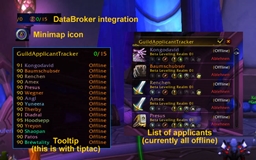 GuildApplicantTracker
 Craft Tracker
Guild Notes Updater 插件下载与使用指南
本页整理了 Guild Notes Updater 的功能用途、适用人群、安装方法和常见问题,方便玩家快速判断是否需要安装。
适合谁用
Guild Notes Updater 是一款 公会 类插件,适合需要优化界面、提升操作效率或补充游戏信息提示的魔兽世界玩家。
基本信息
- 插件作者:LanniOfAlonsus
- 插件分类:公会
- 适配版本:12.0.0,12.0.1
- 累计下载:32
安装方法
- 点击上方下载按钮获取 Guild Notes Updater插件文件。
- 解压后将插件文件夹放入 World of Warcraft/_retail_/Interface/AddOns 目录。
- 重启游戏或在角色界面点击插件,确认 Guild Notes Updater 已启用。
- 如果插件不生效,请检查版本是否匹配,或关闭同类冲突插件后重试。
使用建议
Guild Notes Updater 安装后建议先在角色界面确认已启用,进入游戏后根据插件提供的命令、小地图按钮或设置面板进行调整。如遇到报错,可先单独启用该插件排查冲突。
Guild Notes Updater 常见问题
Guild Notes Updater 适合需要 公会 类功能的玩家,特别是希望提升游戏便利性、界面管理或战斗信息获取效率的用户。
下载后解压到 Interface/AddOns 目录,然后重启游戏并在角色界面启用插件。
常见原因是目录多套一层、游戏版本不匹配、依赖插件缺失或同类插件冲突。
可以查看本页的替代插件推荐和相关插件区域,按下载量和分类选择同类工具。
插件 AI 问答
可以问:这个插件正式服能用吗、和 DBM 冲突吗、怎么设置、有没有替代插件。
Guild Notes Updater 是一款魔兽世界插件,主要用于界面框架、头像、动作条或冷却显示优化、地图、区域、任务路线或交通提醒。建议根据自己的版本和插件环境先测试兼容性。
插件用途
Guild Notes Updater 主要面向需要公会功能的玩家,用来改善游戏体验、减少重复操作或补充默认界面没有直接提供的信息。
适用场景
- 界面框架、头像、动作条或冷却显示优化
- 地图、区域、任务路线或交通提醒
使用建议
安装后建议先在角色选择界面或插件管理器中确认已启用,再进入游戏测试是否与现有整合包、WA 和其他插件冲突。如遇报错,可以先禁用同类插件排查。
📝 Guild Notes Updater
Guild Notes Updater helps guild officers automatically populate blank Public or Officer notes with a predefined message.
It features a clean, retail-friendly Blizzard Settings page, a handy minimap button, and smart automation that respects instance rules introduced with Midnight.
Support & Community
For bug reports, feature requests, release notes, and beta builds, join the official Discord:
LanniOfAlonsus • Addon Hub
https://discord.gg/U8mKfHpeeP
🔒 Midnight Compliance
✅ No chat spam in instances/raids (optional mute enabled by default)
✅ Auto-updates are paused in instances/raids (enabled by default)
✅ Uses the Retail Blizzard Settings panel (no custom frames required)
✅ Behaviours are toggleable so you can tailor compliance to your preference
🔥 Features
✅ Auto-fill blank notes with your predefined message (Public or Officer notes)
✅ Retail Blizzard Settings panel (no custom UI required)
Settings location:
- Escape → Options → AddOns → Guild Notes Updater
- Configure:
- Default Note
- Use Officer Note
- Auto-Update
- Interval (5 / 10 / 15 / 30)
- Pause in Instances
- Mute in Instances
✅ Auto-Update (off by default)
- Runs at your chosen interval (5, 10, 15, or 30 minutes)
- Persists across sessions
- Skips work and/or chat output while you’re in instances (based on your toggles)
- Only prints when updates actually happen (to avoid noise)
✅ Minimap button for quick access (toggle on/off)
✅ Dynamic tooltip on “Update Notes” describing which note type will be affected
✅ Saved settings persist across sessions:
- note text
- minimap toggle
- auto-update
- interval
- instance behaviour
⌨️ Slash Commands
/gnotesor/guildnotes— Open Blizzard Settings for this addon/gnotes minimap— Toggle minimap button/gnotes auto— Toggle Auto-Update/gnotes pause— Toggle Pause Auto-Update in Instances/gnotes mute— Toggle Mute Chat Prints in Instances
🧭 How it behaves in instances (Midnight-safe)
With Pause in Instances enabled (default)
- The auto-update ticker will not run while you’re inside an instance/raid/arena/BG/scenario
- If you zone into an instance, the ticker pauses
- It resumes automatically when you leave
With Mute in Instances enabled (default)
- The addon suppresses its own chat prints while you’re in an instance
- This prevents spam and keeps behaviour Midnight-compliant
📜 License
All Rights Reserved.
Personal use is allowed. Redistribution or modified uploads are not permitted.
🎮 Never lose track of your guild notes again — and stay clean with Midnight!
CurseForge: https://www.curseforge.com/wow/addons/guild-notes-updater用户评价
暂无 / 5,0 条评价相关推荐
继续看看这些内容
