插件中文资料库
中文说明、玩家点评、适用场景和替代推荐,方便快速判断是否适合你。
- 界面布局、头像框、姓名板和动作条优化
 Details! Mythic+ Scoreboard
 TankMD Misdirect
 Questie
Linker Pro 插件下载与使用指南
本页整理了 Linker Pro 的功能用途、适用人群、安装方法和常见问题,方便玩家快速判断是否需要安装。
适合谁用
Linker Pro 是一款 聊天与通讯 类插件,适合需要优化界面、提升操作效率或补充游戏信息提示的魔兽世界玩家。
基本信息
- 插件作者:Facemasher
- 插件分类:聊天与通讯
- 适配版本:2.5.5
- 累计下载:0
安装方法
- 点击上方下载按钮获取 Linker Pro插件文件。
- 解压后将插件文件夹放入 World of Warcraft/_retail_/Interface/AddOns 目录。
- 重启游戏或在角色界面点击插件,确认 Linker Pro 已启用。
- 如果插件不生效,请检查版本是否匹配,或关闭同类冲突插件后重试。
使用建议
Linker Pro 安装后建议先在角色界面确认已启用,进入游戏后根据插件提供的命令、小地图按钮或设置面板进行调整。如遇到报错,可先单独启用该插件排查冲突。
Linker Pro 常见问题
Linker Pro 适合需要 聊天与通讯 类功能的玩家,特别是希望提升游戏便利性、界面管理或战斗信息获取效率的用户。
下载后解压到 Interface/AddOns 目录,然后重启游戏并在角色界面启用插件。
常见原因是目录多套一层、游戏版本不匹配、依赖插件缺失或同类插件冲突。
可以查看本页的替代插件推荐和相关插件区域,按下载量和分类选择同类工具。
插件 AI 问答
可以问:这个插件正式服能用吗、和 DBM 冲突吗、怎么设置、有没有替代插件。
Linker Pro 是一款魔兽世界插件,主要用于组队、队伍交流和自动问候。建议根据自己的版本和插件环境先测试兼容性。
插件用途
Linker Pro 主要面向需要聊天与通讯功能的玩家,用来改善游戏体验、减少重复操作或补充默认界面没有直接提供的信息。
适用场景
- 组队、队伍交流和自动问候
使用建议
安装后建议先在角色选择界面或插件管理器中确认已启用,再进入游戏测试是否与现有整合包、WA 和其他插件冲突。如遇报错,可以先禁用同类插件排查。
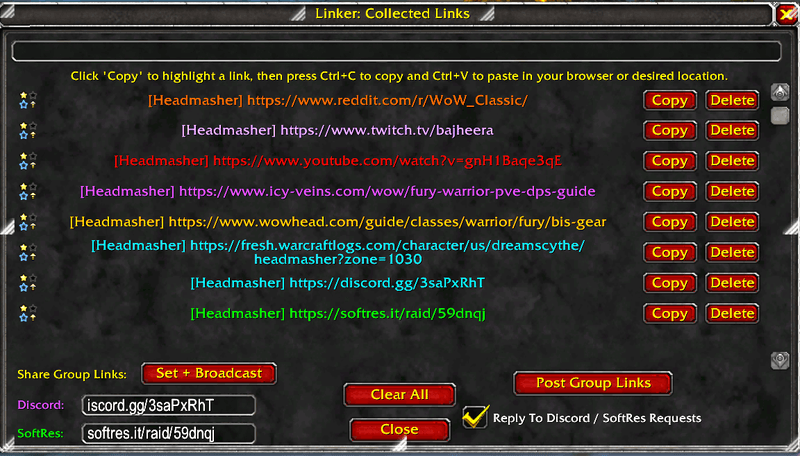
🔗 LinkerPro – The Ultimate World of Warcraft Group Link Management Addon
⚡ Instantly see Discord & SoftRes links without even having to ask your raid leader.
LinkerPro automatically detects, stores, and shares important group links like Discord and SoftRes so raid leaders and groups never have to spam chat or hunt for links again.
Whether you’re building a raid, joining late, or reloading your UI, LinkerPro ensures you always have access to the correct links.
------------------------------------------------------------
✨ CORE FEATURES
🔍 Automatic Link Detection
• Detects supported links posted in chat:
- Discord
- SoftRes
- WoWSims
- Wowhead
- WarcraftLogs
- Icy-Veins
- YouTube
- Reddit
- Twitch
- Kick
• Detected links are saved into a scrollable popup window for easy copying.
⭐ Group Link Priority (Star Links)
• Links posted in party or raid chat are marked as Star Links.
• Only one Discord and one SoftRes group link are kept at a time.
• New group links automatically replace old ones (prevents stale links).
📋 Easy Copy Interface
• Click Copy to highlight a link.
• Press Ctrl+C to copy.
• Clear All button to wipe stored links.
------------------------------------------------------------
🤖 SMART RESPONSE SYSTEM (Leader / Assist Only)
Raid leaders or assistants can enable:
“Reply To Discord / SoftRes Requests”
When enabled:
• Automatically responds when players ask:
- "discord?"
- "softres link?"
- "sr?"
- "where is discord?"
- and more
• Uses the most recent group-detected link.
• Separate cooldowns for Discord and SoftRes.
• Replies in Raid Warning (if leader/assist) or Raid/Party otherwise.
------------------------------------------------------------
🔄 ADDON-TO-ADDON LINK SYNC (NO CHAT SPAM)
• LinkerPro users share links silently via addon messages.
• When someone with LinkerPro joins a group, they automatically request links.
• Anyone who already has the group links can respond.
• New joiners instantly receive Discord / SoftRes.
• If a player reloads their UI, links automatically return after a few seconds.
• Works even if the raid leader does NOT have LinkerPro installed.
------------------------------------------------------------
🛡️ COOPERATIVE SAFETY SYSTEM
• Only group-detected links are shared.
• Prevents old links from previous raids from leaking into new groups.
• Leader/assist has priority, but normal raiders can safely help reseed links.
• First-responder logic prevents multiple people from replying at once.
------------------------------------------------------------
🧹 AUTOMATIC CLEANUP
When you leave a group:
• Group links are removed.
• Smart Response is turned off.
• Cooldowns reset.
• Ensures every new group starts clean.
------------------------------------------------------------
🛠️ MANUAL GROUP LINK CONTROLS (Leader / Assist)
Inside /linker window:
• Enter Discord link
• Enter SoftRes link
• Click “Set + Broadcast”
This instantly:
• Saves the links
• Shares them with all LinkerPro users
• Updates Smart Response system
------------------------------------------------------------
⌨️ SLASH COMMANDS
Type /linker to open the LinkerPro popup window.
------------------------------------------------------------
⭐ WHY USE LINKERPRO?
✔ No more spamming links
✔ No more “can someone link discord?”
✔ New joiners always get links
✔ Reload-safe
✔ Leader-friendly
✔ Pug-friendly
If your raid uses Discord or SoftRes, LinkerPro saves time, reduces chat clutter, and prevents mistakes.
⸻
💬 Feedback & Suggestions
If you’d like to see more link types supported or have ideas for new features, feel free to leave feedback on the project page — your input helps improve Linker!
用户评价
暂无 / 5,0 条评价相关推荐
继续看看这些内容
