插件中文资料库
中文说明、玩家点评、适用场景和替代推荐,方便快速判断是否适合你。
- 副本、团队本和大秘境战斗提醒
 Details! Mythic+ Scoreboard
 TankMD Misdirect
 Journalator
LFG Teleport Button 插件下载与使用指南
本页整理了 LFG Teleport Button 的功能用途、适用人群、安装方法和常见问题,方便玩家快速判断是否需要安装。
适合谁用
LFG Teleport Button 是一款 其他插件 类插件,适合需要优化界面、提升操作效率或补充游戏信息提示的魔兽世界玩家。
基本信息
- 插件作者:Qabhal
- 插件分类:其他插件
- 适配版本:11.2.7
- 累计下载:37
安装方法
- 点击上方下载按钮获取 LFG Teleport Button插件文件。
- 解压后将插件文件夹放入 World of Warcraft/_retail_/Interface/AddOns 目录。
- 重启游戏或在角色界面点击插件,确认 LFG Teleport Button 已启用。
- 如果插件不生效,请检查版本是否匹配,或关闭同类冲突插件后重试。
使用建议
LFG Teleport Button 安装后建议先在角色界面确认已启用,进入游戏后根据插件提供的命令、小地图按钮或设置面板进行调整。如遇到报错,可先单独启用该插件排查冲突。
LFG Teleport Button 常见问题
LFG Teleport Button 适合需要 其他插件 类功能的玩家,特别是希望提升游戏便利性、界面管理或战斗信息获取效率的用户。
下载后解压到 Interface/AddOns 目录,然后重启游戏并在角色界面启用插件。
常见原因是目录多套一层、游戏版本不匹配、依赖插件缺失或同类插件冲突。
可以查看本页的替代插件推荐和相关插件区域,按下载量和分类选择同类工具。
插件 AI 问答
可以问:这个插件正式服能用吗、和 DBM 冲突吗、怎么设置、有没有替代插件。
LFG Teleport Button 是一款魔兽世界插件,主要用于副本、团本、大秘境或钥石辅助、组队、队伍交流和自动问候。建议根据自己的版本和插件环境先测试兼容性。
插件用途
LFG Teleport Button 主要面向需要其他插件功能的玩家,用来改善游戏体验、减少重复操作或补充默认界面没有直接提供的信息。
适用场景
- 副本、团本、大秘境或钥石辅助
- 组队、队伍交流和自动问候
使用建议
安装后建议先在角色选择界面或插件管理器中确认已启用,再进入游戏测试是否与现有整合包、WA 和其他插件冲突。如遇报错,可以先禁用同类插件排查。
LFG Dungeon Teleport Button
- Do you ever wonder which dungeon you were invited to?
- Does opening your spellbook to find the right teleport button or digging through complicated addons just to locate the correct icon feel like a hassle?
- Then this addon is for you!
Retail-only. Shows a **secure teleport button** when your **LFG M+ application is invited**.
Season coverage: **The War Within – Season 3** (static Group Finder activity IDs embedded).
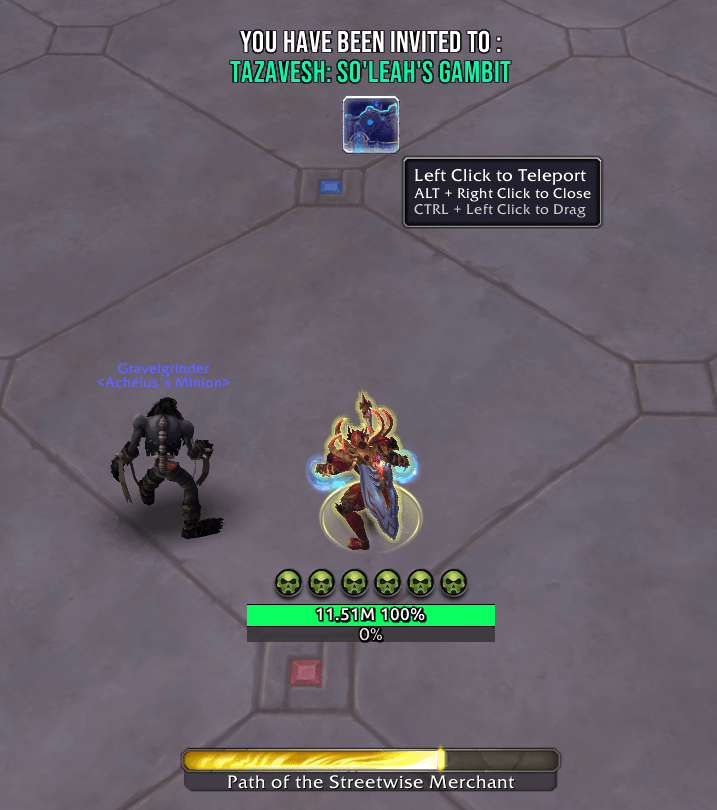
- Pops a 50×50 button at screen `(CENTER, x=0, y=250)`.
- Icon matches the invited dungeon; left-click casts its Teleport spell.
- **Cooldown overlay** is shown and the button text displays the dungeon name.
- If the teleport **is not learned**, the button hides and prints a chat note.
- On **successful cast** or **right-click**, the button hides itself.
- Hover: tooltip shows “Left Click to Teleport” and “Right Click to Close”.
- - Ara-Kara, City of Echoes — icon **5899326**, spell **445417**
- - The Dawnbreaker — icon **5899330**, spell **445414**
- - Tazavesh: Streets of Wonder — icon **4062727**, spell **367416**
- - Tazavesh: So'leah's Gambit — icon **4062727**, spell **367416**
- - Priory of the Sacred Flame — icon **5899331**, spell **445444**
- - Operation: Floodgate — icon **6392629**, spell **1216786**
- - Halls of Atonement — icon **3601526**, spell **354465**
- - Echo-dome Al'dari — icon **6921877**, spell **1237124**
## Commands
## Notes
Attributes of the secure button cannot change during combat. If the invite arrives in combat, the addon prepares the button after combat ends.
- 1016 (Tazavesh: Streets of Wonder)
- 1017 (Tazavesh: So’leah’s Gambit)
- 1284 (Ara-Kara, City of Echoes)
- 1285 (The Dawnbreaker)
- 1281 (Priory of the Sacred Flame)
- 1550 (Operation: Floodgate)
- 1694 (Eco/Echo-dome Al’dari)
- 699 (Halls of Atonement)
用户评价
暂无 / 5,0 条评价相关推荐
继续看看这些内容
