插件中文资料库
中文说明、玩家点评、适用场景和替代推荐,方便快速判断是否适合你。
- 界面布局、头像框、姓名板和动作条优化
 Details! Mythic+ Scoreboard
 BagSync
 RightClickSelfCast
ElvUI WindTools 插件下载与使用指南
本页整理了 ElvUI WindTools 的功能用途、适用人群、安装方法和常见问题,方便玩家快速判断是否需要安装。
适合谁用
ElvUI WindTools 是一款 动作条 / 背包与库存 / 聊天与通讯 / 其他插件 / 插件扩展 类插件,适合需要优化界面、提升操作效率或补充游戏信息提示的魔兽世界玩家。
基本信息
- 插件作者:fang2hou
- 插件分类:动作条 / 背包与库存 / 聊天与通讯 / 其他插件 / 插件扩展
- 适配版本:12.1.5,1.60.1
- 累计下载:0
安装方法
- 点击上方下载按钮获取 ElvUI WindTools插件文件。
- 解压后将插件文件夹放入 World of Warcraft/_retail_/Interface/AddOns 目录。
- 重启游戏或在角色界面点击插件,确认 ElvUI WindTools 已启用。
- 如果插件不生效,请检查版本是否匹配,或关闭同类冲突插件后重试。
使用建议
ElvUI WindTools 安装后建议先在角色界面确认已启用,进入游戏后根据插件提供的命令、小地图按钮或设置面板进行调整。如遇到报错,可先单独启用该插件排查冲突。
ElvUI WindTools 常见问题
ElvUI WindTools 适合需要 动作条 / 背包与库存 / 聊天与通讯 / 其他插件 / 插件扩展 类功能的玩家,特别是希望提升游戏便利性、界面管理或战斗信息获取效率的用户。
下载后解压到 Interface/AddOns 目录,然后重启游戏并在角色界面启用插件。
常见原因是目录多套一层、游戏版本不匹配、依赖插件缺失或同类插件冲突。
可以查看本页的替代插件推荐和相关插件区域,按下载量和分类选择同类工具。
插件 AI 问答
可以问:这个插件正式服能用吗、和 DBM 冲突吗、怎么设置、有没有替代插件。
ElvUI WindTools 是一款魔兽世界插件,主要用于界面框架、头像、动作条或冷却显示优化。建议根据自己的版本和插件环境先测试兼容性。
插件用途
ElvUI WindTools 主要面向需要聊天与通讯功能的玩家,用来改善游戏体验、减少重复操作或补充默认界面没有直接提供的信息。
适用场景
- 界面框架、头像、动作条或冷却显示优化
使用建议
安装后建议先在角色选择界面或插件管理器中确认已启用,再进入游戏测试是否与现有整合包、WA 和其他插件冲突。如遇报错,可以先禁用同类插件排查。

You can also read this page in [简体中文 (zhCN)](https://github.com/wind-addons/ElvUI_WindTools/blob/main/README_zhCN.md) | [繁體中文 (zhTW)](https://github.com/wind-addons/ElvUI_WindTools/blob/main/README_zhTW.md)
Since 17th Feb, 2026, BUG REPORTS & FEATURE REQUESTS only accepted in GitHub or Discord channel.
🔗 Links
🌍 Localization
Complete Support
简体中文,繁體中文,한국어, ру́сский язы́к, English, Deutsch, français, Español
Some strings are still in English
Português, Italiano
❤️ Credits
- Siweia (NDui)
- Witness (NDui_Plus)
- Loudsoul (TinyInspect, TinyTooltip)
- Merathilis (ElvUI_MerathilisUI)
- Tox, Nawuko (ElvUI_ToxiUI)
See All credits.
✨ Features
Media Files
5 fonts, 6 textures and 8 sound effects.
Item
- Delete Item: Automatically fill "DELETE" text when deleting items; supports click-to-confirm and delete key; customizable confirm button style.
- Already Known: Add colored overlay to recipes, toys, pets, and mounts you already know; supports custom colors and opacity; works in bags, mailbox, and merchant frames.
- Fast Loot: Enhance auto-loot speed for more efficient looting.
- Trade: One-click thank you button on trade frame to express appreciation.
- Extra Item Bar: Customizable item bars for flasks, potions, quest items, and custom items; supports up to 5 bars with configurable size, spacing, backdrop, and item slots; auto-show/hide based on content; keybind support.
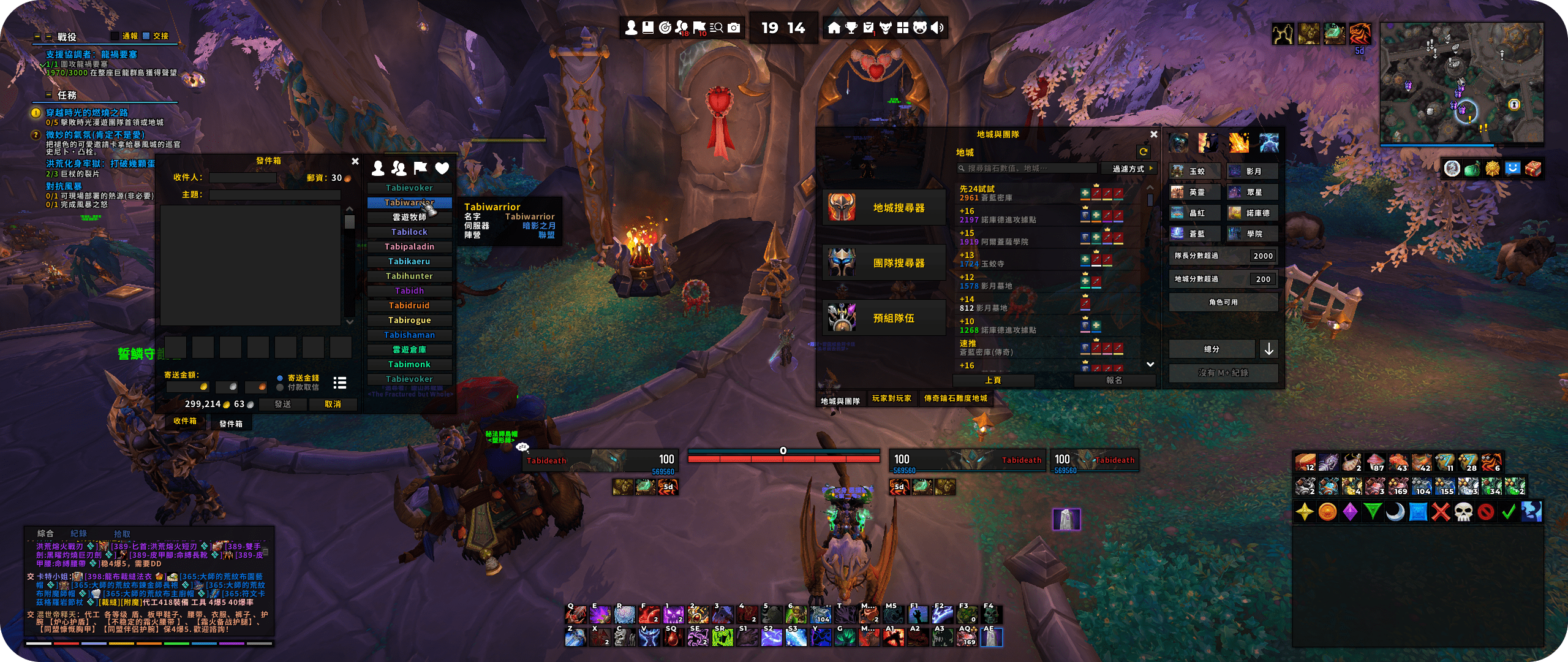
- Contacts: Add contact list panel beside mailbox with favorites and quick mail sending.
- Inspect: Add equipment list panel beside character and inspect frames showing all slots; displays item level, gem info, and enchants;
- Extended Merchant Pages: Extend merchant frame to display more items per page for faster browsing.
Combat
- Raid Markers: Add customizable raid marker bar with world markers, skull/cross markers, ready check, pull countdown, and clear markers; supports button size, spacing, backdrop, keybinds, and visibility options (party/raid/solo).
- Combat Alert: Display customizable animations and screen effects when entering/leaving combat; adjust size, speed, and color.
- Quick Keystone: Automatically place Mythic Keystone from bags into font when the UI opens.
Map
- Super Tracker: Additional features for waypoint - auto track, middle click to clear, remove distance limitation, waypoint parse support, virtual TomTom command support.
- Who Clicked Minimap: Display the name of players who clicked the minimap with customizable animation and colors.
- Rectangle Minimap: Customize the minimap with different length of width and height.
- Minimap Buttons: Collect all minimap buttons to a bar with customizable layout, sorting priority, and expansion buttons support.
- World Map: Remove fog of war with optional colored fog; resize world map with custom scale.
- Instance Difficulty: Reskin the instance difficulty in text style with customizable font and strings.
- Event Tracker: Track world events in the world map - supports TWW weekly quests, Nightfall, Theater Troupe, Radiant Echoes, Dragonlands events with customizable alerts and sounds.
Quest
- Objective Tracker: Customize fonts, colors, and add cosmetic bars to quest headers; supports colorful progress text, percentage display, and custom backdrop.
- Turn In: Automatically accept and complete quests with smart reward selection, customizable pause modifiers, and smart NPC chat support (Darkmoon Faire, Follower Assignees); includes NPC ignore list.
- Switch Buttons: Add a customizable bar with buttons for quickly toggling Turn In and Announcement modules.
Social
- Chat Bar: Add customizable channel switching bar with support for world channels, community channels, emote panel, and roll buttons; supports horizontal/vertical orientation, auto-hide, mouseover, block/text styles, and custom button sizes.
- Chat Link: Enhance item links with icons, level, numerical quality tier, armor/weapon categories, and item name translation; customizable icon sizes.
- Chat Text: Customize role icon packs (8 styles: FFXIV, PhilMod, Hexagon, ElvUI, SunUI, LynUI, ElvUI Old, Blizzard); remove brackets, realm names; add class/faction icons; enhance guild member status; merge achievements; BNet friend online/offline alerts; custom channel abbreviations.
- Context Menu: Add taint-free context menu options: guild invite, who, report stats, and armory (with region override support); includes styled section titles.
- Emote: Parse and send emotes with customizable icon size; emote panel activated by pressing {; chat bubble support.
- Friend List: Enhance friend list with status icon packs (Default/Diablo 3/Square), game icon styles; add colorful level (with hide max level option), class color, client color; use notes as names; hide realm; custom fonts for name and info.
- Smart Tab: Use Tab to cycle chat channels intelligently; configurable channel inclusion (Yell, Battleground, Raid Warning, Officer); whisper history with adjustable expiration time.
Announcement
- Quest: Announce detailed quest progress to party members, supports including quest link and progress information; and also better quest progression text display.
- Goodbye: Say goodbye to teammates after dungeon/raid completion with customizable messages and delay.
- Reset Instance: Alert teammates after resetting instances with customizable messages.
- Keystone: Announce Mythic+ keystone information with customizable format..
Tooltip
- General: Customizable modifier key; add title icons for items, spells, achievements; faction icons; pet icons and IDs; tier set information.
- ElvUI Tooltip Tweaks: Adjust health bar and text Y-offsets; add spec icons and race icons with customizable sizes; enhanced Mythic+ info with dungeon icons; force item level display.
- Progression: Display raid progression, special achievements, and Mythic+ scores with customizable header styles (none/text/texture); supports instance filtering and highest score marking; disable in combat option.
- Keystone: Show keystone information in tooltips (requires both side Details!, BigWigs or WindTools installed); supports abbreviation and custom icon sizes.
- Group Info: Add detailed LFG group information with customizable templates, class icon styles, compact/normal modes; options to exclude dungeons and hide Blizzard default info.
- Objective Progress: Add detailed objective progress information for mobs with adjustable accuracy.
Unit Frames
- Quick Focus: Set focus to mouseover unit using customizable modifier keys (Alt/Ctrl/Shift) + left/right/middle mouse click combinations; works on all unit frames.
- Absorb: Customize ElvUI absorb bar texture and add Blizzard-style absorb spark to health bar end; customize spark size, color, and offset.
- Role Icon: Change role icon pack (8 styles: FFXIV, PhilMod, Hexagon, ElvUI, SunUI, LynUI, ElvUI Old, Blizzard); applies to all unit frames with role icons.
- Tags: Add custom ElvUI tags including range display, health/power without signs, class colors, and icons.
Skins
- Vignetting: Add the shadowed border inner game interface.
- Blizzard Frame Skins: Additional skins for Blizzard frames.
- ElvUI Frame Skins: Reskin ElvUI modules.
- WindTools Skins: Reskin WindTools modules.
- Ace3 Skins: Apply ElvUI skin for Ace3-GUI widgets.
- Angry Keystones Skin: Apply skins for Angry Keystones mythic plus timer.
- Auctionator Skin: Apply ElvUI skin for Auctionator all frames.
- BigWigs Skin: Apply ElvUI skin for BigWigs.
- BigWigs Queue Timer Skin: Apply ElvUI skin for BigWigs Queue Timer.
- BtWQuests Skin: Apply ElvUI skin for BtWQuests.
- BugSack Skin: Apply ElvUI skin for BugSack.
- Collectionator Skin: Apply ElvUI skin for Collectionator.
- Immersion Skin: Apply ElvUI skin for Immersion.
- Manuscripts Journal Skin: Apply ElvUI skin for Manuscripts Journal.
- Mount Route Planner Skin: Apply ElvUI skin for Mount Route Planner.
- MultiLanguage Skin: Apply ElvUI skin for MultiLanguage.
- Myslot Skin: Apply ElvUI skin for Myslot.
- Mythic Dungeon Tools Skin: Apply ElvUI skin for Mythic Dungeon Tools.
- OmniCD Skin: Apply ElvUI skin for OmniCD Config GUI, icons, extra bars, and status bars.
- Paragon Reputation Skin: Apply ElvUI skin for Paragon Reputation.
- Plumber Skin: Apply ElvUI skin for Plumber.
- Postal Skin: Apply ElvUI skin for Postal normal buttons and quick attach buttons.
- Premade Groups Filter Skin: Apply ElvUI skin for Premade Groups Filter.
- RaiderIO Skin: Apply ElvUI skin for RaiderIO.
- RareScanner Skin: Apply ElvUI skin for RareScanner.
- Rematch Skin: Apply ElvUI skin for Rematch.
- SilverDragon Skin: Apply ElvUI skin for SilverDragon.
- Simple Addon Manager Skin: Apply ElvUI skin for Simple Addon Manager.
- Simulationcraft Skin: Apply ElvUI skin for Simulationcraft.
- Talent Loadouts Ex Skin: Apply ElvUI skin for Talent Loadouts Ex.
- TinyInspect Skin: Apply ElvUI skin for TinyInspect.
- TomCat's Tours Skin: Reskin the tooltip and header of TomCat's Tours.
- TomTom Skin: Apply ElvUI skin for TomTom.
- WarpDeplete Skin: Reskin the bars in WarpDeplete.
- WhisperPop Skin: Apply ElvUI skin for WhisperPop.
- World Quest Tab Skin: Apply ElvUI skin for World Quest Tab tabs and settings.
Misc
- CVars Editor: Simple editor for changing CVars with search, favorites, and reset functionality.
- Move Frames: Move Blizzard frames and ElvUI bags by dragging; remember positions; supports Blizard frames and ElvUI bag frames.
- Mute: Mute annoying sound effects with customizable lists and instant stop all sounds hotkey.
- Pause to Slash: Convert CJK pause symbols (、) to slash (/) for easier slash command input.
- Disable Talking Head: Disable the talking head frame.
- Game Bar: Modern system status bar with customizable buttons (Home, Guild, Friend, Calendar, Volume, System, Mute, Config, Game Menu) positioned left/right; time/latency display; custom fonts, colors, backdrop, and tooltips; supports normal/combat modes with auto-hide.
- Skip Cut Scene: Skip most cutscenes automatically; hold modifier key to watch; option to disable in instances/raids.
- LFG List: Enhance Premade Groups list with class-colored bars, larger class icons, and additional member information.
- Move Speed: Display current movement speed in character panel stats.
- Automation: Auto-accept resurrection, summon, quests; auto-hide frames in combat.
- Math Without Kanji: Replace Chinese/Japanese unit characters with alphabetic characters.
- Auto Screenshot: Automatically screenshot when earning achievements.
- Hide Crafter: Hide crafted by information in item tooltips.
- HotKey Above CD: Display hotkey text above ElvUI cooldown spirals for better visibility.
- Guild News Item Level: Show item level in guild news feed.
- Custom Hotkey Alias: Create custom aliases for key bindings (e.g., change "BUTTON1" to "L").
用户评价
暂无 / 5,0 条评价相关推荐
继续看看这些内容
