插件中文资料库
中文说明、玩家点评、适用场景和替代推荐,方便快速判断是否适合你。
- 界面布局、头像框、姓名板和动作条优化
 Copy Anything
 Sleek XP Bubbles
 xanDebuffTimers
Grichelde 插件下载与使用指南
本页整理了 Grichelde 的功能用途、适用人群、安装方法和常见问题,方便玩家快速判断是否需要安装。
适合谁用
Grichelde 是一款 角色扮演 / 聊天与通讯 / 其他插件 类插件,适合需要优化界面、提升操作效率或补充游戏信息提示的魔兽世界玩家。
基本信息
- 插件作者:TeilzeitJedi
- 插件分类:角色扮演 / 聊天与通讯 / 其他插件
- 适配版本:10.0.2,1.14.3,3.4.1,2.5.4
- 累计下载:32
安装方法
- 点击上方下载按钮获取 Grichelde插件文件。
- 解压后将插件文件夹放入 World of Warcraft/_retail_/Interface/AddOns 目录。
- 重启游戏或在角色界面点击插件,确认 Grichelde 已启用。
- 如果插件不生效,请检查版本是否匹配,或关闭同类冲突插件后重试。
使用建议
Grichelde 安装后建议先在角色界面确认已启用,进入游戏后根据插件提供的命令、小地图按钮或设置面板进行调整。如遇到报错,可先单独启用该插件排查冲突。
Grichelde 常见问题
Grichelde 适合需要 角色扮演 / 聊天与通讯 / 其他插件 类功能的玩家,特别是希望提升游戏便利性、界面管理或战斗信息获取效率的用户。
下载后解压到 Interface/AddOns 目录,然后重启游戏并在角色界面启用插件。
常见原因是目录多套一层、游戏版本不匹配、依赖插件缺失或同类插件冲突。
可以查看本页的替代插件推荐和相关插件区域,按下载量和分类选择同类工具。
插件 AI 问答
可以问:这个插件正式服能用吗、和 DBM 冲突吗、怎么设置、有没有替代插件。
Grichelde 是一款魔兽世界插件,主要用于聊天与通讯相关功能。建议根据自己的版本和插件环境先测试兼容性。
插件用途
Grichelde 主要面向需要聊天与通讯功能的玩家,用来改善游戏体验、减少重复操作或补充默认界面没有直接提供的信息。
适用场景
- 聊天与通讯相关功能
使用建议
安装后建议先在角色选择界面或插件管理器中确认已启用,再进入游戏测试是否与现有整合包、WA 和其他插件冲突。如遇报错,可以先禁用同类插件排查。
Grichelde - Text replacer
Grichelde is a WoW Addon for Classic, Wrath of the Lich King Classic and Retail (Dragonflight) that replaces any characters or words you typed in a chat input line according to your replacement rules. The replacement is done before the text is send to other players/in the target channel. It does not change text other players have written in the chat, but the text they will see from you.
Its purpose is to simulate a speaking disability of your toon and hereby strengthen immersion in roleplay. Initially started as a helper addon for a roleplaying friend, Grichelde can be used for much more, like
- fixing your common spelling errors :)
- replacing toon names with their nick names
- write out abbreviations for you
- create hilarious moments during roleplay
However it does not replace slash commands with other slash commands, it only works for chat text. It you want to replace commands, please look at more sophisticated chat addons like Prat.
Disclaimer
No Warranty
The addon is provided "AS IS" and comes without warranty of any kind of function or correctness (for more details, consult the GPL 3 license). Also the author is not held responsible for any risk or damage the addon or its use might cause, especially lost of progress or data due to crashes of the WoW client.
Respect others
This addon does not encourange or intend to hurt or to tease people with speaking disabilities or language disorders. The responsibility rest on the user completely. Please use the features with care and respect to other players.
FAQ
Where do I start?
Grichelde is active right from the start with default mappings. To open the options UI, either left-click on
the new minimap icon, or type /gri or /grichelde in the chatbox. All mappings and channels can be configured there.
Does it replace only letters but also whole words?
Grichelde is capable of handling both, even whole sentences can be replaced. Only slash commands, item links, textures, placeholders and ooc-markers are excluded from replacement.
My replacement is not taken.
After entering a search or replacement text, you see a button "Okay" next to your input. This is not a validation message, but the save button for text. This is a restriction from the UI library and can be seen in other addons as well. Please click on "Okay" to save the input permanently, otherwise it will not be stored..
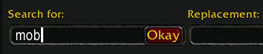
If it still does not work or gives you errors, please read the next question.
I have to disable the Addon frequently. Is there a more elegant solution?
Actually there are two solutions:
1. A right-click on the minimap button will disable Grichelde instantly. Right-click a second time will activate it again. Easy, isn't it?
2. You can disable Grichelde permanently and forcefully replace a sentence in the chatbox with manual override. I call it "Grichelde-On-Demand" :)
In the chatbox put /gri or /grichelde in front of your typed text, you can also include the target channel,
i.e. /gri /guild hello there and Grichelde will apply the active replacements and rules even if guild channel or Grichelde was disabled.
I get errors, what should I do?
Please report your errors on project website at curse forge. Make a screenshot or copy both the error message as well as your recent mappings.
You can bring up a small windows with your mapping by entering the /gri mappings command on copy them.
Why that strange name?
Grichelde is the name of an Undead rogue without a jaw, who was played in RP sessions by a guild member.
She started replacing s and t letters manually for each word in the chat, which became cumbersome over time.
(If you ever wondered how an Undead without a jaw sounds like, its really hilarious, you should try it.)
Without spelling errors, "Griselde" in German is an old-fashioned female first name.
I'm a Pro. Does it support regular expressions?
RegEx are very powerful search and replacement patterns commonly used in programming. Technically all searches the addon performs on the input are done
with regular expression methods, however Lua unfortunately does not support full PCRE syntax and is very limited (read here why).
Nevertheless some patterns can be used like the anchors start of line ^ or end of line $, capturing groups (hello) (world), character classes like numbers %d or (inversed) sets [^%p].
Capture groups can be accessed in the replacement text with %<number> like in %2 %1. Also there are some mappings using RegEx in the Example section.
用户评价
暂无 / 5,0 条评价相关推荐
继续看看这些内容
