插件中文资料库
中文说明、玩家点评、适用场景和替代推荐,方便快速判断是否适合你。
- 界面布局、头像框、姓名板和动作条优化
 Details! Mythic+ Scoreboard
 BagSync
 RightClickSelfCast
EventHorizon_Infall 插件下载与使用指南
本页整理了 EventHorizon_Infall 的功能用途、适用人群、安装方法和常见问题,方便玩家快速判断是否需要安装。
适合谁用
EventHorizon_Infall 是一款 战斗 / 职业 / 增益与减益 类插件,适合需要优化界面、提升操作效率或补充游戏信息提示的魔兽世界玩家。
基本信息
- 插件作者:Nakauri
- 插件分类:战斗 / 职业 / 增益与减益
- 适配版本:12.0.0,12.0.1,12.0.5,12.0.7
- 累计下载:32
安装方法
- 点击上方下载按钮获取 EventHorizon_Infall插件文件。
- 解压后将插件文件夹放入 World of Warcraft/_retail_/Interface/AddOns 目录。
- 重启游戏或在角色界面点击插件,确认 EventHorizon_Infall 已启用。
- 如果插件不生效,请检查版本是否匹配,或关闭同类冲突插件后重试。
使用建议
EventHorizon_Infall 安装后建议先在角色界面确认已启用,进入游戏后根据插件提供的命令、小地图按钮或设置面板进行调整。如遇到报错,可先单独启用该插件排查冲突。
EventHorizon_Infall 常见问题
EventHorizon_Infall 适合需要 战斗 / 职业 / 增益与减益 类功能的玩家,特别是希望提升游戏便利性、界面管理或战斗信息获取效率的用户。
下载后解压到 Interface/AddOns 目录,然后重启游戏并在角色界面启用插件。
常见原因是目录多套一层、游戏版本不匹配、依赖插件缺失或同类插件冲突。
可以查看本页的替代插件推荐和相关插件区域,按下载量和分类选择同类工具。
插件 AI 问答
可以问:这个插件正式服能用吗、和 DBM 冲突吗、怎么设置、有没有替代插件。
EventHorizon_Infall 是一款魔兽世界插件,主要用于界面框架、头像、动作条或冷却显示优化、增益、减益、光环或职业状态监控。建议根据自己的版本和插件环境先测试兼容性。
插件用途
EventHorizon_Infall 主要面向需要增益与减益功能的玩家,用来改善游戏体验、减少重复操作或补充默认界面没有直接提供的信息。
适用场景
- 界面框架、头像、动作条或冷却显示优化
- 增益、减益、光环或职业状态监控
使用建议
安装后建议先在角色选择界面或插件管理器中确认已启用,再进入游戏测试是否与现有整合包、WA 和其他插件冲突。如遇报错,可以先禁用同类插件排查。
Event Horizon Infall takes cooldowns and auras of abilities from your default Cooldown Manager and displays them as timeline bars. Every bar shares the same time scale, so you can see when things come back, when they overlap, and how they relate to each other.
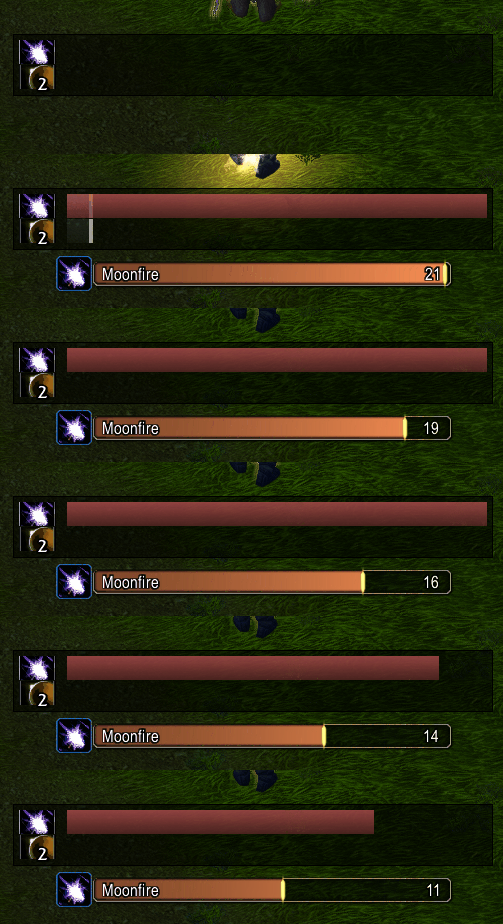
This image shows a moonkin's Moonfire debuff bar configured in both Infall (top) and the default cooldown manager (bottom) as a bar. The difference is that the default Blizzard bar shows 100% to 0% no matter the duration. The Infall frame is configured to show the next 16 seconds on a relative time scale:
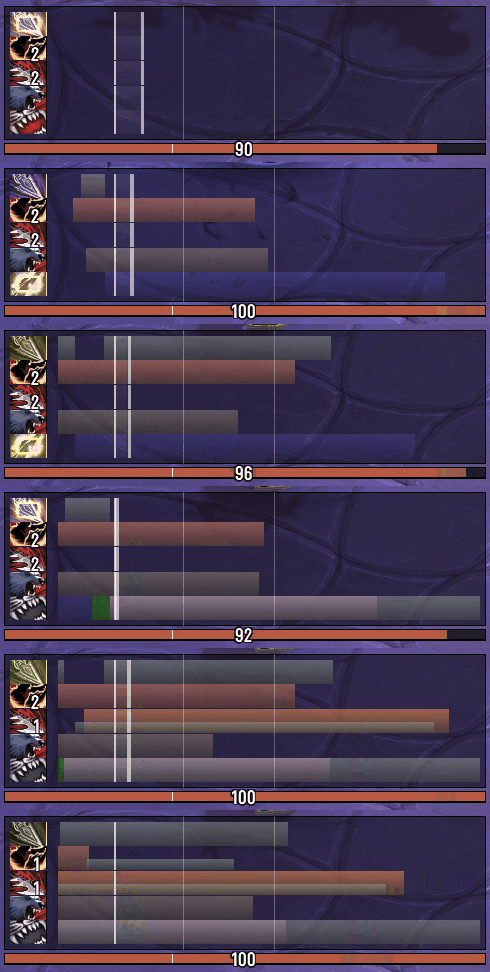
Most Infall setups will be configured to show many rotational cooldown bars, relative to each other.
The white "now" line splits past and future. Bars slide from right to left. If two cooldowns end at the same time, they'll line up. All bars move at the relative time set by the future timescale:
The original is EventHorizon by Brusalk and EventHorizon Continued by Calen. Infall is a rewrite for Midnight.
Some functionality did not make it. Some are still being iterated on.
Current Features
- Reads your Cooldown Manager: bars appear automatically, no spell setup needed
- Settings GUI (
/infall setup): layout, colours, fonts, toggles, profile options in game - De/Buff, cast, and stack pairing: visually pair debuffs, buffs, casts and stacks to cooldown bars
- Transformative spells like Bestial Wrath and Wailing Arrow, etc
- Per spec profiles: settings save and restore when you switch specs
- Charge spell support: spells with multiple charges split into lanes
- Empowered cast stages: Evoker hold to cast abilities show coloured segments per stage
- Past slide history: see what just happened to the left of the now line
- Reactive icons: icon colour changes for usable, out of mana, out of range, on cooldown
- Pandemic indicators: pulse when a buff is in its refresh window
- Spell variant display: shows names for restricted spell buffs like Roll the Bones (or similar)
- GCD and cast overlays: see your global cooldown and current casts
- Font support via LibSharedMedia: picks up fonts from Plater, Details, etc
- Movable and scalable: drag to position, make bigger or smaller
Getting Started
- Install the addon
- Blizzard Cooldown Manager will be enabled by Infall
- Type
/infall setupto configure, or go to Escape -> Options -> AddOns -> EventHorizon Infall - Bars appear!
Commands
/infall setupwill open settings/infall lock//infall unlockwill toggle frame dragging/infall scale xto set UI scale/infall reloadto rebuild bars/infall helpfor full command list
Links
Known Issues
- Past Bar: past bar with 3 charges has the middle lane expire with the bottom lane rather than independently (can be disabled)
用户评价
暂无 / 5,0 条评价相关推荐
继续看看这些内容
