插件中文资料库
中文说明、玩家点评、适用场景和替代推荐,方便快速判断是否适合你。
- 界面布局、头像框、姓名板和动作条优化
 GearInsight
 AmDotMonitor暗牧多目标监控
 Craft Tracker
PIBuddy 插件下载与使用指南
本页整理了 PIBuddy 的功能用途、适用人群、安装方法和常见问题,方便玩家快速判断是否需要安装。
适合谁用
PIBuddy 是一款 牧师 / 增益与减益 / 输出 类插件,适合需要优化界面、提升操作效率或补充游戏信息提示的魔兽世界玩家。
基本信息
- 插件作者:rljohn
- 插件分类:牧师 / 增益与减益 / 输出
- 适配版本:11.0.7,11.1.0
- 累计下载:39
安装方法
- 点击上方下载按钮获取 PIBuddy插件文件。
- 解压后将插件文件夹放入 World of Warcraft/_retail_/Interface/AddOns 目录。
- 重启游戏或在角色界面点击插件,确认 PIBuddy 已启用。
- 如果插件不生效,请检查版本是否匹配,或关闭同类冲突插件后重试。
使用建议
PIBuddy 安装后建议先在角色界面确认已启用,进入游戏后根据插件提供的命令、小地图按钮或设置面板进行调整。如遇到报错,可先单独启用该插件排查冲突。
PIBuddy 常见问题
PIBuddy 适合需要 牧师 / 增益与减益 / 输出 类功能的玩家,特别是希望提升游戏便利性、界面管理或战斗信息获取效率的用户。
下载后解压到 Interface/AddOns 目录,然后重启游戏并在角色界面启用插件。
常见原因是目录多套一层、游戏版本不匹配、依赖插件缺失或同类插件冲突。
可以查看本页的替代插件推荐和相关插件区域,按下载量和分类选择同类工具。
插件 AI 问答
可以问:这个插件正式服能用吗、和 DBM 冲突吗、怎么设置、有没有替代插件。
PIBuddy 是一款魔兽世界插件,主要用于增益、减益、光环或职业状态监控。建议根据自己的版本和插件环境先测试兼容性。
插件用途
PIBuddy 主要面向需要增益与减益功能的玩家,用来改善游戏体验、减少重复操作或补充默认界面没有直接提供的信息。
适用场景
- 增益、减益、光环或职业状态监控
使用建议
安装后建议先在角色选择界面或插件管理器中确认已启用,再进入游戏测试是否与现有整合包、WA 和其他插件冲突。如遇报错,可以先禁用同类插件排查。
The latest build now includes support for cross-realm buddies. Please report any issues!
PIBuddy is a useful tool that helps synchronize Power Infusion with the cooldowns of another player in your party or raid.
Track Cooldowns
- As a Priest, PIBuddy allows you to set a DPS Buddy and automatically keep track of their major DPS cooldown.
- For all other classes, PIBuddy allows you to set a Priest Buddy and keep track of their Power Infusion cooldown.
- Every class and specialization is supported, even tanks!

One-Way Mode
PIBuddy is designed for both the Priest and DPS player to have the addon installed. This ensures that abilities that modify the duration and cooldown of your abilities are mirrored to your buddy. However, if your selected buddy is not running the addon, PIBuddy will fall back to one-way mode. In this mode, we will track some known cooldown defaults and "best guesses" based on events in the combat log.
When running PUG groups like Mythic+ dungeons, you can simply Right Click on the DPS Cooldown icon to set your current target as your buddy. This will allow you to track their major cooldown after its first usage, and synchronize your usage of Power Infusion for the remainder of the dungeon. You can swap buddies at any time, although some features like Macro generation will require you to exit combat to apply.
For DPS players, you can do the same by right clicking on the Power Infusion icon with a Priest selected.
Party and Raid
- PIBuddy allows you to set a different target for both Party and Raid content.
- This allows you to buddy up with various players while running dungeons, and not have to reset your buddy again each raid night.

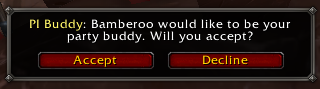
- Send buddy requests to other players running the addon.
Macros
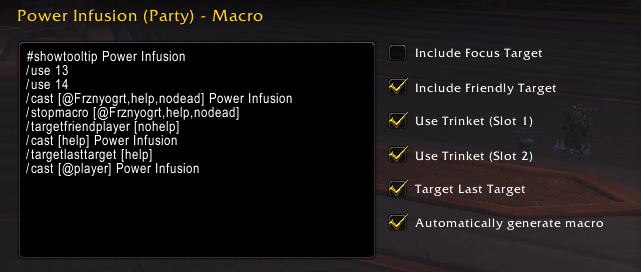
- Automatically create a macro to cast Power Infusion on your buddy, falling back to nearby friendly players. This ensures you won't waste Power Infusion if your buddy is dead or offline.
- Any time your buddy is changed, the macro will be updated and your Power Infusion will go to the right player without any mouseovers required.
- Macros can only be updated while out of combat.
Configure Cooldowns
- Select the major cooldown that you'd like to sync with your priest buddy. All major cooldowns for DPS and Tank classes are supported.
- For example, as a Death Knight you can choose to track a different cooldown for Blood, Frost and Unholy specializations.
- You can change the cooldown to track at any time, and it will be synced immediately with your buddy.

Request PI (PI ME!)
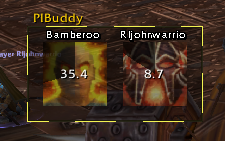
PIBuddy provides an optional button that can request a PI from your Priest Buddy at any time. The priest's Buddy Frame will glow, indicating that they should ignore the current state of your cooldowns and PI you now. We will also glow the raid/party frames of your buddy in case you prefer mouseover macros.
Warnings
PIBuddy can warn you if your are missing the Power Infusion or Twins of the Sun Priestess talents. If you rely on a focus target, PI Buddy can also warn you if your focus target is not set or you have no buddy in your current content.

Customize the Frame
All aspects of the PIBuddy frame can be enabled and disabled to fit your preferences.
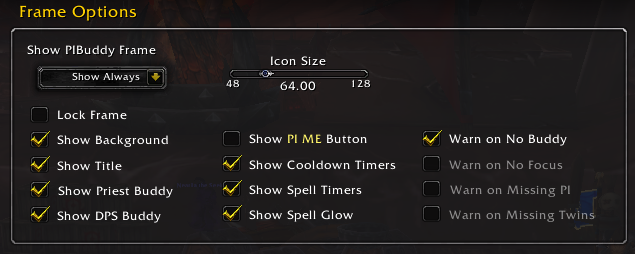
By default, everything will display:

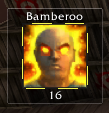
If you prefer a more minimal style, you can disable showing your own cooldowns and only display the information you want to see.
Commands
- /pibuddy set - Sets your current target as your PI Buddy.
- /pibuddy request - Request a Power Infusion from your Priest Buddy. You can macro this into your DPS cooldowns.
- /pibuddy sync - Resyncs with your Buddy (debug purposes only)
用户评价
暂无 / 5,0 条评价相关推荐
继续看看这些内容
