插件中文资料库
中文说明、玩家点评、适用场景和替代推荐,方便快速判断是否适合你。
- 背包、银行和物品整理
- 拍卖行、交易和金币管理
 Details! Mythic+ Scoreboard
 Copy Anything
 BagSync
DavePanels 插件下载与使用指南
本页整理了 DavePanels 的功能用途、适用人群、安装方法和常见问题,方便玩家快速判断是否需要安装。
适合谁用
DavePanels 是一款 数据代理 类插件,适合需要优化界面、提升操作效率或补充游戏信息提示的魔兽世界玩家。
基本信息
- 插件作者:DaVeGaLiSoT
- 插件分类:数据代理
- 适配版本:12.0.5
- 累计下载:37
安装方法
- 点击上方下载按钮获取 DavePanels插件文件。
- 解压后将插件文件夹放入 World of Warcraft/_retail_/Interface/AddOns 目录。
- 重启游戏或在角色界面点击插件,确认 DavePanels 已启用。
- 如果插件不生效,请检查版本是否匹配,或关闭同类冲突插件后重试。
使用建议
DavePanels 安装后建议先在角色界面确认已启用,进入游戏后根据插件提供的命令、小地图按钮或设置面板进行调整。如遇到报错,可先单独启用该插件排查冲突。
DavePanels 常见问题
DavePanels 适合需要 数据代理 类功能的玩家,特别是希望提升游戏便利性、界面管理或战斗信息获取效率的用户。
下载后解压到 Interface/AddOns 目录,然后重启游戏并在角色界面启用插件。
常见原因是目录多套一层、游戏版本不匹配、依赖插件缺失或同类插件冲突。
可以查看本页的替代插件推荐和相关插件区域,按下载量和分类选择同类工具。
插件 AI 问答
可以问:这个插件正式服能用吗、和 DBM 冲突吗、怎么设置、有没有替代插件。
DavePanels 是一款魔兽世界插件,主要用于装备修理、金币或商人相关提醒、背包、银行、专业制造或物品整理。建议根据自己的版本和插件环境先测试兼容性。
插件用途
DavePanels 主要面向需要数据代理功能的玩家,用来改善游戏体验、减少重复操作或补充默认界面没有直接提供的信息。
适用场景
- 装备修理、金币或商人相关提醒
- 背包、银行、专业制造或物品整理
使用建议
安装后建议先在角色选择界面或插件管理器中确认已启用,再进入游戏测试是否与现有整合包、WA 和其他插件冲突。如遇报错,可以先禁用同类插件排查。
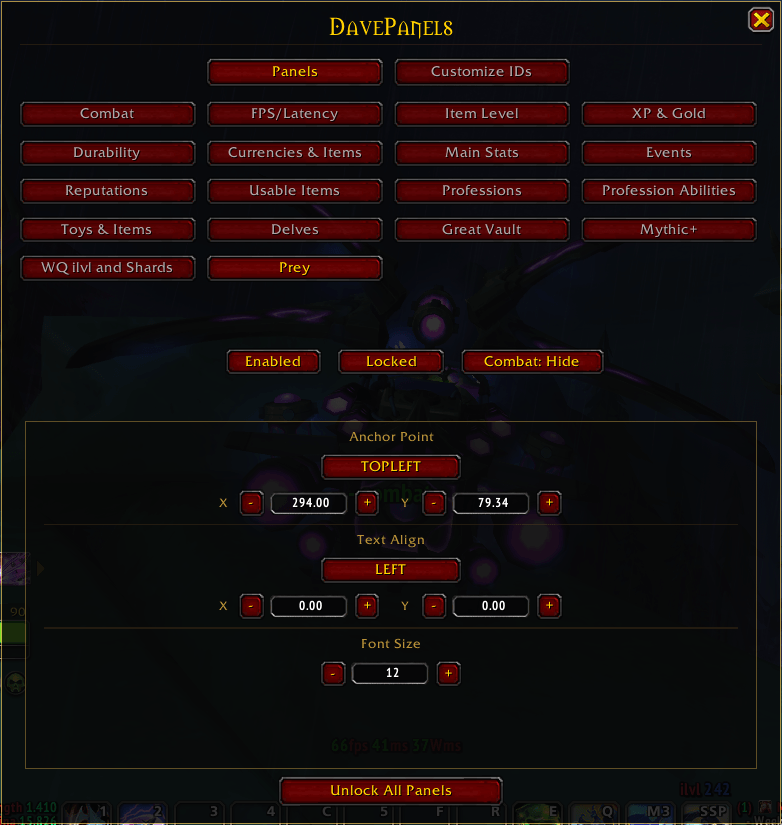
DavePanels is a modular info-hub for World of Warcraft that puts your most important data front and center — no more menu-diving. Toggle the panels you need and keep everything at a glance.
You can use /dp to open the configuration window or using the minimap button.
📋 Available Panels
| Panel | What it shows |
|---|---|
| Combat | Combat state indicator — + Combat + when in combat, - Combat - when out |
| FPS / Latency | Frames per second, local latency, and world latency |
| Item Level | Your character's average item level |
| XP & Gold | Session time, current/max XP, rested XP, and XP to next level — gold only at max level |
| Durability | Remaining durability per equipped item |
| Currency & Bag Items | Tracks currencies and items by ID; click any currency to open the Currency window, this panel only track currencies and items, to use items (clickable button on screen), add them to Usable Items Panel |
| Main Stats | Your character's primary stats |
| Professions | Your 2 main professions (sorry Cooking, Fishing and Archaeology 👀), knowledge points available (X), and ** if mounted gathering is unlocked — click the anchor to open the Professions book |
| Events | Tracks active events in Midnight Zones |
| Reputations | Midnight reputations and Valeera level |
| Usable Items | Clickable icons for items added via the main panel |
| Profession Abilities & Knowledge | Clickable icons for profession abilities (e.g. Carve Meat, Sharpen Knife) and knowledge-granting gathered items |
| Toys & Items |
Clickable icons for your toys and bag items |
| Delves |
Tracks the Number of Bountiful Delves for Midnight Zones |
| Great Vault |
Tracks the progress of the weekly Great Vault. |
|
WQ Ilvl and Shards |
Tracks World Quests rewarding better ilvl than the items equipped, also tracks World Quest that reward Coffer Key Shards |
|
Prey |
Tracks the number of available preys per difficulty to do. |
🌐 Languages
Supports English and Spanish.
💡 Tip: Use an addon like IdTip to easily find item and spell IDs.
用户评价
暂无 / 5,0 条评价相关推荐
继续看看这些内容
