插件中文资料库
中文说明、玩家点评、适用场景和替代推荐,方便快速判断是否适合你。
- 副本、团队本和大秘境战斗提醒
- 背包、银行和物品整理
 Details! Mythic+ Scoreboard
 BagSync
 RightClickSelfCast
LootHawk 插件下载与使用指南
本页整理了 LootHawk 的功能用途、适用人群、安装方法和常见问题,方便玩家快速判断是否需要安装。
适合谁用
LootHawk 是一款 背包与库存 / 其他插件 类插件,适合需要优化界面、提升操作效率或补充游戏信息提示的魔兽世界玩家。
基本信息
- 插件作者:Kaelab
- 插件分类:背包与库存 / 其他插件
- 适配版本:2.5.5
- 累计下载:0
安装方法
- 点击上方下载按钮获取 LootHawk插件文件。
- 解压后将插件文件夹放入 World of Warcraft/_retail_/Interface/AddOns 目录。
- 重启游戏或在角色界面点击插件,确认 LootHawk 已启用。
- 如果插件不生效,请检查版本是否匹配,或关闭同类冲突插件后重试。
使用建议
LootHawk 安装后建议先在角色界面确认已启用,进入游戏后根据插件提供的命令、小地图按钮或设置面板进行调整。如遇到报错,可先单独启用该插件排查冲突。
LootHawk 常见问题
LootHawk 适合需要 背包与库存 / 其他插件 类功能的玩家,特别是希望提升游戏便利性、界面管理或战斗信息获取效率的用户。
下载后解压到 Interface/AddOns 目录,然后重启游戏并在角色界面启用插件。
常见原因是目录多套一层、游戏版本不匹配、依赖插件缺失或同类插件冲突。
可以查看本页的替代插件推荐和相关插件区域,按下载量和分类选择同类工具。
插件 AI 问答
可以问:这个插件正式服能用吗、和 DBM 冲突吗、怎么设置、有没有替代插件。
LootHawk 是一款魔兽世界插件,主要用于背包、银行、专业制造或物品整理、团队分配、Roll 点记录或公会管理、副本、团本、大秘境或钥石辅助。建议根据自己的版本和插件环境先测试兼容性。
插件用途
LootHawk 主要面向需要背包与库存功能的玩家,用来改善游戏体验、减少重复操作或补充默认界面没有直接提供的信息。
适用场景
- 背包、银行、专业制造或物品整理
- 团队分配、Roll 点记录或公会管理
- 副本、团本、大秘境或钥石辅助
使用建议
安装后建议先在角色选择界面或插件管理器中确认已启用,再进入游戏测试是否与现有整合包、WA 和其他插件冲突。如遇报错,可以先禁用同类插件排查。
LootHawk enables you to create lists of items that you want to be notified about when they drop in dungeons or raids. You can configure how you want to be notified from the Settings menu. Hopefully, a lot of the addon's functionality is self-explanatory.
Slash Commands
- /lh or /loothawk opens the main UI
- /lh settings opens the settings menu
- You can also left click the minimap button to open the main UI and right click the minimap button to open the settings menu
UI Functionality
You can add new lists from the Lists view by either clicking Add New List button or Import List button. You'll be prompted to name the list when you add a new one and you can also rename existing lists by clicking the Rename List button on the right of the entry that appears.
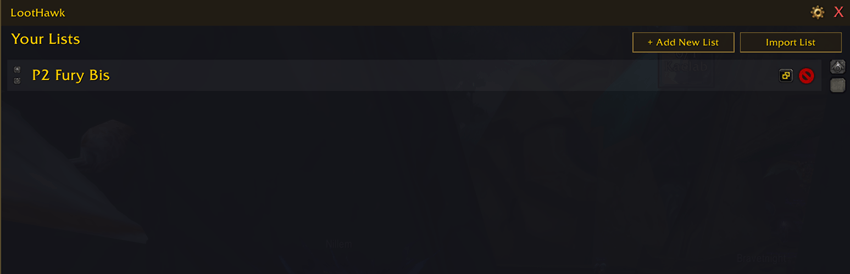
NOTE: The import functionality is currently experimental and may import extra items in addition to what you're trying to add and require cleanup. You theoretically should be able to import JSON from basically anywhere that has the ability to export it, like WoW Sims or sixty upgrades or wherever.
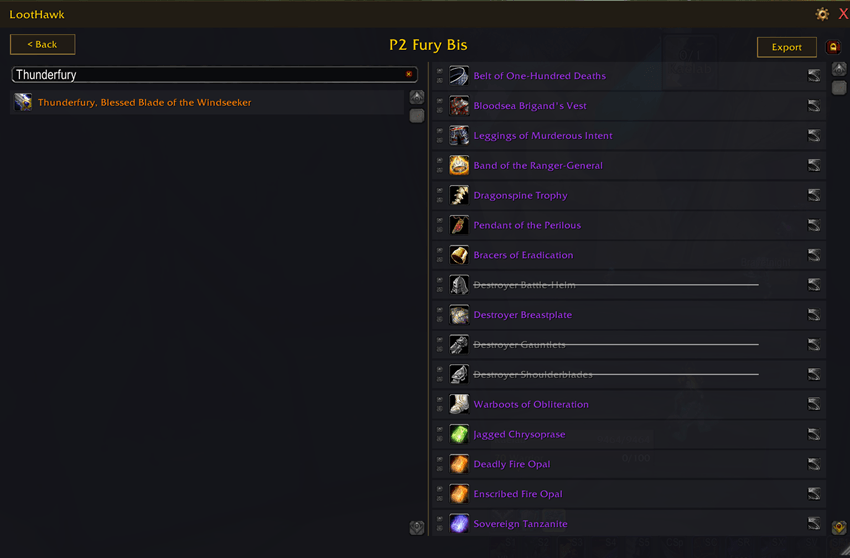
Clicking a list after it shows up in the view brings you to the specific list view where you can search items by name and add them to that list. Items you own already that are on your list will be grayed out and striked through, allowing easy tracking of what you still need.
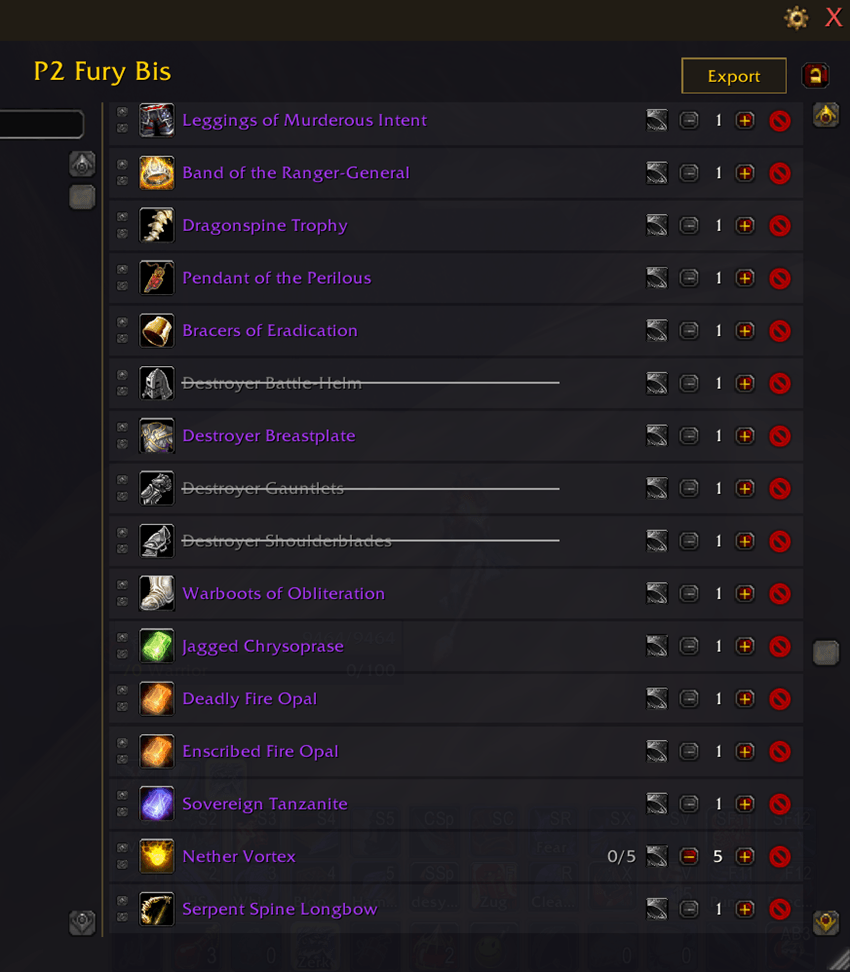
You can enter edit mode by clicking the lock icon in the top right of a singular list view, allowing you to adjust the quantity you want to get of items and also allowing you to delete an item from a list if you accidentally added it and don't want it there.
Finally, you can click the Always Notify bell icon to always be informed when that item drops regardless of if you have obtained the number of copies of it you specified already or not.
Notification Options
In the Settings menu, you can choose to be notified when an item drops in a number of ways:
- Play a sound when a roll for that item initiates
- Show a toast (popup) on your screen that says the item name and what list(s) you put it on (This can be moved to a new position on your screen)
- Show a glow effect on the border of the loot roll window while an item is being rolled
- Show a message in the chat
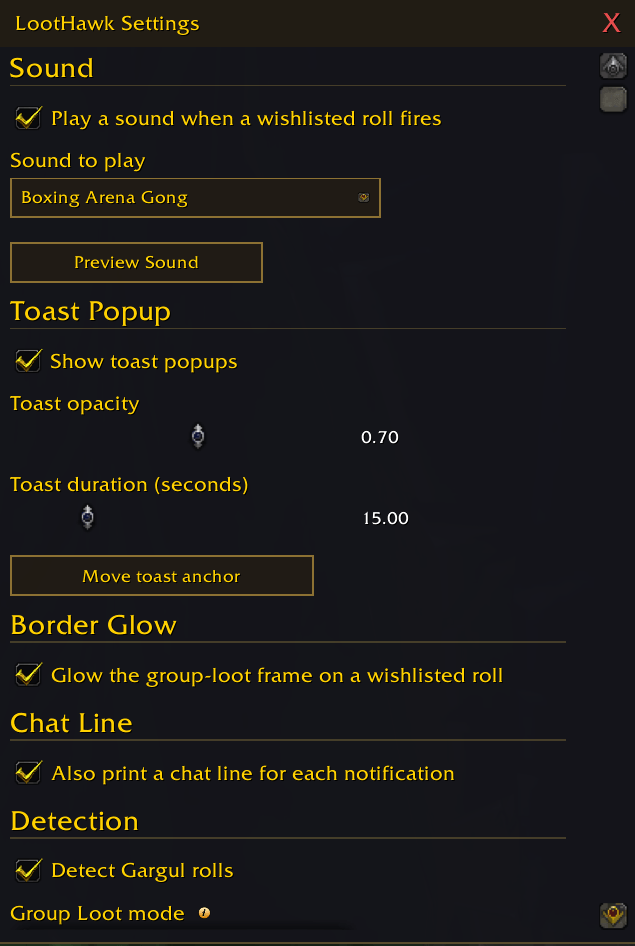
You can choose to detect Group Loot rolls (the normal need, greed, pass roll window) as well as Gargul-initiated rolls, and you can configure when you want Group Loot default loot system rolls to notify you. You can also do a test roll from the settings to see how it all looks and if you want to use each notification type.
Important Note on AI
This addon was made as an experiment. I'm a software developer by trade, but I wanted to do a project to see how strong Claude could be at creating something with only design/vision input instead of code input from a user. Thus, this addon was designed by me, but entirely coded by Claude. If you are squeamish at all about AI, that's understandable. Feel free to not use this addon. But, it's not like I took anyone's job away making this. It was just a small, one-man, hobby project.
Future Plans
If the addon is liked and used and reaches a mature stage for TBC Anniversary where most users are happy with it, then I might extend it to other expansions (probably starting with other Classic version, as that's what I primarily play). It has already been intentionally made in as modular of a way as possible to plug data and functionality in for new expansions.
I'm happy to accept new ideas for the addon, pieces of functionality you'd like to see added or altered, etc. I may not add it, but there's a chance I do add it if I think it's a good and feasible addition.
用户评价
暂无 / 5,0 条评价相关推荐
继续看看这些内容
