插件中文资料库
中文说明、玩家点评、适用场景和替代推荐,方便快速判断是否适合你。
- 副本、团队本和大秘境战斗提醒
- 背包、银行和物品整理
- 任务路线、地图标记和野外探索
 Details! Mythic+ Scoreboard
 BagSync
 TankMD Misdirect
Voidcore Advisor 插件下载与使用指南
本页整理了 Voidcore Advisor 的功能用途、适用人群、安装方法和常见问题,方便玩家快速判断是否需要安装。
适合谁用
Voidcore Advisor 是一款 其他插件 类插件,适合需要优化界面、提升操作效率或补充游戏信息提示的魔兽世界玩家。
基本信息
- 插件作者:megla884
- 插件分类:其他插件
- 适配版本:12.0.5,12.0.7
- 累计下载:41
安装方法
- 点击上方下载按钮获取 Voidcore Advisor插件文件。
- 解压后将插件文件夹放入 World of Warcraft/_retail_/Interface/AddOns 目录。
- 重启游戏或在角色界面点击插件,确认 Voidcore Advisor 已启用。
- 如果插件不生效,请检查版本是否匹配,或关闭同类冲突插件后重试。
使用建议
Voidcore Advisor 安装后建议先在角色界面确认已启用,进入游戏后根据插件提供的命令、小地图按钮或设置面板进行调整。如遇到报错,可先单独启用该插件排查冲突。
Voidcore Advisor 常见问题
Voidcore Advisor 适合需要 其他插件 类功能的玩家,特别是希望提升游戏便利性、界面管理或战斗信息获取效率的用户。
下载后解压到 Interface/AddOns 目录,然后重启游戏并在角色界面启用插件。
常见原因是目录多套一层、游戏版本不匹配、依赖插件缺失或同类插件冲突。
可以查看本页的替代插件推荐和相关插件区域,按下载量和分类选择同类工具。
插件 AI 问答
可以问:这个插件正式服能用吗、和 DBM 冲突吗、怎么设置、有没有替代插件。
Voidcore Advisor 是一款魔兽世界插件,主要用于背包、银行、专业制造或物品整理、团队分配、Roll 点记录或公会管理。建议根据自己的版本和插件环境先测试兼容性。
插件用途
Voidcore Advisor 主要面向需要其他插件功能的玩家,用来改善游戏体验、减少重复操作或补充默认界面没有直接提供的信息。
适用场景
- 背包、银行、专业制造或物品整理
- 团队分配、Roll 点记录或公会管理
使用建议
安装后建议先在角色选择界面或插件管理器中确认已启用,再进入游戏测试是否与现有整合包、WA 和其他插件冲突。如遇报错,可以先禁用同类插件排查。
VoidcoreAdvisor
VoidcoreAdvisor is a World of Warcraft addon for Retail (Patch 12.0.0+) that helps you decide when — and on which loot spec — to spend your Nebulous Voidcores.
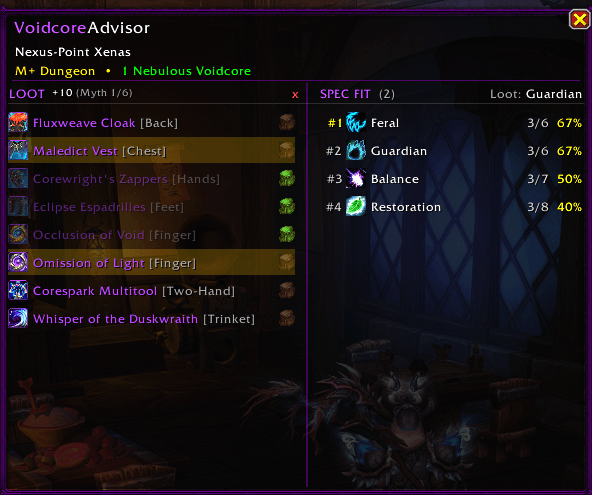
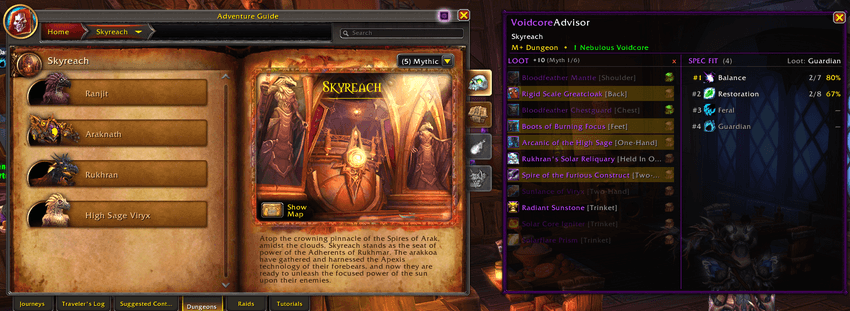
The addon adds a side panel to the Encounter Journal that shows the remaining loot pool for every raid boss and Mythic+ dungeon, along with the percentage chance each loot specialization has of giving you the items you want.
Simply select the items you are chasing, and VoidcoreAdvisor automatically calculates which spec gives you the best odds based on the remaining available loot.
As you obtain items throughout the season, the addon updates your remaining loot pools automatically, helping keep your probabilities accurate without requiring constant manual tracking.
Features
• Shows remaining loot pools for raids and Mythic+
• Calculates the best loot specialization for your selected items
• Manual Voidcache loot scan button for all loot specializations
• Detects items already obtained through Nebulous Voidcore rolls
• Automatically excludes unavailable items per specialization after scanning
• Tracks obtained items automatically throughout the season
• Loot spec recommendation popup for Mythic+ dungeons
• One-click loot specialization switching
• Safer bonus roll confirmation window
• Support for both raid bosses and Mythic+ dungeons
• Adjustable Mythic+ reward track item levels
• Slot filters for targeting specific gear types
• Persistent per-character tracking
• Localized in 11 languages
Encounter Journal Integration
VoidcoreAdvisor adds a dedicated side panel to the Encounter Journal showing:
• Remaining items for each loot specialization
• Probability percentages for every spec
• Selected item tracking
• Cross-spec loot comparisons
Specs with fewer remaining items naturally have higher chances per Voidcore roll, making it easy to see which specialization is most efficient for your current goals.
Automatic Voidcache Loot Scanning
One of VoidcoreAdvisor’s core features is its automatic Voidcache loot scan system.
The addon can scan Nebulous Voidcache loot tables for every specialization to determine:
• Which items each spec can receive
• Which items you have already obtained through Voidcore rolls
Already collected items are automatically removed from future calculations, helping keep remaining loot pools and percentages accurate throughout the season.
Items unavailable to specific loot specs are also excluded automatically, allowing the addon to calculate more realistic odds for each specialization.
This is especially useful for classes with multiple loot specs and heavily shared loot tables.
How the Scan Works
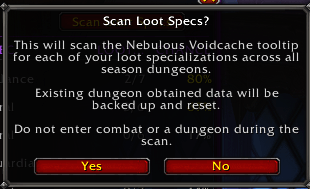
VoidcoreAdvisor reads loot availability directly from the Nebulous Voidcache tooltip for every specialization and dungeon or raid boss.
During the scan, the addon automatically:
• Detects already obtained items
• Removes unavailable items from each spec
• Updates remaining loot pools
• Refreshes probability calculations
The scan waits for tooltip data to fully load before saving results to help avoid incomplete or outdated information.
Scans automatically stop if:
• You enter combat
• Your loot specialization changes manually
• Another scan is already running
Before saving scan results, VoidcoreAdvisor automatically creates a backup of your existing obtained-item data.
If something looks incorrect, you can restore the previous state at any time with:
/vca restore
Raid and Mythic+ backups are stored separately.


Mythic+ Scan
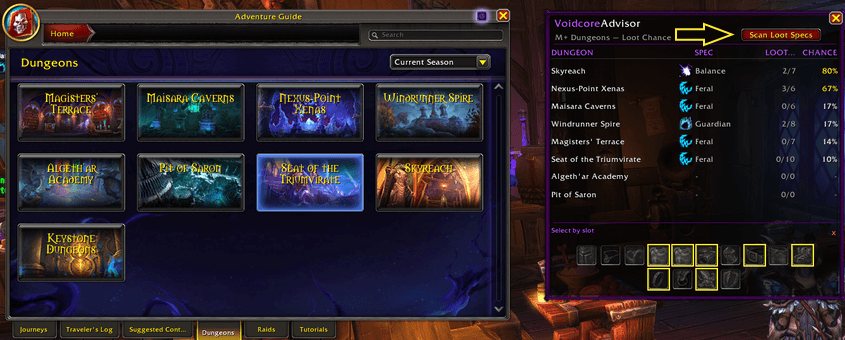
Open the Encounter Journal on the Mythic+ dungeon list and click the Scan Loot Specs button in the top-right corner of the overview panel.
The button is disabled while inside instances or while another scan is running.
Raid Scan
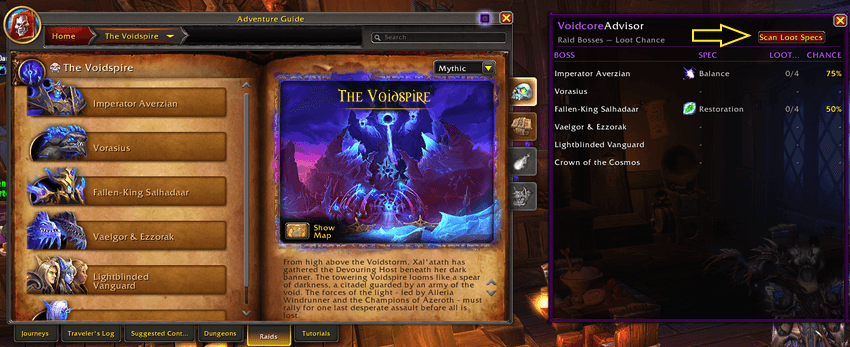
Open a raid’s overview page in the Encounter Journal and click the Scan Loot Specs button in the top-right corner.
The same restrictions apply: you must be outside an instance and not already scanning.
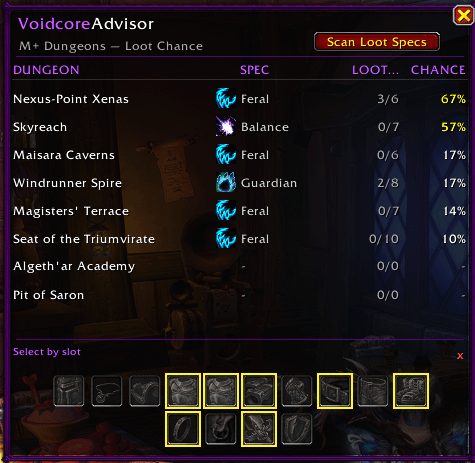
Dungeon Overview
When viewing the Mythic+ dungeon list, VoidcoreAdvisor displays an overview panel ranking every current-season dungeon by your best possible Voidcore odds.
Each dungeon row shows:
• Best loot specialization
• Remaining items for that spec
• Highest single-roll percentage chance
Equipment slot filters let you narrow the rankings to specific item types such as trinkets, weapons, or armor slots.
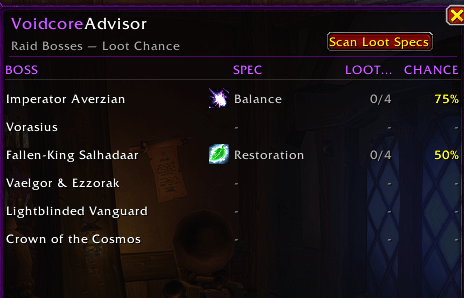
Raid Overview
When viewing a raid overview page, VoidcoreAdvisor displays every boss along with:
• Best loot specialization
• Remaining items
• Probability percentage
This gives you a quick overview of which bosses are still worth rolling on and which spec gives the best odds for each encounter.
Bonus Roll Confirmation Overlay
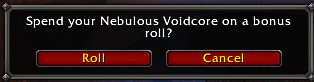
VoidcoreAdvisor replaces the default Nebulous Voidcore prompt with a safer confirmation overlay designed to help prevent accidental Voidcore spending.
The overlay displays:
• Item icon and tooltip
• Current Voidcore count
• Roll cost
• Active loot specialization
• Remaining wanted items
• Per-spec remaining item counts
• Live timer bar
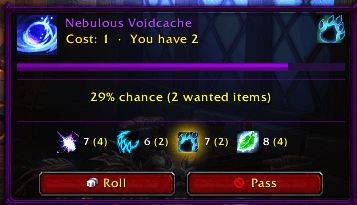
Rolling requires a second confirmation click before spending a Voidcore, while Pass remains instant.
The overlay uses Blizzard-styled Roll and Pass buttons so it feels consistent with the default UI.
Loot Spec Recommendations
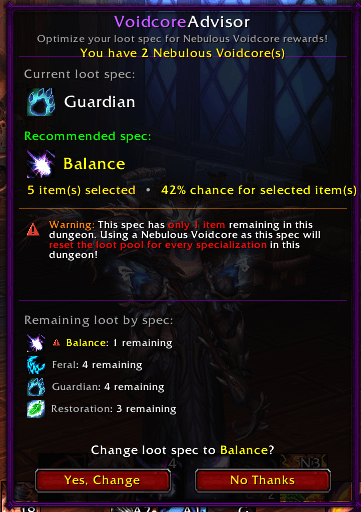
When entering current-season Mythic+ dungeons, VoidcoreAdvisor can automatically check whether your current loot specialization is the best option for your selected items.
If another spec gives better odds and you have a Nebulous Voidcore available, the addon can display a recommendation popup showing:
• Your current loot spec
• The recommended spec
• Remaining items
• Probability percentages
You can switch loot specialization directly from the popup with a single click.
The reminder only appears once per dungeon and can be disabled in the addon settings.
Customization
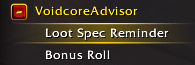
Most features can be individually enabled or disabled from the Options panel, including:
• Bonus roll overlay
• Loot spec recommendation popups
• Per-spec loot count displays
CurseForge: https://www.curseforge.com/wow/addons/voidcoreadvisor
用户评价
暂无 / 5,0 条评价相关推荐
继续看看这些内容
