插件中文资料库
中文说明、玩家点评、适用场景和替代推荐,方便快速判断是否适合你。
- 任务路线、地图标记和野外探索
 TooltipRealmInfo
 TimePlayed+
 Paladin's Blessings - Classic Era & HC
LucidNav – Lucid Nightmare Maze Navigator 插件下载与使用指南
本页整理了 LucidNav – Lucid Nightmare Maze Navigator 的功能用途、适用人群、安装方法和常见问题,方便玩家快速判断是否需要安装。
适合谁用
LucidNav – Lucid Nightmare Maze Navigator 是一款 成就 类插件,适合需要优化界面、提升操作效率或补充游戏信息提示的魔兽世界玩家。
基本信息
- 插件作者:dev_bug
- 插件分类:成就
- 适配版本:12.0.7
- 累计下载:42
安装方法
- 点击上方下载按钮获取 LucidNav – Lucid Nightmare Maze Navigator插件文件。
- 解压后将插件文件夹放入 World of Warcraft/_retail_/Interface/AddOns 目录。
- 重启游戏或在角色界面点击插件,确认 LucidNav – Lucid Nightmare Maze Navigator 已启用。
- 如果插件不生效,请检查版本是否匹配,或关闭同类冲突插件后重试。
使用建议
LucidNav – Lucid Nightmare Maze Navigator 安装后建议先在角色界面确认已启用,进入游戏后根据插件提供的命令、小地图按钮或设置面板进行调整。如遇到报错,可先单独启用该插件排查冲突。
LucidNav – Lucid Nightmare Maze Navigator 常见问题
LucidNav – Lucid Nightmare Maze Navigator 适合需要 成就 类功能的玩家,特别是希望提升游戏便利性、界面管理或战斗信息获取效率的用户。
下载后解压到 Interface/AddOns 目录,然后重启游戏并在角色界面启用插件。
常见原因是目录多套一层、游戏版本不匹配、依赖插件缺失或同类插件冲突。
可以查看本页的替代插件推荐和相关插件区域,按下载量和分类选择同类工具。
插件 AI 问答
可以问:这个插件正式服能用吗、和 DBM 冲突吗、怎么设置、有没有替代插件。
LucidNav – Lucid Nightmare Maze Navigator 是一款魔兽世界插件,主要用于地图、区域、任务路线或交通提醒、坐骑、宠物或击杀记录。建议根据自己的版本和插件环境先测试兼容性。
插件用途
LucidNav – Lucid Nightmare Maze Navigator 主要面向需要成就功能的玩家,用来改善游戏体验、减少重复操作或补充默认界面没有直接提供的信息。
适用场景
- 地图、区域、任务路线或交通提醒
- 坐骑、宠物或击杀记录
使用建议
安装后建议先在角色选择界面或插件管理器中确认已启用,再进入游戏测试是否与现有整合包、WA 和其他插件冲突。如遇报错,可以先禁用同类插件排查。
LucidNav – Lucid Nightmare Maze Navigator
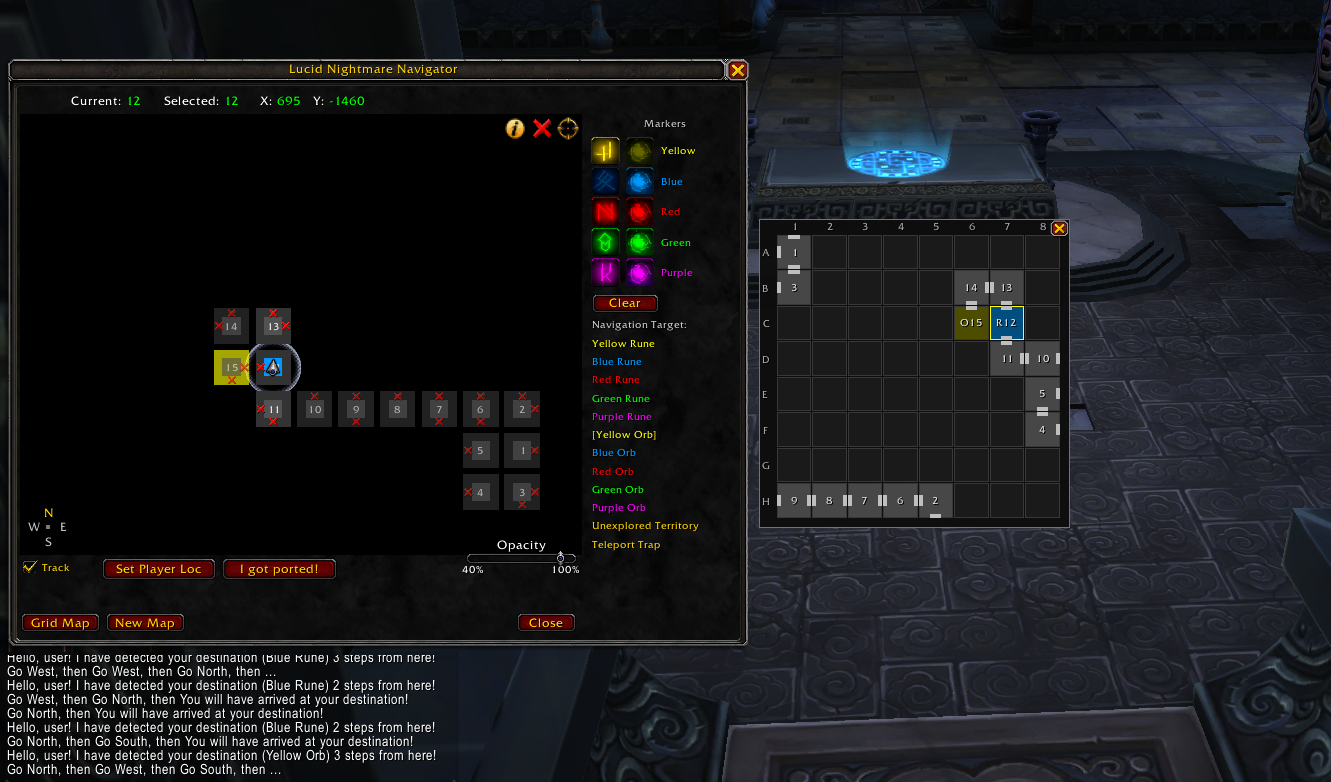
LucidNav is a real-time mapping and navigation addon for the Endless Halls, the maze required to obtain the Lucid Nightmare secret mount in World of Warcraft.
Instead of drawing the maze manually on paper, LucidNav automatically builds a live map of the labyrinth as you explore and guides you step-by-step to any destination.
✔ Automatic maze mapping with right-click panning ✔ Turn-by-turn navigation ✔ Rune and orb tracking with color-coded icon markers ✔ Teleport trap marking ✔ Persistent map saving ✔ 8×8 grid overview map ✔ Undo + right-click room editing to fix mistakes
Only active inside the Endless Halls.
Features
🗺️ Live Map Canvas
LucidNav builds a scrollable map as you explore. Each room is a 35×35 cell that appears automatically when you walk through a corridor.
- Right-click drag to pan the map
- Left-click the center of a room to select it
- Left-click an edge of a room to toggle a wall on that side
- Right-click a room for an edit menu (see below)
- A compass rose (N/S/E/W) and live X/Y coordinates are displayed for orientation
🧭 8×8 Grid Overview
A compact 8×8 grid map opens alongside the main window, giving you a bird's-eye view of your exploration progress. It highlights the current room, POI rooms, and the teleport trap.
↩️ Undo & Room Editing (New in 1.2.0)
Made a wrong turn or mis-marked a room? You no longer have to reset the whole map.
- Undo — step back through your last actions (up to 20 steps) via the toolbar Undo button or
/ln undo. Newly mapped rooms, deduplication, trap marks, and resets can all be reverted. - Right-click any room for a quick edit menu:
- Set as current room — correct your position
- Unlink neighbor — remove a single wrong connection (pick the direction)
- Detach — unlink a room from all its neighbors
- Undo last action
🎯 Points of Interest Tracking
Mark and track the locations of runes and orbs using color-coded icon buttons:
- Yellow Rune / Orb
- Blue Rune / Orb
- Red Rune / Orb
- Green Rune / Orb
- Purple Rune / Orb
Select a room first, then click its matching marker. Marked rooms are color-highlighted on the map.
➜ Turn-by-Turn Navigation
Select a navigation target and the addon guides you step-by-step toward:
- the nearest unexplored room
- any discovered rune or orb
- the teleport trap room
Routes are calculated using the shortest known path through the maze.
💾 Persistent Map
Your maze progress is automatically saved when you log out and restored the next time you enter.
- Proper logout (20-second timer): you respawn at Room 1 — the addon resets your position automatically
- Force-close / crash / DC: you return to your last room in the maze — walk to a known room and use Set Player Loc (or right-click → Set as current room) to correct your position
- The maze resets every daily reset — finish your run before the server reset!
Quick Start
- Enter the Endless Halls
- Open the addon:
/lnn,/ln, or/lucid— the map and grid overview open together - Walk around normally — the map builds itself as you explore
- Left-click the center of a room to select it; left-click an edge to mark a blocked wall
- When you discover a rune or orb, select the room and click its matching color marker on the right panel
- Choose a Navigation Target to receive step-by-step directions
- Made a mistake? Right-click the room to fix it, or hit Undo
If you encounter the teleport trap, click "I got ported!" immediately — the room turns orange with a skull marker.
Tips for Solving the Maze
- Do not extinguish runes early — they are essential navigation landmarks
- Use navigation to reach unexplored rooms first
- The teleport trap is marked in orange with a skull icon — navigation avoids routing through it
- If a room gets linked incorrectly, right-click → Unlink neighbor / Detach instead of resetting the map
- The maze resets every daily reset — plan accordingly
Compatibility
Tested with:
World of Warcraft 12.0.7 – Midnight
Credits
This addon is a fork and enhancement of LucidNightmareNavigator by Debuggernaut.
The v1.1 UI redesign — larger cells, right-click panning, click-to-select / click-edge-to-wall, icon POI markers, jump dialog, and compass rose — was inspired by and based on Lucid Nightmare addon by Shtock. Thanks for the clean architectural patterns that made the working pan implementation possible.
Map visualization concept inspired by: https://nightswimmer.github.io/EndlessHalls
Source Code
GitHub repository: https://github.com/cristian-encalada/LucidNav
Bug reports and pull requests are welcome.
CurseForge: https://www.curseforge.com/wow/addons/lucidnav用户评价
暂无 / 5,0 条评价相关推荐
继续看看这些内容
