插件中文资料库
中文说明、玩家点评、适用场景和替代推荐,方便快速判断是否适合你。
- 界面布局、头像框、姓名板和动作条优化
 Details! Mythic+ Scoreboard
 BagSync
 FollowerLocationInfo
GearLens Inspector 插件下载与使用指南
本页整理了 GearLens Inspector 的功能用途、适用人群、安装方法和常见问题,方便玩家快速判断是否需要安装。
适合谁用
GearLens Inspector 是一款 珠宝加工 / 鼠标提示 / 背包与库存 / 增益与减益 / 其他插件 类插件,适合需要优化界面、提升操作效率或补充游戏信息提示的魔兽世界玩家。
基本信息
- 插件作者:lonely_wescoff11
- 插件分类:珠宝加工 / 鼠标提示 / 背包与库存 / 增益与减益 / 其他插件
- 适配版本:12.0.7
- 累计下载:48
安装方法
- 点击上方下载按钮获取 GearLens Inspector插件文件。
- 解压后将插件文件夹放入 World of Warcraft/_retail_/Interface/AddOns 目录。
- 重启游戏或在角色界面点击插件,确认 GearLens Inspector 已启用。
- 如果插件不生效,请检查版本是否匹配,或关闭同类冲突插件后重试。
使用建议
GearLens Inspector 安装后建议先在角色界面确认已启用,进入游戏后根据插件提供的命令、小地图按钮或设置面板进行调整。如遇到报错,可先单独启用该插件排查冲突。
GearLens Inspector 常见问题
GearLens Inspector 适合需要 珠宝加工 / 鼠标提示 / 背包与库存 / 增益与减益 / 其他插件 类功能的玩家,特别是希望提升游戏便利性、界面管理或战斗信息获取效率的用户。
下载后解压到 Interface/AddOns 目录,然后重启游戏并在角色界面启用插件。
常见原因是目录多套一层、游戏版本不匹配、依赖插件缺失或同类插件冲突。
可以查看本页的替代插件推荐和相关插件区域,按下载量和分类选择同类工具。
插件 AI 问答
可以问:这个插件正式服能用吗、和 DBM 冲突吗、怎么设置、有没有替代插件。
GearLens Inspector 是一款魔兽世界插件,主要用于珠宝加工相关功能。建议根据自己的版本和插件环境先测试兼容性。
插件用途
GearLens Inspector 主要面向需要珠宝加工功能的玩家,用来改善游戏体验、减少重复操作或补充默认界面没有直接提供的信息。
适用场景
- 珠宝加工相关功能
使用建议
安装后建议先在角色选择界面或插件管理器中确认已启用,再进入游戏测试是否与现有整合包、WA 和其他插件冲突。如遇报错,可以先禁用同类插件排查。
GearLens Inspector
Quick Overview
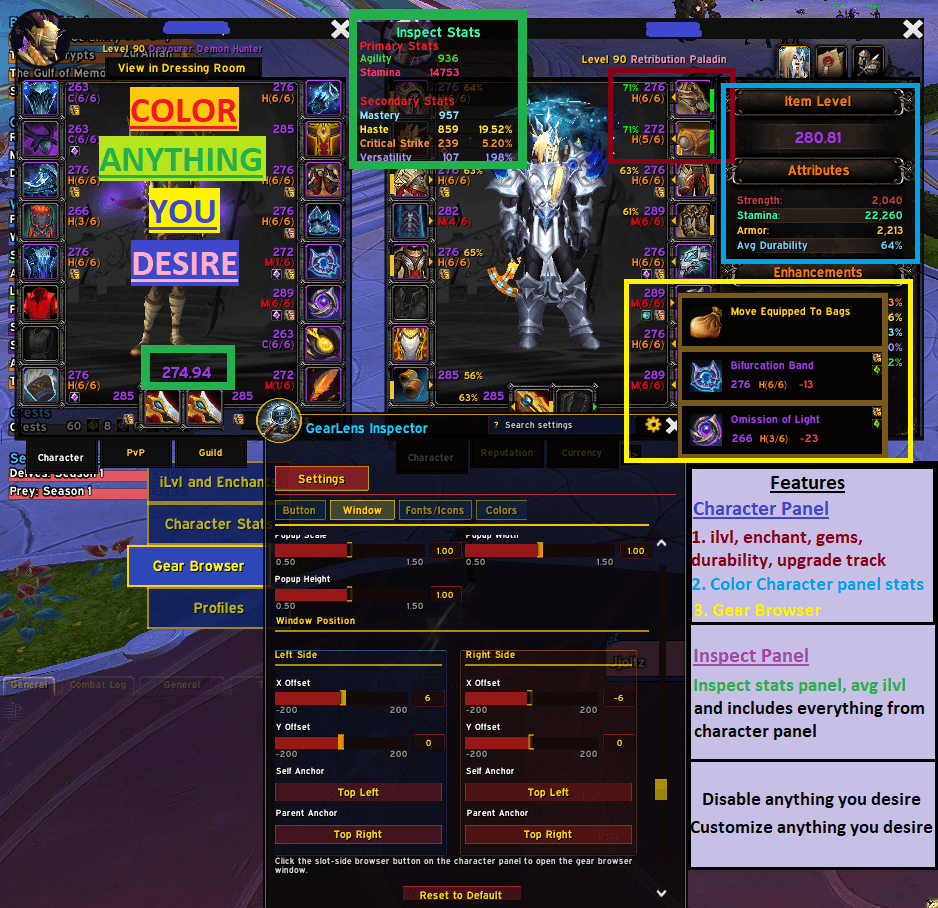
GearLens Inspector overlays detailed gear information directly onto the character paperdoll and inspect window — gem sockets, enchant status, item level, upgrade track, average item level, and a full gear stats panel — all fully configurable individually.
How to Access Settings
Type /gli in the chat box at any time to open the settings window.
Also accessible via Game Menu → Interface → AddOns → GearLens Inspector → Open /gli Settings.
NEW
- Global/Individual panel mode — Choose global settings for both character and inspect panels, or customize them individually if you like!
- Avg ilvl / Max ilvl for character panel (eg. 251/255)
- Reset all settings button.
- Reset to default settings on individual tabs
What It Does at a Glance
• Gem Socket Icons — filled gems show the gem icon with tooltip; empty sockets show a placeholder
• Enchant Icons — green scroll when enchanted, red warning icon when an enchant is missing
• Item Level — number on every slot, colored by item rarity or a custom color
• Upgrade Track — compact label e.g. C(4/8) showing tier and progress on every slot
• Inspect Overlay — all of the above appears on the inspect window when viewing another player
• Average Item Level — calculated average shown above the weapon slots on the inspect window
• Inspect Stats Panel — floating panel showing primary and secondary gear stats with percentage conversions
• Import/Export — share your full settings as a compact string; import settings from a string
Settings Summary
|
Tab |
What You Can Configure |
|
Feature Toggles |
Master on/off for character panel and inspect panel; individual toggles for sockets, enchants, item level, upgrade track, avg iLevel, stats panel; font face; menu transparency
|
|
Enchant & Sockets |
Icon size; X/Y offset; self and parent anchor — all configured independently for left-side and right-side slots |
|
Upgrade Track |
Font size; label width; X/Y offset; anchors; rarity or custom colour — left/right independently |
|
Item Level |
Font size; X/Y offset; anchors; rarity or custom colour — left/right independently |
|
Inspect Avg iLvl |
Font size; X/Y offset; anchors; rarity or custom colour for the inspect average item level label |
|
Inspect Stats Panel |
Sort order; font size; transparency; position and anchors; header/percent colour; per-stat colour overrides for all 4 primary and 9 secondary stats |
|
Import/Export |
Export all settings as a shareable base64 string; import settings from a string |
Credits:
Original by f1r3m1nd
用户评价
暂无 / 5,0 条评价相关推荐
继续看看这些内容
