插件中文资料库
中文说明、玩家点评、适用场景和替代推荐,方便快速判断是否适合你。
- 副本、团队本和大秘境战斗提醒
- 伤害、治疗、仇恨和战斗数据统计
 Details! Mythic+ Scoreboard
 Augment Rune Reminder
 Craft Tracker
CoolPlan - Mythic+ Cooldown Reminder 插件下载与使用指南
本页整理了 CoolPlan - Mythic+ Cooldown Reminder 的功能用途、适用人群、安装方法和常见问题,方便玩家快速判断是否需要安装。
适合谁用
CoolPlan - Mythic+ Cooldown Reminder 是一款 战斗 / 首领战斗 / HUD界面 类插件,适合需要优化界面、提升操作效率或补充游戏信息提示的魔兽世界玩家。
基本信息
- 插件作者:pingping_e
- 插件分类:战斗 / 首领战斗 / HUD界面
- 适配版本:12.0.0,12.0.1,12.0.5,12.0.7
- 累计下载:42
安装方法
- 点击上方下载按钮获取 CoolPlan - Mythic+ Cooldown Reminder插件文件。
- 解压后将插件文件夹放入 World of Warcraft/_retail_/Interface/AddOns 目录。
- 重启游戏或在角色界面点击插件,确认 CoolPlan - Mythic+ Cooldown Reminder 已启用。
- 如果插件不生效,请检查版本是否匹配,或关闭同类冲突插件后重试。
使用建议
CoolPlan - Mythic+ Cooldown Reminder 安装后建议先在角色界面确认已启用,进入游戏后根据插件提供的命令、小地图按钮或设置面板进行调整。如遇到报错,可先单独启用该插件排查冲突。
CoolPlan - Mythic+ Cooldown Reminder 常见问题
CoolPlan - Mythic+ Cooldown Reminder 适合需要 战斗 / 首领战斗 / HUD界面 类功能的玩家,特别是希望提升游戏便利性、界面管理或战斗信息获取效率的用户。
下载后解压到 Interface/AddOns 目录,然后重启游戏并在角色界面启用插件。
常见原因是目录多套一层、游戏版本不匹配、依赖插件缺失或同类插件冲突。
可以查看本页的替代插件推荐和相关插件区域,按下载量和分类选择同类工具。
插件 AI 问答
可以问:这个插件正式服能用吗、和 DBM 冲突吗、怎么设置、有没有替代插件。
CoolPlan - Mythic+ Cooldown Reminder 是一款魔兽世界插件,主要用于伤害统计、输出循环或战斗表现分析、倒计时、提醒和战斗预警、副本、团本、大秘境或钥石辅助。建议根据自己的版本和插件环境先测试兼容性。
插件用途
CoolPlan - Mythic+ Cooldown Reminder 主要面向需要首领战斗功能的玩家,用来改善游戏体验、减少重复操作或补充默认界面没有直接提供的信息。
适用场景
- 伤害统计、输出循环或战斗表现分析
- 倒计时、提醒和战斗预警
- 副本、团本、大秘境或钥石辅助
使用建议
安装后建议先在角色选择界面或插件管理器中确认已启用,再进入游戏测试是否与现有整合包、WA 和其他插件冲突。如遇报错,可以先禁用同类插件排查。
CoolPlan
On-screen / sound / TTS cooldown reminders for World of Warcraft Mythic+ and raids.
A Mythic+ tool that auto-builds a 5-player cooldown plan from the top teams on Warcraft Logs, then plays it back in game on each boss's dangerous casts.
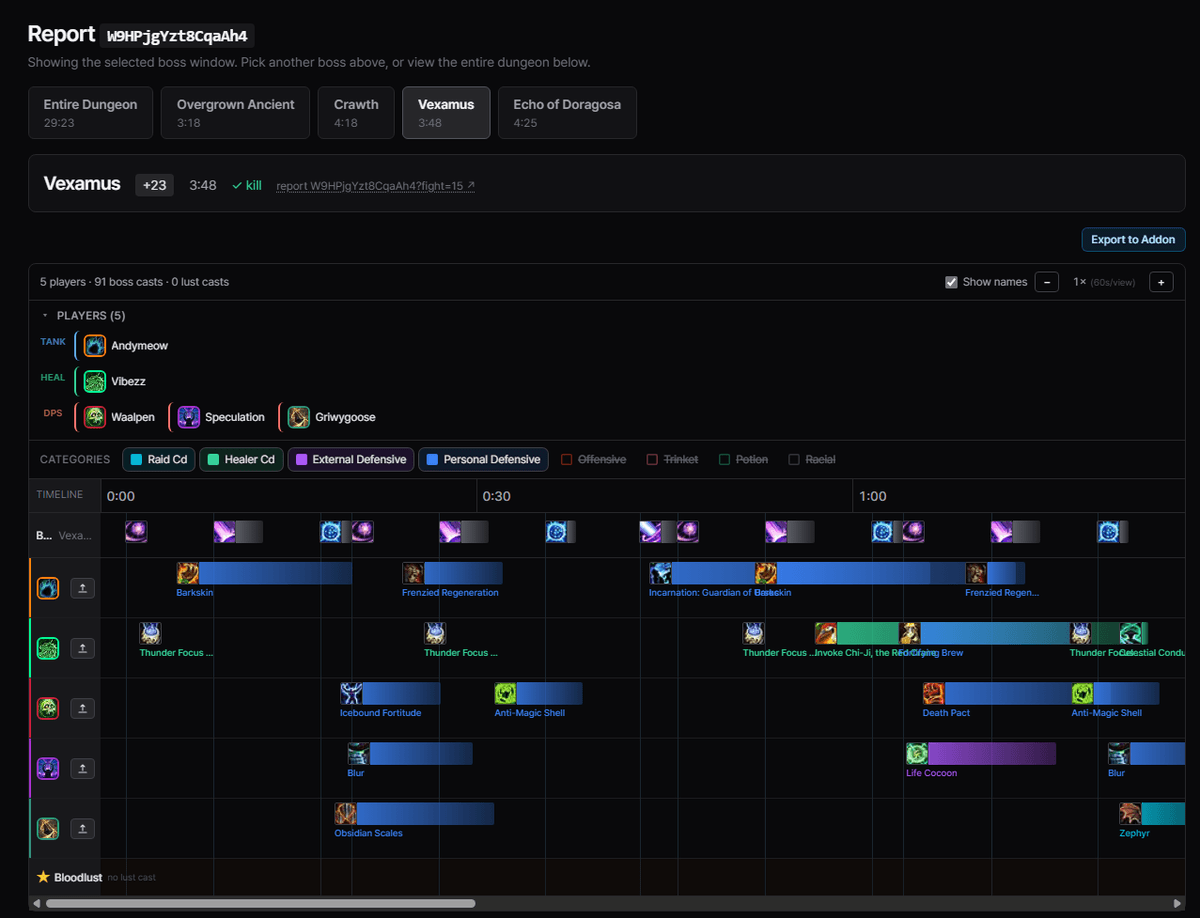
Plan a team's cooldowns on coolplan.team, export a string, import it in game. Reminders then fire automatically during the matching boss.
Plan on the web, play in game
| 1 · Plan on coolplan.team | 2 · Reminders fire in game |
|---|---|
 |
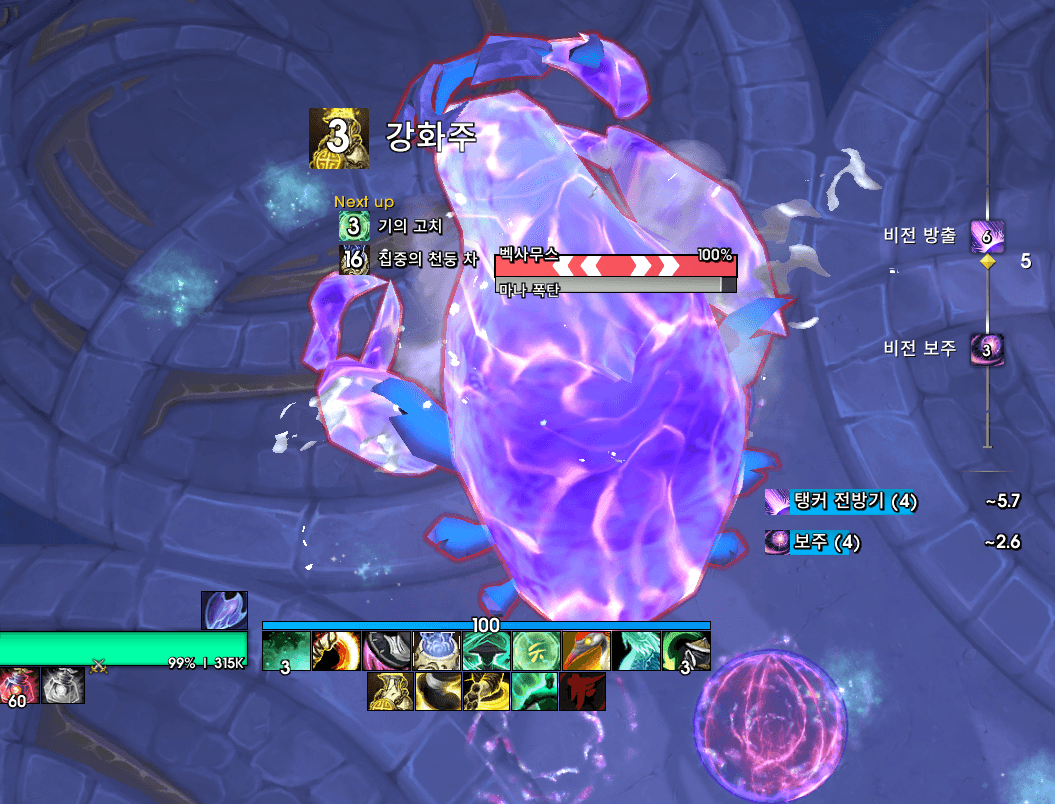 |
The website is the planning tool, this addon is the in-game display. Each player sees only their own cooldowns. Raid-wide defensives and Bloodlust are shown to everyone.
How it works
1. Export from the website. Open a boss timeline on coolplan.team and click Export to Addon. Rename each player to your real character names so reminders go to the right person, then copy the string.
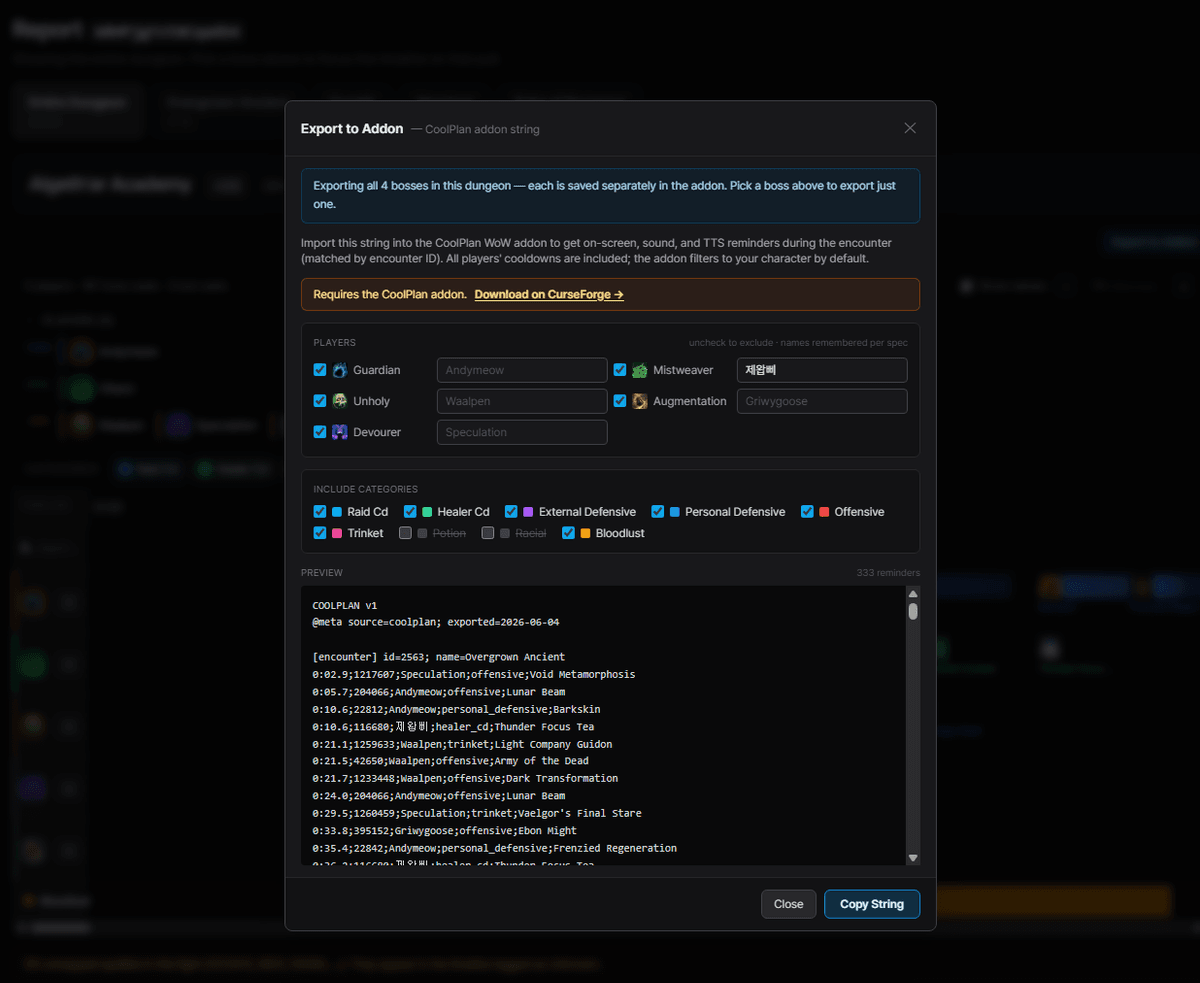
2. Import in game. /coolplan -> Import / Export -> paste -> Load Plans.
The plan format is plain text, so you can also hand-edit it in the box.
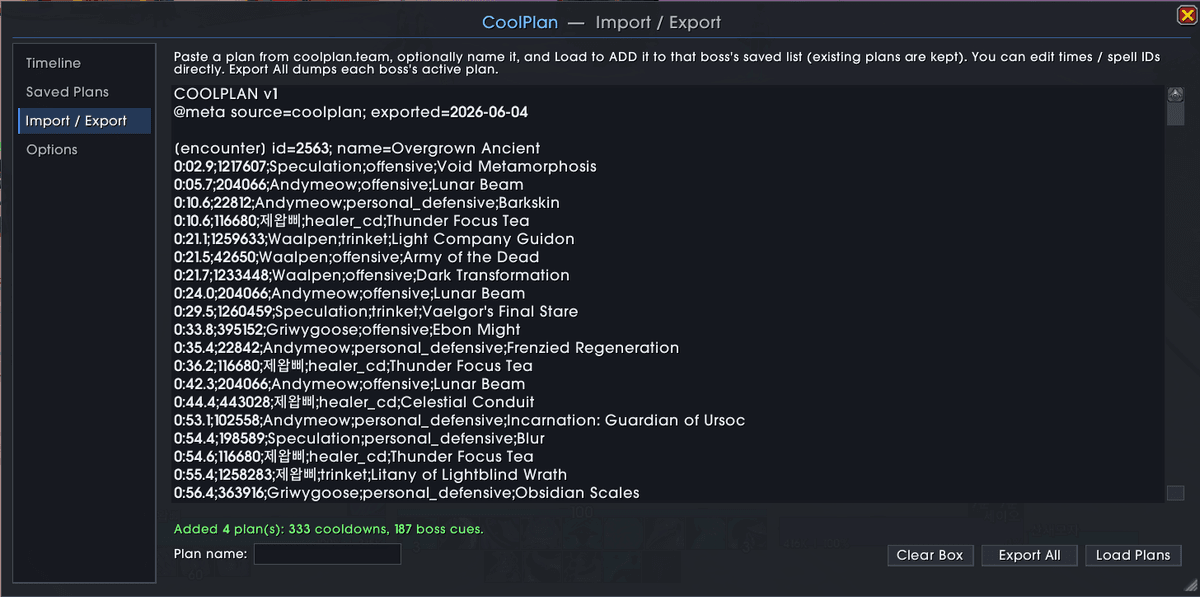
3. Pull the boss. The addon matches the encounter and shows each player their own cooldowns on a HUD, with a countdown and a depleting bar.
Features
Saved plan library. Multiple named plans per boss, a dungeon to boss browser, Use / Rename / Share / Export per plan, and one-click Share to party.
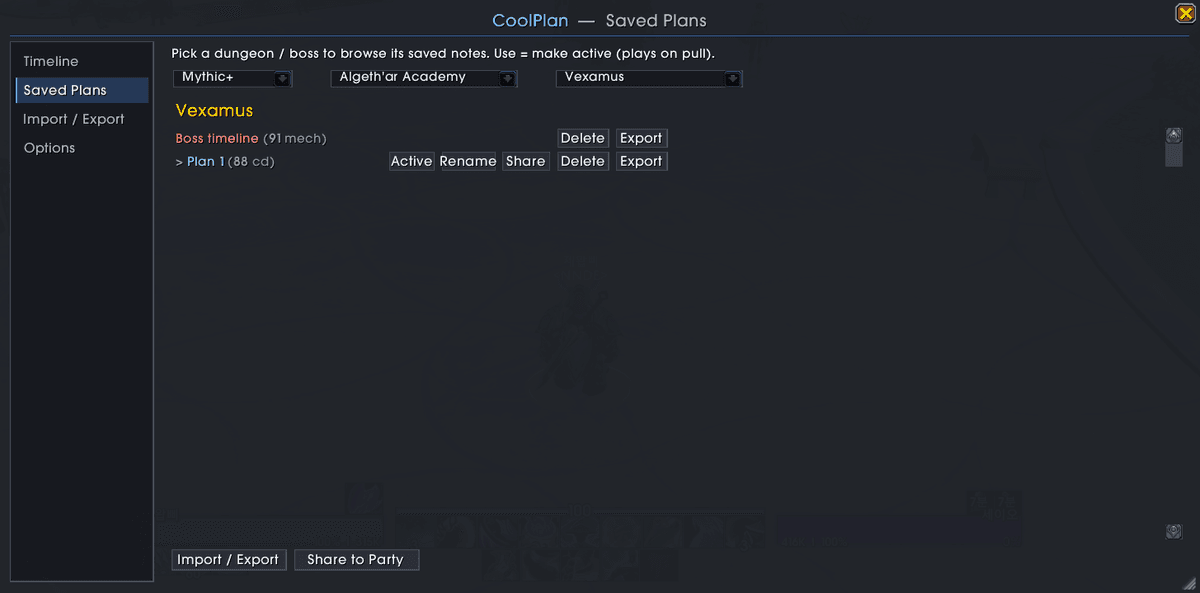
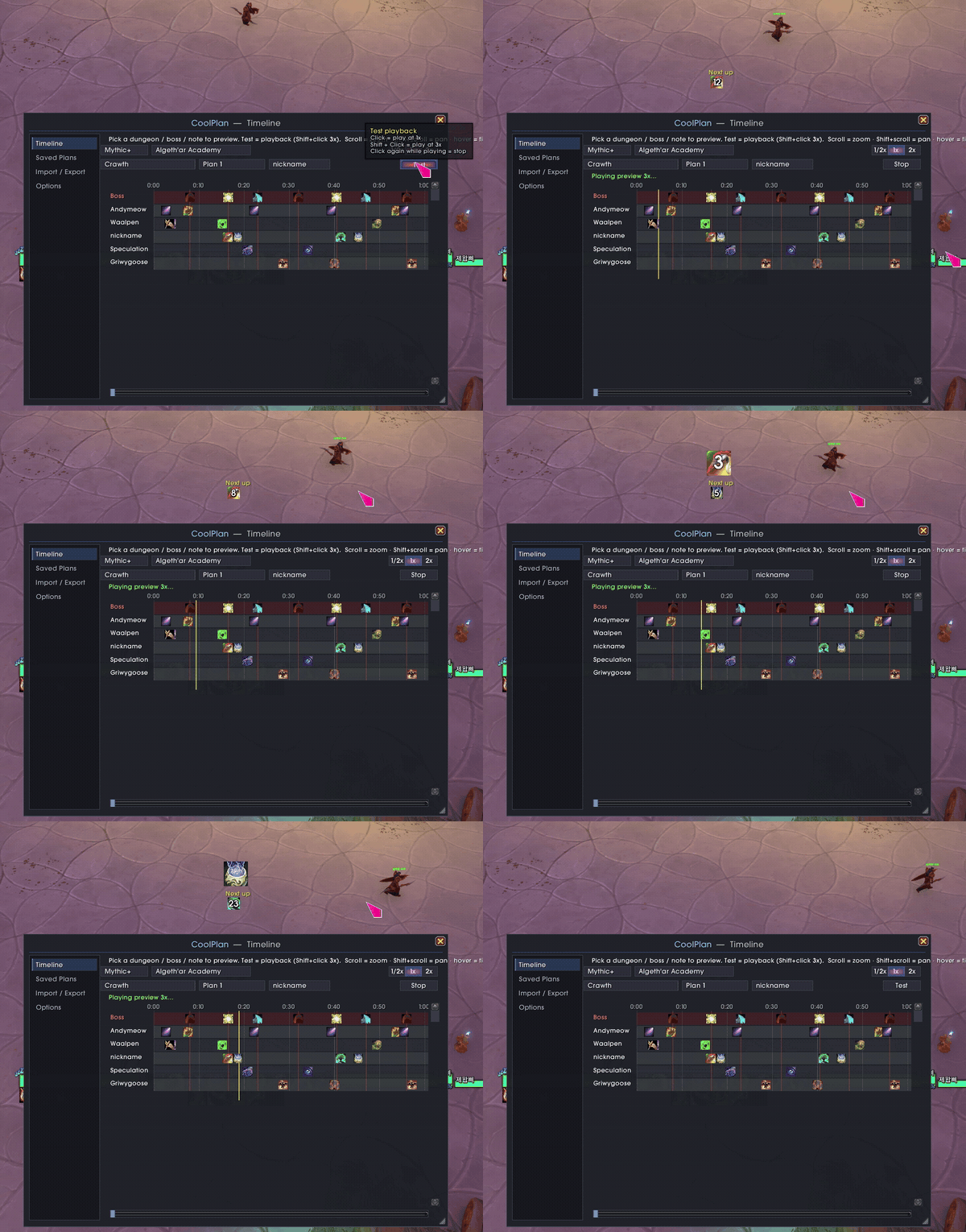
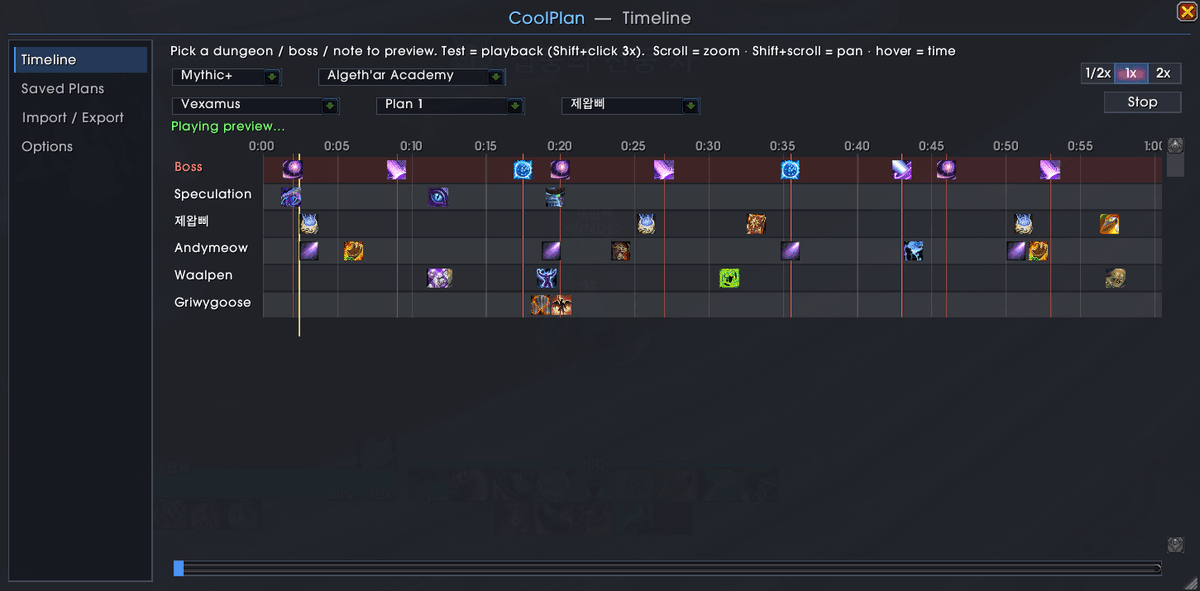
Timeline preview. Scrub the whole plan, zoom/pan, and Test the playback (1x, or Shift-click for 3x) to rehearse before the pull.
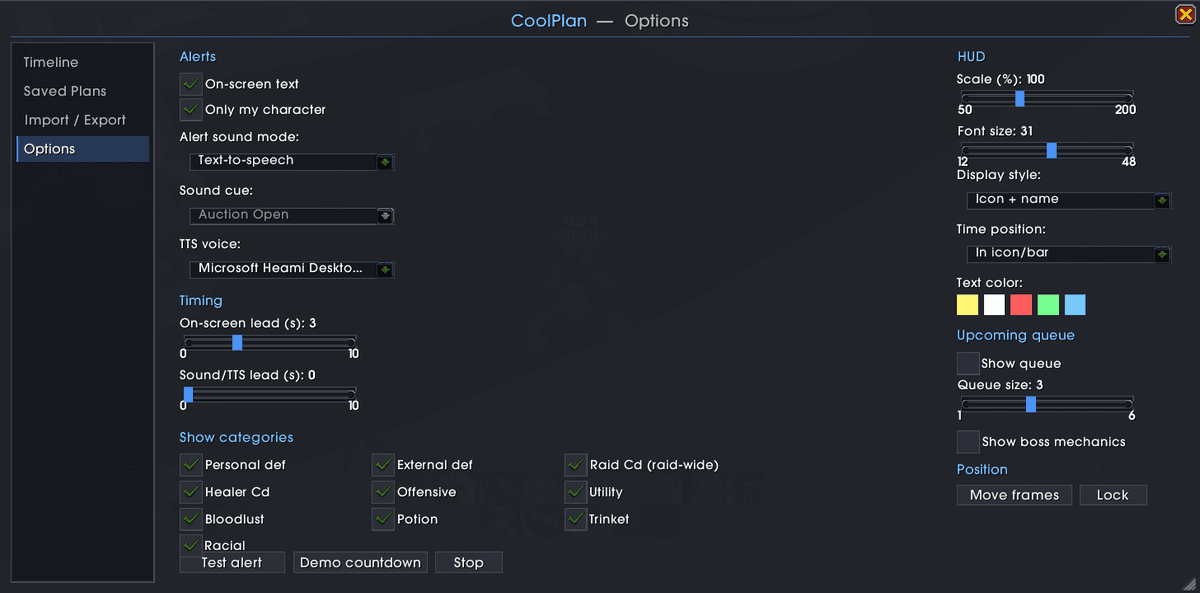
Fully configurable. HUD style (icon / icon+name / bar), lead time, position, scale, font and color. Sound or TTS alerts with separate timing, an upcoming queue, per-category show/hide, and an optional boss-ability timeline.
Also a minimap button (collects into MinimapButtonButton / Titan / etc.) and per-character saved data.
Slash commands
| Command | What it does |
|---|---|
/coolplan |
Open the main window |
/coolplan plans |
Saved Plans |
/coolplan edit |
Import / Export |
/coolplan options |
Options |
/coolplan timeline |
Timeline preview |
/coolplan share |
Share the active plan to your party |
/coolplan test / demo |
Preview an alert / a countdown |
/coolplan move / lock |
Move / lock the HUD frames |
/coolplan minimap |
Toggle the minimap button |
/coolplan errors |
Show suppressed Lua errors |
Install
- CurseForge: search for CoolPlan (recommended, it auto-updates).
- Manual: download, unzip, and copy the
CoolPlanfolder intoWorld of Warcraft/_retail_/Interface/AddOns/. Restart WoW.
Notes
- No external dependencies. It bundles LibStub, LibDataBroker-1.1, LibDBIcon-1.0,
LibDeflate and LibSharedMedia-3.0 under
Libs/(each under its own license). - Feedback and bug reports: the Discord linked on coolplan.team.
License
MIT, see LICENSE. Bundled libraries keep their own licenses.
CurseForge: https://www.curseforge.com/wow/addons/coolplan用户评价
暂无 / 5,0 条评价相关推荐
继续看看这些内容
