插件中文资料库
中文说明、玩家点评、适用场景和替代推荐,方便快速判断是否适合你。
- 副本、团队本和大秘境战斗提醒
- 界面布局、头像框、姓名板和动作条优化
- 伤害、治疗、仇恨和战斗数据统计
 AttendanceExporter
 WhisperPop (Continued)
 XiaoDaiGua小呆瓜提醒
RetroRuns 插件下载与使用指南
本页整理了 RetroRuns 的功能用途、适用人群、安装方法和常见问题,方便玩家快速判断是否需要安装。
适合谁用
RetroRuns 是一款 地图与小地图 / 成就 / 首领战斗 / 幻化 类插件,适合需要优化界面、提升操作效率或补充游戏信息提示的魔兽世界玩家。
基本信息
- 插件作者:PhotekWoW
- 插件分类:地图与小地图 / 成就 / 首领战斗 / 幻化
- 适配版本:12.0.5,12.0.7
- 累计下载:0
安装方法
- 点击上方下载按钮获取 RetroRuns插件文件。
- 解压后将插件文件夹放入 World of Warcraft/_retail_/Interface/AddOns 目录。
- 重启游戏或在角色界面点击插件,确认 RetroRuns 已启用。
- 如果插件不生效,请检查版本是否匹配,或关闭同类冲突插件后重试。
使用建议
RetroRuns 安装后建议先在角色界面确认已启用,进入游戏后根据插件提供的命令、小地图按钮或设置面板进行调整。如遇到报错,可先单独启用该插件排查冲突。
RetroRuns 常见问题
RetroRuns 适合需要 地图与小地图 / 成就 / 首领战斗 / 幻化 类功能的玩家,特别是希望提升游戏便利性、界面管理或战斗信息获取效率的用户。
下载后解压到 Interface/AddOns 目录,然后重启游戏并在角色界面启用插件。
常见原因是目录多套一层、游戏版本不匹配、依赖插件缺失或同类插件冲突。
可以查看本页的替代插件推荐和相关插件区域,按下载量和分类选择同类工具。
插件 AI 问答
可以问:这个插件正式服能用吗、和 DBM 冲突吗、怎么设置、有没有替代插件。
RetroRuns 是一款魔兽世界插件,主要用于伤害统计、输出循环或战斗表现分析、副本、团本、大秘境或钥石辅助。建议根据自己的版本和插件环境先测试兼容性。
插件用途
RetroRuns 主要面向需要首领战斗功能的玩家,用来改善游戏体验、减少重复操作或补充默认界面没有直接提供的信息。
适用场景
- 伤害统计、输出循环或战斗表现分析
- 副本、团本、大秘境或钥石辅助
使用建议
安装后建议先在角色选择界面或插件管理器中确认已启用,再进入游戏测试是否与现有整合包、WA 和其他插件冲突。如遇报错,可以先禁用同类插件排查。

RetroRuns is a solo legacy raid navigator. Zone into an old raid and it lays out the next boss, the route to reach them, encounter notes focused on soloing, your transmog collection state for every piece of loot that's about to drop, and your progress on each Glory achievement with a soloable rating per row. Kill the boss and it advances automatically.
Currently supports ALL raids in the following expansions:
- Dragonflight
- Shadowlands
- Battle for Azeroth
- Legion
- Warlords of Draenor
- Mists of Pandaria
Actively developing LFR functionality to be included in the next major release!
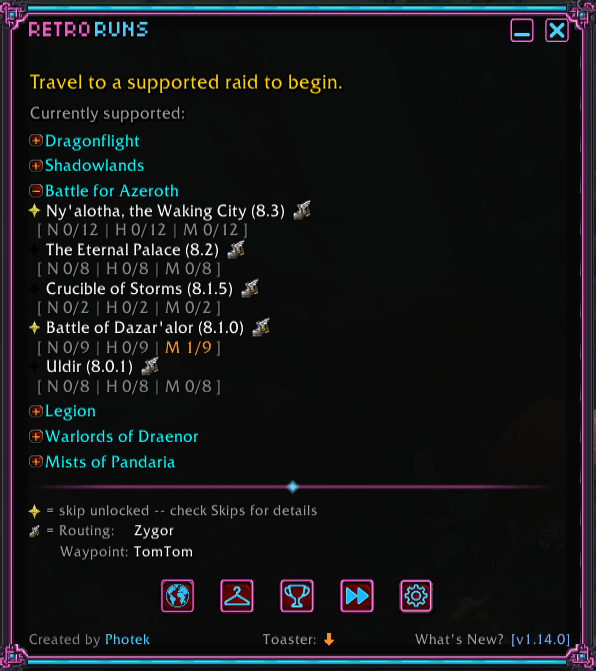
At a glance, see which raids you've already cleared this week, which still have lockouts open, and which have a skip unlocked on your account. One click on the flight-master icon next to any raid name routes you straight to its entrance.
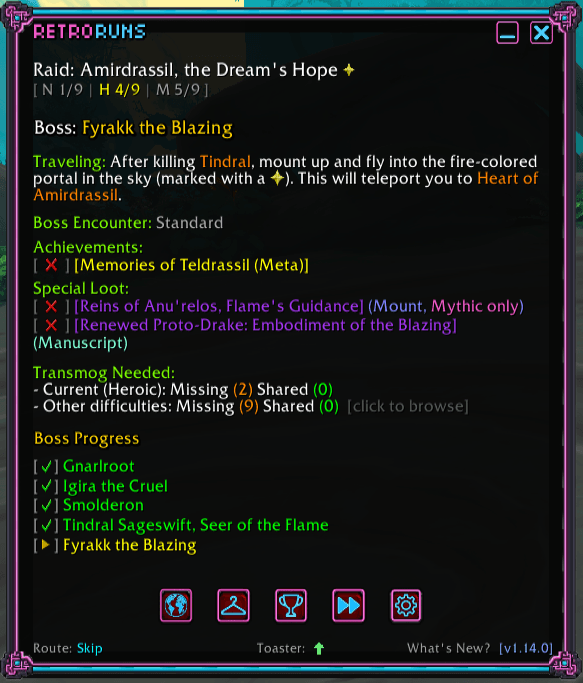
Main UI (active raid) — Step-by-step routing through every boss, with live tracking of where you are, what's coming next, and what special loot to watch for. Boss-specific solo tips and on-the-fly notes call out tricky mechanics, and the route auto-advances as you move, so the panel always shows the right info for the right moment.
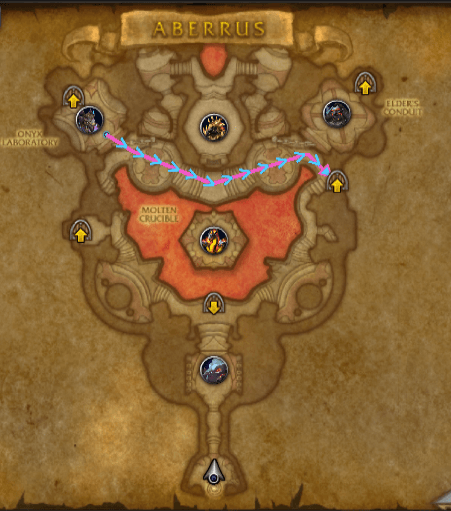
Map with route lines drawn straight onto the World Map with directional chevrons so you can read the path at a glance — no separate pane, no minimap squinting. Auto-advances based on current progress.
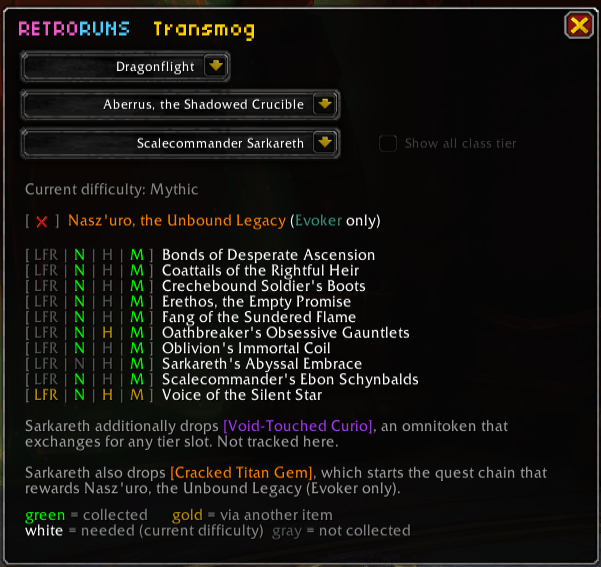
Tmog UI — Track every transmog drop across the supported raids in one window: boss attribution, source difficulty, and what you've collected versus what's still out there. Filters keep the noise down so you can focus on the pieces you actually want, with tier-token sets covered across every supported raid.
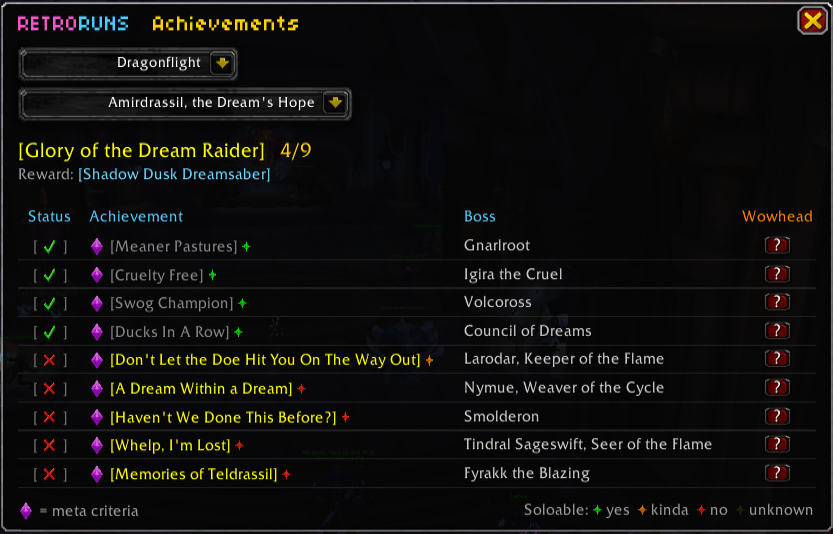
Achievements UI — Every Glory meta-achievement laid out boss by boss, with a soloable-difficulty indicator (green = any class, orange = class kit needed, red = confirmed not soloable) and one-click Wowhead links. The boss your route is on stays highlighted, so you can clear achievements as you pass through.
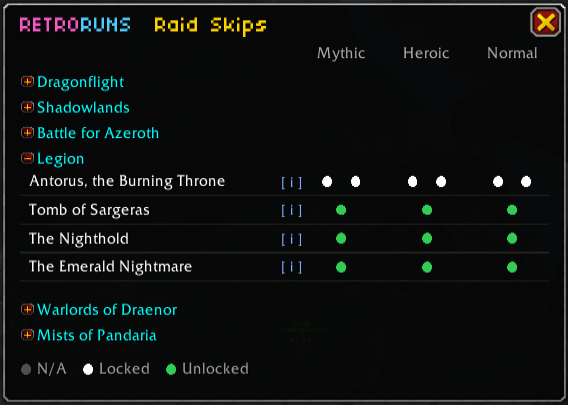
Skips UI — See exactly which difficulty cascades you've unlocked on this account for every skip-eligible raid: what saves you a wing, what drops you mid-raid, what you still need to grind. Account-wide aware, so unlocks earned on one character show up everywhere. And when a skip is unlocked, the choice is yours at the door; run the full raid with the standard route, or take the skip and let RetroRuns guide you from the entry boss through the shortcut straight to the end bosses.
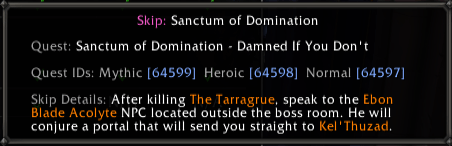
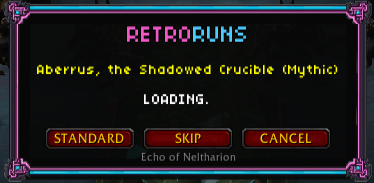
Getting started. Install via the CurseForge app (or drop the RetroRuns folder into Interface/AddOns/), /reload, zone into a supported raid, and click Load on the prompt. The minimap button toggles the panel. Right-click it for settings; drag it around the minimap edge to reposition.
Commands you'll use:
/rr— toggle the main panel/rr tmog— open the transmog browser standalone/rr skips— account-wide raid skip status / instructions/rr status— print current raid, step, and kill state to chat/rr settings — open settings panel
- Bugs and feature requests: GitHub issues
- General comments: here on the CurseForge page
- Source code: github.com/PhotekWoW/RetroRuns (MIT licensed)
- General Support/Feedback: retroruns.support@gmail.com
- Support RetroRuns: buymeacoffee.com/photek
用户评价
暂无 / 5,0 条评价相关推荐
继续看看这些内容
