插件中文资料库
中文说明、玩家点评、适用场景和替代推荐,方便快速判断是否适合你。
- 界面布局、头像框、姓名板和动作条优化
 Details! Mythic+ Scoreboard
 BagSync
 LaoLiHelper_UI美化系统自带框架
Modern Character UI 插件下载与使用指南
本页整理了 Modern Character UI 的功能用途、适用人群、安装方法和常见问题,方便玩家快速判断是否需要安装。
适合谁用
Modern Character UI 是一款 HUD界面 / 幻化 类插件,适合需要优化界面、提升操作效率或补充游戏信息提示的魔兽世界玩家。
基本信息
- 插件作者:looterz
- 插件分类:HUD界面 / 幻化
- 适配版本:12.0.1,12.0.5,12.0.7
- 累计下载:0
安装方法
- 点击上方下载按钮获取 Modern Character UI插件文件。
- 解压后将插件文件夹放入 World of Warcraft/_retail_/Interface/AddOns 目录。
- 重启游戏或在角色界面点击插件,确认 Modern Character UI 已启用。
- 如果插件不生效,请检查版本是否匹配,或关闭同类冲突插件后重试。
使用建议
Modern Character UI 安装后建议先在角色界面确认已启用,进入游戏后根据插件提供的命令、小地图按钮或设置面板进行调整。如遇到报错,可先单独启用该插件排查冲突。
Modern Character UI 常见问题
Modern Character UI 适合需要 HUD界面 / 幻化 类功能的玩家,特别是希望提升游戏便利性、界面管理或战斗信息获取效率的用户。
下载后解压到 Interface/AddOns 目录,然后重启游戏并在角色界面启用插件。
常见原因是目录多套一层、游戏版本不匹配、依赖插件缺失或同类插件冲突。
可以查看本页的替代插件推荐和相关插件区域,按下载量和分类选择同类工具。
插件 AI 问答
可以问:这个插件正式服能用吗、和 DBM 冲突吗、怎么设置、有没有替代插件。
Modern Character UI 是一款魔兽世界插件,主要用于界面框架、头像、动作条或冷却显示优化。建议根据自己的版本和插件环境先测试兼容性。
插件用途
Modern Character UI 主要面向需要HUD界面功能的玩家,用来改善游戏体验、减少重复操作或补充默认界面没有直接提供的信息。
适用场景
- 界面框架、头像、动作条或冷却显示优化
使用建议
安装后建议先在角色选择界面或插件管理器中确认已启用,再进入游戏测试是否与现有整合包、WA 和其他插件冲突。如遇报错,可以先禁用同类插件排查。
Modern Character UI
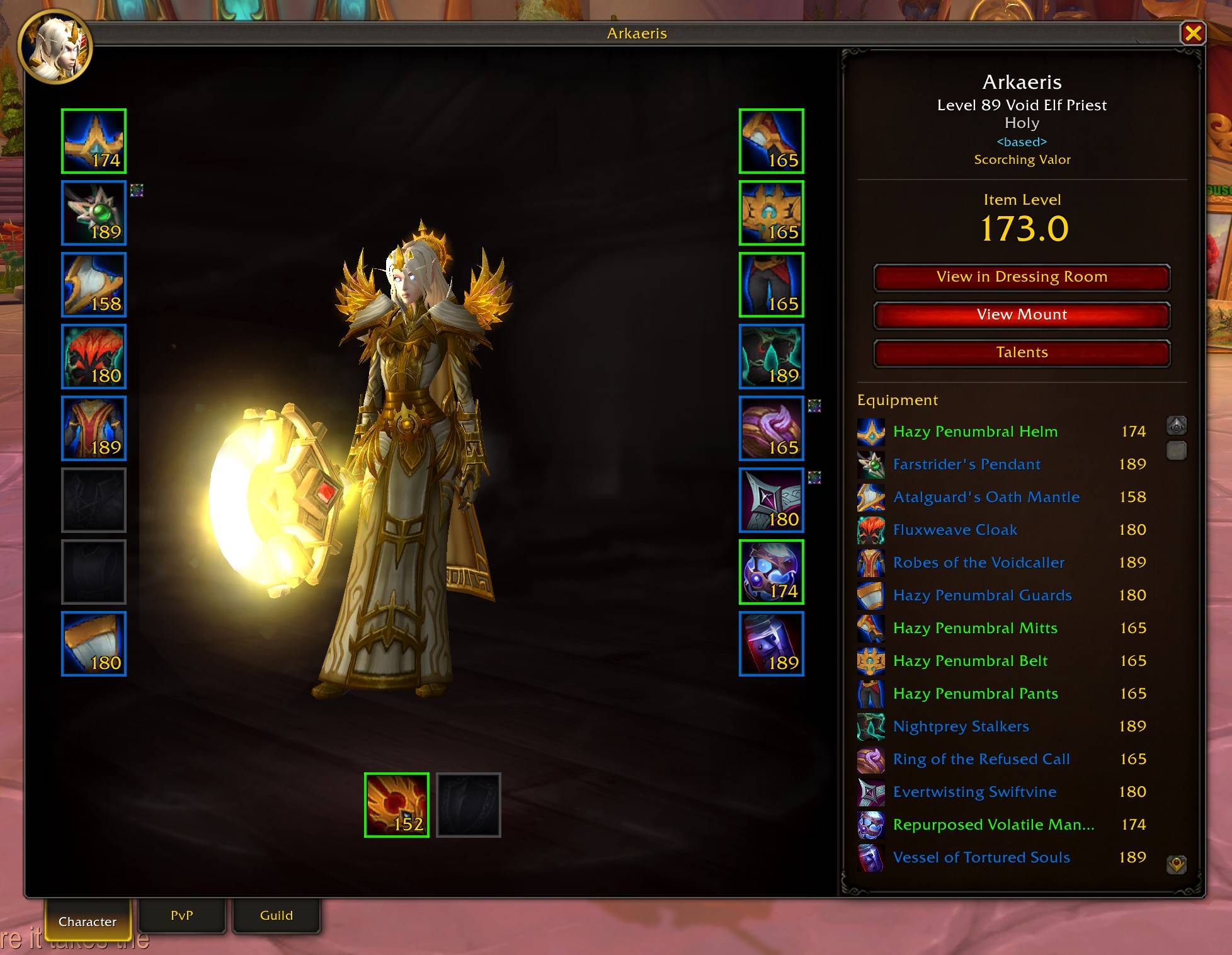
High-resolution UI for the character, dressing room, and inspect windows with Midnight-style design and quality of life features
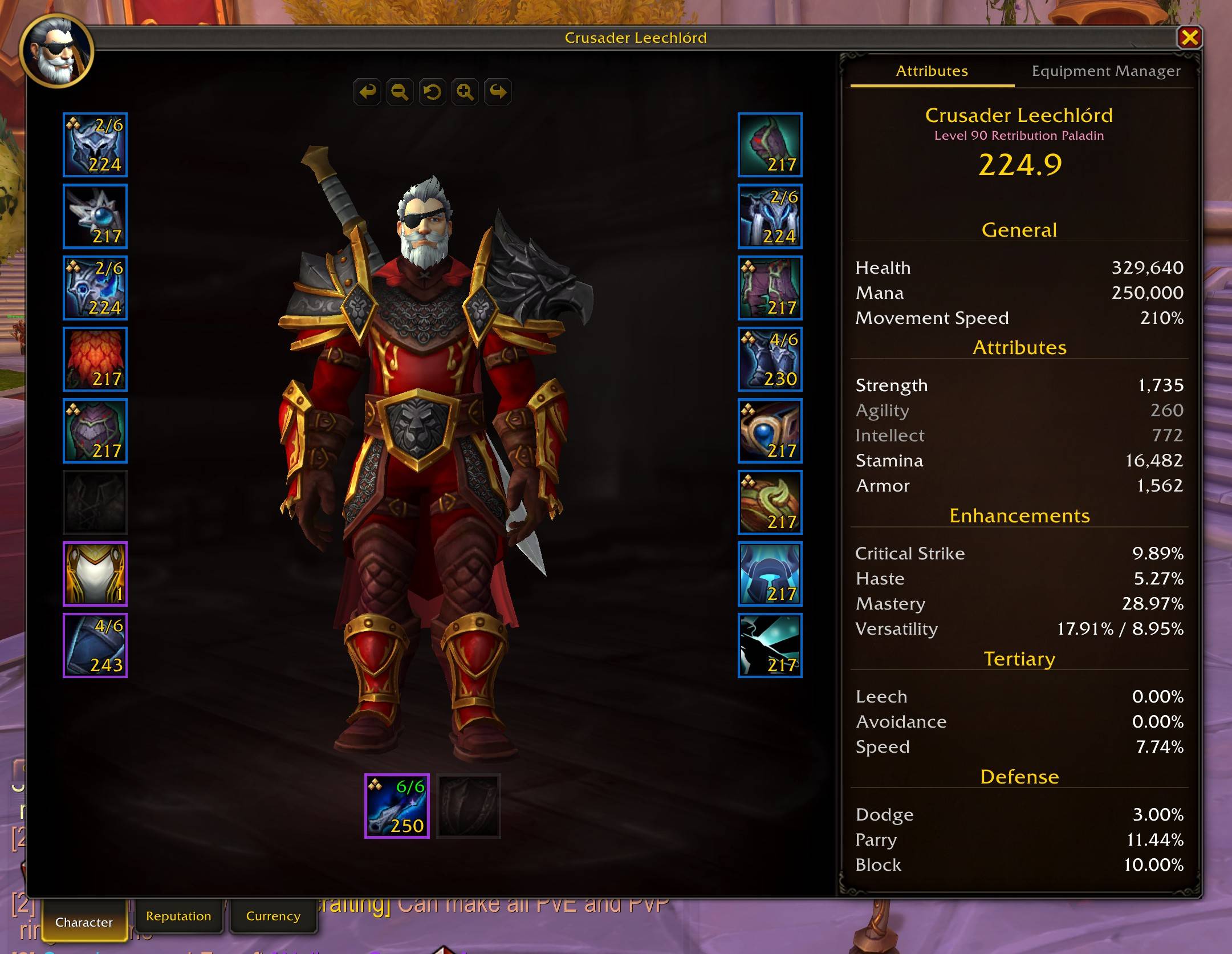
Character Panel
- 3x larger window with a clean design inspired by the new Midnight UI
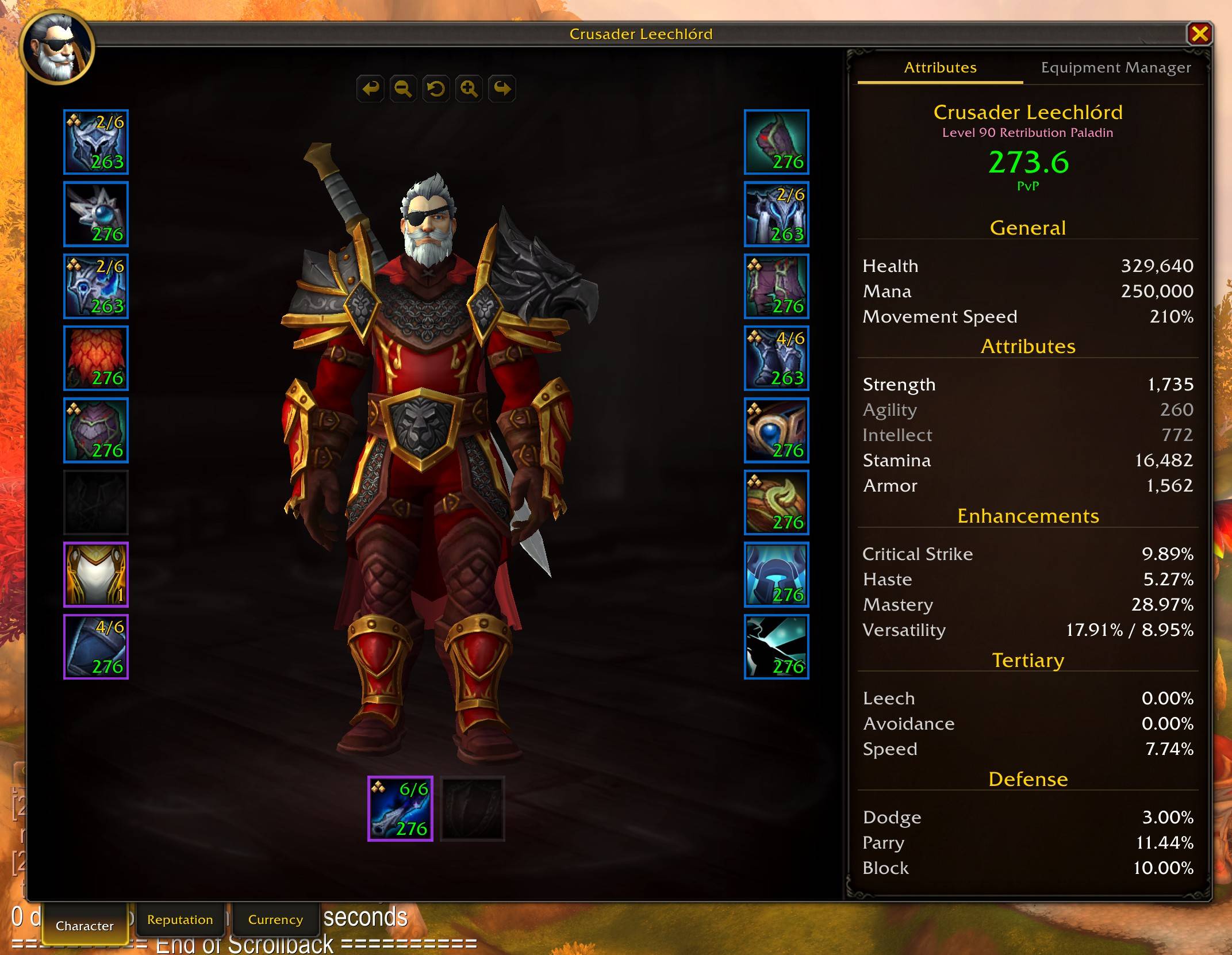
- Per-slot item level, quality-colored borders, gem/socket indicators, cooldown overlays
- Click your name to change title, specialization shown in subtitle
- Equipment Manager tab to save, load, rename, and delete gear sets
- PvP Item Levels show for items and your character while in PvP content
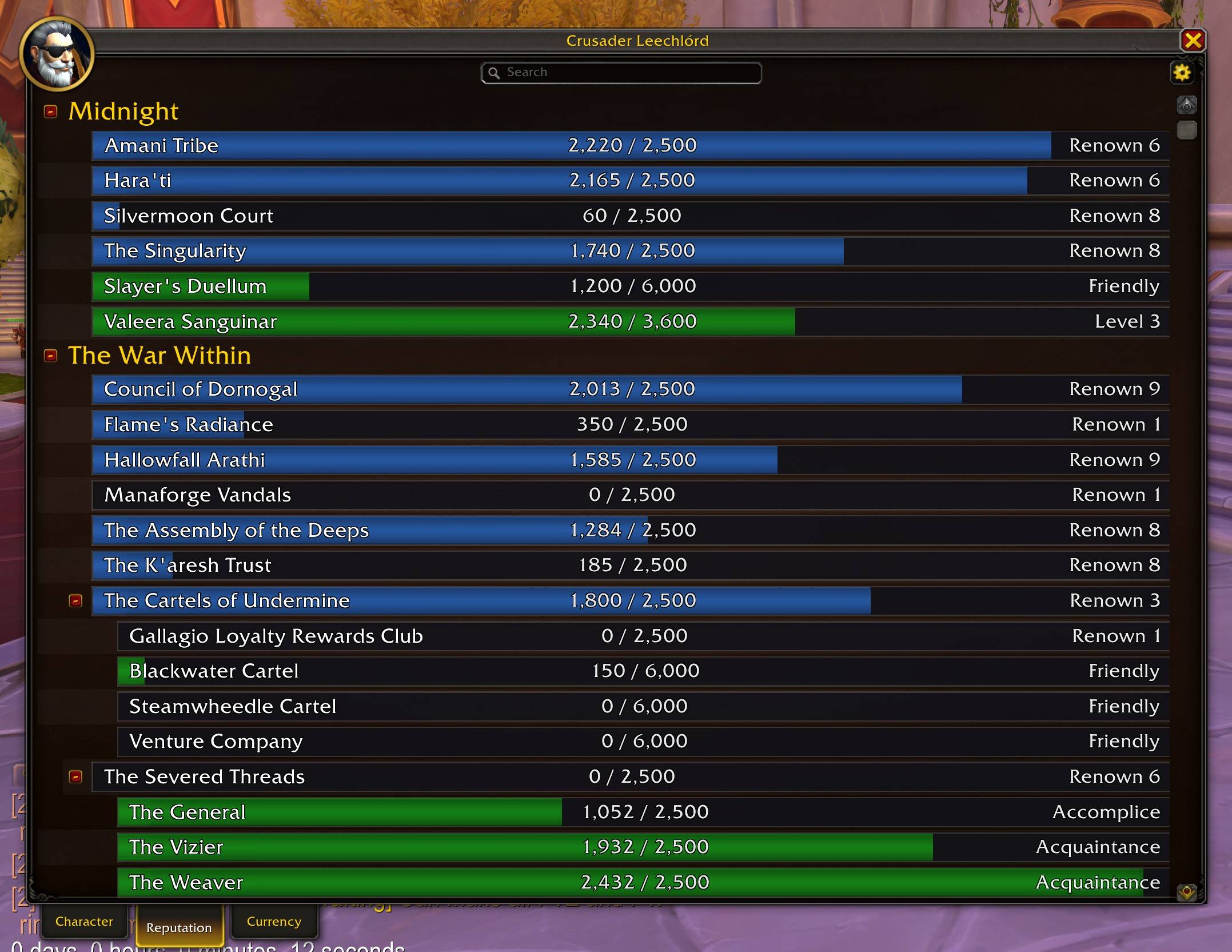
- Reputation tab with search, filters, color-coded standing bars, and detail panel
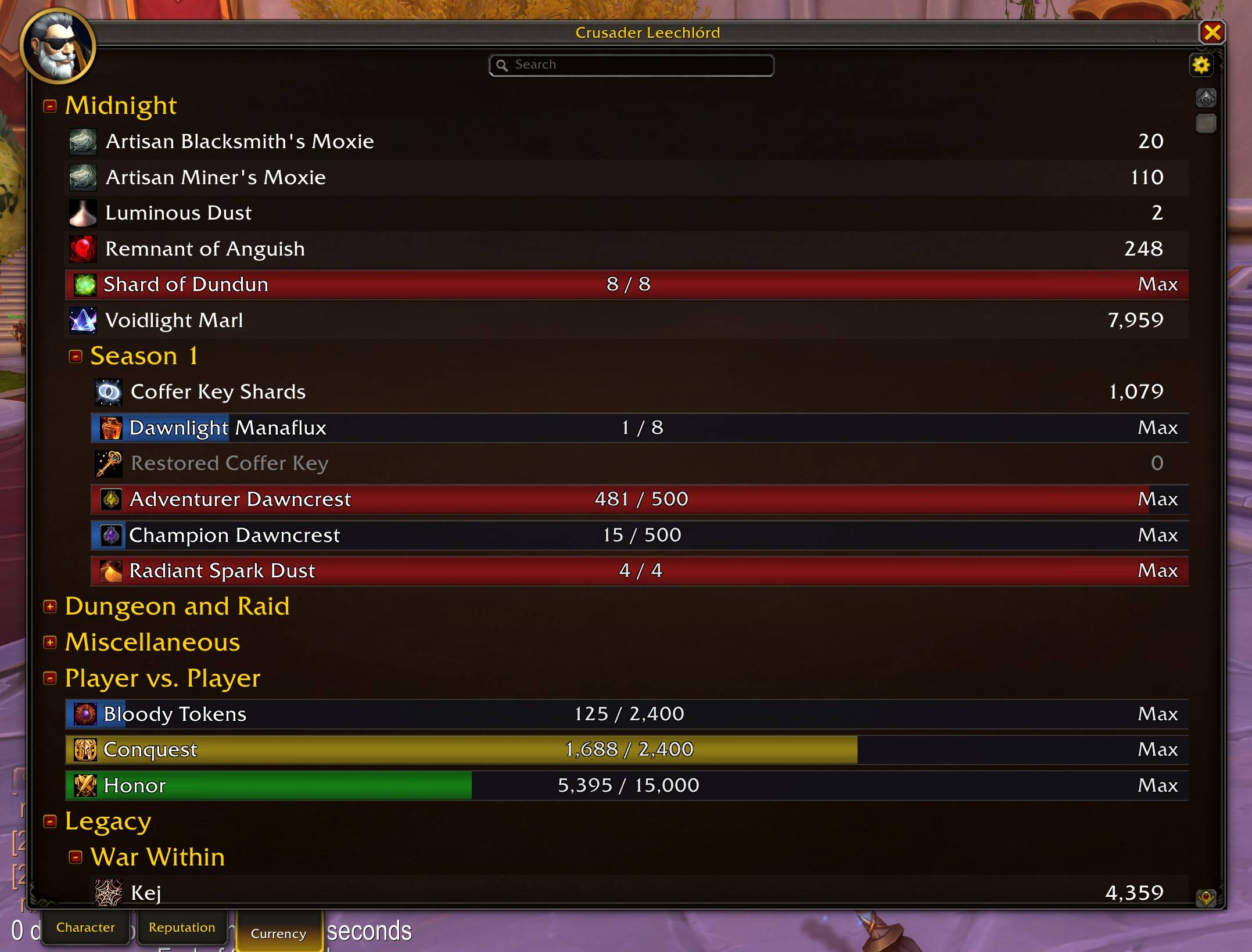
- Currency tab with search, filters, backpack tracking (Shift+click), and transfer log
- Movement Speed tracking based on stats and the current movement mode
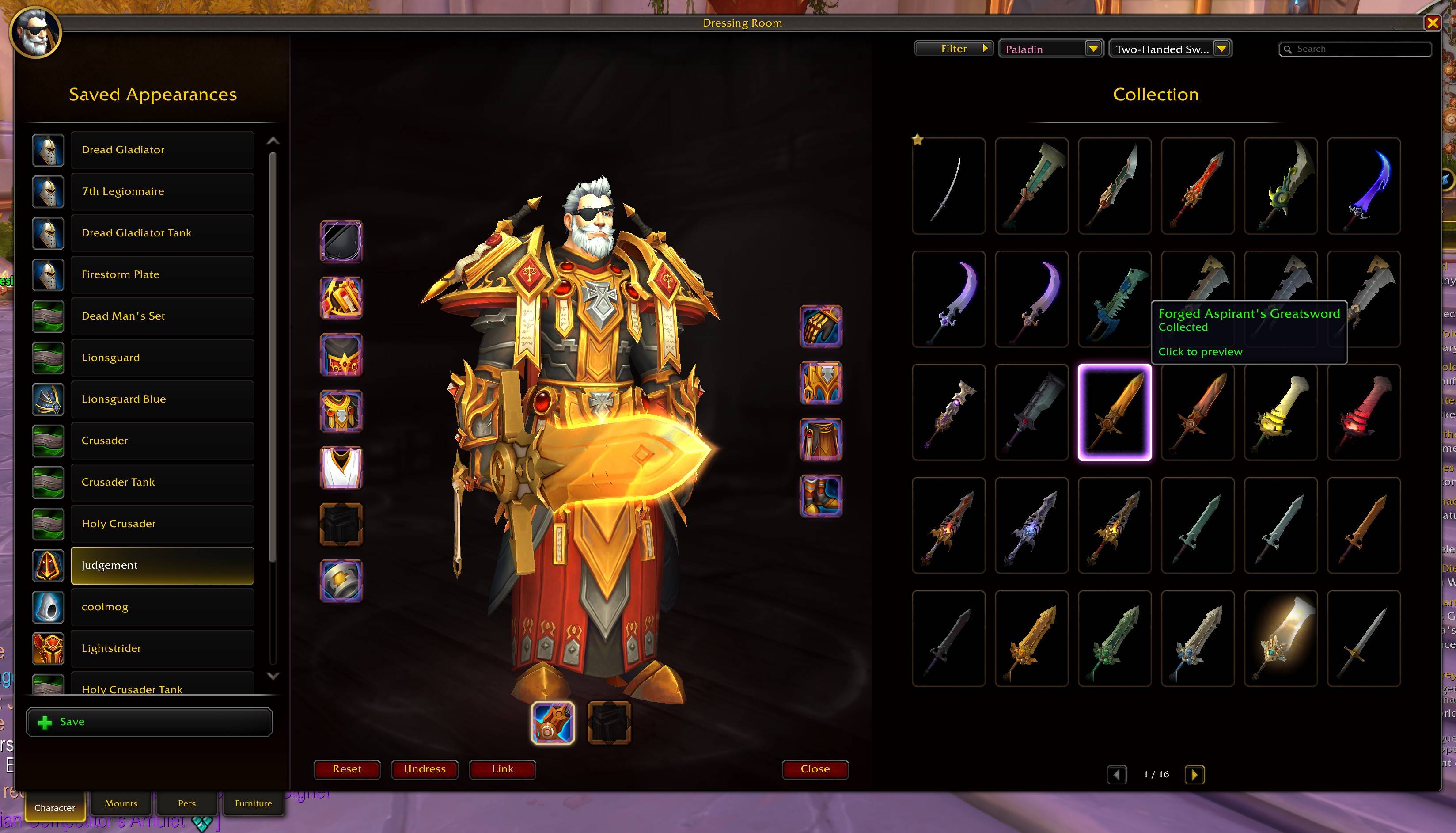
Dressing Room
- Full Transmog-style 3-panel layout with outfit list, character preview, and built-in appearances browser
- 5x6 model grid with search, source filters, and paging
- Weapon category dropdown and class filter to browse appearances for any class
- Click any appearance to preview it instantly; previewed items are highlighted with page navigation
- Click equipment slots to browse appearances, right-click to undress
- Save and load custom outfit sets
- Click any item slot being previewed to view it in your collection instantly
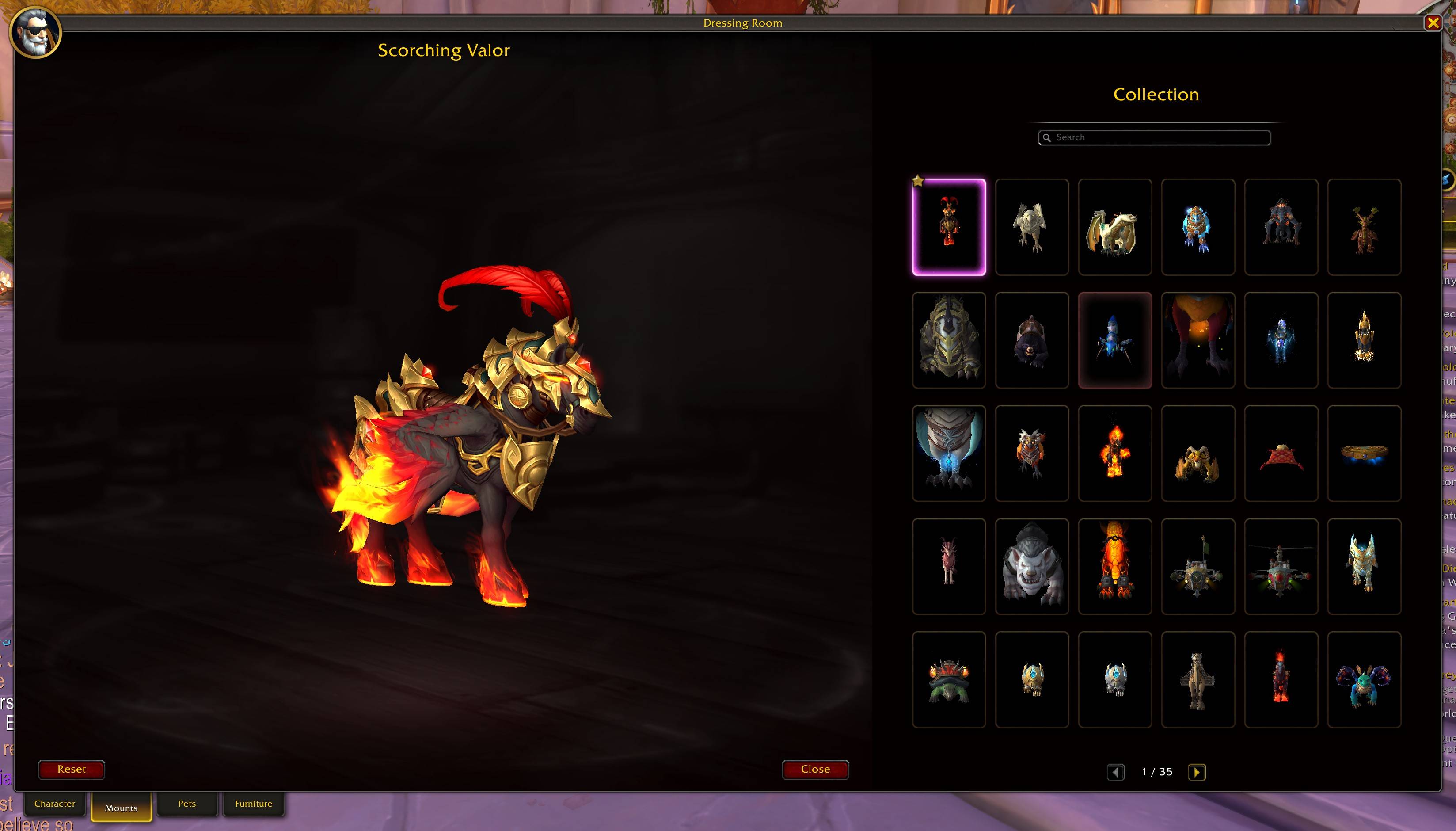
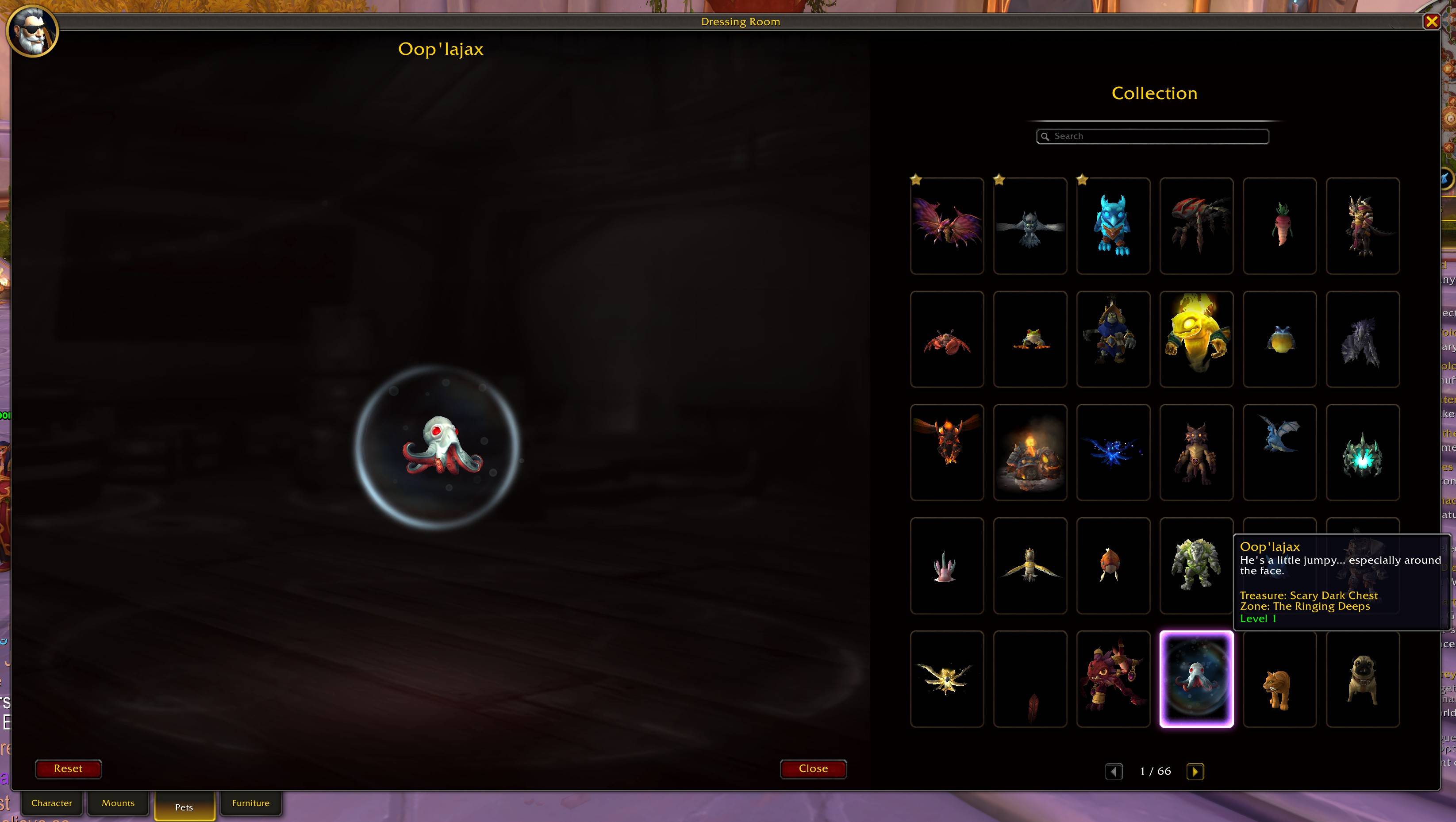
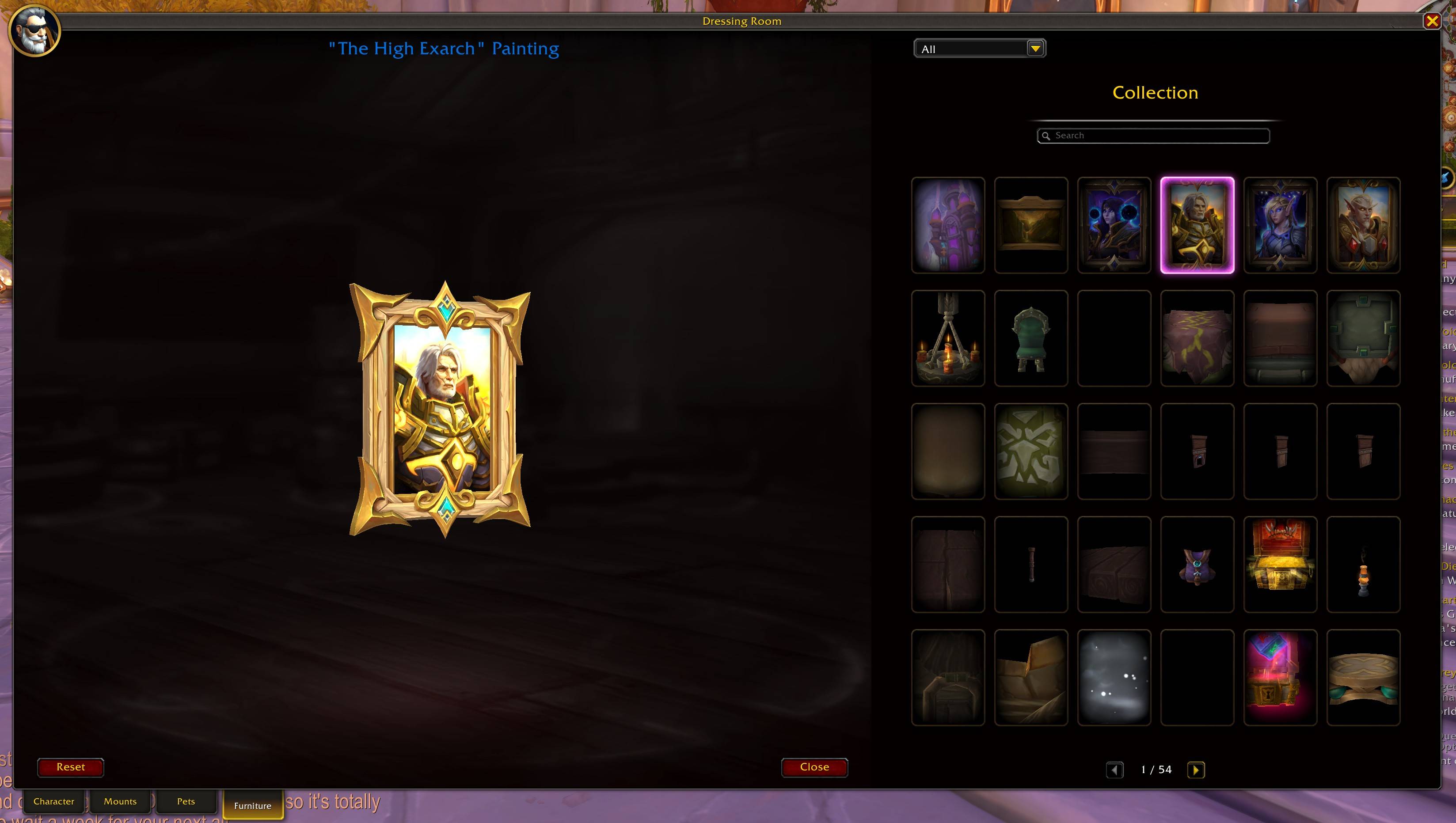
- Tab-based navigation: Character, Mounts, Pets, and Furniture modes
- Mount preview with 3D model browser, search, and paging across all mounts
- Battle pet preview with 3D model browser, search, and paging across all pets
- Housing furniture preview with 3D model browser, category filter, search, and paging
- Ctrl+click any mount, pet, or furniture link to preview it instantly
Inspect Window
- Same design as the character panel with 3D model and 18 equipment slots
- Item level, specialization, and class-colored name display
- Character, PvP, and Guild tabs matching the legacy inspect window
- View in Dressing Room and View Talents buttons
- View Mount button to preview the target's current mount in the dressing room
- PvP tab shows honor level, arena ratings, solo shuffle, RBG, and blitz ratings
- Guild tab shows tabard, name, faction, rank, and member count
Quality of Life
- Combat lockout option to prevent Character window from opening mid-fight
- Optional enchant status and upgrade track overlays on equipment slots
- Configurable window scaling (50-200%) for Character Panel, Inspect, and Dressing Room
- Preview any item in the dressing room and then click the item slot to view it in your collection
- Inspect another class and browse their collection in the dressing room with automatic class filtering
- Search & Filter support for the Reputation and Currency tabs to quickly find what you need
- Preview mounts in the dressing room with a dedicated mount browser, search, and paging across all mounts in the game
- Preview housing furniture with 3D models, category filtering, and collection browsing
- All windows remember their position between sessions
Installation
- Download from CurseForge or GitHub.
- Place the
ModernCharacterUIfolder in yourInterface\AddOnsdirectory.
Configuration
/mcu or Interface > AddOns > Modern Character UI.
- Override Legacy Character Panel: On
- Override Legacy Dressing Room: On
- Override Legacy Inspect Window: On
- Block Opening in Combat: On
- Show Enchant Status: Off — displays an indicator on enchanted equipment slots
- Show Upgrade Track: Off — displays upgrade progress (e.g. 2/6) on equipment slots
- Slot Overlay Font Size: 8-16 (default 10) — adjusts font size for item level, upgrade track, and other slot text
- Overlay Readability Style: Gradient Strips (default) — choose a background style for slot overlays: None, Thick Outline, Gradient Strips, Darkened Icon, Corner Darkening, or Drop Shadow
- Rounded Equipment Icons: Off — applies rounded corners to equipment slot icons
- Stats Panel Font Size: 8-18 (default 12) — adjusts font size for stat labels and values
- Stats Header Font Size: 8-20 (default 13) — adjusts font size for section headers
- Reputation Panel Font Size: 8-18 (default 16) — adjusts font size for faction names and standing text
- Reputation Category Font Size: 8-24 (default 20) — adjusts font size for reputation category headers
- Currency Panel Font Size: 8-18 (default 16) — adjusts font size for currency names and quantities
- Currency Category Font Size: 8-24 (default 20) — adjusts font size for currency category headers
- Character Panel Scale: 50-200% (default 100%)
- Inspect Window Scale: 50-200% (default 100%)
- Dressing Room Scale: 50-200% (default 100%)
Commands
/mcu: Open settings/mcu character: Toggle character panel/mcu dress: Toggle dressing room/mcu mounts: Open mount preview/mcu pets: Open pet preview/mcu furniture: Open furniture preview
Feedback and Support
Found a bug or have a suggestion? Visit the issue tracker on GitHub.
Contribution
Pull requests are welcome on the GitHub repository.
License
Released under the MIT License.
CurseForge: https://www.curseforge.com/wow/addons/modern-character-ui用户评价
暂无 / 5,0 条评价相关推荐
继续看看这些内容
