插件中文资料库
中文说明、玩家点评、适用场景和替代推荐,方便快速判断是否适合你。
- 背包、银行和物品整理
- 界面布局、头像框、姓名板和动作条优化
 Details! Mythic+ Scoreboard
 BagSync
 Sleek XP Bubbles
BiSGearCheck 插件下载与使用指南
本页整理了 BiSGearCheck 的功能用途、适用人群、安装方法和常见问题,方便玩家快速判断是否需要安装。
适合谁用
BiSGearCheck 是一款 鼠标提示 / 背包与库存 类插件,适合需要优化界面、提升操作效率或补充游戏信息提示的魔兽世界玩家。
基本信息
- 插件作者:breakbone_addons
- 插件分类:鼠标提示 / 背包与库存
- 适配版本:2.5.5
- 累计下载:0
安装方法
- 点击上方下载按钮获取 BiSGearCheck插件文件。
- 解压后将插件文件夹放入 World of Warcraft/_retail_/Interface/AddOns 目录。
- 重启游戏或在角色界面点击插件,确认 BiSGearCheck 已启用。
- 如果插件不生效,请检查版本是否匹配,或关闭同类冲突插件后重试。
使用建议
BiSGearCheck 安装后建议先在角色界面确认已启用,进入游戏后根据插件提供的命令、小地图按钮或设置面板进行调整。如遇到报错,可先单独启用该插件排查冲突。
BiSGearCheck 常见问题
BiSGearCheck 适合需要 鼠标提示 / 背包与库存 类功能的玩家,特别是希望提升游戏便利性、界面管理或战斗信息获取效率的用户。
下载后解压到 Interface/AddOns 目录,然后重启游戏并在角色界面启用插件。
常见原因是目录多套一层、游戏版本不匹配、依赖插件缺失或同类插件冲突。
可以查看本页的替代插件推荐和相关插件区域,按下载量和分类选择同类工具。
插件 AI 问答
可以问:这个插件正式服能用吗、和 DBM 冲突吗、怎么设置、有没有替代插件。
BiSGearCheck 是一款魔兽世界插件,主要用于背包、银行、专业制造或物品整理、插件库、数据接口或依赖支持。建议根据自己的版本和插件环境先测试兼容性。
插件用途
BiSGearCheck 主要面向需要背包与库存功能的玩家,用来改善游戏体验、减少重复操作或补充默认界面没有直接提供的信息。
适用场景
- 背包、银行、专业制造或物品整理
- 插件库、数据接口或依赖支持
使用建议
安装后建议先在角色选择界面或插件管理器中确认已启用,再进入游戏测试是否与现有整合包、WA 和其他插件冲突。如遇报错,可以先禁用同类插件排查。
BiS Gear Check compares your equipped gear against ranked Best in Slot lists and shows you exactly what upgrades you still need. Built for TBC Anniversary.
Features
Phase 2
Phase 2 data is now included in version 3.7.0 and above. Use the Phase dropdown in Settings to change the phase throughout BiSGearCheck, which will default to Phase 1 until Phase 2 is released.
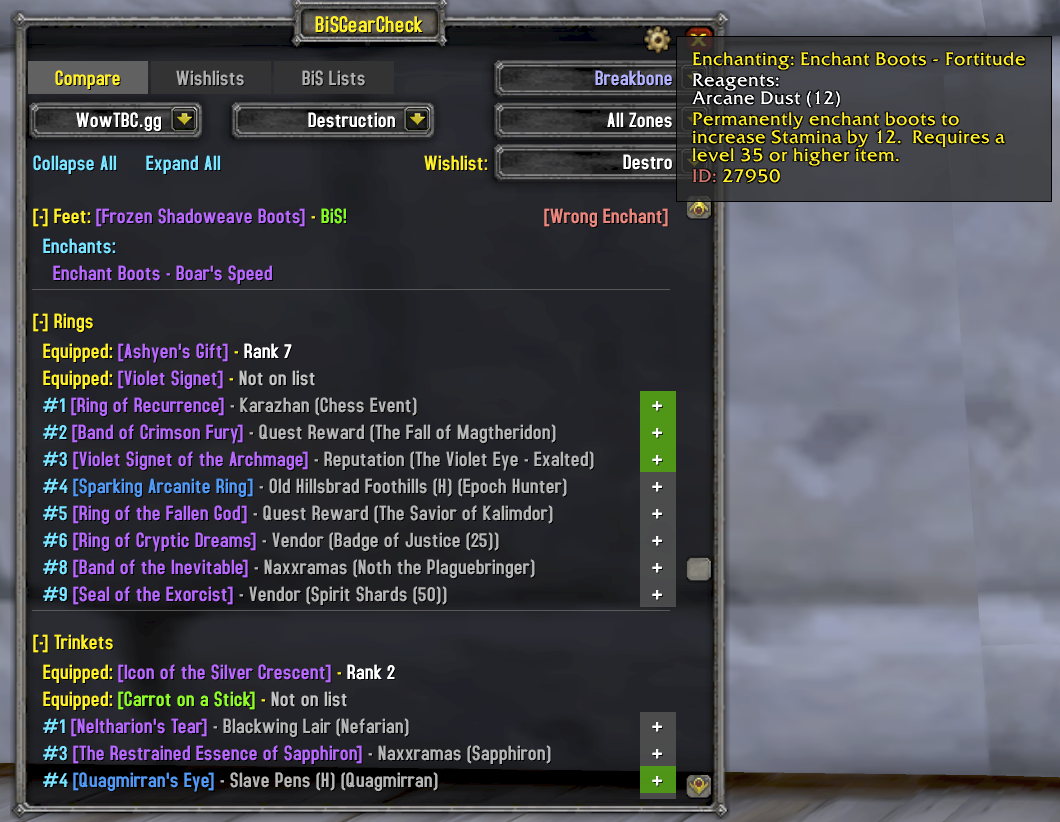
Gear Comparison
See every upgrade available for your spec, ranked by slot. Your currently equipped item is shown with its rank, and every item ranked higher is listed with its source -- boss name, dungeon, quest, or vendor. Automatically refreshes when you swap gear.
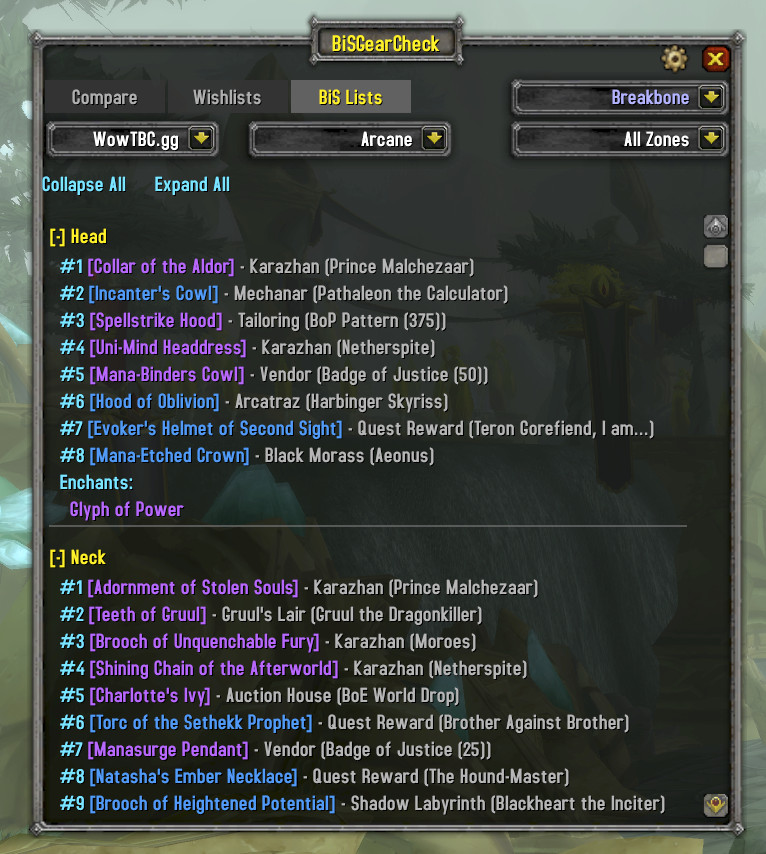
BiS Lists Browser
Browse the full BiS list for any spec across all classes. Switch between data sources to compare rankings. Filter by zone to focus on a specific dungeon or raid. Class-colored headers make it easy to find what you're looking for.
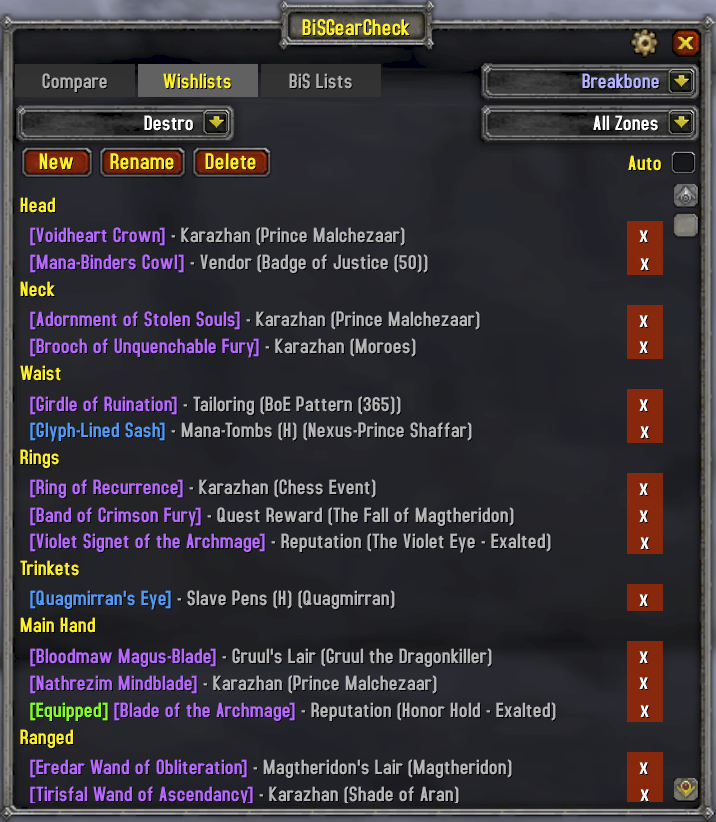
Wishlists
Track the items you're chasing. Create multiple named wishlists, add upgrades directly from the comparison view, and filter by dungeon or raid zone. Auto-filter mode automatically shows items for your current zone when you enter a dungeon or raid.
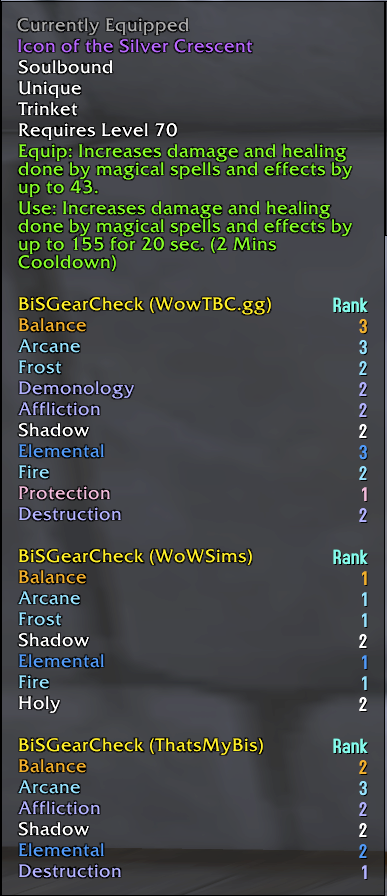
Tooltip Integration
BiS rankings appear directly in item tooltips, grouped by data source. Hover over any item in your bags, in chat, or on a vendor and see which specs rank it and at what position, with class-colored spec names. Each enabled source gets its own section so you can compare rankings across sources at a glance.
Multi-Character Support
Switch between all characters on your account without logging out. View another character's gear on the Compare tab, edit their wishlists, and plan upgrades across your roster. Gear snapshots are saved automatically. Set a minimum level threshold or ignore specific characters to keep the dropdown clean.
Enchant & Gem Warnings
Equipped gear is checked for missing enchants, wrong enchants, empty sockets, and low-quality gems. Warnings appear pinned to the right of each equipped item row. Hover [Wrong Enchant] to see exactly what's applied. Recommended enchants and gems are shown per slot and per spec, with Aldor/Scryer filtering based on your reputation.
Budget alternatives are recognized: lesser shoulder inscriptions, lesser spellthreads, and lesser leg armors show as [Lesser Enchant] in yellow instead of red. Green-quality gems show as [Lesser Gems] in yellow.
Raid Scan
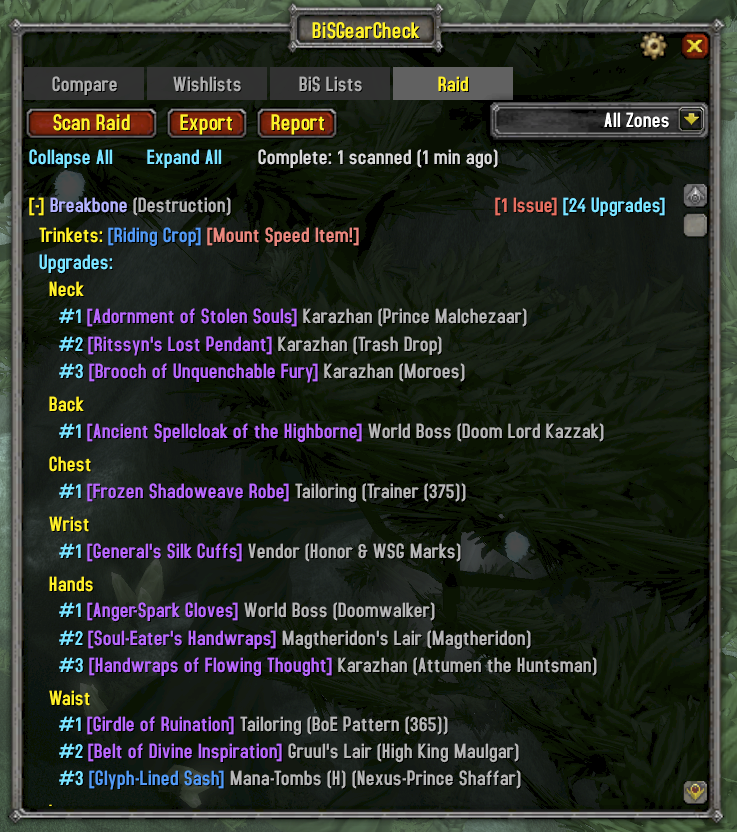
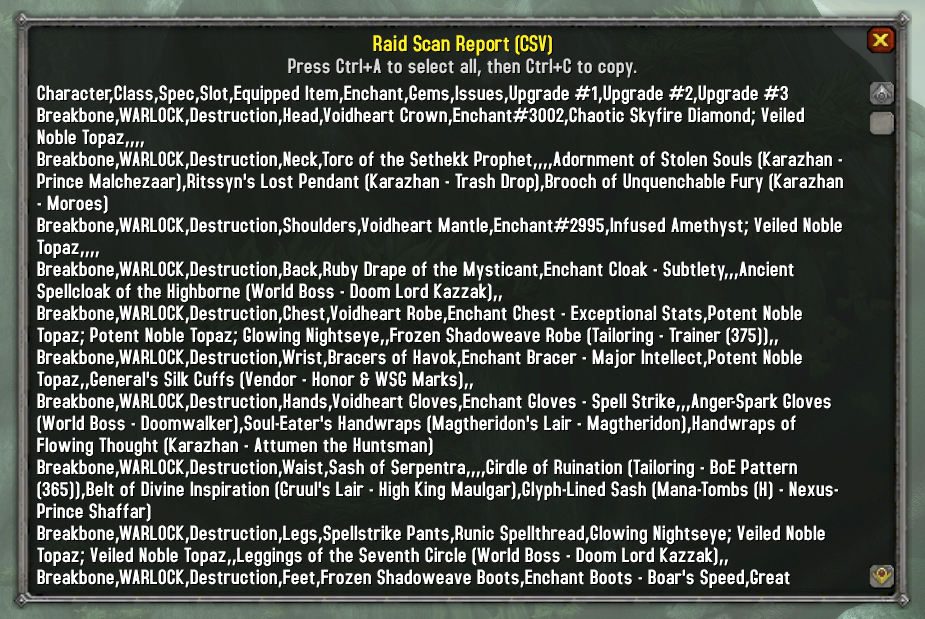
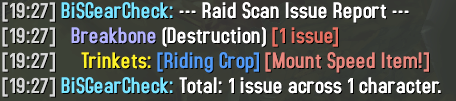
Inspect your entire raid at once. Scan all members to check for missing enchants, wrong gems, empty sockets, and mount-speed items left equipped. Each issue shows the item's BiS list position. Right-click any character to whisper their issues directly. Export results as CSV or print a summary to chat.

Faction-Aware
Alliance and Horde characters see only the items available to their faction. Faction-specific quest rewards, reputation items, and Aldor/Scryer enchants are filtered automatically.
Data Sources
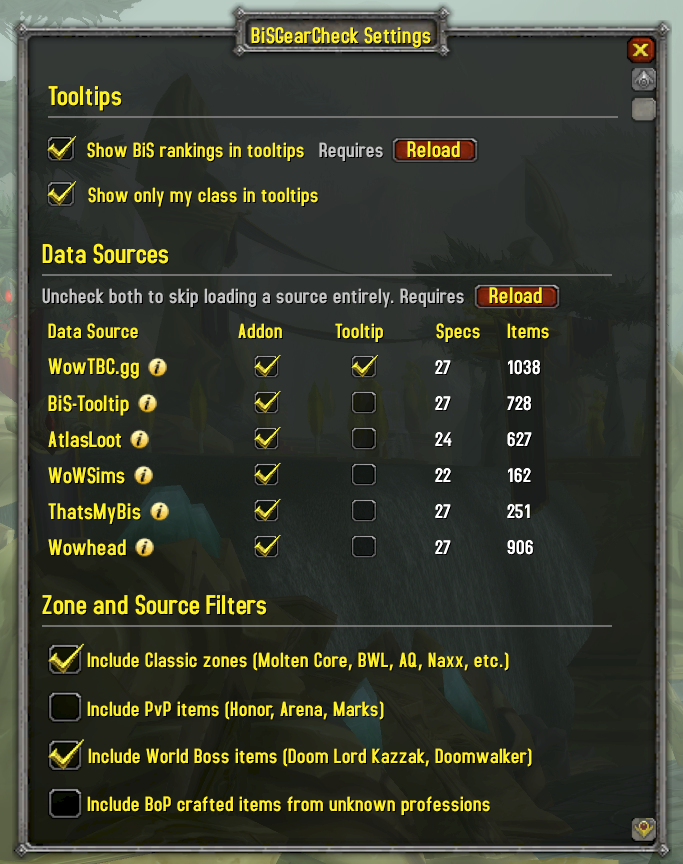
BiS data is available for Phase 1 (Karazhan/Gruul/Mag) and Phase 2 (SSC/TK). Switch phases via the dropdown in Settings or the BiS Lists tab.
- WowTBC.gg -- Community-voted BiS lists. Full Phase 1 and Phase 2 coverage across all 27 specs.
- BiS-Tooltip -- BiS rankings from BiS-Tooltip (boegi1's TBC backport) combined with WoWSims presets. Full Phase 1 and Phase 2 coverage across all 27 specs.
- AtlasLoot -- BiS rankings from AtlasLoot loot tables. Phase 2 covers 25 specs (missing Rogue Assassination, Rogue Subtlety for Phase 2).
- WoWSims -- Simulation-optimized gear sets from WoWSims TBC. Most mathematically rigorous but limited Phase 2 coverage (5 specs with explicit presets).
- ThatsMyBis -- Community wishlist aggregates from thatsmybis.com. Phase 2 lists include SSC/TK items where wishlisted, with Phase 1 gear filling remaining slots.
- Wowhead -- Editorial BiS guides from Wowhead. Phase 2 covers 24 specs (missing Rogue Assassination, Rogue Subtlety, Shaman Restoration).
Each source can be independently enabled for the main addon UI and/or tooltips in the Settings panel. Switch between sources at any time to compare rankings.
Usage
- Minimap button: Left-click for Compare, right-click for Wishlists, alt-click for Settings
/bisgearor/bgc-- Toggle the comparison view/bisgear wishlistor/bgc wl-- Toggle the wishlist view
Installation
Extract the BiSGearCheck folder into your WoW AddOns directory:
World of Warcraft/_anniversary_/Interface/AddOns/BiSGearCheck/用户评价
暂无 / 5,0 条评价相关推荐
继续看看这些内容
