插件中文资料库
中文说明、玩家点评、适用场景和替代推荐,方便快速判断是否适合你。
- 背包、银行和物品整理
- 界面布局、头像框、姓名板和动作条优化
 Mind-seekers Tracker
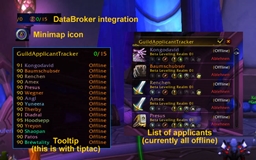 GuildApplicantTracker
 PoisonBars
GuildCrafts — Guild Recipe & Profession Tracker 插件下载与使用指南
本页整理了 GuildCrafts — Guild Recipe & Profession Tracker 的功能用途、适用人群、安装方法和常见问题,方便玩家快速判断是否需要安装。
适合谁用
GuildCrafts — Guild Recipe & Profession Tracker 是一款 专业技能 / 公会 类插件,适合需要优化界面、提升操作效率或补充游戏信息提示的魔兽世界玩家。
基本信息
- 插件作者:_lektor
- 插件分类:专业技能 / 公会
- 适配版本:2.5.5
- 累计下载:37
安装方法
- 点击上方下载按钮获取 GuildCrafts — Guild Recipe & Profession Tracker插件文件。
- 解压后将插件文件夹放入 World of Warcraft/_retail_/Interface/AddOns 目录。
- 重启游戏或在角色界面点击插件,确认 GuildCrafts — Guild Recipe & Profession Tracker 已启用。
- 如果插件不生效,请检查版本是否匹配,或关闭同类冲突插件后重试。
使用建议
GuildCrafts — Guild Recipe & Profession Tracker 安装后建议先在角色界面确认已启用,进入游戏后根据插件提供的命令、小地图按钮或设置面板进行调整。如遇到报错,可先单独启用该插件排查冲突。
GuildCrafts — Guild Recipe & Profession Tracker 常见问题
GuildCrafts — Guild Recipe & Profession Tracker 适合需要 专业技能 / 公会 类功能的玩家,特别是希望提升游戏便利性、界面管理或战斗信息获取效率的用户。
下载后解压到 Interface/AddOns 目录,然后重启游戏并在角色界面启用插件。
常见原因是目录多套一层、游戏版本不匹配、依赖插件缺失或同类插件冲突。
可以查看本页的替代插件推荐和相关插件区域,按下载量和分类选择同类工具。
插件 AI 问答
可以问:这个插件正式服能用吗、和 DBM 冲突吗、怎么设置、有没有替代插件。
GuildCrafts — Guild Recipe & Profession Tracker 是一款魔兽世界插件,主要用于界面框架、头像、动作条或冷却显示优化、背包、银行、专业制造或物品整理。建议根据自己的版本和插件环境先测试兼容性。
插件用途
GuildCrafts — Guild Recipe & Profession Tracker 主要面向需要专业技能功能的玩家,用来改善游戏体验、减少重复操作或补充默认界面没有直接提供的信息。
适用场景
- 界面框架、头像、动作条或冷却显示优化
- 背包、银行、专业制造或物品整理
使用建议
安装后建议先在角色选择界面或插件管理器中确认已启用,再进入游戏测试是否与现有整合包、WA 和其他插件冲突。如遇报错,可以先禁用同类插件排查。
GuildCrafts
Find guild crafters instantly.
Stop asking in guild chat “Can anyone craft this?” and waiting for replies.
GuildCrafts automatically builds a shared crafting database for your guild.
Search any item and instantly see who can craft it.
You can even search directly from guild chat.
!gc shadowcloth
!gc spellstrike hood
!gc flask
GuildCrafts automatically replies with matching crafters — no addon required for the person asking.
Core Features
Guild Chat Craft Lookup
Perfect for quickly finding crafters during raids, farming sessions, or when browsing the auction house.
Just type:
!gc <item name>
GuildCrafts will reply with guild members who can craft it.
Players asking the question do not need the addon installed.
Shared Guild Recipe Database
GuildCrafts combines the recipes of all addon users into a single guild recipe book.
Search by:
- recipe name
- crafted item
- profession
Instantly see which guild members can craft what.
The more guild members who install the addon, the more complete the database becomes.
Item Tooltip Integration
GuildCrafts injects crafter info directly into native item tooltips.
Hover any item anywhere in the game:
- bags
- auction house
- trade chat
- tooltips
GuildCrafts shows which guild members can craft that item — no asking in chat or checking external websites.
Recipe Browser
GuildCrafts includes a full crafting browser for your guild.
Browse professions and recipes in two ways:
Members View
See every recipe known by a specific guild member.
Useful when you already know who might craft something.
Recipes View
See every guild member who can craft a recipe.
- Hover recipes to inspect the crafted item or spell
- Expand recipes to view reagent materials
- Hover reagents to inspect them
- Hover the crafter preview to see the full crafter list
- Click
[W]to whisper a crafter directly — chat opens pre-filled, you review before sending - Click
[>]to post crafters directly to guild chat
This makes it easy to see who can craft something and what it costs at a glance.
Online Filter & Tooltip Toggle
Two toggle buttons sit in the bottom bar of the GuildCrafts window.
[Online] hides offline members across the member list, crafter lists, and profession counts. The button glows gold when the filter is active.
[Tooltip] controls whether GuildCrafts injects crafter info into item tooltips. Disable it when popular items (flasks, enchants) generate tooltips that are too long in large guilds. The setting persists across sessions.
[Minimap] shows or hides the minimap icon without needing a slash command. Glows gold when the minimap button is visible.
Online Status Indicator
Every member row shows a small coloured O dot:
- Green — online and GuildCrafts is active this session
- Yellow — online, but GuildCrafts not detected (may have uninstalled)
- Grey — offline
Hover the dot to see a tooltip explaining the status.
Quality of Life
Favorites
Star recipes or crafters you use often and access them instantly from the Favorites tab.
Perfect for things like:
- regular raid consumables
- enchant contacts
- crafting partners
Cooldown Tracking
GuildCrafts tracks profession cooldowns across your guild.
Examples include:
- Mooncloth
- Shadowcloth
- Spellcloth
- Transmutes
Quickly see which cooldowns are available.
Specializations
GuildCrafts tracks profession specializations such as:
- Transmutation Master
- Mooncloth Tailoring
- Spellfire Tailoring
- Goblin / Gnomish Engineering
So you always know who can craft which variant.
Hover the specialization label in a member's detail panel to see a plain-English description of what it unlocks.
Everything is built to stay fast and easy to scan.
Setup
Getting started takes less than a minute.
- Install the addon
- Open each of your profession windows once
- Done
Your recipes will now automatically sync with other guild members who use the addon.
Supported Version
Built for WoW TBC Anniversary Edition
Interface version 20505
Supports all crafting and gathering professions:
Crafting: Alchemy · Blacksmithing · Enchanting · Engineering · Jewelcrafting · Leatherworking · Tailoring
Secondary: Mining (incl. Smelting) · Herbalism · Skinning · Cooking
Gathering professions track skill levels and member counts. Mining additionally tracks Smelting recipes.
Commands
/gc
Open the GuildCrafts window.
/gc minimap
Toggle the minimap button.
/gc reset
Clear your local database and re-scan recipes.
!gc <query>
Search for crafters directly from guild chat.
Example:
!gc shadowcloth
Automatic Sync
GuildCrafts synchronizes recipe data automatically between addon users.
- no setup required
- low chat traffic
- new recipes broadcast automatically
- only one guild member ever responds to
!gc— even when multiple addon users are online or some are inside dungeons/battlegrounds
Members who leave the guild are automatically removed after 7 days. Guild members who haven't updated their data in 45 days are auto-pruned. Entries from early addon versions with no scan timestamp are also cleaned up automatically. Any active member can resync instantly by opening a profession window.
If your own profession data is more than 30 days old, the addon shows a one-time reminder on login to rescan.
Works best when multiple guild members use the addon — the more players sync, the more complete the database becomes.
Project Status
GuildCrafts has reached its original scope and is stable. Critical fixes will still be addressed. The project is not abandoned — contributions and new maintainers are welcome.
Support the Developer
GuildCrafts is built to solve a real problem, and I'm thrilled to see so many guilds finding it useful.
If it's saved you time or helped your guild coordinate better, consider buying me a coffee — it's genuinely appreciated.
A huge thank you to everyone using the addon, reporting bugs, and sharing it with their guilds.
CurseForge: https://www.curseforge.com/wow/addons/guildcrafts用户评价
暂无 / 5,0 条评价相关推荐
继续看看这些内容
