插件中文资料库
中文说明、玩家点评、适用场景和替代推荐,方便快速判断是否适合你。
- 界面布局、头像框、姓名板和动作条优化
 Details! Mythic+ Scoreboard
 BagSync
 TankMD Misdirect
LibIconPicker 插件下载与使用指南
本页整理了 LibIconPicker 的功能用途、适用人群、安装方法和常见问题,方便玩家快速判断是否需要安装。
适合谁用
LibIconPicker 是一款 动作条 / 开发工具 / 背包与库存 / 运行库 / 任务与升级 类插件,适合需要优化界面、提升操作效率或补充游戏信息提示的魔兽世界玩家。
基本信息
- 插件作者:kapresoft
- 插件分类:动作条 / 开发工具 / 背包与库存 / 运行库 / 任务与升级
- 适配版本:1.15.8,2.5.5,12.0.5,5.5.4
- 累计下载:0
安装方法
- 点击上方下载按钮获取 LibIconPicker插件文件。
- 解压后将插件文件夹放入 World of Warcraft/_retail_/Interface/AddOns 目录。
- 重启游戏或在角色界面点击插件,确认 LibIconPicker 已启用。
- 如果插件不生效,请检查版本是否匹配,或关闭同类冲突插件后重试。
使用建议
LibIconPicker 安装后建议先在角色界面确认已启用,进入游戏后根据插件提供的命令、小地图按钮或设置面板进行调整。如遇到报错,可先单独启用该插件排查冲突。
LibIconPicker 常见问题
LibIconPicker 适合需要 动作条 / 开发工具 / 背包与库存 / 运行库 / 任务与升级 类功能的玩家,特别是希望提升游戏便利性、界面管理或战斗信息获取效率的用户。
下载后解压到 Interface/AddOns 目录,然后重启游戏并在角色界面启用插件。
常见原因是目录多套一层、游戏版本不匹配、依赖插件缺失或同类插件冲突。
可以查看本页的替代插件推荐和相关插件区域,按下载量和分类选择同类工具。
插件 AI 问答
可以问:这个插件正式服能用吗、和 DBM 冲突吗、怎么设置、有没有替代插件。
LibIconPicker 是一个插件依赖库,为其他插件提供数据或功能支持。
插件用途
LibIconPicker 主要面向需要开发工具功能的玩家,用来改善游戏体验、减少重复操作或补充默认界面没有直接提供的信息。
适用场景
- 插件库、数据接口或依赖支持
使用建议
安装后建议先在角色选择界面或插件管理器中确认已启用,再进入游戏测试是否与现有整合包、WA 和其他插件冲突。如遇报错,可以先禁用同类插件排查。
LibIconPicker is a high-performance icon selection library for World of Warcraft addons. It provides a clean, callback-based API that lets addons open an icon picker and receive the selected icon instantly — without managing UI state, layouts, or large icon lists themselves.
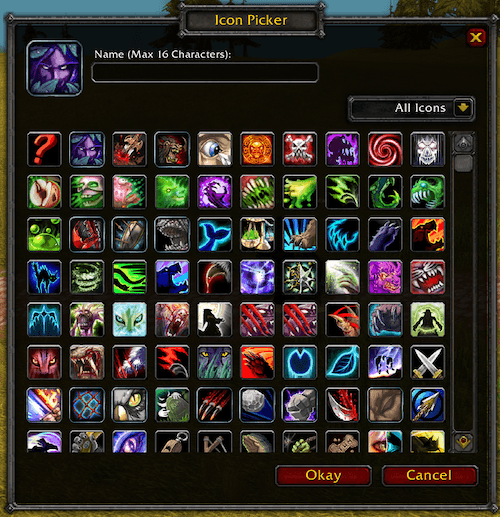
Designed from the ground up to be lightweight and efficient, LibIconPicker uses a hybrid scroll frame and lazy rendering so only visible icons are processed at any time. This keeps CPU usage low during scrolling and filtering, even with very large icon sets, and avoids unnecessary redraws or background work.
The UI is lazy-loaded and initialized only when needed, ensuring minimal memory usage and zero impact on addon startup time. No persistent data or saved variables are created by the library, keeping memory footprints small and predictable.
LibIconPicker is designed to load on-demand, supports multiple addons simultaneously, and avoids global side effects by following established WoW library conventions. The result is a fast, scalable, and memory-efficient icon picker that integrates cleanly into any addon without adding performance overhead or maintenance burden.
LibIconPicker is NOT SAFE TO EMBED due to global XML frame names in the addon xml files.
Usage
The following example loads LibIconPicker on demand (if not already loaded) before invoking its public API. See the use cases for complete integration patterns and how this library can be leveraged by consumer addons.
local LoadAddOn     = LoadAddOn or C_AddOns.LoadAddOn
local IsAddOnLoaded = IsAddOnLoaded or C_AddOns.IsAddOnLoaded
local addOnName     = 'LibIconPicker'
local loaded, msg   = IsAddOnLoaded(addOnName), nil
if not loaded then
    loaded, msg = LoadAddOn(addOnName)
    if not loaded then
        return print('Failed to load LibIconPicker, msg:', msg)
    end
end
LibIconPicker:Open(function(sel)
    print('Selected icon:', sel.icon)
end)
API Definition
Full Documentation is here:
The public interface definition is here with EmmyLua annotations
LibIconPicker_Options
--- @type LibIconPicker_Options
local opt = {
    showTextInput = true,
    -- @type LibIconPicker_TextInputOptions
    textInput = { label = 'Enter Name:', value = 'Uber Spell' },
    -- @type LibIconPicker_Anchor
    anchor = {
        point = 'TOPRIGHT',
        relativeTo = UIParent,
        relativePoint = 'TOPRIGHT',
        x = -50,
        y = -100
    },
}
Callback: LibIconPicker_CallbackFn
--- @param sel LibIconPicker_Selection
function callbackFn(sel)
    -- sel.icon           : The user selected icon
    -- sel.textInputValue : The user text input value
end
Usage Example
Show icon picker with textInput and anchor
--- @type LibIconPicker_Options
local opt = {
    showTextInput = true,
    anchor = {
        point = 'TOPRIGHT',
        relativeTo = UIParent,
        relativePoint = 'TOPRIGHT',
        x = -50,
        y = -100
    },
}
--- @param sel LibIconPicker_Selection
LibIconPicker:Open(function(sel)
    print('Selected icon:', sel.icon, ' user-input-text:', sel.textInputValue)
end, opt)
Close the Icon Picker
LibIconPicker:Close()General Comments
Drop your commments/questions here.
Donations
As a software engineer, I am passionate about this project and have dedicated a significant amount of time and effort to creating a high-quality product. If you enjoy using this World of Warcraft add-on, please consider supporting me through a donation via Paypal™ or the Bitcoin Address provided below. Your support is greatly appreciated. Thank you in advance for your generosity.
CurseForge: https://www.curseforge.com/wow/addons/libiconpicker用户评价
暂无 / 5,0 条评价相关推荐
继续看看这些内容
