Housing Lumber Helper 是一款魔兽世界插件,主要用于背包、银行、专业制造或物品整理、地图、区域、任务路线或交通提醒、团队分配、Roll 点记录或公会管理。建议根据自己的版本和插件环境先测试兼容性。
插件用途
Housing Lumber Helper 主要面向需要拍卖与商业功能的玩家,用来改善游戏体验、减少重复操作或补充默认界面没有直接提供的信息。
适用场景
- 背包、银行、专业制造或物品整理
- 地图、区域、任务路线或交通提醒
- 团队分配、Roll 点记录或公会管理
使用建议
安装后建议先在角色选择界面或插件管理器中确认已启用,再进入游戏测试是否与现有整合包、WA 和其他插件冲突。如遇报错,可以先禁用同类插件排查。

Housing Lumber Helper
The complete lumber farming companion - live session stats, loot location mapping, compass HUD, auto-deposit to Warband Bank, and inventory tracking with TSM + PSL support.
Features
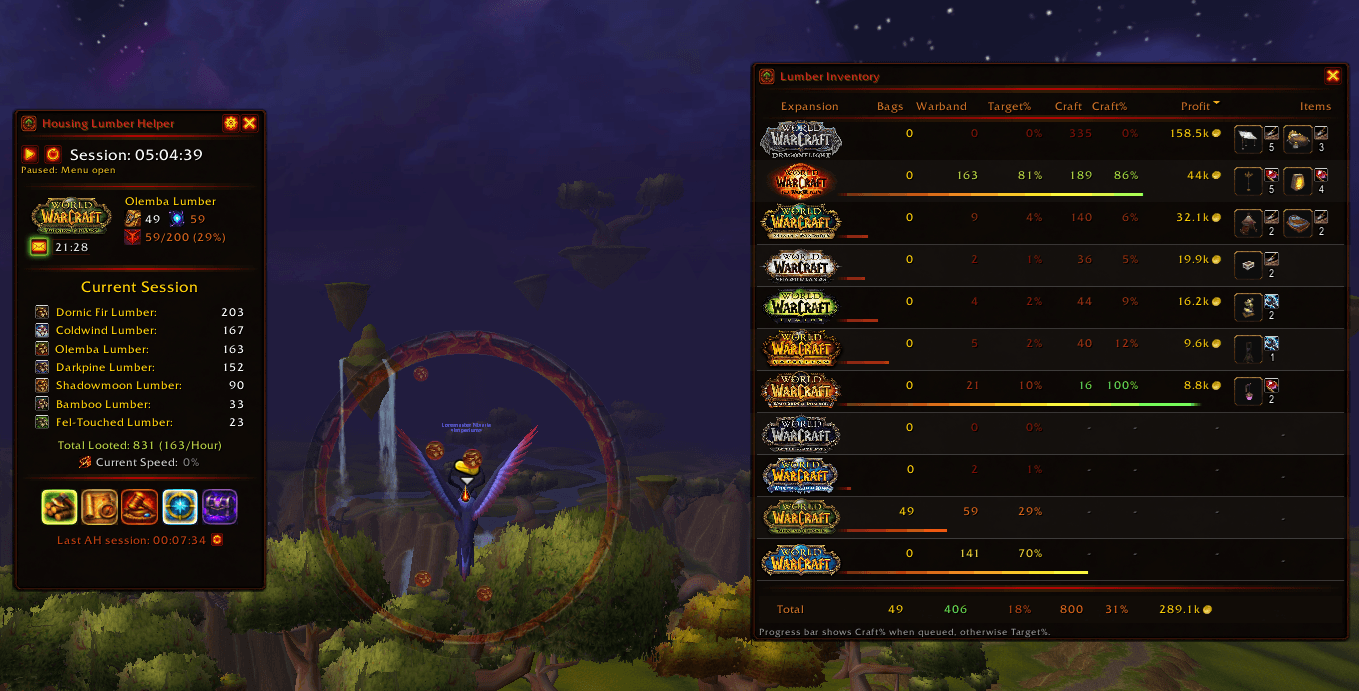
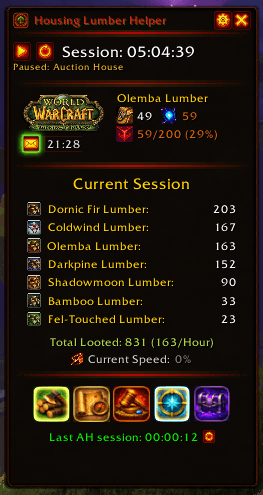
Session Tracking
Never lose track of your farming progress
- Live timer with lumber-per-hour statistics
- Auto-starts when you loot lumber
- Smart auto-pause when AFK, at mailbox, auction house, or in menus (toggleable in settings) - AFK pause shows live countdown until Blizzard auto-logout (30 min)
- Instance auto-hide - automatically hides in dungeons, raids, battlegrounds, arenas, and scenarios, then restores when you exit
- Per-character session persistence across logins
- Auto zone detection with live feedback showing bag count, warband total, and goal progress (crafting queue when TSM/PSL active, or target progress as fallback)
- Local time display - prevents losing track of real time while Compass HUD hides your minimap clock
- Mail indicator - pulsing icon when you have unread mail, with configurable glow color and sender names on hover
- Tracking reminder - glowing hatchet icon appears when "Find Lumber" minimap tracking is disabled, click for instructions on how to enable
- Speed tracker - live current speed, average speed, and total distance traveled (accurate during dragonriding)
- Session looted lumber displayed in descending order by quantity
- Total looted and lumber-per-hour statistics
- Toolbar with quick access buttons for inventory panel, map, AH mount summon, compass HUD, lumber history, and Warband Bank spell
- Compact mode - minimize the tracker to a tiny window showing timer, bag count, target progress, and toolbar - maximize anytime to return to full view
- Draggable window - drag by header, position saved across sessions, Escape to close
- Settings button (gear icon in header) for quick access to options
- Keybindings - bind keys to toggle Compass HUD, Inventory, and History panels (configure in WoW Options > Keybinds)
|
|
Inventory Panel
See everything at a glance with three tabs
Lumber Tab
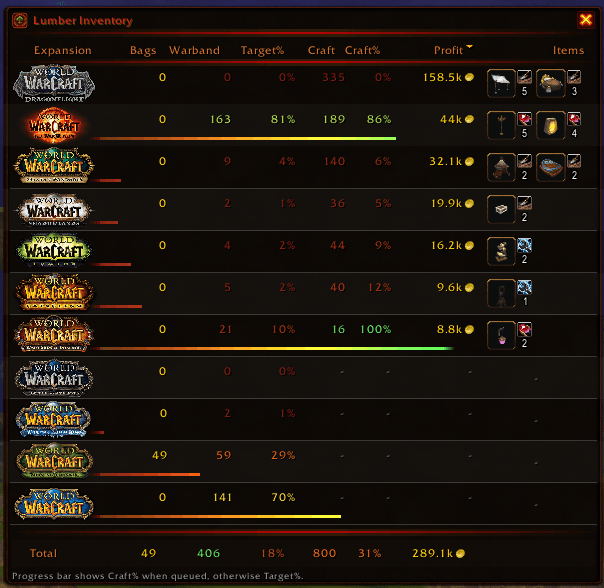
- All 12 expansion lumber types in one view
- Bags vs. Warband total with progress tracking
- Sortable columns with visual ember progress bars
- Customizable target goal (0-10,000) with expansion-specific overrides
- Goal percentages showing progress toward your target lumber threshold (uses expansion-specific target if set)
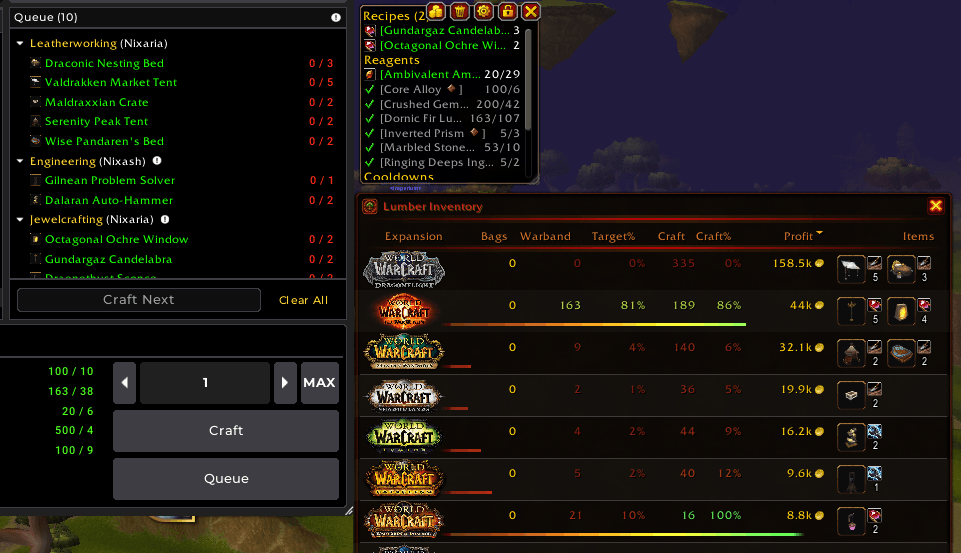
- TSM + PSL queue tracking across all your professions - see exactly how much lumber you need for every queued craft (combined total when both enabled)
- Profit column - estimated profit (sell price minus material costs) from queued crafts using each lumber type, with gold coin icon and red text for losses - know if crafting is profitable before you start
- g/L column (gold per lumber) - profit efficiency showing gold earned per lumber unit farmed - helps identify which expansion's lumber is most worth your time (e.g., 900g/L vs 200g/L makes the choice obvious)
- Items column - shows queued craft items for each lumber type as an icon grid sorted by profit (highest first), profession badges displayed next to each icon show which profession crafts each item (Blacksmithing, Leatherworking, etc.)
- Summary row at the bottom showing totals for Bags/Warband/Craft/Profit and averages for Target%/Craft% (respects expansion visibility)
- Expansion abbreviations option - show text abbreviations (TWW, DF, SL, etc.) instead of logos
Crafts Tab NEW
- Individual craft breakdown - see every queued recipe from TSM/PSL as its own row with full profit analysis
- Columns: Profession badge, Item icon, Recipe name (colored by item quality), Qty, Lumber needed (with material icon), Profit/Item, Total Profit, g/L, and Expansion logo
- Profession availability - badges appear dimmed for professions your current character doesn't have, helping you see which crafts you can do right now vs. on an alt
- Click any profession badge to open that recipe directly in your profession window
- Sortable columns - default sorts by highest total profit first
- Summary row showing totals for Qty, Lumber, Total Profit, and weighted average g/L
- Row hover highlighting and expansion tooltips on hover
History Tab
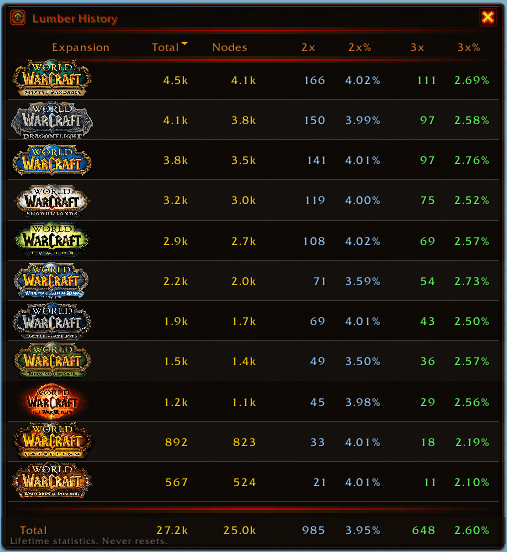
- Lifetime statistics per expansion that never reset
- Total lumber, nodes harvested, double drop (2x) and triple drop (3x) counts and percentages
- Summary row with aggregated totals
- Live updates when you loot lumber
- Sortable columns and expansion logo tooltips
All tabs:
- Clickable column headers - sort by any column, ascending/descending toggle
- Row hover highlighting with warm red tint on mouseover
- Sort preference and tab selection saved across sessions
- Tab tooltips on hover with descriptions of each tab's contents
|
|
Compass HUD
Track lumber while farming
- Screen-center compass showing nearby lumber locations
- Lumber pins rotate based on your facing direction
- Distance indicator - closer pins appear larger
- Rotates with you - arrow always points forward
- Auto-hides when opening map, bank, AH, entering instances, in combat, or in cities (combat and city hide optional)
- Hover over pins to see "Looted N times" for each location
- Obsidian ring border with adjustable transparency
- Speed bar - curved progress arc around the ring showing your current movement speed with red-to-green gradient (scales up to 1000% for dragonriding dives)
- Breadcrumb trail - smooth fading path showing where you've traveled, aligns with Routes lines when following an optimized route (configurable duration 8-30 sec)
- Accessibility: "Lock north to top" option reduces motion for sensitive players
- Minimap relocated to compass center (not hidden) - minimap tracking still works
- Up to 20 closest pins shown, size scales with distance
|

|
Integrations
Connect with your favorite crafting addons - lumber needs are combined from all enabled sources
- Reads your TradeSkillMaster crafting queue
- Shows lumber needed for queued crafts
- Progress tracking toward crafting goals
- Real-time updates - UI refreshes within 1 second when queue changes
- Auto-disables gracefully on errors
- Reads your ProfessionShoppingList tracked recipes
- Perfect for planning crafts across multiple alts
- Combined with TSM in the Craft column
- Real-time updates - UI refreshes within 1 second when list changes
- Auto-disables gracefully on errors
- Import lumber pins into Routes for optimized farming paths
- Routes calculates the most efficient route through your pins
- Draws route lines on minimap, worldmap, and Compass HUD
- Automatic discovery - just install Routes, no configuration needed
- Respects "Minimum Loot Count" filter - only exports reliable pins
|
|
Lumber History
Track your lifetime farming statistics (also available as Inventory Panel History tab)
- Lifetime statistics that never reset - see your total lumber collected across all time
- Per-expansion breakdown - total lumber, nodes harvested, double drops (2x), triple drops (3x)
- Drop rate percentages - see how often you get lucky with 2x and 3x drops
- Summary row showing aggregated totals across all visible expansions
- Sortable columns - click any header to sort by that statistic
- Live updates - refreshes within 1 second when you loot lumber
- Expansion tooltips - hover over expansion logos to see full names
- Toolbar button (book icon) opens the history panel
- Escape to close, position saved between sessions
|
|
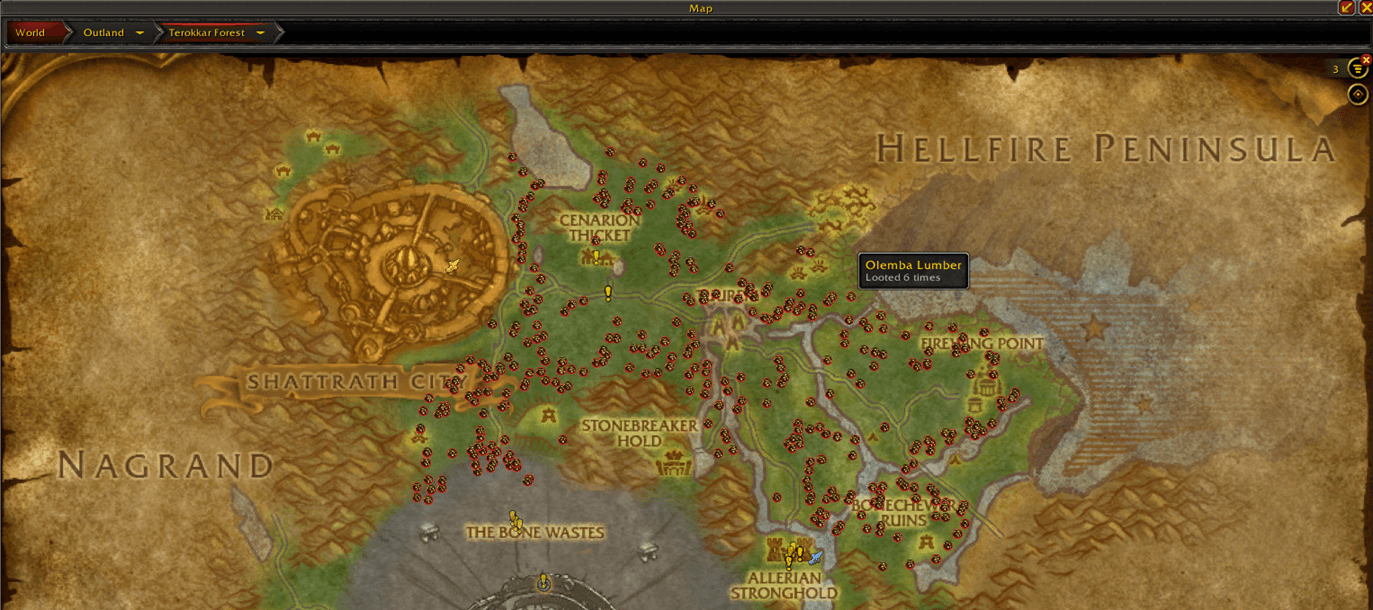
Loot Map Markers
Remember where the nodes are
- Automatic recording of loot positions
- World map pins with smart clustering
- Hover over pins to see "Looted N times" for each location
- Color-coded pins match lumber type
- Right-click any pin to remove it from the map
- Configurable max pins per map (default 500, 0 = unlimited)
|
|
Warband Bank Auto-Deposit
- Automatically deposits lumber when opening any bank
- Scans all bags including reagent bag
Auction House Timer
- Tracks time since your last AH visit
- Visual warnings + optional sound alerts
- Manual reset button - reset the timer without visiting the AH
- Reset on login option - perfect for multi-character workflows where you check AH on a different character
- Quick-summon button for AH mount (Brutosaur, Trader's Gilded Brutosaur) with animated glow when timer threshold reached (color configurable in settings)
- Button shows visual cooldown overlay for Warband Bank spell
Work Complete Sound
- Audio notification when your farming goal is reached
- 30 built-in sounds to choose from (achievement fanfares, loot toasts, alarm clocks, and more)
- Prioritizes crafting goals over target lumber
- Zone-based tracking for current expansion
Settings
Fully configurable through the WoW Options menu:
General
- Language selection - Choose your UI language:
Auto (follows WoW client) | English | Deutsch (vollständige deutsche Übersetzung)
Game content (materials, expansions, mounts, spells) always uses your game client's language.
- Window transparency (20% - 100%)
- Minimap button visibility + addon compartment visibility (separate toggles)
- Session auto-pause on AFK/AH/Mail/Menu (on/off)
- UI Style - switch between Custom (amber theme) and Blizzard (standard WoW) frame appearance
- Glow color (9 color options) - applies to mail indicator and AH mount button
- Work complete sound notification (on/off) with 30 selectable sounds
- Warband Bank auto-deposit (on/off)
- Reset window position
- Sound preview - selecting a sound plays it immediately
- Settings inputs: Enter to save, Escape to cancel
Target Lumber
- Set your global farming goal (0 - 10,000)
- Color gradient: Red → Orange → Yellow → Green
- Expansion-specific targets - override the global target for individual expansions:
- Set different goals per expansion (e.g., 50 for Shadowlands, 500 for TWW)
- Leave empty to use global target
- Target% and color coding adapts per expansion
- Summary row caps each expansion at 100% before averaging
Expansion Visibility
- Show/hide expansions in inventory panel
- Keep your interface clean
Auction House Timer
- Warning threshold (1 - 1440 minutes)
- 30 sound options with preview on selection
Integrations
- Enable/disable TSM integration
- Enable/disable PSL integration
- Both can be enabled - needs are combined
Map and Compass
- Toggle loot position recording
- Toggle compass HUD overlay
- Lock north to top (reduces motion)
- Compass refresh rate (15-60 FPS) - lower values improve performance
- HUD ring transparency (0% - 100%)
- Speed bar toggle and opacity
- Breadcrumb trail toggle and duration (8-30 sec)
- Hide compass during combat (on/off)
- Hide compass in cities (on/off)
- Minimum loot count filter - hide one-time nodes, show only consistent spawn locations
- Clear all saved pins or clear current map only (less destructive)

If this addon saved you from counting logs like a confused peon,
consider fueling the developer with some caffeine.
CurseForge: https://www.curseforge.com/wow/addons/housinglumberhelper
 LaoLiHelper多功能综合助手
 Details! Mythic+ Scoreboard
 LaoLiHelper_UI美化系统自带框架