插件详情
插件中文资料库
中文说明、玩家点评、适用场景和替代推荐,方便快速判断是否适合你。
玩家一句话点评
asFixUnitFrame 适合需要单位框架、界面增强或玩法辅助的玩家,建议结合自己的职业和版本先测试再长期使用。
适用场景
- 界面布局、头像框、姓名板和动作条优化
 Details! Mythic+ Scoreboard
 RightClickSelfCast
 Mind-seekers Tracker
asFixUnitFrame 插件下载与使用指南
本页整理了 asFixUnitFrame 的功能用途、适用人群、安装方法和常见问题,方便玩家快速判断是否需要安装。
适合谁用
asFixUnitFrame 是一款 单位框架 类插件,适合需要优化界面、提升操作效率或补充游戏信息提示的魔兽世界玩家。
基本信息
- 插件作者:asMOD_kr
- 插件分类:单位框架
- 适配版本:12.0.5,12.0.7
- 累计下载:0
安装方法
- 点击上方下载按钮获取 asFixUnitFrame插件文件。
- 解压后将插件文件夹放入 World of Warcraft/_retail_/Interface/AddOns 目录。
- 重启游戏或在角色界面点击插件,确认 asFixUnitFrame 已启用。
- 如果插件不生效,请检查版本是否匹配,或关闭同类冲突插件后重试。
使用建议
asFixUnitFrame 安装后建议先在角色界面确认已启用,进入游戏后根据插件提供的命令、小地图按钮或设置面板进行调整。如遇到报错,可先单独启用该插件排查冲突。
asFixUnitFrame 常见问题
这个插件适合哪些玩家?
asFixUnitFrame 适合需要 单位框架 类功能的玩家,特别是希望提升游戏便利性、界面管理或战斗信息获取效率的用户。
下载后怎么安装?
下载后解压到 Interface/AddOns 目录,然后重启游戏并在角色界面启用插件。
为什么插件不显示或不生效?
常见原因是目录多套一层、游戏版本不匹配、依赖插件缺失或同类插件冲突。
有没有类似插件可以替代?
可以查看本页的替代插件推荐和相关插件区域,按下载量和分类选择同类工具。
插件 AI 问答
可以问:这个插件正式服能用吗、和 DBM 冲突吗、怎么设置、有没有替代插件。
asFixUnitFrame 是一款魔兽世界插件,主要用于界面框架、头像、动作条或冷却显示优化。建议根据自己的版本和插件环境先测试兼容性。
插件用途
asFixUnitFrame 主要面向需要单位框架功能的玩家,用来改善游戏体验、减少重复操作或补充默认界面没有直接提供的信息。
适用场景
- 界面框架、头像、动作条或冷却显示优化
使用建议
安装后建议先在角色选择界面或插件管理器中确认已启用,再进入游戏测试是否与现有整合包、WA 和其他插件冲突。如遇报错,可以先禁用同类插件排查。
asFixUnitFrame (Midnight)
Turn off features of Unit Frames.
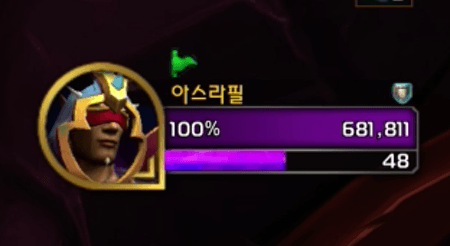
Key Features
- Optional Unit Frame Modifications (Configurable via Addon Settings):
- Hide Combat Text on Frames: Prevents default Blizzard combat status text from appearing directly on Player, Target, and Pet unit frames.
- Hide Target Buffs/Debuffs: Removes the standard buff and debuff icons from the Target unit frame.
- Hide Target Cast Bar: Hides the cast bar attached to the Target unit frame.
- Hide Player Class Bar: Hides special class resource displays (e.g., Rogue Combo Points, Death Knight Runes, Evoker Essence).
- Hide Player Totem Bar (Default: Disabled): Hides the Shaman Totem bar and Warlock Infernal bar.
- Numeric Threat Display: Enables the numeric threat level display on the Target (
threatShowNumericCVar setting). - Class-Colored Health Bars: Changes the health bar colors of Player, Target, and Target of Target frames to their respective class colors (if the unit is a player).
Configuration
- Options can be modified via
ESC>Options>Addons>asFixUnitFrame. HideDebuff: Hide debuffs on the Target (Default: Enabled).HideCombatText: Hide combat text on the Player frame (Default: Enabled).HideCastBar: Hide the Target's cast bar (Default: Enabled).HideClassBar: Hide the Player's class bar (Default: Enabled).HideTotemBar: Hide the Player's totem bar (Default: Disabled).ShowClassColor: Change health bar colors to class colors (Default: Enabled).ShowAggro: Display numeric threat level on the Target (Default: Enabled).
Contact Information
- Korean Users: Visit the Inven asMOD Forum.
- English Users: Visit the asMOD YouTube Channel or GitHub.
asFixUnitFrame (한밤)
블리자드 기본 유닛 프레임 기능 숨김
주요 기능
- 선택적 유닛 프레임 수정 (애드온 설정을 통해 구성 가능):
- 프레임 위 전투 텍스트 숨기기: 플레이어, 대상 및 소환수 유닛 프레임에 블리자드 기본 전투 상황 알림 텍스트가 직접 나타나지 않도록 함.
- 대상의 버프/디버프 숨기기: 대상 유닛 프레임에서 표준 버프 및 디버프 아이콘을 제거.
- 대상의 시전바 숨기기: 대상 유닛 프레임의 시전바를 숨김.
- 플레이어 직업 바 숨기기: 특수 직업 자원 표시(예: 도적 연계 점수, 죽음의 기사 룬, 기원사 정수)를 숨김.
- 플레이어 토템 바 숨기기 (기본 : 해제): 주술사 토템 바, 흑마법사 불지옥 정령 바 숨김.
- 숫자 위협 수준 표시: 대상 위협 수준 표시를 활성화 (
threatShowNumericCVar 설정). - 직업 색상 생명력 바: 플레이어, 대상 및 대상의 대상 프레임의 생명력 바를 직업(플레이어인 경우) 색상으로 변경.
설정
ESC>설정>애드온>asFixUnitFrame옵션을 변경 가능.HideDebuff: 대상의 디버프 숨김 (기본: 활성).HideCombatText: 플레이어 전투 텍스트 숨김 (기본: 활성).HideCastBar: 대상의 사진바 숨김 (기본: 활성).HideClassBar: 플에이어 직업바 숨김 (기본: 활성).HideTotemBar: 플레이어 토템바 숨김 (기본: 비활성).ShowClassColor: 생명력 색상을 직업 색상으로 (기본: 활성).ShowAggro: 대상위 위협수준 표시 (기본: 활성).
문의처
한글 유저:인벤 asMOD 포럼방문 (https://www.inven.co.kr/board/wow/5288)영문 유저:Youtube asMOD 채널방문 (https://www.youtube.com/@asmod-wow),Github방문 (https://github.com/aspilla/asMOD/)
用户评价
暂无 / 5,0 条评价免费插件下载后可以评价;付费插件 / WA 购买后可以评价;委托订单完成后可以评价。
暂无评价。
相关推荐
继续看看这些内容
