插件中文资料库
中文说明、玩家点评、适用场景和替代推荐,方便快速判断是否适合你。
- 界面布局、头像框、姓名板和动作条优化
 AmDotMonitor暗牧多目标监控
 Craft Tracker
 Paladin's Blessings - Classic Era & HC
NOS Multi Timers Stopwatch 插件下载与使用指南
本页整理了 NOS Multi Timers Stopwatch 的功能用途、适用人群、安装方法和常见问题,方便玩家快速判断是否需要安装。
适合谁用
NOS Multi Timers Stopwatch 是一款 动作条 / 鼠标提示 类插件,适合需要优化界面、提升操作效率或补充游戏信息提示的魔兽世界玩家。
基本信息
- 插件作者:Nossein
- 插件分类:动作条 / 鼠标提示
- 适配版本:1.15.8,2.5.5
- 累计下载:0
安装方法
- 点击上方下载按钮获取 NOS Multi Timers Stopwatch插件文件。
- 解压后将插件文件夹放入 World of Warcraft/_retail_/Interface/AddOns 目录。
- 重启游戏或在角色界面点击插件,确认 NOS Multi Timers Stopwatch 已启用。
- 如果插件不生效,请检查版本是否匹配,或关闭同类冲突插件后重试。
使用建议
NOS Multi Timers Stopwatch 安装后建议先在角色界面确认已启用,进入游戏后根据插件提供的命令、小地图按钮或设置面板进行调整。如遇到报错,可先单独启用该插件排查冲突。
NOS Multi Timers Stopwatch 常见问题
NOS Multi Timers Stopwatch 适合需要 动作条 / 鼠标提示 类功能的玩家,特别是希望提升游戏便利性、界面管理或战斗信息获取效率的用户。
下载后解压到 Interface/AddOns 目录,然后重启游戏并在角色界面启用插件。
常见原因是目录多套一层、游戏版本不匹配、依赖插件缺失或同类插件冲突。
可以查看本页的替代插件推荐和相关插件区域,按下载量和分类选择同类工具。
插件 AI 问答
可以问:这个插件正式服能用吗、和 DBM 冲突吗、怎么设置、有没有替代插件。
NOS Multi Timers Stopwatch 是一款魔兽世界插件,主要用于界面框架、头像、动作条或冷却显示优化、倒计时、提醒和战斗预警。建议根据自己的版本和插件环境先测试兼容性。
插件用途
NOS Multi Timers Stopwatch 主要面向需要动作条功能的玩家,用来改善游戏体验、减少重复操作或补充默认界面没有直接提供的信息。
适用场景
- 界面框架、头像、动作条或冷却显示优化
- 倒计时、提醒和战斗预警
使用建议
安装后建议先在角色选择界面或插件管理器中确认已启用,再进入游戏测试是否与现有整合包、WA 和其他插件冲突。如遇报错,可以先禁用同类插件排查。
NOS Multi Timer Stopwatch is a lightweight, clean, and highly customizable multi-stopwatch addon for World of Warcraft. It allows you to manually create and run multiple independent timers simultaneously for any in-game activity that requires precise time tracking.
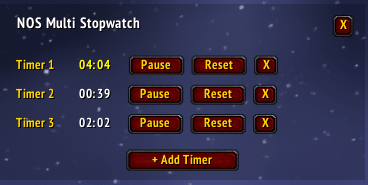
Since this addon is completely manual, you have full control over when each stopwatch starts, pauses, or resets, making it a versatile tool for any time-sensitive tasks.
Key Features:
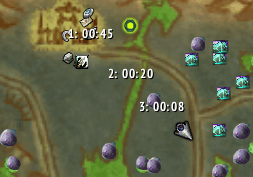
- World Map & Minimap Tracking (NEW!): Starting a timer now automatically drops a clean, text-based pin (e.g., "1: 02:30") on both your World Map and Minimap at your exact character location. Keep track of multiple spawn points across the zone without bulky icons cluttering your view!
- Smart Reset & Pin Locking (NEW!): Pressing 'Reset' instantly restarts the time to 00:00 without stopping the timer. The map pin stays locked to its original coordinate, making it completely effortless to track back-to-back respawns.
- Dynamic Multi-Stopwatch: Add or remove as many custom stopwatches (Timer 1, Timer 2, etc.) as your current activity requires.
- Auto-Resizing UI: The main window automatically adjusts its height based on how many timers are currently active, keeping your screen clean and clutter-free.
- 4-Minute Visual Alert: To give you a clear visual cue, the stopwatch text will start flashing bright yellow once it reaches the 4-minute mark.
- Minimap Button Integration: Easy and beginner-friendly access via a pocket-watch icon on your minimap. No need to memorize chat commands!
- Clean & Low-Opacity Design: Features a sleek, subtle transparent background that blends nicely with the default WoW user interface.
How to Use:
- Toggle Frame: Simply Left-Click the pocket-watch icon on your minimap, or type
/ntimeor/mobtimein the chat. - Add Timers: Click the
+ Add Timerbutton at the bottom of the frame to create a new stopwatch. - Manage Timers: Each timer has its own independent Start/Pause, Reset, and X (Delete) buttons.
- Move Frame: Left-click and drag the dark background area to place the window anywhere on your screen.
用户评价
暂无 / 5,0 条评价相关推荐
继续看看这些内容
