插件中文资料库
中文说明、玩家点评、适用场景和替代推荐,方便快速判断是否适合你。
- 副本、团队本和大秘境战斗提醒
- 界面布局、头像框、姓名板和动作条优化
- 伤害、治疗、仇恨和战斗数据统计
 Details! Mythic+ Scoreboard
 Copy Anything
 BagSync
KwikTip 插件下载与使用指南
本页整理了 KwikTip 的功能用途、适用人群、安装方法和常见问题,方便玩家快速判断是否需要安装。
适合谁用
KwikTip 是一款 战斗 / 鼠标提示 / 坦克 / 治疗 / 输出 类插件,适合需要优化界面、提升操作效率或补充游戏信息提示的魔兽世界玩家。
基本信息
- 插件作者:Postblink218
- 插件分类:战斗 / 鼠标提示 / 坦克 / 治疗 / 输出
- 适配版本:12.0.1
- 累计下载:49
安装方法
- 点击上方下载按钮获取 KwikTip插件文件。
- 解压后将插件文件夹放入 World of Warcraft/_retail_/Interface/AddOns 目录。
- 重启游戏或在角色界面点击插件,确认 KwikTip 已启用。
- 如果插件不生效,请检查版本是否匹配,或关闭同类冲突插件后重试。
使用建议
KwikTip 安装后建议先在角色界面确认已启用,进入游戏后根据插件提供的命令、小地图按钮或设置面板进行调整。如遇到报错,可先单独启用该插件排查冲突。
KwikTip 常见问题
KwikTip 适合需要 战斗 / 鼠标提示 / 坦克 / 治疗 / 输出 类功能的玩家,特别是希望提升游戏便利性、界面管理或战斗信息获取效率的用户。
下载后解压到 Interface/AddOns 目录,然后重启游戏并在角色界面启用插件。
常见原因是目录多套一层、游戏版本不匹配、依赖插件缺失或同类插件冲突。
可以查看本页的替代插件推荐和相关插件区域,按下载量和分类选择同类工具。
插件 AI 问答
可以问:这个插件正式服能用吗、和 DBM 冲突吗、怎么设置、有没有替代插件。
KwikTip 是一款魔兽世界插件,主要用于界面框架、头像、动作条或冷却显示优化、伤害统计、输出循环或战斗表现分析、副本、团本、大秘境或钥石辅助。建议根据自己的版本和插件环境先测试兼容性。
插件用途
KwikTip 主要面向需要战斗功能的玩家,用来改善游戏体验、减少重复操作或补充默认界面没有直接提供的信息。
适用场景
- 界面框架、头像、动作条或冷却显示优化
- 伤害统计、输出循环或战斗表现分析
- 副本、团本、大秘境或钥石辅助
使用建议
安装后建议先在角色选择界面或插件管理器中确认已启用,再进入游戏测试是否与现有整合包、WA 和其他插件冲突。如遇报错,可以先禁用同类插件排查。

World of Warcraft 12.0.1
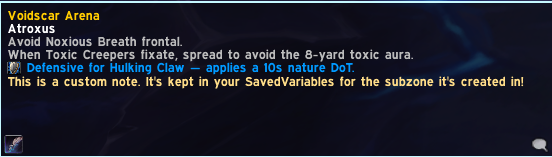
A World of Warcraft: Midnight addon that displays contextual tips for dungeons and raids. As your group moves through an instance, KwikTip surfaces relevant boss and trash tips in a small, unobtrusive HUD — no interaction required mid-pull.
Inspired by QE Dungeon Tips by QEdev (no longer maintained).
Download on CurseForge | Download on Wago | Download on WoWInterface

Screenshots
Features
- Boss tips — concise, actionable guidance for every boss in the Season 1 M+ rotation
- Sub-zone aware HUD — the HUD updates automatically as your group moves through each area; boss room tips surface on entry before the encounter starts, and trash sections in supported dungeons get their own contextual tips
- Role-specific notes — tips are categorized by role (tank, healer, DPS, general) and interrupt priority, each with a distinct color and icon so you can find what's relevant at a glance
- M+ affix display — active keystone affix names and tips are shown in the HUD while waiting between encounters
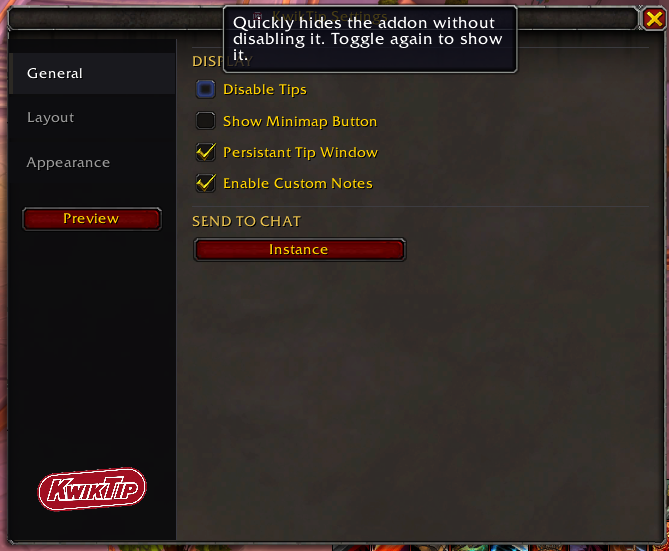
- Delve support — opt-in boss tips for Midnight delves (enable in settings)
- Keep Open Through Instance — optionally keep the HUD visible throughout a run
- Resizable, draggable HUD — drag to reposition, drag corners to resize; locks in place when done
- LibSharedMedia-3.0 support — font picker lists all fonts registered by your other addons if LSM is present; falls back to three built-in WoW fonts otherwise
Dungeon Coverage
All bosses across all listed dungeons have tips. Full area tip coverage — boss rooms and trash sections — is live for all eight Midnight dungeons and three of the four legacy M+ dungeons (Algeth'ar Academy, Pit of Saron, Skyreach). Seat of the Triumvirate coverage is in progress pending in-game verification.
Season 1 Mythic+ Rotation
| Dungeon | Type |
|---|---|
| Windrunner Spire | New — Midnight |
| Maisara Caverns | New — Midnight |
| Magisters' Terrace | New — Midnight (reworked) |
| Nexus-Point Xenas | New — Midnight |
| Algeth'ar Academy | Legacy |
| Pit of Saron | Legacy |
| Seat of the Triumvirate | Legacy |
| Skyreach | Legacy |
Additional Midnight Dungeons
| Dungeon | Type |
|---|---|
| Murder Row | Level-up (81–88) |
| Den of Nalorakk | Level-up (81–88) |
| The Blinding Vale | Max level |
| Voidscar Arena | Max level |
Delves (opt-in)
Boss tips for all Midnight delves. Enable in settings — off by default.
Installation
- Download or clone this repository
- Copy the
KwikTipfolder into your addons directory:
World of Warcraft/_retail_/Interface/AddOns/KwikTip- Enable the addon in the WoW character select screen
Usage
| Command | Action |
|---|---|
/kwiktip or /kwik |
Open/close settings |
/kwik move |
Toggle move mode (drag and resize the HUD) |
/kwik debug |
Print current instance detection state to chat |
/kwik debuglog |
Toggle map/mob ID logging to SavedVariables |
/kwik preview |
Toggle role notes preview in the HUD |
/kwik clearlog |
Clear all debug logs from SavedVariables |
/kwik feedback |
Print the feedback/issue link to chat |
/kwik help |
Print all available commands to chat |
The HUD is hidden outside of instances. Use /kwik move to show and reposition it at any time.
用户评价
暂无 / 5,0 条评价相关推荐
继续看看这些内容
