插件中文资料库
中文说明、玩家点评、适用场景和替代推荐,方便快速判断是否适合你。
- 界面布局、头像框、姓名板和动作条优化
 RightClickSelfCast
 RaidBuffManager
ActionBar Buddy (ElvUI Plugin) 插件下载与使用指南
本页整理了 ActionBar Buddy (ElvUI Plugin) 的功能用途、适用人群、安装方法和常见问题,方便玩家快速判断是否需要安装。
适合谁用
ActionBar Buddy (ElvUI Plugin) 是一款 动作条 / 插件扩展 类插件,适合需要优化界面、提升操作效率或补充游戏信息提示的魔兽世界玩家。
基本信息
- 插件作者:Repooc
- 插件分类:动作条 / 插件扩展
- 适配版本:1.15.8,5.5.3,2.5.5,12.0.5,3.80.1
- 累计下载:0
安装方法
- 点击上方下载按钮获取 ActionBar Buddy (ElvUI Plugin)插件文件。
- 解压后将插件文件夹放入 World of Warcraft/_retail_/Interface/AddOns 目录。
- 重启游戏或在角色界面点击插件,确认 ActionBar Buddy (ElvUI Plugin) 已启用。
- 如果插件不生效,请检查版本是否匹配,或关闭同类冲突插件后重试。
使用建议
ActionBar Buddy (ElvUI Plugin) 安装后建议先在角色界面确认已启用,进入游戏后根据插件提供的命令、小地图按钮或设置面板进行调整。如遇到报错,可先单独启用该插件排查冲突。
ActionBar Buddy (ElvUI Plugin) 常见问题
ActionBar Buddy (ElvUI Plugin) 适合需要 动作条 / 插件扩展 类功能的玩家,特别是希望提升游戏便利性、界面管理或战斗信息获取效率的用户。
下载后解压到 Interface/AddOns 目录,然后重启游戏并在角色界面启用插件。
常见原因是目录多套一层、游戏版本不匹配、依赖插件缺失或同类插件冲突。
可以查看本页的替代插件推荐和相关插件区域,按下载量和分类选择同类工具。
插件 AI 问答
可以问:这个插件正式服能用吗、和 DBM 冲突吗、怎么设置、有没有替代插件。
ActionBar Buddy (ElvUI Plugin) 是一款魔兽世界插件,主要用于界面框架、头像、动作条或冷却显示优化。建议根据自己的版本和插件环境先测试兼容性。
插件用途
ActionBar Buddy (ElvUI Plugin) 主要面向需要动作条功能的玩家,用来改善游戏体验、减少重复操作或补充默认界面没有直接提供的信息。
适用场景
- 界面框架、头像、动作条或冷却显示优化
使用建议
安装后建议先在角色选择界面或插件管理器中确认已启用,再进入游戏测试是否与现有整合包、WA 和其他插件冲突。如遇报错,可以先禁用同类插件排查。
ActionBar Buddy (ElvUI Plugin)



Version 2.0 Rewrite Released
With the new 2.0 version, settings will be reset as the addon has a bit more to it now and doesn't work exactly like it did before. Hopefully this general break down can get you started!
Notable Changes:
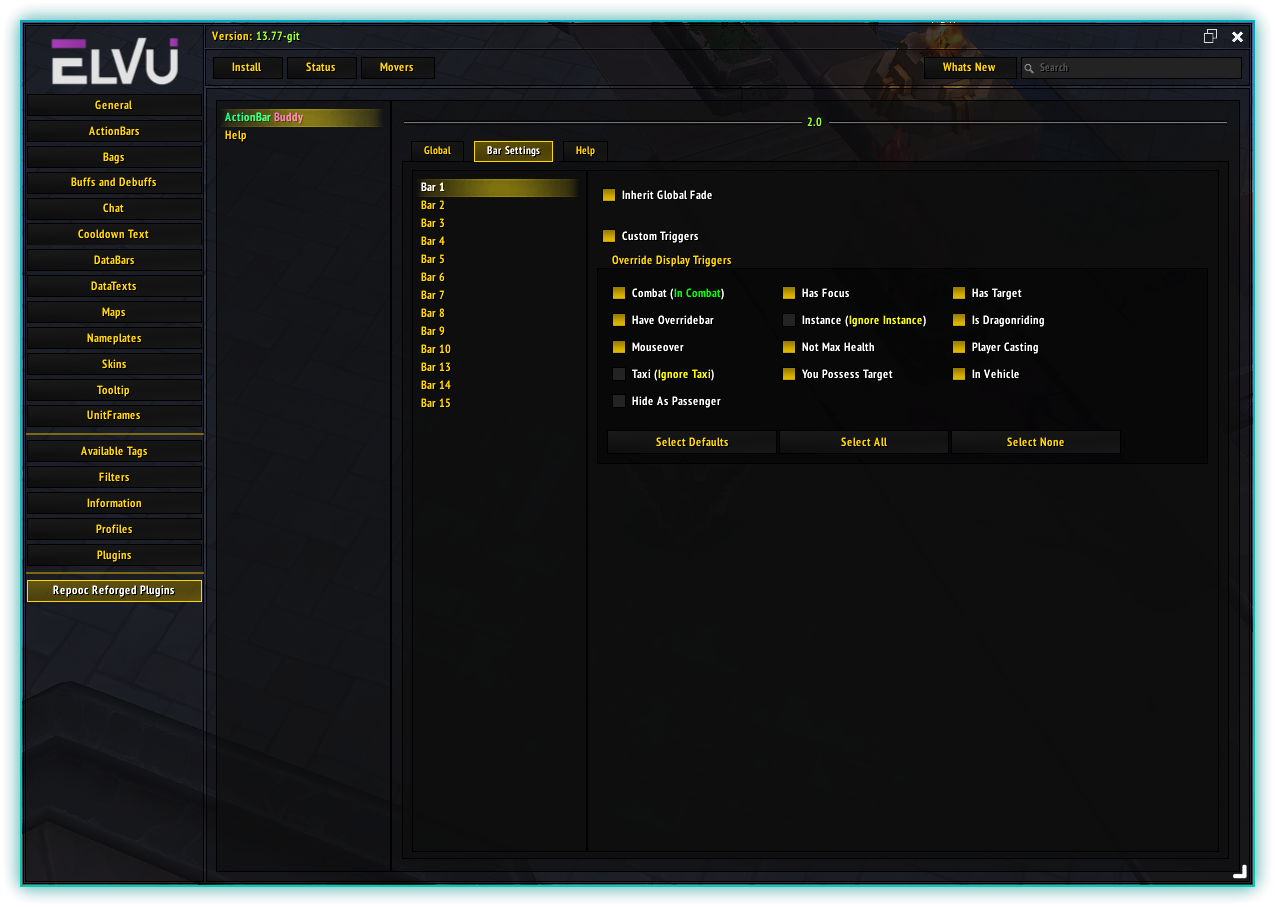
- ActionBar Buddy no longers uses ElvUI's Inherit Global Fade option in the bar's section in the main ElvUI's settings. It now has it's own option in the Bar Settings section in ActionBar Buddy's settings.
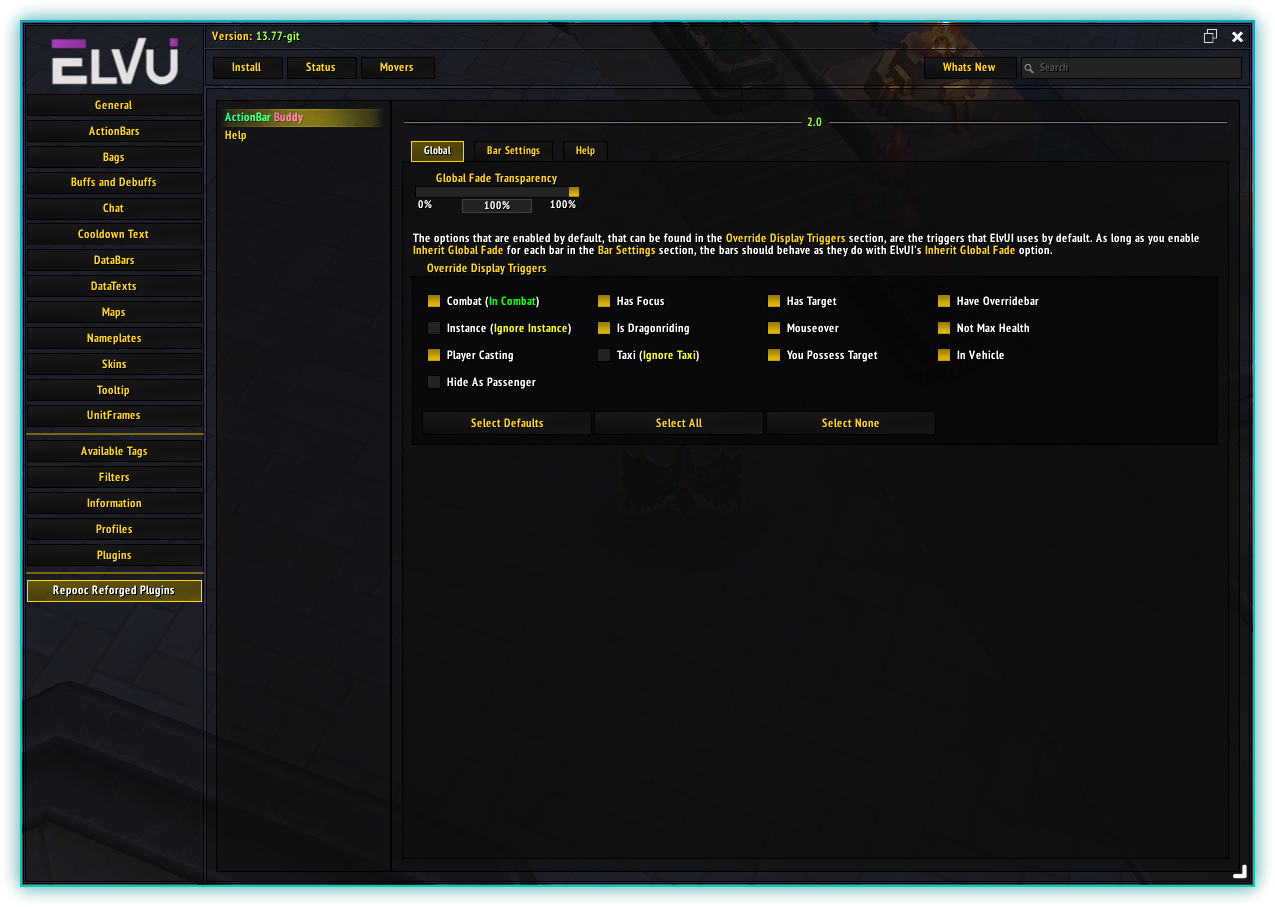
- ActionBar Buddy no longers uses ElvUI's Global Fade Transparency slider option in the General section ElvUI's ActionBars section to determine the value. It can be found in the Global section in ActionBar Buddy's settings.
- If you would like to get back to the same functionality before the rewrite, all you have to do is;
- Open ElvUI Options
- Navigate to: Repooc Reforged Plugins -> ActionBar Buddy -> Bar Settings
- Go to each bar and enable ActionBar Buddy's Inherit Global Fade option as ElvUI's is no longer used when you enable this one.
- While you are doing the step above, ensure Custom Triggers is disabled. Doing so will ensure the triggers on the Global tab will control the bars visibility, just like it was before the rewrite.
- After you have enabled Inherit Global Fade on the bars that had it before and made sure Custom Triggers are disabled, go to the Global tab and adjust the triggers and Global Fade Transparency slider.
- Congratulation's, you now reproduced the same effects as before the rewrite! You should take some time with the Custom Triggers on some bars as it can yield some nice and clean looking UI!
Did you ever use ElvUI's Inherit Global Fade option and wish that it would not trigger and show all the bars when you were Dragon Riding (aka Dynamic Flight) but instead, have only bar 1 to become fully visible when you get on the Dragon Riding mount? You can do that! With ActionBar Buddy's Inherit Global Fade option (not ElvUI's built in one), you can pick and choose if the bars share the same triggers, or some have custom triggers set, while the others share the global setting!
ActionBar Buddy is the solution! This ElvUI plugin allows you to focus on what matters by letting you take more control over what ElvUI's Inherit Global Fade gave you so you can set bars to react on a select few events instead of all of the ones ElvUI does. Take that control of your bars now and download ActionBar Buddy!
Features:
- Highly Customizable (If Needed): The main options are all located in ActionBar Buddy's section once you navigate to the Repooc Reforged Plugins section at the bottom of the navigation bar in ElvUI's configuration window.
- Control Over The Triggers: You can now have those bars show on mouseover or combat, not one or the other! You have a bit more freedom to do what you like with your bars without cluttering your screen and show when you really need them to.
Future Updates:
I strive to keep ActionBar Buddy up to everyone's needs. While I welcome and value your feedback, please understand that not all suggestions may be implemented. I'll carefully consider each idea for additional customization options and features, ensuring that any future updates align with the essence of this plugin which is aimed at making the current triggers that ElvUI sets, to be optional.
Your input is crucial in shaping the journey of this addon. Thank you for being part of the community driving its growth!
Note: Ensure you have ElvUI installed for functionality.
Download now and get what you deserve!
用户评价
暂无 / 5,0 条评价相关推荐
继续看看这些内容
