插件中文资料库
中文说明、玩家点评、适用场景和替代推荐,方便快速判断是否适合你。
- 副本、团队本和大秘境战斗提醒
- 背包、银行和物品整理
- 界面布局、头像框、姓名板和动作条优化
 RightClickSelfCast
 Questie
 TankMD Misdirect
ListLoot Classic Anniversary 插件下载与使用指南
本页整理了 ListLoot Classic Anniversary 的功能用途、适用人群、安装方法和常见问题,方便玩家快速判断是否需要安装。
适合谁用
ListLoot Classic Anniversary 是一款 背包与库存 / 其他插件 类插件,适合需要优化界面、提升操作效率或补充游戏信息提示的魔兽世界玩家。
基本信息
- 插件作者:Adambo
- 插件分类:背包与库存 / 其他插件
- 适配版本:2.5.6
- 累计下载:0
安装方法
- 点击上方下载按钮获取 ListLoot Classic Anniversary插件文件。
- 解压后将插件文件夹放入 World of Warcraft/_retail_/Interface/AddOns 目录。
- 重启游戏或在角色界面点击插件,确认 ListLoot Classic Anniversary 已启用。
- 如果插件不生效,请检查版本是否匹配,或关闭同类冲突插件后重试。
使用建议
ListLoot Classic Anniversary 安装后建议先在角色界面确认已启用,进入游戏后根据插件提供的命令、小地图按钮或设置面板进行调整。如遇到报错,可先单独启用该插件排查冲突。
ListLoot Classic Anniversary 常见问题
ListLoot Classic Anniversary 适合需要 背包与库存 / 其他插件 类功能的玩家,特别是希望提升游戏便利性、界面管理或战斗信息获取效率的用户。
下载后解压到 Interface/AddOns 目录,然后重启游戏并在角色界面启用插件。
常见原因是目录多套一层、游戏版本不匹配、依赖插件缺失或同类插件冲突。
可以查看本页的替代插件推荐和相关插件区域,按下载量和分类选择同类工具。
插件 AI 问答
可以问:这个插件正式服能用吗、和 DBM 冲突吗、怎么设置、有没有替代插件。
ListLoot Classic Anniversary 是一款魔兽世界插件,主要用于界面框架、头像、动作条或冷却显示优化、背包、银行、专业制造或物品整理、团队分配、Roll 点记录或公会管理,适合对应经典服或周年服版本使用。建议根据自己的版本和插件环境先测试兼容性。
插件用途
ListLoot Classic Anniversary 主要面向需要背包与库存功能的玩家,用来改善游戏体验、减少重复操作或补充默认界面没有直接提供的信息。
适用场景
- 界面框架、头像、动作条或冷却显示优化
- 背包、银行、专业制造或物品整理
- 团队分配、Roll 点记录或公会管理
使用建议
安装后建议先在角色选择界面或插件管理器中确认已启用,再进入游戏测试是否与现有整合包、WA 和其他插件冲突。如遇报错,可以先禁用同类插件排查。
ListLoot – Your Loot Tracker
Organized All-Time Loot History For Every Group Member.
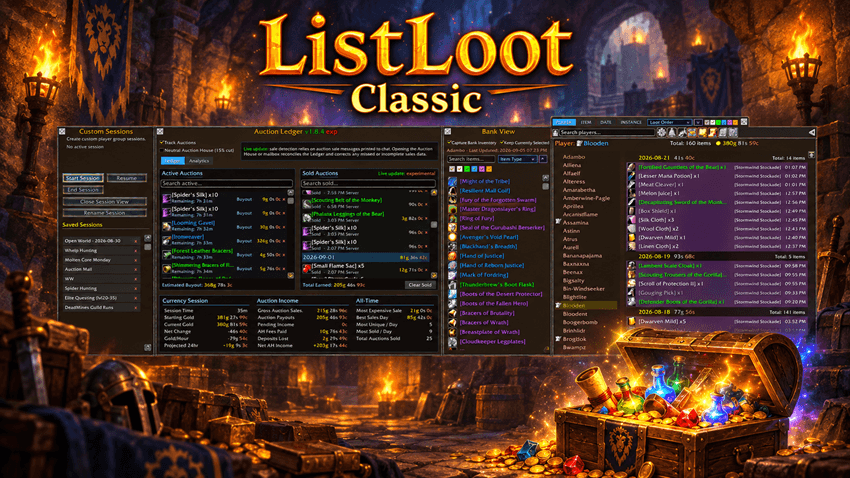
ListLoot keeps a persistent record of every item you and your group members acquire, sorted neatly by player and date. Gone are the days of scrolling endlessly through chat logs—now you can see exactly who got what, when, and in what quantity.
________________________________________________________________________________________________________________
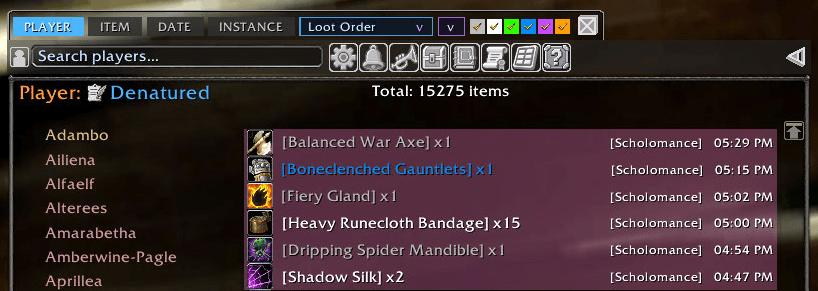
Player and Item Frames.
Player Frame: Shows all tracked players, highlighting the currently selected player for easy navigation.
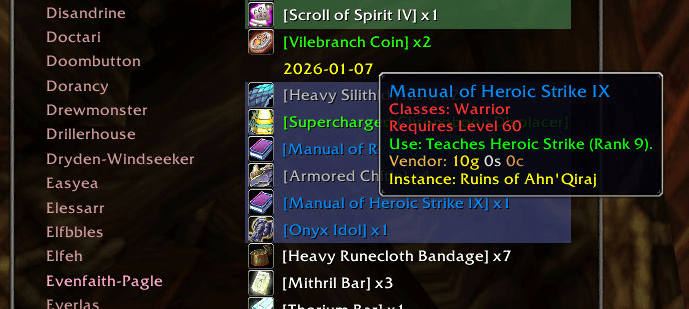
Loot Frame: Displays detailed item info for the selected player, with colored quality text, tooltips on hover, and active ItemLinks.
Player Notes.
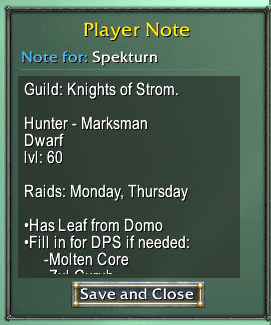
Every player in the ListLoot database can have a permanent custom note attached to their profile.
Use Player Notes for whatever information matters to you:
- Guild or group information.
- Attendance reminders.
- Player evaluations.
- Loot-management notes.
- Helpful or reliable players.
- Crafting professions or specialties.
- Follow-up reminders.
- Particularly good—or memorable—group experiences.
- Anything else worth associating with that player.
Players with an existing note are visibly marked in the player list with the player note icon for quick identification.

Notes can be opened and edited directly from the selected player's controls or from their entry in the player list.
________________________________________________________________________________________________________________
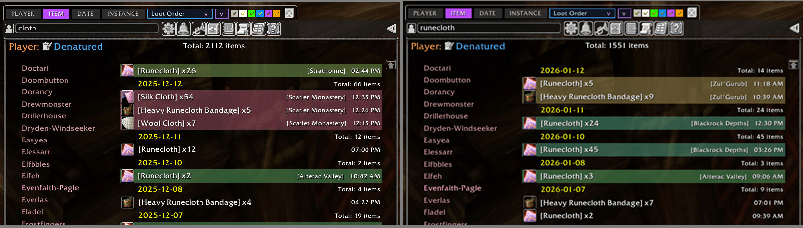
Search, Filter, and Advanced Sorting.
Need to find a specific item or check totals for a particular day? ListLoot supports searching and filtering, so you can quickly zero in on exactly what you want to see.
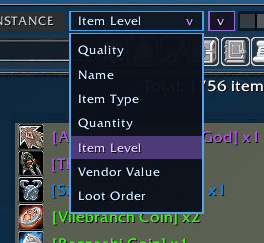
Just like the Bank View, the main item view supports advanced sorting. Item can be sorted in ascending or decending order by:
- Quality
- Name
- Item Type
- Quantity
- Item Level
- Vendor Price
- Loot Order
________________________________________________________________________________________________________________
Instance Loot Tagging.
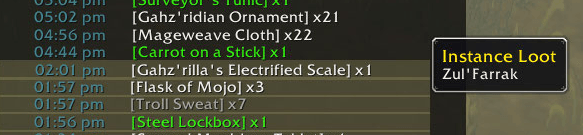
Whenever you’re in a dungeon or raid, ListLoot tags loot with an additional session detail: the instance name. You can immediately see which loot came from which encounter, adding clarity to your runs.
_______________________________________________________________________________________________________________
TImestamp(toggled).
Each loot entry is tagged with color-coded timestamps.

________________________________________________________________________________________________________________
Realtime Loot Alerts.
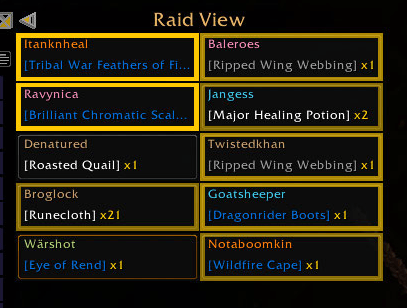
ListLoot doesn’t just log loot—it alerts you immediately when specific items are acquired, whether by you or anyone in your group. Using the Raid View feature, each group member is displayed in their own frame, showing the most recent item they’ve looted.
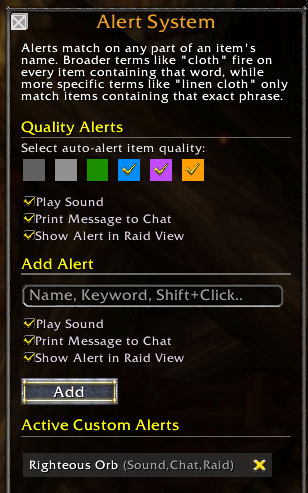
When an item on your Notification List is acquired, that player’s frame flashes until clicked, ensuring nothing gets missed. This is perfect for tracking specific drops during fast-paced dungeon runs, raids, or round-robin loot situations.
__________________________________________________________________________________________________
Custom Player Sessions.
Custom Sessions let you create saved, independent views of raids, dungeons, farming groups, or any other activity without changing the master ListLoot database.
- Start a Session and ListLoot builds a dedicated roster from players who join the group.
- Loot recorded during the Session becomes available through its own Session View.
- Give Sessions custom names for raids, guild runs, events, farming groups, or anything else worth remembering.
- Divide a Session into multiple Sub-Sessions for individual raids, days, wings, runs, or whatever organization makes sense to you.
- Leave a Session or Sub-Session name blank and ListLoot can provide a date-based default.
- Stop a Session without deleting it.
- Resume it later and choose whether to continue the previous Sub-Session or begin a new one.
- Rename Sub-Sessions at any time.
- Give individual Sub-Sessions custom colors for quick visual organization.
- View the entire Session or drill down into a single Sub-Session.
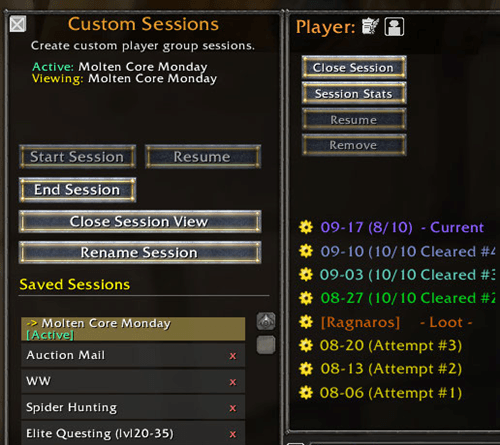
A weekend raid can remain one permanent Session while Friday, Saturday, and Sunday's runs remain separately organized inside it.
Session Stats.
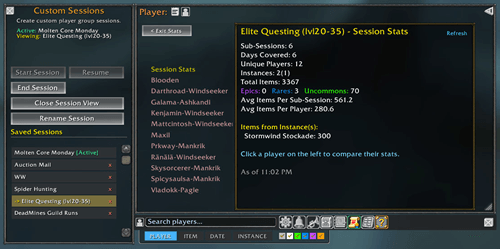
Every saved Session includes a dedicated Statistics View for analyzing both the group as a whole and the individual players who participated.
Statistics include information such as:
- Total Sub-Sessions.
- Sessions / Days represented.
- Total players who participated.
- Instances completed.
- Total items looted.
- Epic, Rare, and Uncommon loot counts.
- Per-player loot totals.
- Session-wide totals.
- Per-Session averages.
- Per-Player averages.
- Individual player performance within the selected Session.
Statistics follow the Session being viewed, allowing you to compare the complete event or focus on individual portions of it.
Useful for raid leaders, guild records, loot reviews, group comparisons, or simply confirming that yes—the same person really did get all the Epics.
_________________________________________________________________________________________________________________
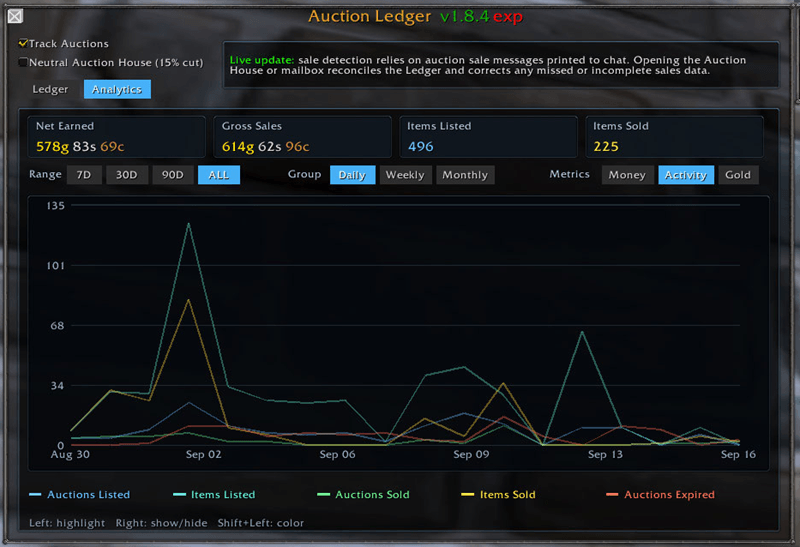
Auction Ledger.
The Auction Ledger keeps track of all active auction listings, allowing you to easily see what items you have listed, for how much, and when the listing expires. All successfully sold auctions are permanently recorded and displayed with per-day readouts.
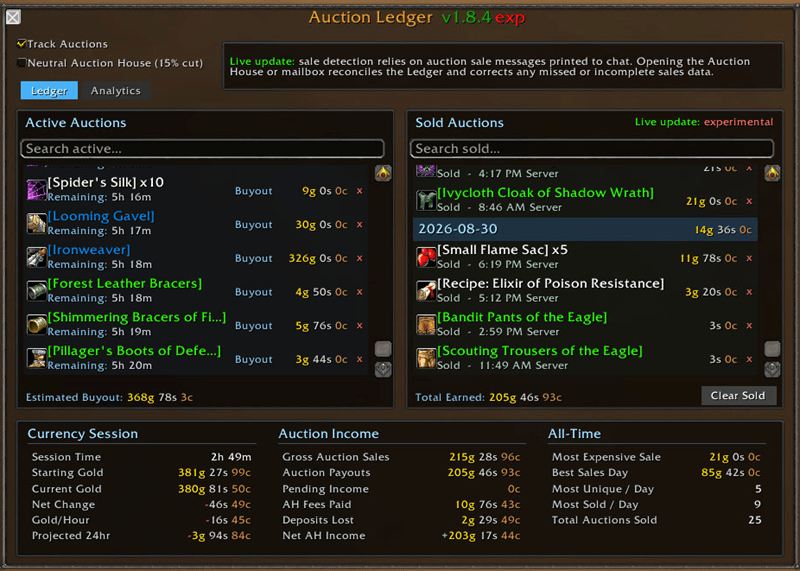
Analytics.
ListLoot keeps auction metrics, displaying your auction performance over time.
________________________________________________________________________________________________________________
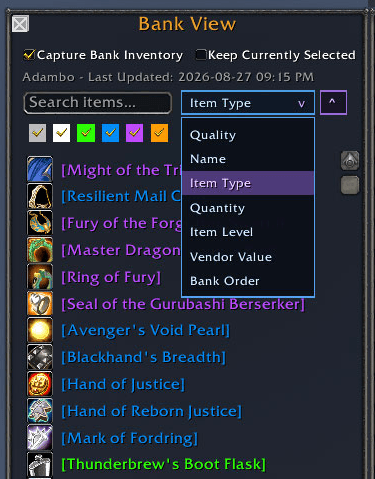
Bank View.
Bank View allows ListLoot to capture a character's bank inventory and save it for later viewing.
Once Capture Bank Inventory is enabled for a character:
- View that character's saved bank contents after leaving the bank.
- View the bank while logged into another character.
- Access saved bank inventories across characters and servers represented in ListLoot.
- Select a character from the normal ListLoot player interface and inspect their stored bank snapshot.
- See item quantities and useful item information directly from the saved inventory.
Bank View can be locked to the character currently being displayed.

That means you can keep one character's bank open while selecting another character in the main ListLoot window—particularly useful when comparing inventories instead of repeatedly playing UI ping-pong.
Advanced Bank Sorting
Saved inventory can be sorted ascending or descending by:
- Quality
- Name
- Item Type
- Quantity
- Item Level
- Vendor Price
- Original Bank Order
________________________________________________________________________________________________________________
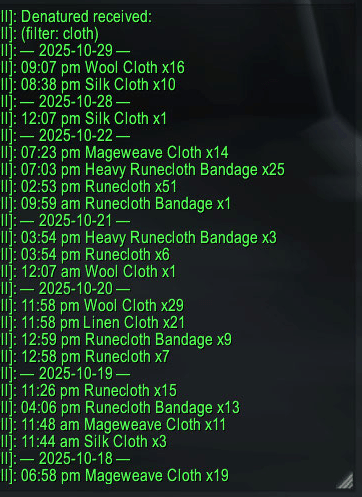
Post Item Readout to Chat.
Post the item display for a given player to party, raid, or guild chat channels.
________________________________________________________________________________________________________________
Visual Analysis of Loot Patterns.
With session-based color coding and totals, you can easily analyze loot trends:
Which runs gave the best rewards?
Who received the most rare items?
Are certain players missing from distribution?
Who It’s For.
Guild leaders & loot officers: Manage and track loot distribution efficiently.
Raid organizers: Review participation and session results.
Casual players: Keep a personal record of loot history effortlessly.
Why ListLoot Matters.
Transform chaotic loot chat into structured, meaningful information. Every drop is logged, analyzed, and displayed, while real-time notifications ensure you never miss an important item. It’s not just tracking, it’s awareness, clarity, and insight, all in one addon.
CurseForge: https://www.curseforge.com/wow/addons/listloot用户评价
暂无 / 5,0 条评价相关推荐
继续看看这些内容
