插件中文资料库
中文说明、玩家点评、适用场景和替代推荐,方便快速判断是否适合你。
- 副本、团队本和大秘境战斗提醒
- 界面布局、头像框、姓名板和动作条优化
 RightClickSelfCast
 Sleek XP Bubbles
 Ultimate Gathering Counter
Buzzard Frames 插件下载与使用指南
本页整理了 Buzzard Frames 的功能用途、适用人群、安装方法和常见问题,方便玩家快速判断是否需要安装。
适合谁用
Buzzard Frames 是一款 团队框架 / 治疗 / 单位框架 类插件,适合需要优化界面、提升操作效率或补充游戏信息提示的魔兽世界玩家。
基本信息
- 插件作者:serinaa
- 插件分类:团队框架 / 治疗 / 单位框架
- 适配版本:12.1.0,12.1.5
- 累计下载:0
安装方法
- 点击上方下载按钮获取 Buzzard Frames插件文件。
- 解压后将插件文件夹放入 World of Warcraft/_retail_/Interface/AddOns 目录。
- 重启游戏或在角色界面点击插件,确认 Buzzard Frames 已启用。
- 如果插件不生效,请检查版本是否匹配,或关闭同类冲突插件后重试。
使用建议
Buzzard Frames 安装后建议先在角色界面确认已启用,进入游戏后根据插件提供的命令、小地图按钮或设置面板进行调整。如遇到报错,可先单独启用该插件排查冲突。
Buzzard Frames 常见问题
Buzzard Frames 适合需要 团队框架 / 治疗 / 单位框架 类功能的玩家,特别是希望提升游戏便利性、界面管理或战斗信息获取效率的用户。
下载后解压到 Interface/AddOns 目录,然后重启游戏并在角色界面启用插件。
常见原因是目录多套一层、游戏版本不匹配、依赖插件缺失或同类插件冲突。
可以查看本页的替代插件推荐和相关插件区域,按下载量和分类选择同类工具。
插件 AI 问答
可以问:这个插件正式服能用吗、和 DBM 冲突吗、怎么设置、有没有替代插件。
Buzzard Frames 是一款魔兽世界插件,主要用于界面框架、头像、动作条或冷却显示优化。建议根据自己的版本和插件环境先测试兼容性。
插件用途
Buzzard Frames 主要面向需要团队框架功能的玩家,用来改善游戏体验、减少重复操作或补充默认界面没有直接提供的信息。
适用场景
- 界面框架、头像、动作条或冷却显示优化
使用建议
安装后建议先在角色选择界面或插件管理器中确认已启用,再进入游戏测试是否与现有整合包、WA 和其他插件冲突。如遇报错,可以先禁用同类插件排查。
A raidframe addon where you don't need a PhD to navigate the settings panel.
/bf or left-click the BuzzardFrames minimap icon to open the settings. Right-click the minimap icon to toggle setup mode for repositioning frames.
A discord server is now available for questions/feature requests: Buzzard Frames discord


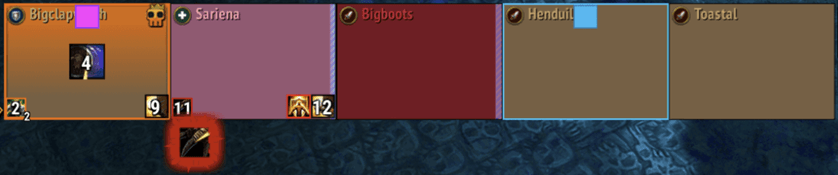

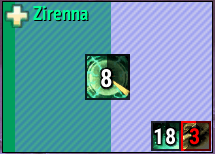
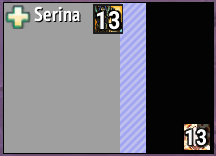
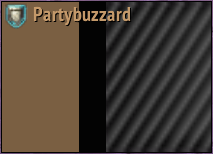
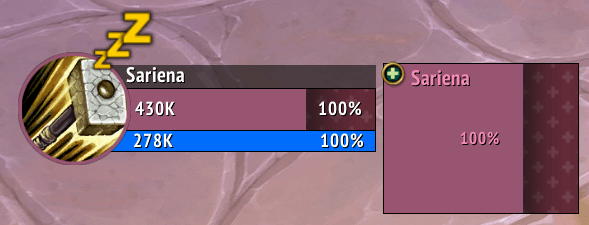
Buzzard Frames are intended to look very similar to Blizzard's default frames:
- Default settings mirror Blizzard-frames as much as possible.
- Uses standard Blizzard textures for health & power bars, shields, heal absorbs, dispellable debuffs and temporary max health reduction.
- Also includes full customization options for anyone who wants something totally different.
- Uses secure headers.
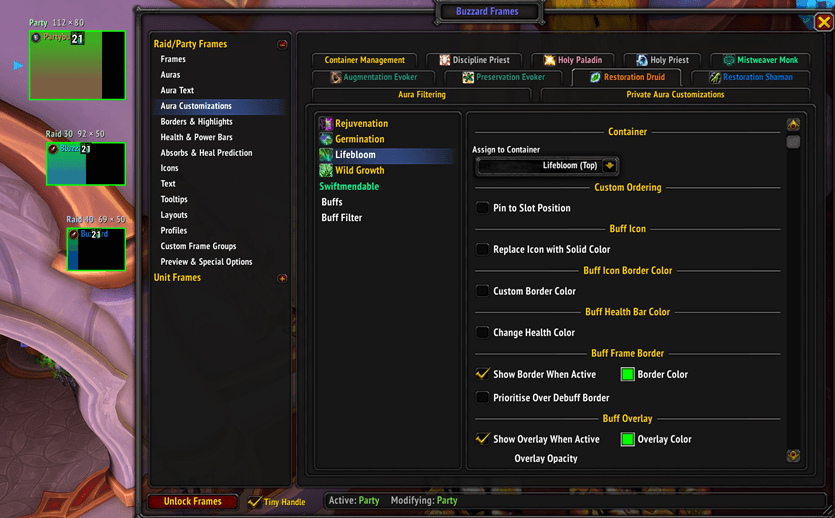
Includes several features that the standard Blizzard raid frames are missing:
- Custom healer buff configurations with predefined non-secret spell lists.
- Buff-triggered health color changes and overlays, overabsorb display and hiding raidbuffs out of combat.
- Overabsorb display.
- Auto-layout switching by instance size, role or spec.
- Comprehensive Preview and Setup Mode for configuration.
Special features aimed at Augmentation Evoker:
- Sense Power tracking with custom border, health color change, overlay etc.
- Custom Frame Groups module with filters by Role, Class, Group and Name List Filter mode with mouseover keybind option for unit assignment.
Click Casting Support
- Supports Blizzard click-casting and Clique addon.
FrameSort
- Supports FrameSort addon for increased flexibility in group sorting.
Unit Frames
- Buzzard Frames includes a Unit Frames module with simple Player, Target, Focus, Pet, Boss frames that match the style of the raidframes.
- Includes detachable power, alt power and resource bars.
- Includes Unit Frame Layouts feature which allows the unit frames and player power/resource bars to be positioned differently depending on the current role, spec or group type.
- Disabled by default - can be enabled in the Unit Frames section of the options.
- Uses the oUF framework.
**The backend code of Buzzard Frames is largely based on the open-source Grid2. Not affiliated with the developer in any way, but very much appreciate the open licensing of their framework which made Buzzard Frames possible. AI is used in the development of this addon.**
CurseForge: https://www.curseforge.com/wow/addons/buzzard-frames用户评价
暂无 / 5,0 条评价相关推荐
继续看看这些内容
