插件中文资料库
中文说明、玩家点评、适用场景和替代推荐,方便快速判断是否适合你。
- 背包、银行和物品整理
- 任务路线、地图标记和野外探索
- 界面布局、头像框、姓名板和动作条优化
 Details! Mythic+ Scoreboard
 Copy Anything
 TankMD Misdirect
GudaChat 插件下载与使用指南
本页整理了 GudaChat 的功能用途、适用人群、安装方法和常见问题,方便玩家快速判断是否需要安装。
适合谁用
GudaChat 是一款 聊天与通讯 类插件,适合需要优化界面、提升操作效率或补充游戏信息提示的魔兽世界玩家。
基本信息
- 插件作者:Guda
- 插件分类:聊天与通讯
- 适配版本:11.2.7,5.5.4,2.5.6,1.15.9,12.1.5,1.60.1
- 累计下载:52
安装方法
- 点击上方下载按钮获取 GudaChat插件文件。
- 解压后将插件文件夹放入 World of Warcraft/_retail_/Interface/AddOns 目录。
- 重启游戏或在角色界面点击插件,确认 GudaChat 已启用。
- 如果插件不生效,请检查版本是否匹配,或关闭同类冲突插件后重试。
使用建议
GudaChat 安装后建议先在角色界面确认已启用,进入游戏后根据插件提供的命令、小地图按钮或设置面板进行调整。如遇到报错,可先单独启用该插件排查冲突。
GudaChat 常见问题
GudaChat 适合需要 聊天与通讯 类功能的玩家,特别是希望提升游戏便利性、界面管理或战斗信息获取效率的用户。
下载后解压到 Interface/AddOns 目录,然后重启游戏并在角色界面启用插件。
常见原因是目录多套一层、游戏版本不匹配、依赖插件缺失或同类插件冲突。
可以查看本页的替代插件推荐和相关插件区域,按下载量和分类选择同类工具。
插件 AI 问答
可以问:这个插件正式服能用吗、和 DBM 冲突吗、怎么设置、有没有替代插件。
GudaChat 是一款魔兽世界插件,主要用于界面框架、头像、动作条或冷却显示优化、背包、银行、专业制造或物品整理。建议根据自己的版本和插件环境先测试兼容性。
插件用途
GudaChat 主要面向需要聊天与通讯功能的玩家,用来改善游戏体验、减少重复操作或补充默认界面没有直接提供的信息。
适用场景
- 界面框架、头像、动作条或冷却显示优化
- 背包、银行、专业制造或物品整理
使用建议
安装后建议先在角色选择界面或插件管理器中确认已启用,再进入游戏测试是否与现有整合包、WA 和其他插件冲突。如遇报错,可以先禁用同类插件排查。
A clean, minimalistic chat replacement for World of Warcraft. GudaChat strips away the clutter of Blizzard's default chat frame and replaces it with a modern, streamlined interface, while keeping all the functionality you need.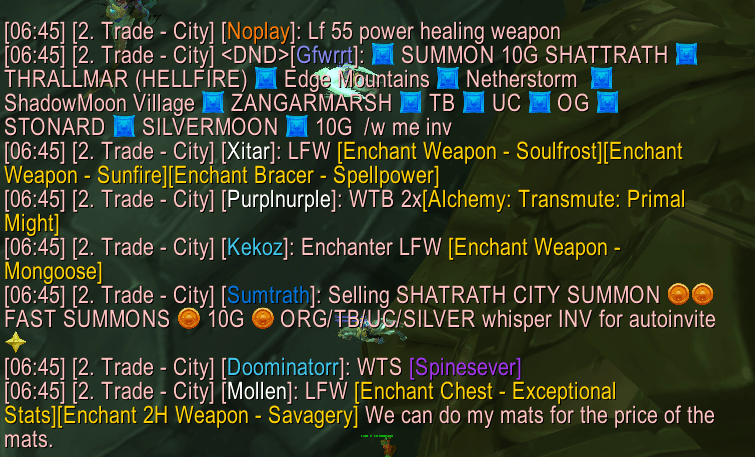
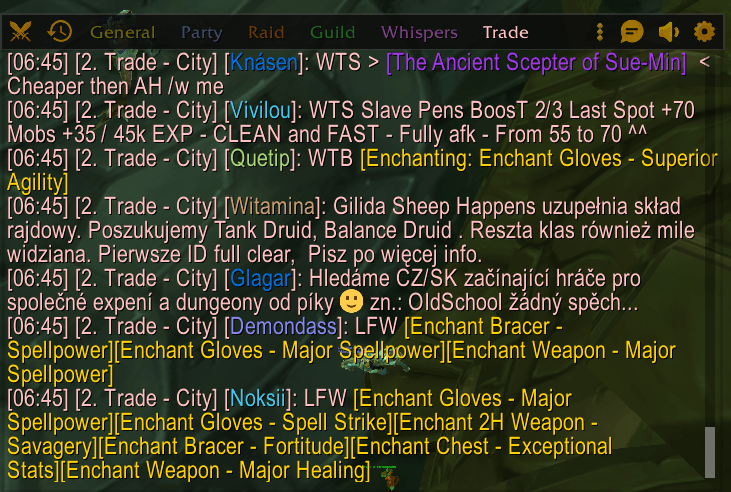
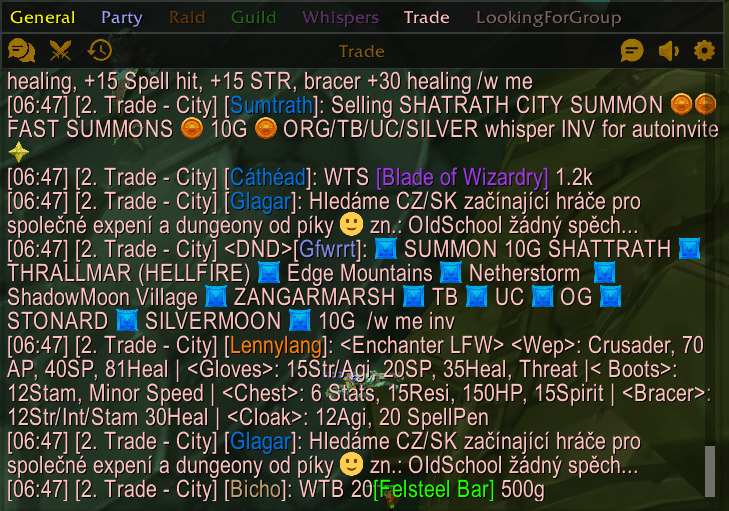
New in 2.0
- Themes — Blizzard, Modern Dark and Classic. Switch instantly, no reload needed.
- New settings window — six clear pages with a live chat preview.
- Whisper icon and quick reply — see who whispered you and answer without leaving what you are doing.
- Whisper ring — bind one key: tap it to answer the last whisper, hold it to pick a person.
- Hide chat text when not in use — a fully clean screen until you need the chat.
- WoW: Forever support, plus many fixes and a faster, lighter chat.
Features
Themes
Pick the look you like in Settings > Appearance. Every theme switches instantly, without a reload.
- Blizzard (default) — the game's own gold text, dialog frames and tooltip style
- Modern Dark — flat dark panels with rounded corners and an accent colour (your class colour by default, or any colour you choose)
- Classic — the original GudaChat look

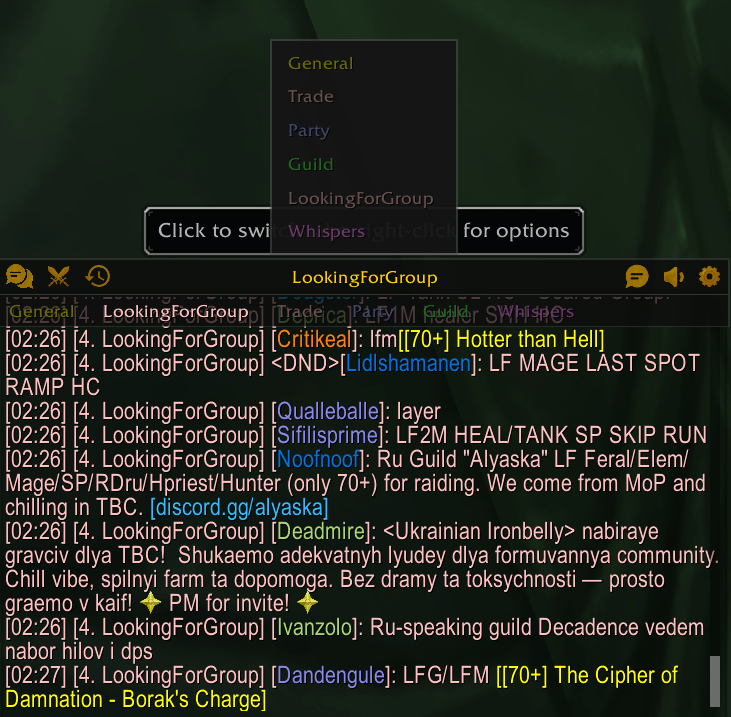
Hover-Reveal Header Bar
A compact header bar appears on hover with quick-access icons for tab switching, combat log, whispers, chat type selection, channels, history, and settings. Stays out of your way until you need it.
Whisper Icon and Quick Reply
A small whisper icon shows how many people sent you unread whispers. Hover it to see who whispered you and their last message. Click a name to answer in a small reply box, or click the icon to answer the latest person. Turn it off in Settings > Tabs & Alerts if you don't need it.

The reply box shows your last messages with that person. Press Enter to send, Shift+Enter to send and keep it open, or Esc to close it. Drag it anywhere you like; it remembers the spot.

Whisper Ring
Bind the Whisper ring key in Key Bindings > GudaChat. Tap the key to reply to the latest whisper at your mouse. Hold it to open a ring of the people who whispered you, move toward one, and let go to reply to them.
Hide Chat Text When Not in Use
Optional: the chat text fades out together with the header when your mouse leaves the chat. It comes back when you hover, when you type, and for a few seconds when a new message arrives.
Emoji Support
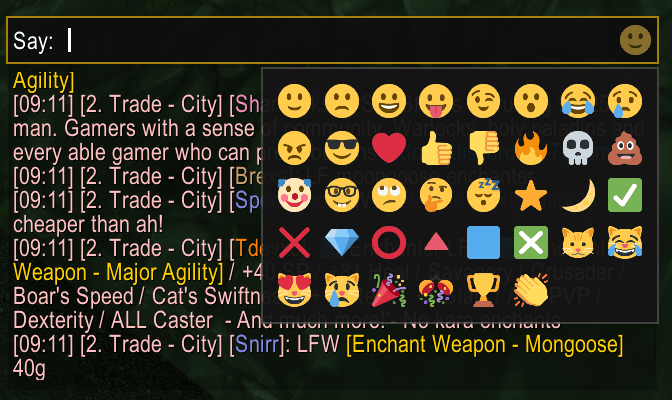
Over 30 built-in emojis that render inline in chat messages. Type shortcuts like :) :fire: :skull: or use the emoji picker button in the input bar. Adjustable emoji size.
Chat History
Messages persist across sessions and reloads, saved for each character. Browse, search, and filter history by channel. Copy entire conversations to clipboard with one click. Separate Loot and Addon logs, each with its own size limit.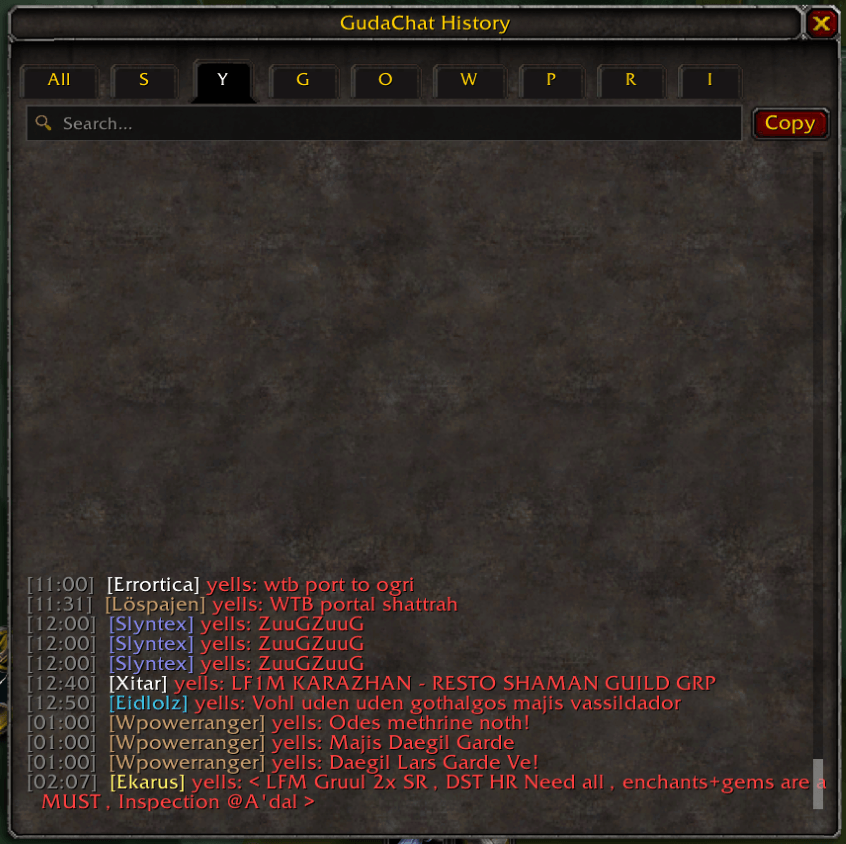
Copyable Links
URLs in chat are automatically highlighted and clickable. Click any link to open a copy popup — no more manually retyping URLs.
Class-Colored Names & Player Levels
Player names are colored by class. Optional level indicators show difficulty-colored level brackets next to each player's name. Your own name is highlighted when someone mentions you, with an optional sound.
Dedicated Whisper Tab
Enable a separate whisper tab to keep private messages organized. Incoming whispers trigger a blinking notification on the header icon.
Combat Log Filtering
Quick-filter the combat log with subtabs: My Actions, or What Happened to Me? Your choice is kept when you switch tabs.
Customizable Settings
Open settings with /gc or the header gear icon. Six pages:
- Appearance — Theme, accent colour, live preview, chat font, size and line spacing, background
- Chat — Lock position, message fading, hide text when not in use, scrollbar, timestamps, input bar position
- Messages — Class colors, player levels, copyable links, name highlight and sound, emojis
- Tabs & Alerts — Tab bar, whisper tab, tab blink notifications, whisper icon
- History & Logs — History, loot log, addon log, size limits, clear history
- About — Version, supported game versions and commands


Additional Details
- Custom context menu (right-click the tab name) for renaming, creating, and removing chat windows, font size, and background color
- Sleek custom scrollbar with scroll-to-bottom button
- Drag-to-move via the header bar with lockable position
- Available in English, German, French, Spanish, Italian, Portuguese, Russian, Korean and Chinese
- Works on Retail, MoP Classic, TBC Anniversary, Classic Era and WoW: Forever
Slash Commands
/gcor/gudachat— Open settings
Part of the Guda Suite
Works alongside GudaBags and GudaDamage for a consistent, minimal UI experience.
CurseForge: https://www.curseforge.com/wow/addons/gudachat用户评价
暂无 / 5,0 条评价相关推荐
继续看看这些内容
