插件中文资料库
中文说明、玩家点评、适用场景和替代推荐,方便快速判断是否适合你。
- 副本、团队本和大秘境战斗提醒
- 界面布局、头像框、姓名板和动作条优化
- 伤害、治疗、仇恨和战斗数据统计
 Details! Mythic+ Scoreboard
 BagSync
 TankMD Misdirect
Click to Cast Tooltip 插件下载与使用指南
本页整理了 Click to Cast Tooltip 的功能用途、适用人群、安装方法和常见问题,方便玩家快速判断是否需要安装。
适合谁用
Click to Cast Tooltip 是一款 战斗 / 鼠标提示 / 首领战斗 / 治疗 / 单位框架 类插件,适合需要优化界面、提升操作效率或补充游戏信息提示的魔兽世界玩家。
基本信息
- 插件作者:theGimpboy
- 插件分类:战斗 / 鼠标提示 / 首领战斗 / 治疗 / 单位框架
- 适配版本:12.0.5
- 累计下载:53
安装方法
- 点击上方下载按钮获取 Click to Cast Tooltip插件文件。
- 解压后将插件文件夹放入 World of Warcraft/_retail_/Interface/AddOns 目录。
- 重启游戏或在角色界面点击插件,确认 Click to Cast Tooltip 已启用。
- 如果插件不生效,请检查版本是否匹配,或关闭同类冲突插件后重试。
使用建议
Click to Cast Tooltip 安装后建议先在角色界面确认已启用,进入游戏后根据插件提供的命令、小地图按钮或设置面板进行调整。如遇到报错,可先单独启用该插件排查冲突。
Click to Cast Tooltip 常见问题
Click to Cast Tooltip 适合需要 战斗 / 鼠标提示 / 首领战斗 / 治疗 / 单位框架 类功能的玩家,特别是希望提升游戏便利性、界面管理或战斗信息获取效率的用户。
下载后解压到 Interface/AddOns 目录,然后重启游戏并在角色界面启用插件。
常见原因是目录多套一层、游戏版本不匹配、依赖插件缺失或同类插件冲突。
可以查看本页的替代插件推荐和相关插件区域,按下载量和分类选择同类工具。
插件 AI 问答
可以问:这个插件正式服能用吗、和 DBM 冲突吗、怎么设置、有没有替代插件。
Click to Cast Tooltip 是一款魔兽世界插件,主要用于界面框架、头像、动作条或冷却显示优化、伤害统计、输出循环或战斗表现分析、法术、物品 ID 和提示信息显示。建议根据自己的版本和插件环境先测试兼容性。
插件用途
Click to Cast Tooltip 主要面向需要首领战斗功能的玩家,用来改善游戏体验、减少重复操作或补充默认界面没有直接提供的信息。
适用场景
- 界面框架、头像、动作条或冷却显示优化
- 伤害统计、输出循环或战斗表现分析
- 法术、物品 ID 和提示信息显示
使用建议
安装后建议先在角色选择界面或插件管理器中确认已启用,再进入游戏测试是否与现有整合包、WA 和其他插件冲突。如遇报错,可以先禁用同类插件排查。
Click-To-Cast-Tooltip
Click-To-Cast-Tooltip is a World of Warcraft addon that displays a dynamic tooltip showing which spells, macros, or actions you can cast based on your current modifier keys (Shift, Alt, Ctrl) and mouse button.
Features
- Custom tooltip at mouse cursor showing available click-cast bindings
- Blizzard tooltip integration for unit frames
- Clique addon integration: show your Clique click-cast bindings in the tooltip
- Full support for party, raid, boss, arena, and pet frames
- Works with Blizzard, ElvUI, Cell, and other major unit frame addons
- Highly configurable appearance and behavior
Screenshots
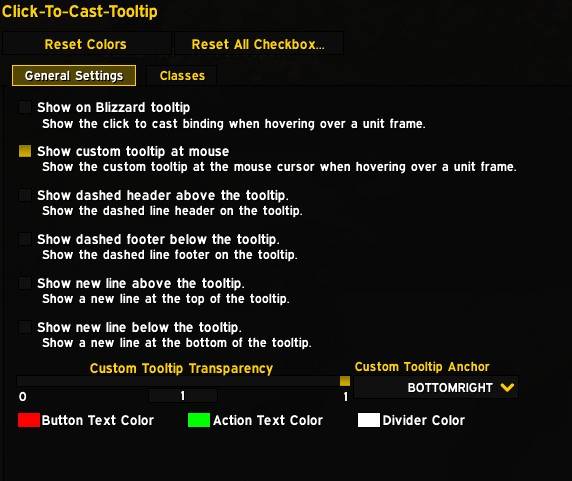
Settings Panel
Access the settings via /ctctt or through Esc → Options → AddOns → Click-To-Cast Tooltip:
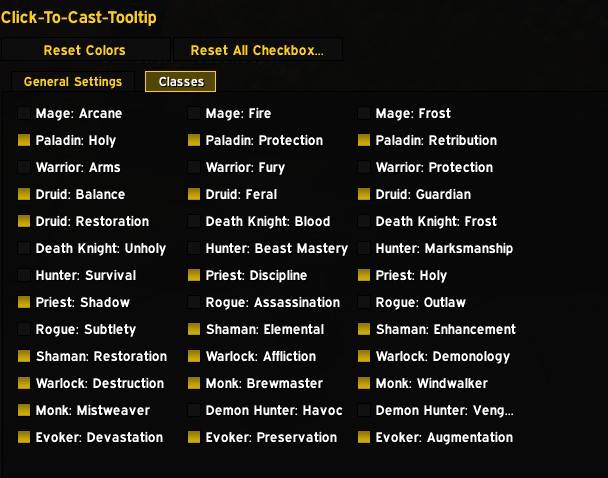
Class Color Settings
Customize colors for buttons and actions:
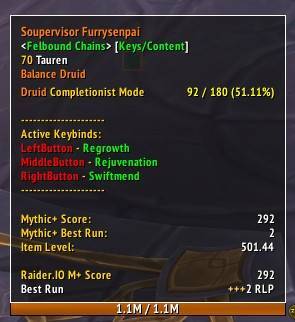
Example Blizzard Tooltip
Blizzard tooltip with all options enabled (shown with ElvUI):
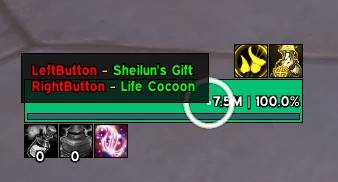
Mouseover Tooltip
Tooltip appears at your mouse cursor when hovering unit frames:
Slash Commands
/ctcttand/clicktocasttooltipOpens the options panel for the addon.
Settings Overview
All settings are available in the options panel. Here’s what you can configure:
Tooltip Appearance
- Show Custom Tooltip: Enable/disable the custom tooltip at your mouse.
- Tooltip Anchor: Set the anchor point for the tooltip (e.g., BOTTOMRIGHT, TOPLEFT).
- Tooltip Transparency: Adjust the transparency of the tooltip.
Blizzard Tooltip Integration
- Show Blizzard Tooltip: Enable/disable extra lines in the Blizzard tooltip.
- Show Header/Footer: Add dashed lines above/below the tooltip for clarity.
- Show New Line Top/Bottom: Add empty lines for spacing.
Colors
- Button Color: Set the color for mouse button names.
- Action Color: Set the color for spell/macro/action names.
- Divider Color: Set the color for header/footer lines.
Spec Toggles
- Spec-Specific Enable/Disable: Enable or disable the tooltip for each specialization.
Supported Unit Frames
- Blizzard: Player, Target, Focus, Pet, Party, Raid, Boss, Arena, and more
- ElvUI: All major unit frames, including party/raid/arena
- Cell: Party, raid, pet, spotlight, quick assist, and more
Clique Addon Support
- If you use the popular Clique addon for click-casting, Click-To-Cast-Tooltip will automatically detect and display your Clique bindings in the tooltip.
- You can choose to show only Clique bindings, only Blizzard bindings, or both (configurable in the settings).
- On first load with Clique installed, you'll be prompted to disable Blizzard bindings for a cleaner experience (one-time prompt).
How It Works
When you hover over a unit frame, the addon scans your click-cast bindings and displays a tooltip showing which actions are available for the current modifier keys and mouse button. The tooltip updates dynamically as you press or release modifier keys.
Feedback & Support
If you encounter issues or have feature requests, please open an issue on GitHub.
CurseForge: https://www.curseforge.com/wow/addons/click-to-cast-tooltip用户评价
暂无 / 5,0 条评价相关推荐
继续看看这些内容
