插件中文资料库
中文说明、玩家点评、适用场景和替代推荐,方便快速判断是否适合你。
- 日常任务、练级和满级玩法辅助
- 界面体验优化和信息展示增强
- 副本前先测试兼容性,确认不报错后再长期使用
 Details! Mythic+ Scoreboard
 TankMD Misdirect
 RightClickSelfCast
Combat Mode (MouseLook) 插件下载与使用指南
本页整理了 Combat Mode (MouseLook) 的功能用途、适用人群、安装方法和常见问题,方便玩家快速判断是否需要安装。
适合谁用
Combat Mode (MouseLook) 是一款 战斗 / HUD界面 / 其他插件 类插件,适合需要优化界面、提升操作效率或补充游戏信息提示的魔兽世界玩家。
基本信息
- 插件作者:thericgames
- 插件分类:战斗 / HUD界面 / 其他插件
- 适配版本:12.0.0,12.0.1,12.0.5
- 累计下载:27
安装方法
- 点击上方下载按钮获取 Combat Mode (MouseLook)插件文件。
- 解压后将插件文件夹放入 World of Warcraft/_retail_/Interface/AddOns 目录。
- 重启游戏或在角色界面点击插件,确认 Combat Mode (MouseLook) 已启用。
- 如果插件不生效,请检查版本是否匹配,或关闭同类冲突插件后重试。
使用建议
Combat Mode (MouseLook) 安装后建议先在角色界面确认已启用,进入游戏后根据插件提供的命令、小地图按钮或设置面板进行调整。如遇到报错,可先单独启用该插件排查冲突。
Combat Mode (MouseLook) 常见问题
Combat Mode (MouseLook) 适合需要 战斗 / HUD界面 / 其他插件 类功能的玩家,特别是希望提升游戏便利性、界面管理或战斗信息获取效率的用户。
下载后解压到 Interface/AddOns 目录,然后重启游戏并在角色界面启用插件。
常见原因是目录多套一层、游戏版本不匹配、依赖插件缺失或同类插件冲突。
可以查看本页的替代插件推荐和相关插件区域,按下载量和分类选择同类工具。
插件 AI 问答
可以问:这个插件正式服能用吗、和 DBM 冲突吗、怎么设置、有没有替代插件。
Combat Mode (MouseLook) 是一款魔兽世界插件,主要用于其他插件相关功能。建议根据自己的版本和插件环境先测试兼容性。
插件用途
Combat Mode (MouseLook) 主要面向需要其他插件功能的玩家,用来改善游戏体验、减少重复操作或补充默认界面没有直接提供的信息。
适用场景
- 其他插件相关功能
使用建议
安装后建议先在角色选择界面或插件管理器中确认已启用,再进入游戏测试是否与现有整合包、WA 和其他插件冲突。如遇报错,可以先禁用同类插件排查。
Introducing Combat Mode – an AddOn designed to bring a more dynamic action combat experience to World of Warcraft by implementing Free Look (Mouselook), Reticle Targeting, casting with mouse clicks, and more

With a full suite of carefully programmed changes inspired by Guild Wars 2's Action Camera - all aimed at breathing some much-needed life into WoW's tab-targeting combat - Combat Mode introduces features like Free Look (Mouselook), allowing you to change your character’s facing direction by moving the mouse without needing to perpetually hold right-click. When enabled - either through a toggle or press & hold key bind - the cursor is locked to the center of the screen and transformed into a reticle capable of target selection, even supporting the use of @cursor or @mouseover macros.
Combat Mode takes it further by allowing you to cast abilities with mouse clicks, a common mechanic in third-person action games. For convenience, the AddOn will automatically deactivate Free Look while interacting with a range of interface panels, reactivating it once closed.
Experience World of Warcraft like never before with Combat Mode!
 FEATURES
- Mouse Look Camera - Rotate the player character's view with the camera without having to perpetually hold right click.
- Reticle Targeting - Enable users to target units by simply aiming the reticle at them, as well as allowing proper use of @mouseover and @cursor macro decorators in combination with the crosshairs.
- Mouse Click Casting - When Free Look is enabled, frees your mouse clicks so you can cast up to 8 skills with them.
- Cursor Unlock - Automatically releases the cursor when opening interface panels like bags, map, character panel, etc.
- Healing Radial - Radial menu for quickly casting helpful spells at party members
INSTRUCTIONS
After installing the AddOn, you'll be greeted by this message upon your first login on each character: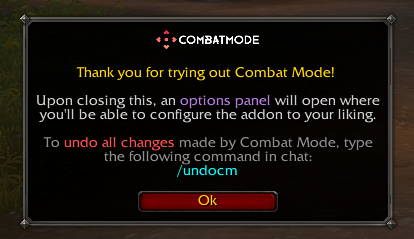
- Click OK to proceed or go to Game Menu (ESC) > Options > AddOns > Combat Mode.
- In the options panel and Edit Mode, you'll be able to configure the addon to your liking.
SUPPORT
Talk to us on Discord.
CONTRIBUTING
You can submit a PR with your contributions to Combat Mode's repository on GitHub.
Thank you to all of our contributors who have worked on this project.
CurseForge: https://www.curseforge.com/wow/addons/combat-mode
用户评价
暂无 / 5,0 条评价相关推荐
继续看看这些内容
