插件中文资料库
中文说明、玩家点评、适用场景和替代推荐,方便快速判断是否适合你。
- 副本、团队本和大秘境战斗提醒
- 界面布局、头像框、姓名板和动作条优化
 Details! Mythic+ Scoreboard
 BagSync
 TankMD Misdirect
Keystone Roulette 插件下载与使用指南
本页整理了 Keystone Roulette 的功能用途、适用人群、安装方法和常见问题,方便玩家快速判断是否需要安装。
适合谁用
Keystone Roulette 是一款 其他插件 类插件,适合需要优化界面、提升操作效率或补充游戏信息提示的魔兽世界玩家。
基本信息
- 插件作者:Pinta365
- 插件分类:其他插件
- 适配版本:12.1.5
- 累计下载:57
安装方法
- 点击上方下载按钮获取 Keystone Roulette插件文件。
- 解压后将插件文件夹放入 World of Warcraft/_retail_/Interface/AddOns 目录。
- 重启游戏或在角色界面点击插件,确认 Keystone Roulette 已启用。
- 如果插件不生效,请检查版本是否匹配,或关闭同类冲突插件后重试。
使用建议
Keystone Roulette 安装后建议先在角色界面确认已启用,进入游戏后根据插件提供的命令、小地图按钮或设置面板进行调整。如遇到报错,可先单独启用该插件排查冲突。
Keystone Roulette 常见问题
Keystone Roulette 适合需要 其他插件 类功能的玩家,特别是希望提升游戏便利性、界面管理或战斗信息获取效率的用户。
下载后解压到 Interface/AddOns 目录,然后重启游戏并在角色界面启用插件。
常见原因是目录多套一层、游戏版本不匹配、依赖插件缺失或同类插件冲突。
可以查看本页的替代插件推荐和相关插件区域,按下载量和分类选择同类工具。
插件 AI 问答
可以问:这个插件正式服能用吗、和 DBM 冲突吗、怎么设置、有没有替代插件。
Keystone Roulette 是一款魔兽世界插件,主要用于副本、团本、大秘境或钥石辅助。建议根据自己的版本和插件环境先测试兼容性。
插件用途
Keystone Roulette 主要面向需要其他插件功能的玩家,用来改善游戏体验、减少重复操作或补充默认界面没有直接提供的信息。
适用场景
- 副本、团本、大秘境或钥石辅助
使用建议
安装后建议先在角色选择界面或插件管理器中确认已启用,再进入游戏测试是否与现有整合包、WA 和其他插件冲突。如遇报错,可以先禁用同类插件排查。
Keystone Roulette - World of Warcraft Addon
Tired of endless debates about which Mythic+ dungeon to run? Let fate decide with Keystone Roulette!
Description
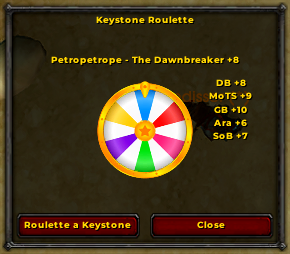
Keystone Roulette adds a bit of excitement to your Mythic+ runs by randomly selecting a keystone from your party members.
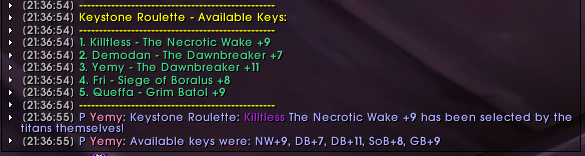
Type /ksr to open the GUI to roulette for a keystone to run or simply type /ksr roll or /ksr roulette to roll without GUI, and the addon will:
- Gather keystone information from everyone in your group.
- Choose a keystone at random.
- Announce the chosen dungeon in party chat, along with a fun, randomized message.
- List all available keystones for transparency.
No more arguments, no more indecision – just pure, unadulterated dungeon-running fun!
Download
You can download Keystone Roulette from these popular sources:
Slash Commands
Keystone Roulette offers the following slash commands:
/ksr: Opens the roulette GUI to visually roll for a keystone./ksr roll,/ksr roulette: Rolls for a random keystone from your party./ksr options: Opens the addon's options panel./ksr help: Displays a help message with usage instructions./ksr debug: Toggles debug mode./ksr reset: Resets the addon settings to their defaults and reloads the UI.
Troubleshooting
If you encounter any issues, try these steps:
- Type
/ksr reset: This will reset the addon settings to defaults, which might resolve some problems. - Check for error messages: Pay attention to any error messages in the chat frame, as they might provide clues about the issue.
Debugging and Reporting Issues
To help diagnose problems, Keystone Roulette has a debug mode that provides more detailed information. Here's how to enable it and report issues:
Enable debug mode: Type
/ksr debugin the chat frame. This will enable debug messages, which might reveal the cause of the issue. Note: While debug mode is enabled, messages will be printed to the console/chat window instead of the party chat.Reproduce the error: Try to reproduce the error you're experiencing while debug mode is enabled.
Gather debug output: Look for debug messages in your chat window. These messages might contain clues about the problem.
Report the issue: If you're still unable to resolve the issue, please open an issue on the GitHub repository and include the following information:
- A description of the issue.
- Steps to reproduce the error.
- Any relevant debug output.
By providing this information, you'll help me identify and fix bugs more efficiently, making Keystone Roulette even better!
CurseForge: https://www.curseforge.com/wow/addons/keystone-roulette用户评价
暂无 / 5,0 条评价相关推荐
继续看看这些内容
