插件中文资料库
中文说明、玩家点评、适用场景和替代推荐,方便快速判断是否适合你。
- 界面布局、头像框、姓名板和动作条优化
 Details! Mythic+ Scoreboard
 BagSync
 RightClickSelfCast
ActionBarTweakz 插件下载与使用指南
本页整理了 ActionBarTweakz 的功能用途、适用人群、安装方法和常见问题,方便玩家快速判断是否需要安装。
适合谁用
ActionBarTweakz 是一款 动作条 类插件,适合需要优化界面、提升操作效率或补充游戏信息提示的魔兽世界玩家。
基本信息
- 插件作者:Lozer
- 插件分类:动作条
- 适配版本:12.0.5
- 累计下载:44
安装方法
- 点击上方下载按钮获取 ActionBarTweakz插件文件。
- 解压后将插件文件夹放入 World of Warcraft/_retail_/Interface/AddOns 目录。
- 重启游戏或在角色界面点击插件,确认 ActionBarTweakz 已启用。
- 如果插件不生效,请检查版本是否匹配,或关闭同类冲突插件后重试。
使用建议
ActionBarTweakz 安装后建议先在角色界面确认已启用,进入游戏后根据插件提供的命令、小地图按钮或设置面板进行调整。如遇到报错,可先单独启用该插件排查冲突。
ActionBarTweakz 常见问题
ActionBarTweakz 适合需要 动作条 类功能的玩家,特别是希望提升游戏便利性、界面管理或战斗信息获取效率的用户。
下载后解压到 Interface/AddOns 目录,然后重启游戏并在角色界面启用插件。
常见原因是目录多套一层、游戏版本不匹配、依赖插件缺失或同类插件冲突。
可以查看本页的替代插件推荐和相关插件区域,按下载量和分类选择同类工具。
插件 AI 问答
可以问:这个插件正式服能用吗、和 DBM 冲突吗、怎么设置、有没有替代插件。
ActionBarTweakz 是一款魔兽世界插件,主要用于界面框架、头像、动作条或冷却显示优化。建议根据自己的版本和插件环境先测试兼容性。
插件用途
ActionBarTweakz 主要面向需要动作条功能的玩家,用来改善游戏体验、减少重复操作或补充默认界面没有直接提供的信息。
适用场景
- 界面框架、头像、动作条或冷却显示优化
使用建议
安装后建议先在角色选择界面或插件管理器中确认已启用,再进入游戏测试是否与现有整合包、WA 和其他插件冲突。如遇报错,可以先禁用同类插件排查。
Take control of your action bars with this Ultra-lightweight add-on designed to enhance Blizzard’s default action bars. ActionBarTweaks offers simple, powerful customization for a cleaner, more efficient UI without the bloat of heavier add-ons. Perfect for all players, especially those who care about low latency & minimal resource usage!
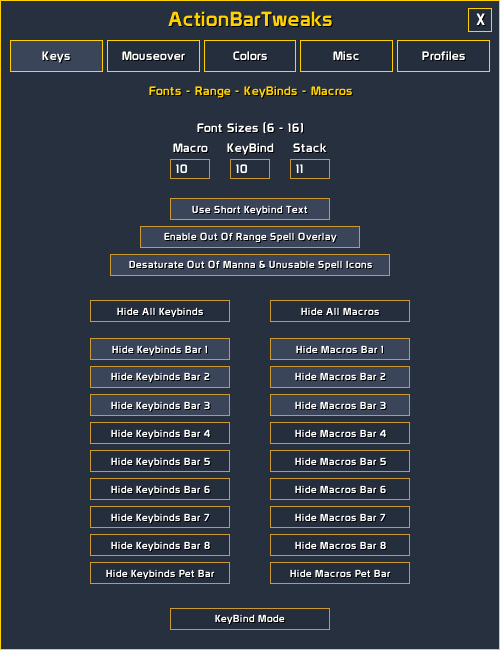
- Change macro, keybind & stack-count, font sizes.
- Shorten keybind text (e.g., “Mid…” Middle mouse button to “MM…”) for a compact look.
- Enable a red overlay on spell icons that are out of range.
- Enable desaturation of spell icons when Unusable/Grey, Out of manna/Blue.
- Hide keybind or macro text globally or per bar (Action Bars 1–8, Pet Bar).
- Enter quick keybind mode from the add-on UI or by typing /kb in chat.
Buttons
- Scale buttons individually or globally, mostly helpful for closing gaps between buttons to overcome the minimum padding allowed of 2 in Edit Mode.
Mouseover Bars & Frames
- Hide or fade Action Bars 1–8, Pet Bar, Stance Bar, XP Bar, Micro Menu, or Bags Bar until you hover over them.
- Customize fade opacity and in/out durations for each bar or frame.
Colors
- Add custom colors and transparency to empty action bar slots.
- Enable class color health bars for friendly/enemy players.
- Disable/Enable class color nameplates for friendly/enemy players.
- Enable customizable health bar reaction colors, for friendly/enemy players, pets & NPCs.
Dark/Light Mode options list.
- Action bars.
- Tooltips.
- Unit frames.
- Unit Buffs/Debuffs.
- Elite textures.
- Cast bars
- Raid/Party frames.
- Player Buffs/Debuffs.
- Mini map.
- Objectives.
- Micro-menu.
- Nameplate & Resources.
Misc
- Enable a flash effect when pressing spell keys.
- Hide Blizzard’s default cast and highlight animations for a smoother look
- Hide Rest glow on Player frame.
- Hide Rest animation on player frame (Zzz).
- Hide Reputation glow on target frame.
- Hide Reputation glow on focus frame.
- Hide Prestige icon on player, target & focus frames.
- Hide PVP icon on player, target & focus frames.
- Hide Combat glow on payer frame.
- Hide Combat icon on player frame (Swords).
- Hide Damage & healing numbers on player frame.
- Hide Elite & Boss Dragon textures on target and focus frames.
Profiles
- Create account-wide profiles to save and switch settings across characters.
Usage
- Enter
/abtin chat to open the settings panel and customize your action bars.
Please report any Bugs you encounter caused by this add-on. I will try to get them fixed as soon as possible.
When reporting a Bug, please be as descriptive as possible, it helps to pinpoint the issue much quicker.
CurseForge: https://www.curseforge.com/wow/addons/actionbartweakz
用户评价
暂无 / 5,0 条评价相关推荐
继续看看这些内容
