插件中文资料库
中文说明、玩家点评、适用场景和替代推荐,方便快速判断是否适合你。
- 背包、银行和物品整理
- 界面布局、头像框、姓名板和动作条优化
 Wick's Bags
 ItemRack Universal
 ItemRack_Easy
ItemRack 插件下载与使用指南
本页整理了 ItemRack 的功能用途、适用人群、安装方法和常见问题,方便玩家快速判断是否需要安装。
适合谁用
ItemRack 是一款 背包与库存 类插件,适合需要优化界面、提升操作效率或补充游戏信息提示的魔兽世界玩家。
基本信息
- 插件作者:Kharthus
- 插件分类:背包与库存
- 适配版本:12.0.5
- 累计下载:0
安装方法
- 点击上方下载按钮获取 ItemRack插件文件。
- 解压后将插件文件夹放入 World of Warcraft/_retail_/Interface/AddOns 目录。
- 重启游戏或在角色界面点击插件,确认 ItemRack 已启用。
- 如果插件不生效,请检查版本是否匹配,或关闭同类冲突插件后重试。
使用建议
ItemRack 安装后建议先在角色界面确认已启用,进入游戏后根据插件提供的命令、小地图按钮或设置面板进行调整。如遇到报错,可先单独启用该插件排查冲突。
ItemRack 常见问题
ItemRack 适合需要 背包与库存 类功能的玩家,特别是希望提升游戏便利性、界面管理或战斗信息获取效率的用户。
下载后解压到 Interface/AddOns 目录,然后重启游戏并在角色界面启用插件。
常见原因是目录多套一层、游戏版本不匹配、依赖插件缺失或同类插件冲突。
可以查看本页的替代插件推荐和相关插件区域,按下载量和分类选择同类工具。
插件 AI 问答
可以问:这个插件正式服能用吗、和 DBM 冲突吗、怎么设置、有没有替代插件。
ItemRack 是一款魔兽世界插件,主要用于背包、银行、专业制造或物品整理、插件库、数据接口或依赖支持。建议根据自己的版本和插件环境先测试兼容性。
插件用途
ItemRack 主要面向需要背包与库存功能的玩家,用来改善游戏体验、减少重复操作或补充默认界面没有直接提供的信息。
适用场景
- 背包、银行、专业制造或物品整理
- 插件库、数据接口或依赖支持
使用建议
安装后建议先在角色选择界面或插件管理器中确认已启用,再进入游戏测试是否与现有整合包、WA 和其他插件冲突。如遇报错,可以先禁用同类插件排查。
This is the Retail version only. For the Classic version please use their page:
https://www.curseforge.com/wow/addons/itemrack-classic
This is a mod to make swapping equipment easier through popout slot menus, equip slot buttons, gear sets and automated swaps.
ItemRackFu plugin by Gnarfoz:
http:www.wowinterface.com/downloads/info9162
ButtonFacade plugin by Romracer:
http:www.wowinterface.com/downloads/info9109
Quick Start Guide
Minimap button:
- Right-click the minimap button to open options or create sets
- Left-click the minimap button to choose a set
- Shift-click the minimap button to unequip the last set equipped
- Alt-click the minimap button to toggle events on/off
Dockable buttons:
- Alt+click slots on the character sheet to create/remove buttons
- Alt+click yourself in the character sheet to create/remove a set button
- Alt+click the created buttons to toggle their auto-queue status
- Shift+drag buttons to break them apart if they're docked to each other
- Drag the menu's border around to dock it to a different side of buttons
- Right-click the menu's border to rotate the menu
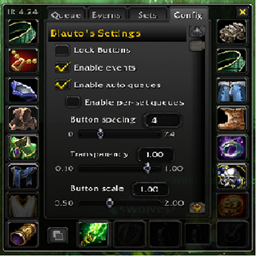
- Size, alpha, spacing, etc are in options
Creating/equipping sets:
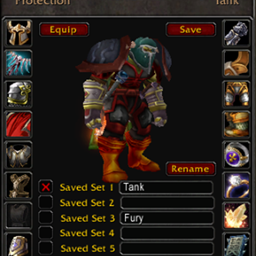
- You create sets in the Sets tab after right-clicking the minimap button
- Select slots for the set, choose a name and icon and click Save
- Once a set is saved, there are several ways to equip it:
1. Left-click the minimap button and choose the set
2. Mouseover a set button you've created (Alt+click yourself in character sheet)
3. Use a key binding you define in the set ("Bind Key" button)
4. In macros with /itemrack equip setname
5. In events or scripts that use EquipSet("setname")
Popout menus:
- Click an item or set in a menu to equip it
- Shift+click a set in a menu to unequip it
- Alt+click an item in a menu to hide/unhide it
- Hold Alt as you mouseover a slot to show all hidden items
While at a bank:
- Items/sets in the bank have a blue border.
- Selecting an item or set that's in the bank will pull it from the bank to your bags.
- Selecting an item or set that's not in the bank will attempt to put it all into the bank.
Slash Commands
/itemrack : list the most common slash commands
/itemrack opt : summon the options GUI
/itemrack equip setname : equips a set
/itemrack reset : resets buttons
/itemrack reset everything : wipes all settings, sets and events
/itemrack lock/unlock : locks and unlocks the buttons
/itemrack toggle set name[, second set name] : equips/unequips "set name" (or swaps between two sets if a second set given)
Macro Functions
EquipSet("setname") equips "setname"
UnequipSet("setname") unequips "setname"
ToggleSet("setname") toggles (equips then unequips) "setname"
IsSetEquipped("setname") returns true if "setname" is equipped
In the unlikely event that another mod (or default UI in the future) uses these function names, you can use their long version ItemRack.EquipSet(), ItemRack.UnequipSet(), etc. This mod only commandeers the shortened names if they appear to be unused.
Events
2.2 (re)introduces events. These are scripts to automatically equip and unequip gear as things happen in game.
To use an event:
1. In the 'Sets' tab, create or make sure you have a set you'd like to equip when the event happens.
2. In the 'Events' tab, click the red ? icon beside the event you want to use.
3. Choose the set for this event.
4. Ensure the event has a check beside it.
As events are enabled, a separate process watches for those events and equips (and unequips if chosen) as they happen.
If you want to create or edit an event, there are four types of events:
- Buff: These events equip gear as you gain buffs. ie, Evocation, Drinking and being on a mount.
- Stance: These events equip gear when you change stances or forms. ie, Battle Stance, Moonkin Form, Shadowform
- Zone: These events equip gear when you're in one of a list of zones. ie, the PVP event includes all arena and BG maps.
- Script: For those with lua knowledge, you can create your own event based on a game event. A couple examples are in the default events.
When dealing with events, it's good to keep some things in mind:
- You'll get the most predictable behavior by having sets that don't overlap. If you're a warrior with a Tanking, DPS and PVP set, consider not including weapons in those sets. If you decide to make an event to swap in a 2H when you go into Berserker Stance and a 1h+shield when you go into Defensive Stance, you won't step on the toes of events that swap in PVP gear in a BG/arena or a tuxedo in a city.
- A gold gear icon on the minimap button (and on the sets button if you've created one) means that events are enabled. If you decide you want to temporarily shut down all events, Alt+click the minimap button or the sets button. (You can disable events in options also)
- For non-English users, you might want to edit the events that have English text within them. I try to keep it locale-independant when possible (ie, warrior and most druid stances use the numbers instead of names), but you'll never enter "Stormwind City" on a deDE client for the city event.
- Script Events do not have a "set" defined to them like other events do. They need to EquipSet("setname") explicitly. Its set button will always be the macro keys icon.
- Advanced users of 1.9x may notice the lack of a delay option in scripted events. I've decided to pull this down into the scripting system to streamline the event process. For now, you can use ItemRack.CreateTimer and ItemRack.StartTimer defined in ItemRack.lua.
用户评价
暂无 / 5,0 条评价相关推荐
继续看看这些内容
