插件中文资料库
中文说明、玩家点评、适用场景和替代推荐,方便快速判断是否适合你。
- 背包、银行和物品整理
- 界面布局、头像框、姓名板和动作条优化
 RightClickSelfCast
 nMainbar Redux
 Reload Buttons
UFO - Universal FlyOut 插件下载与使用指南
本页整理了 UFO - Universal FlyOut 的功能用途、适用人群、安装方法和常见问题,方便玩家快速判断是否需要安装。
适合谁用
UFO - Universal FlyOut 是一款 动作条 / 背包与库存 / 专业技能 / 伙伴 类插件,适合需要优化界面、提升操作效率或补充游戏信息提示的魔兽世界玩家。
基本信息
- 插件作者:scott_ingram
- 插件分类:动作条 / 背包与库存 / 专业技能 / 伙伴
- 适配版本:12.0.0,12.0.1,12.0.5
- 累计下载:45
安装方法
- 点击上方下载按钮获取 UFO - Universal FlyOut插件文件。
- 解压后将插件文件夹放入 World of Warcraft/_retail_/Interface/AddOns 目录。
- 重启游戏或在角色界面点击插件,确认 UFO - Universal FlyOut 已启用。
- 如果插件不生效,请检查版本是否匹配,或关闭同类冲突插件后重试。
使用建议
UFO - Universal FlyOut 安装后建议先在角色界面确认已启用,进入游戏后根据插件提供的命令、小地图按钮或设置面板进行调整。如遇到报错,可先单独启用该插件排查冲突。
UFO - Universal FlyOut 常见问题
UFO - Universal FlyOut 适合需要 动作条 / 背包与库存 / 专业技能 / 伙伴 类功能的玩家,特别是希望提升游戏便利性、界面管理或战斗信息获取效率的用户。
下载后解压到 Interface/AddOns 目录,然后重启游戏并在角色界面启用插件。
常见原因是目录多套一层、游戏版本不匹配、依赖插件缺失或同类插件冲突。
可以查看本页的替代插件推荐和相关插件区域,按下载量和分类选择同类工具。
插件 AI 问答
可以问:这个插件正式服能用吗、和 DBM 冲突吗、怎么设置、有没有替代插件。
UFO - Universal FlyOut 是一款魔兽世界插件,主要用于背包、银行、专业制造或物品整理、插件库、数据接口或依赖支持。建议根据自己的版本和插件环境先测试兼容性。
插件用途
UFO - Universal FlyOut 主要面向需要背包与库存功能的玩家,用来改善游戏体验、减少重复操作或补充默认界面没有直接提供的信息。
适用场景
- 背包、银行、专业制造或物品整理
- 插件库、数据接口或依赖支持
使用建议
安装后建议先在角色选择界面或插件管理器中确认已启用,再进入游戏测试是否与现有整合包、WA 和其他插件冲突。如遇报错,可以先禁用同类插件排查。
Release v12.0.1 - Mar 27, 2026
v12.0.5
* Bliz will enable the /outfit macro in v12.0.5 so UFO will be able to support outfits
v12.0.1
UFO continues to display spell cooldowns and it continues to cast spells, both in and out of combat. However, because of #77, it can't start a new cooldown display during combat. Any displays triggered before combat will display normally.
v12.0.0.pre-patch.01
* BUGFIX: Single Button Assist can prevent placing UFOs
* "Right-click to open config" now uses ACE3's floating config panel. Thanks ACE!
* verified on Midnight PTR 12.00.01
v12.0.0.pre-patch
- mandatory toc bump for 12.0.0 pre-patch - no other changes required?! The Addon Apocalypse spared me. No lamb's blood needed.
v11.2.7.c
Full Changelog: https://github.com/ScottIngram/UFO/compare/v11.2.7.b...11.2.7.c
- save & load a snapshot of UFO locations on the action bars for alts -- because setting up alts in Remix got old fast
v11.2.7
Full Changelog: https://github.com/users/ScottIngram/projects/6/
- NEW #36 - long flyout wrapping
- BUG #60 - isUsable() filters out mounts while in no-mount zones
- BUG #65 - flyout in catalog on the collections panel is occluded
v11.2.5c
- NEW feature #64 - designate a PRIME_BTN via shift-click
- bugfix #63 - UfoProxy complains invalid nil type
- bugfix #58 - most recent button uses wrong tooltip
- enhancement #62 - add tooltip to the [UFO] buttons
- enhancement #57 - support localized config window
v11.2.5a
BUGFIX - config for some users still has FIRST_BTN #61
v11.2.5
- NEW - config: most recent button becomes primary
- NEW - config: support modifier keys with keybindings
- NEW - config: disable label on the action bar
- NEW - let user move buttons the current toon can't use
- NEW - support the "summon favorite random mount" button
- BUGFIX - the [UFO] button on the collections window is broken
- BUGFIX - moving a mount corrupts the data - code self heal the data
- BUGFIX - UFOs on action bar #1 vanish
- BUGFIX - dragging an item in the vendor window throws error
New Contributors - THANK YOU!
- Update zhCN.lua or Suggested missing content by @kaineoa in https://github.com/ScottIngram/UFO/pull/30
- Update ruRU.lua by @Hubbotu in https://github.com/ScottIngram/UFO/pull/42
UFO lets you create custom actionbar flyout menus similar to the built-in ones for mage portals, warlock demons, dragonriding abilities, etc. But with UFO, you can include anything you want:
- Spells
- Items
- Mounts
- Pets
- Macros
- Trade skill Windows
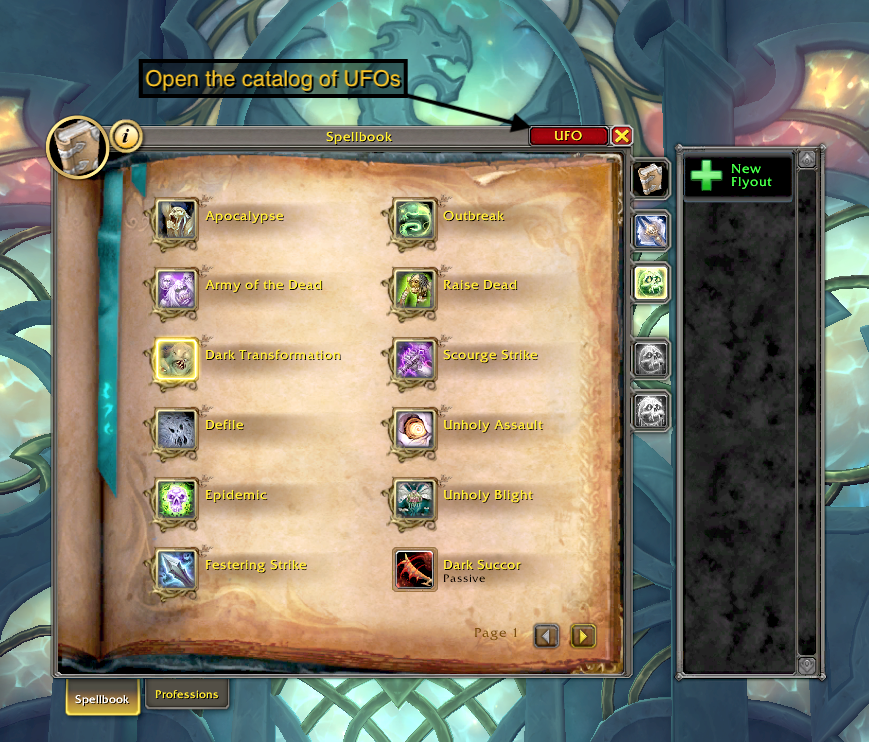
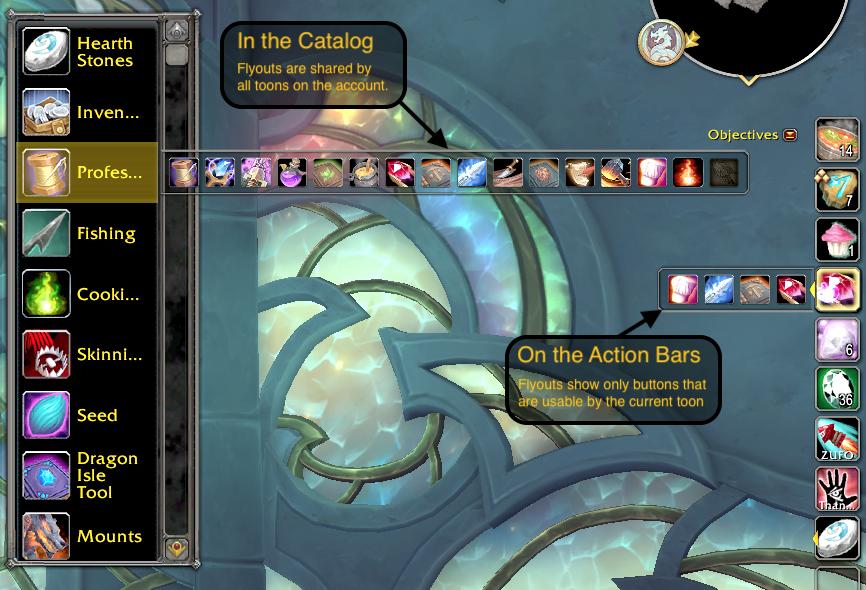
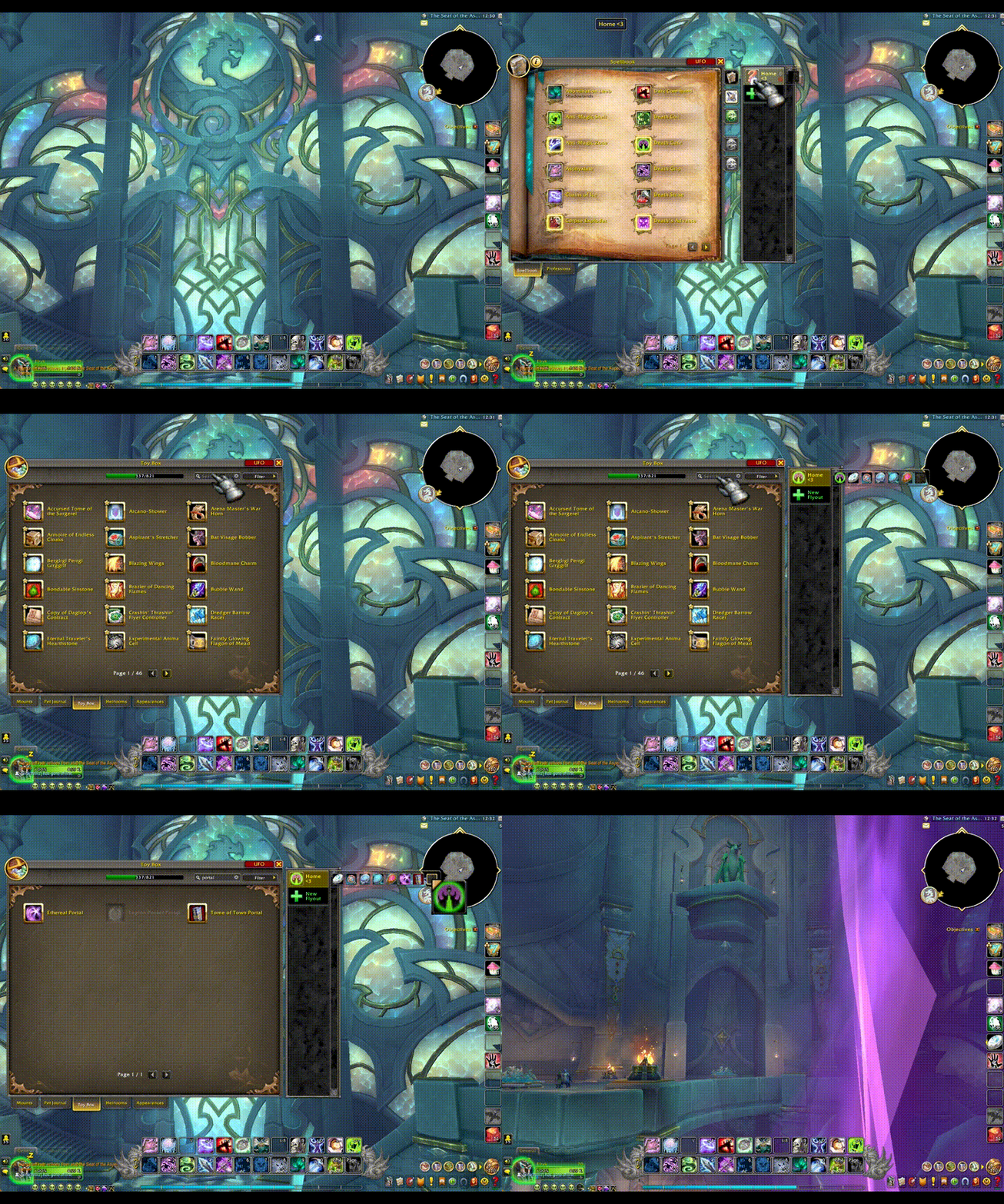
UFO adds a flyout catalog UI onto the side of various panels (Spellbook, Macros, Collections) to let you create and organize multiple flyouts. These can be shared between all characters on your account.
From there, you can drag your flyouts onto your action bars. Each toon keeps their own distinct record of which flyouts are on which bars. Furthermore, placements are stored per spec and automatically change when you change your spec.
In the options screen, you can individually configure the left / middle / right / etc mouse buttons to:
- Open the flyout (the standard behavior)
- Trigger a Random button
- Trigger the First button or Most Recent button
Random favorite mounts, pets, or hearthstones, anyone?
3rd-Party Addon Support
There is VERY limited (let's call it beta) "support" for a few action bar and other addons:
- Bartender4
- ElvUI
- LargerMacroIconSelection adds a search bar to the icon picker.
- Want more? [[Make a request]](https://github.com/ScottIngram/Ufo/issues/new?labels=3rd party addon)
FAQ:
Q: How do I open UFO?
A: Any of the following will open the UFO Catalog where you can create and organize your custom flyouts:
- Type
/ufo - Click the [UFO] button in the upper right corner of the: Spellbook / Collections Panel / Macros Panel
- Click "UFO" in the Addon Compartment (the new menu Blizzard added in Dragonflight to the upper right corner of the minimap).
Q: What if one toon places an ability / item / etc. only they can use onto a flyout shared with other toons?
A: A flyout on the actionbars will only show buttons that are usable by the current toon. However, in the catalog, all buttons will be visible.
Q: Do I have to set up my flyouts on the action bars over and over for each spec?
A: The first time you change to a different spec, UFO will copy your current flyout positions to the new spec. From that point, they are separate and must be changed independently.
Q: Does it work in combat?
A: Yes. Except summoning a battlepet companion. Oh noes.
Tips & Tricks:
- Random Mounts, Pets, or Hearthstones - Load up a UFO with nothing but your favorite mounts and use the random-click feature. Ditto for pets and hearthstones,
- Icon of First Button - If you choose the "?" icon while defining your flyout, UFO will show the icon of the first button in the flyout.
- Reuse UFOs Between Toons - because UFO will hide buttons that a toon can't use, feel free to load up one flyout with every profession and profession related abilities or items (finesse flasks, campfire, fishing bobbers, Tuskarr harpoon, etc).
- One-Button Make & Consume - For mages (or similarly, warlocks) make a flyout with a consumable mana bun as the first button and the Create Mana Bun spell as the second. On login, the bun won't exist and the UFO will instead show Create Mana Bun. Using the Right-Click feature, clicking on the UFO will create the bun and immediately update itself so that clicking will eat it. For warlocks, the same approach works for health stones. In fact, you can reuse the same flyout with both create bun and create healthstone for all toons and only the usable spell will be visible.
Acknowledgements
Many thanks to Sébastien Desvignes and his addon FloFlyout which was the basis for my work here.
CurseForge: https://www.curseforge.com/wow/addons/ufo-universal-flyouts用户评价
暂无 / 5,0 条评价相关推荐
继续看看这些内容
