插件中文资料库
中文说明、玩家点评、适用场景和替代推荐,方便快速判断是否适合你。
- 界面布局、头像框、姓名板和动作条优化
 Details! Mythic+ Scoreboard
 RightClickSelfCast
 Mind-seekers Tracker
Slacker's Tweak Suite 插件下载与使用指南
本页整理了 Slacker's Tweak Suite 的功能用途、适用人群、安装方法和常见问题,方便玩家快速判断是否需要安装。
适合谁用
Slacker's Tweak Suite 是一款 音频与视频 / 鼠标提示 / 其他插件 类插件,适合需要优化界面、提升操作效率或补充游戏信息提示的魔兽世界玩家。
基本信息
- 插件作者:Slackluster
- 插件分类:音频与视频 / 鼠标提示 / 其他插件
- 适配版本:12.1.5,1.60.1
- 累计下载:0
安装方法
- 点击上方下载按钮获取 Slacker's Tweak Suite插件文件。
- 解压后将插件文件夹放入 World of Warcraft/_retail_/Interface/AddOns 目录。
- 重启游戏或在角色界面点击插件,确认 Slacker's Tweak Suite 已启用。
- 如果插件不生效,请检查版本是否匹配,或关闭同类冲突插件后重试。
使用建议
Slacker's Tweak Suite 安装后建议先在角色界面确认已启用,进入游戏后根据插件提供的命令、小地图按钮或设置面板进行调整。如遇到报错,可先单独启用该插件排查冲突。
Slacker's Tweak Suite 常见问题
Slacker's Tweak Suite 适合需要 音频与视频 / 鼠标提示 / 其他插件 类功能的玩家,特别是希望提升游戏便利性、界面管理或战斗信息获取效率的用户。
下载后解压到 Interface/AddOns 目录,然后重启游戏并在角色界面启用插件。
常见原因是目录多套一层、游戏版本不匹配、依赖插件缺失或同类插件冲突。
可以查看本页的替代插件推荐和相关插件区域,按下载量和分类选择同类工具。
插件 AI 问答
可以问:这个插件正式服能用吗、和 DBM 冲突吗、怎么设置、有没有替代插件。
Slacker's Tweak Suite 是一款魔兽世界插件,主要用于界面框架、头像、动作条或冷却显示优化。建议根据自己的版本和插件环境先测试兼容性。
插件用途
Slacker's Tweak Suite 主要面向需要其他插件功能的玩家,用来改善游戏体验、减少重复操作或补充默认界面没有直接提供的信息。
适用场景
- 界面框架、头像、动作条或冷却显示优化
使用建议
安装后建议先在角色选择界面或插件管理器中确认已启用,再进入游戏测试是否与现有整合包、WA 和其他插件冲突。如遇报错,可以先禁用同类插件排查。

Slacker's Tweak Suite (STS) is a collection of QoL tweaks.
Features
Features marked with [F] are available on Forever; features marked with [R] are available on Retail.
- General
- [R&F] Adds your current realm name to the character panel.
- [R&F] Cursor Guide: Show a guide around the cursor to help you keep track of it.
- [R&F] Skip Seen Cinematics: Automatically skip before-seen cinematics.
- Inventory
- [R&F] Disable Always Compare: Disable the always compare items behavior.
- [R] Show WoW Token Price: Show the current WoW Token price on the WoW Token item tooltip.
- [R] Split Reagent Bag Count: Shows the free slots of your regular bags and your reagent bag separately on top of the backpack icon.
- Loot
- [R] Instant Catalyst: Hold Shift to instantly catalyze an item, skipping the 5 second timer.
- [R] Instant Great Vault: Hold Shift to instantly receive your reward from the Great Vault and skip the 5 second timer.
- [R] Hide Loot Roll Window: Hide the window that shows loot rolls and their results. You can show the window again with /loot.
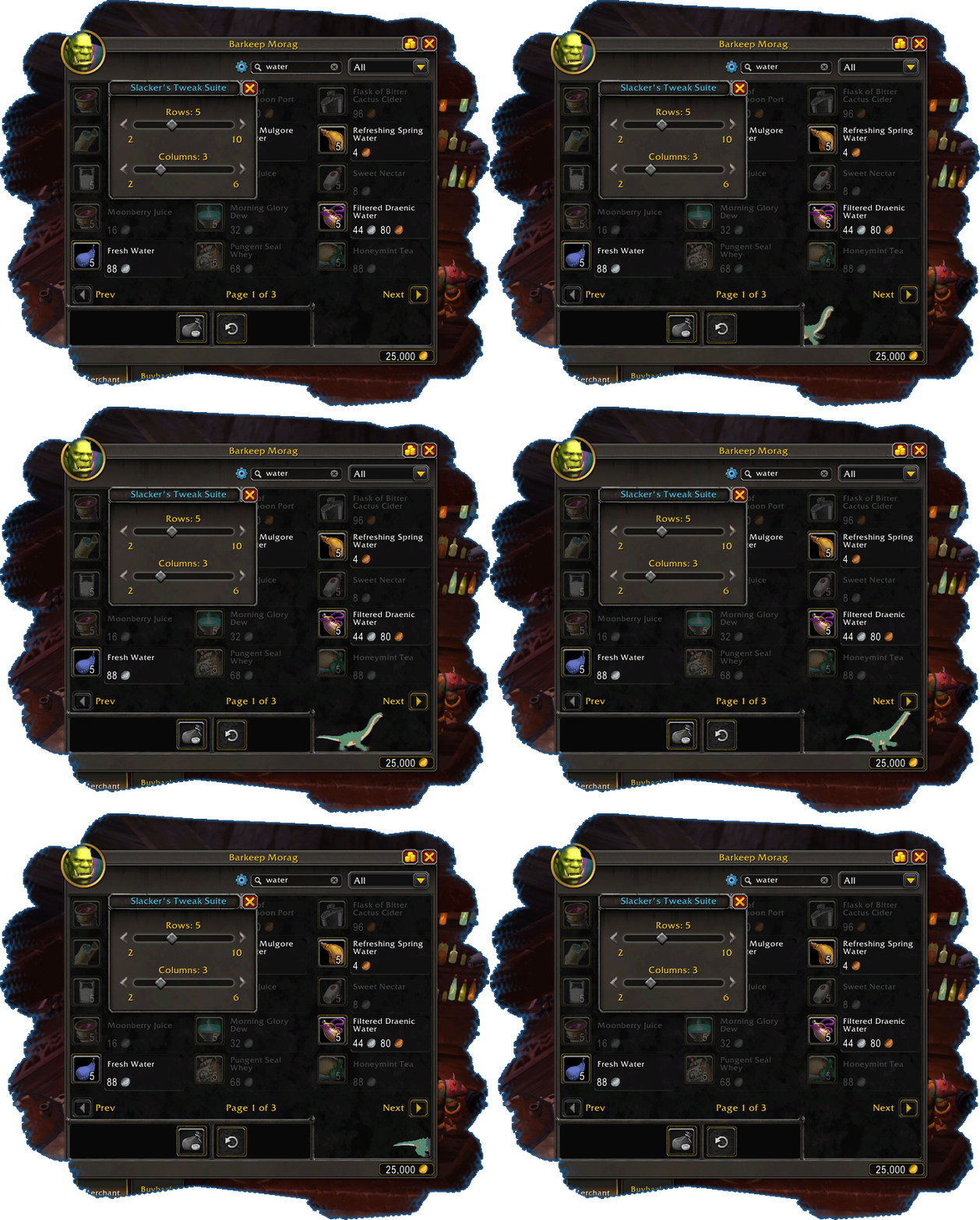
- [R&F] Extended Merchant Frame: Allows configuring how many rows and columns of items are displayed on merchants, and adds a search filter.
- [R] Disable Merchant Filter: Automatically set all merchant filters to All to display items normally not shown to your class.
- [R&F] Disable Merchant Compare: Disable the automatic gear comparison on merchant items.
- Sound
- [R] Play Queue Sound: Play the queue sound on the Master channel when any queue pops, including battlegrounds and pet battles.
- [R] Play Ready Check Sound: Play the ready check sound on the Master channel when a ready check is initiated.
- [R] Play Countdown Sound: Play the countdown sound on the Master channel when any countdown / pull timer is initiated.
- Addons
- [R] Disable HandyNotes Alt+RMB: Disable HandyNotes' keybind on the map, re-enabling it for TomTom waypoints instead.
- [R] AH Price Tooltip: Show the most recent pricing information from either Auctionator, Oribos Exchange, or TradeSkillMaster
- Holidays
- [R] [Hallow's End] No Trick: Sit down before completing a Candy Bucket quest, preventing getting tricked and pacified.
If you are experiencing issues
- Check if the issue occurs with only this addon enabled, or if the issue is a feature you can disable from the addon's settings menu.
- If you run into any issues or if you have other feedback, feel free to join the Discord and ask in the
#slackers-tweak-suitechannel, or create a ticket on GitHub. :)
用户评价
暂无 / 5,0 条评价相关推荐
继续看看这些内容
