插件中文资料库
中文说明、玩家点评、适用场景和替代推荐,方便快速判断是否适合你。
- 背包、银行和物品整理
 Details! Mythic+ Scoreboard
 Copy Anything
 BagSync
MyBags 插件下载与使用指南
本页整理了 MyBags 的功能用途、适用人群、安装方法和常见问题,方便玩家快速判断是否需要安装。
适合谁用
MyBags 是一款 鼠标提示 / 背包与库存 / 幻化 类插件,适合需要优化界面、提升操作效率或补充游戏信息提示的魔兽世界玩家。
基本信息
- 插件作者:MyGamesDevelopmentAcc
- 插件分类:鼠标提示 / 背包与库存 / 幻化
- 适配版本:12.0.0,12.0.5
- 累计下载:40
安装方法
- 点击上方下载按钮获取 MyBags插件文件。
- 解压后将插件文件夹放入 World of Warcraft/_retail_/Interface/AddOns 目录。
- 重启游戏或在角色界面点击插件,确认 MyBags 已启用。
- 如果插件不生效,请检查版本是否匹配,或关闭同类冲突插件后重试。
使用建议
MyBags 安装后建议先在角色界面确认已启用,进入游戏后根据插件提供的命令、小地图按钮或设置面板进行调整。如遇到报错,可先单独启用该插件排查冲突。
MyBags 常见问题
MyBags 适合需要 鼠标提示 / 背包与库存 / 幻化 类功能的玩家,特别是希望提升游戏便利性、界面管理或战斗信息获取效率的用户。
下载后解压到 Interface/AddOns 目录,然后重启游戏并在角色界面启用插件。
常见原因是目录多套一层、游戏版本不匹配、依赖插件缺失或同类插件冲突。
可以查看本页的替代插件推荐和相关插件区域,按下载量和分类选择同类工具。
插件 AI 问答
可以问:这个插件正式服能用吗、和 DBM 冲突吗、怎么设置、有没有替代插件。
MyBags 是一款魔兽世界插件,主要用于背包、银行、专业制造或物品整理。建议根据自己的版本和插件环境先测试兼容性。
插件用途
MyBags 主要面向需要幻化功能的玩家,用来改善游戏体验、减少重复操作或补充默认界面没有直接提供的信息。
适用场景
- 背包、银行、专业制造或物品整理
使用建议
安装后建议先在角色选择界面或插件管理器中确认已启用,再进入游戏测试是否与现有整合包、WA 和其他插件冲突。如遇报错,可以先禁用同类插件排查。
MyBags
An easy-to-use inventory addon for bags, bank, and warband with manual and automatic categorization and simple layout control.

Disclaimer: I do this for fun. I do this mainly for myself :). There are other great bag addons like Baganator, BetterBags or Bagnon with great support, but just lacked the flexibility in the setup of the bags that I wanted. I am exposing it though so it was easier for my friends who wanted to use it to download it :)
Easy layout adjustments
Drag a category header onto another category to reorder it
Hold
Shiftwhile releasing the drag to move the dragged category together with all categories below it in that source column.
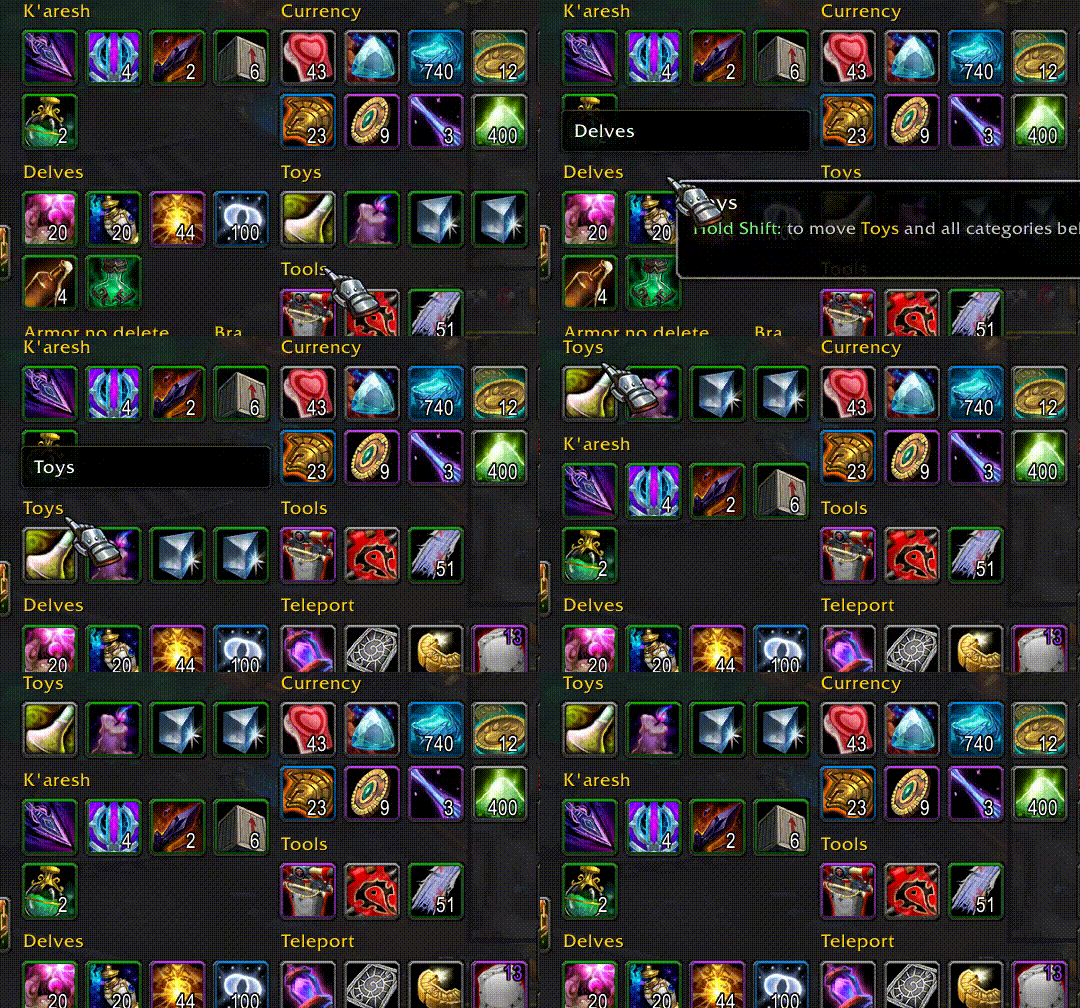
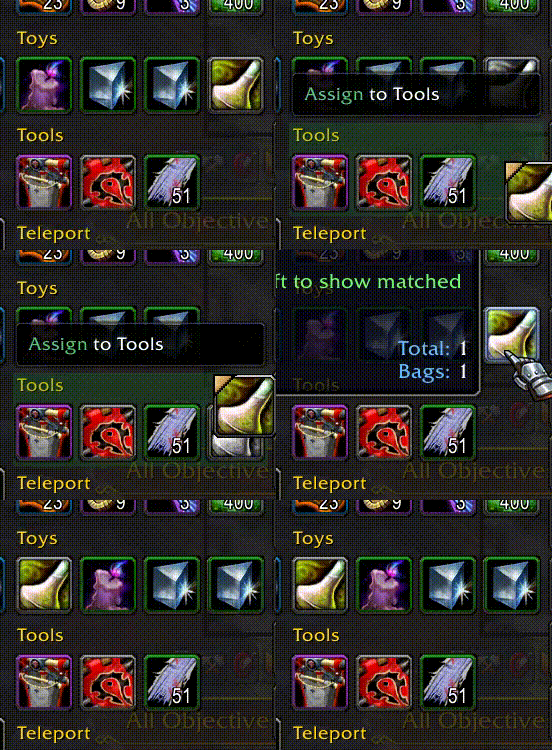
Moving items between categories easily reassigns to a new category and reorders items within a category
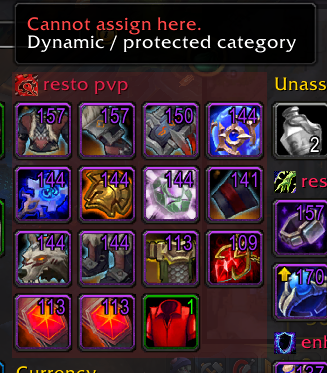
Dynamic equipment categories based on your equipment sets. Please note you cannot assign an item to an equipment set category
Demo
Here are few animations showcasing how easily you can do certain things. You can download entire demo video here
Move categories around

Collapse those with items you do not need to look at too often

Reorder items inside categories to your liking

Create new category and manually assign items to it

Create or modify queries for automatic categorization and use searchable query help if needed

Check tooltips with shift for details of given item categorization priority or query parameters details to create a proper query

Easily delete a category (you can hold shift to skip confirmation)

How it works
- Start with built-in categories, then drag categories/items to shape your layout.
- New items go to
New Items; right-click its header to clear them back to normal categorization. - Items fall back to
Unassignedunless manually assigned or matched by a category query. - Click the top-right cog to enter edit mode for category management:
- add, delete, import, and export custom categories
- mark categories as always visible
- mark categories as not used in a given container (
Bags,Bank,Warbank) - edit query and priority rules for custom categories
- Search filters visible items and combines Blizzard text matching with valid MyBags query matching. Query Help is available in-game next to bag/bank search bars.
Import and export categories
MyBags supports category import/export using a plain Lua table payload. It is available when entering edit mode using cog on the top right of the addon.
- Export writes selected custom categories into an import-ready payload.
- Import creates custom categories from the payload entries (you can import multiple categories at once).
- Category data includes
name,query,priority,alwaysVisible, anditems. - Use this flow to move/share category setups with others!
AI prompt workflow
You can also ask AI to help you generate categories based on queries by utilizing the import feature.
- Paste the template prompt below into your AI tool.
- Keep the structure unchanged.
- Modify only the category request list at the end.
- You can review and
importoutput prepared by your AI into the addon ;) !
Template prompt:
Here is a sample exported category (one from the list, though multiple categories can be included at once) that I can import into the MyBags addon:

{
  version = 1,
  categories = {
    {
      name = "shirts",
      query = "itemtype=4 and itemsubtype =0 and inventorytype =4",
      priority = 73,
      alwaysVisible = false,
      items = {  },
    },
  },
}

I would like to create additional categories that I can import. Please refer to the following documentation for the correct query format: https://raw.githubusercontent.com/MyGamesDevelopmentAcc/MyBags/refs/heads/main/QUERY_ATTRIBUTES.md

Please create a list of categories to import:

* Reagents, with a separate category for each expansion
* Armor and weapons (combined), with a separate category for each expansion
Other features
- Always-available built-in categories:
Equipment Sets,New Items, andUnassigned. - Default starter categories include
Junk(query-based custom category). Unassignedis the default fallback and is always visible.- Category headers can be collapsed/expanded.
- Hold
Shifton an item tooltip to inspect matched categories and query attributes. - Item order stays as you define it inside categories.
- Container free space is shown in the footer.
- You can still switch between combined bags and separate bags.
Q&A
List of questions about things regarding the addon or possible extensions.
Will you add a feature to show ilvl?
There are other addons that provide such functionality. The one I really like is Simple Item Levels
Design Decisions
Below are the key decisions made during the development of this addon:
Simplicity First
This addon is designed to be extremely simple and straightforward. It is not intended to be configurable. Instead, it follows a set of default behaviors that I believe will meet the needs of users who choose to use it.
Built on Existing Bags
The addon is designed to enhance the functionality of the default game bags rather than create an entirely new bag system. I’ve observed that many bag addons, when disabled, leave behind features added by the default bags that aren't available in those addons—whether intentionally or not. This addon aims to build on what’s already there, avoiding such issues.
Preserves Default Bag Item Slot Layout
The addon will display items exactly as they appear in the default bag slots. This approach ensures that any new features supported by the default game bags will be available without any additional work.
CurseForge: https://www.curseforge.com/wow/addons/mybags用户评价
暂无 / 5,0 条评价相关推荐
继续看看这些内容
