插件中文资料库
中文说明、玩家点评、适用场景和替代推荐,方便快速判断是否适合你。
- 界面布局、头像框、姓名板和动作条优化
 Details! Mythic+ Scoreboard
 BagSync
 RightClickSelfCast
Danders Rotation Tracker 插件下载与使用指南
本页整理了 Danders Rotation Tracker 的功能用途、适用人群、安装方法和常见问题,方便玩家快速判断是否需要安装。
适合谁用
Danders Rotation Tracker 是一款 动作条 / 战斗 类插件,适合需要优化界面、提升操作效率或补充游戏信息提示的魔兽世界玩家。
基本信息
- 插件作者:Danderz
- 插件分类:动作条 / 战斗
- 适配版本:12.0.0,12.0.1
- 累计下载:49
安装方法
- 点击上方下载按钮获取 Danders Rotation Tracker插件文件。
- 解压后将插件文件夹放入 World of Warcraft/_retail_/Interface/AddOns 目录。
- 重启游戏或在角色界面点击插件,确认 Danders Rotation Tracker 已启用。
- 如果插件不生效,请检查版本是否匹配,或关闭同类冲突插件后重试。
使用建议
Danders Rotation Tracker 安装后建议先在角色界面确认已启用,进入游戏后根据插件提供的命令、小地图按钮或设置面板进行调整。如遇到报错,可先单独启用该插件排查冲突。
Danders Rotation Tracker 常见问题
Danders Rotation Tracker 适合需要 动作条 / 战斗 类功能的玩家,特别是希望提升游戏便利性、界面管理或战斗信息获取效率的用户。
下载后解压到 Interface/AddOns 目录,然后重启游戏并在角色界面启用插件。
常见原因是目录多套一层、游戏版本不匹配、依赖插件缺失或同类插件冲突。
可以查看本页的替代插件推荐和相关插件区域,按下载量和分类选择同类工具。
插件 AI 问答
可以问:这个插件正式服能用吗、和 DBM 冲突吗、怎么设置、有没有替代插件。
Danders Rotation Tracker 是一款魔兽世界插件,主要用于界面框架、头像、动作条或冷却显示优化、伤害统计、输出循环或战斗表现分析、副本、团本、大秘境或钥石辅助。建议根据自己的版本和插件环境先测试兼容性。
插件用途
Danders Rotation Tracker 主要面向需要动作条功能的玩家,用来改善游戏体验、减少重复操作或补充默认界面没有直接提供的信息。
适用场景
- 界面框架、头像、动作条或冷却显示优化
- 伤害统计、输出循环或战斗表现分析
- 副本、团本、大秘境或钥石辅助
使用建议
安装后建议先在角色选择界面或插件管理器中确认已启用,再进入游戏测试是否与现有整合包、WA 和其他插件冲突。如遇报错,可以先禁用同类插件排查。
Danders' Rotation Tracker
Works in The War Within & Midnight (Beta Tested). Works with base action bars & Domions bars, anything else is untested.
This addon was created for players who use the 'Assisted Combat' (one-button) rotation but want to learn their real keybinds. It creates a movable button, with a layout inspired by Hero Rotation, that shows the one-button spell icon, but with one major difference:
It displays the keybind for the next actual spell in the rotation, not the keybind for the 'Assisted Combat' spell itself.
This way, you can see what's coming up and start to learn your class's actual keybinds, without chasing the assisted highlight around your bars.
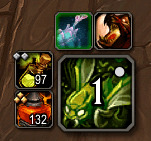
What it does
- Shows the real keybind: This is the main thing. It finds the next spell in the rotation on your bars and shows you that keybind.
- Hides the Blizzard Arrow: Lets you turn off that giant gold arrow on your action bar.
- Extra Buttons: You can add up to four extra tracker buttons. You can set them up to mirror any other button, so they're great for tracking cooldowns, trinkets, consumables, or whatever else you want.
- Customization:
- You can scale the main button and extra buttons.
- You can change the keybind text (font size, style, and position).
- Frame Stuff:
- Drag the frame wherever you want.
- Lock it in place.
- Make it click-through so it doesn't get in the way.
- Opacity Options: You can set the opacity for in-combat and out-of-combat, and even make it fade in when you get a target.
How to set it up
Important Note: This addon works by mirroring an existing button on your action bars. With the API changes in Midnight, this was the easiest way I could find to make the icon track everything properly (like GCD, range, and if you have enough resource). All that good stuff is already built into the default buttons, so this just uses that.
This means you have to do a quick one-time setup:
-
Type
/drtor/dandersin chat to open the options. -
In the "Main Button" tab, pick an action bar and button slot you're not using for something else.
-
Open your Spellbook (P), and drag the "Assisted Combat" spell onto that exact button slot.
-
The tracker will start showing you the keybinds.
The Extra Buttons work the exact same way. Just point them to a button slot, and they'll mirror whatever you put there. Perfect for tracking trinkets, burst CDs, or consumables.
A note from me
Just so you know, I'm not a professional addon developer! This was just something I threw together to help myself, and I thought I'd share it in case anyone else found it useful.
If you're a developer, feel free to grab the code and change or improve on it however you want.
CurseForge: https://www.curseforge.com/wow/addons/danders-rotation-tracker用户评价
暂无 / 5,0 条评价相关推荐
继续看看这些内容
