插件中文资料库
中文说明、玩家点评、适用场景和替代推荐,方便快速判断是否适合你。
- 界面布局、头像框、姓名板和动作条优化
 Details! Mythic+ Scoreboard
 Copy Anything
 BagSync
Vremon UI 插件下载与使用指南
本页整理了 Vremon UI 的功能用途、适用人群、安装方法和常见问题,方便玩家快速判断是否需要安装。
适合谁用
Vremon UI 是一款 动作条 / 职业 / 增益与减益 / 单位框架 类插件,适合需要优化界面、提升操作效率或补充游戏信息提示的魔兽世界玩家。
基本信息
- 插件作者:Vremon
- 插件分类:动作条 / 职业 / 增益与减益 / 单位框架
- 适配版本:12.1.0,12.1.5
- 累计下载:37
安装方法
- 点击上方下载按钮获取 Vremon UI插件文件。
- 解压后将插件文件夹放入 World of Warcraft/_retail_/Interface/AddOns 目录。
- 重启游戏或在角色界面点击插件,确认 Vremon UI 已启用。
- 如果插件不生效,请检查版本是否匹配,或关闭同类冲突插件后重试。
使用建议
Vremon UI 安装后建议先在角色界面确认已启用,进入游戏后根据插件提供的命令、小地图按钮或设置面板进行调整。如遇到报错,可先单独启用该插件排查冲突。
Vremon UI 常见问题
Vremon UI 适合需要 动作条 / 职业 / 增益与减益 / 单位框架 类功能的玩家,特别是希望提升游戏便利性、界面管理或战斗信息获取效率的用户。
下载后解压到 Interface/AddOns 目录,然后重启游戏并在角色界面启用插件。
常见原因是目录多套一层、游戏版本不匹配、依赖插件缺失或同类插件冲突。
可以查看本页的替代插件推荐和相关插件区域,按下载量和分类选择同类工具。
插件 AI 问答
可以问:这个插件正式服能用吗、和 DBM 冲突吗、怎么设置、有没有替代插件。
Vremon UI 是一款魔兽世界插件,主要用于界面框架、头像、动作条或冷却显示优化。建议根据自己的版本和插件环境先测试兼容性。
插件用途
Vremon UI 主要面向需要动作条功能的玩家,用来改善游戏体验、减少重复操作或补充默认界面没有直接提供的信息。
适用场景
- 界面框架、头像、动作条或冷却显示优化
使用建议
安装后建议先在角色选择界面或插件管理器中确认已启用,再进入游戏测试是否与现有整合包、WA 和其他插件冲突。如遇报错,可以先禁用同类插件排查。
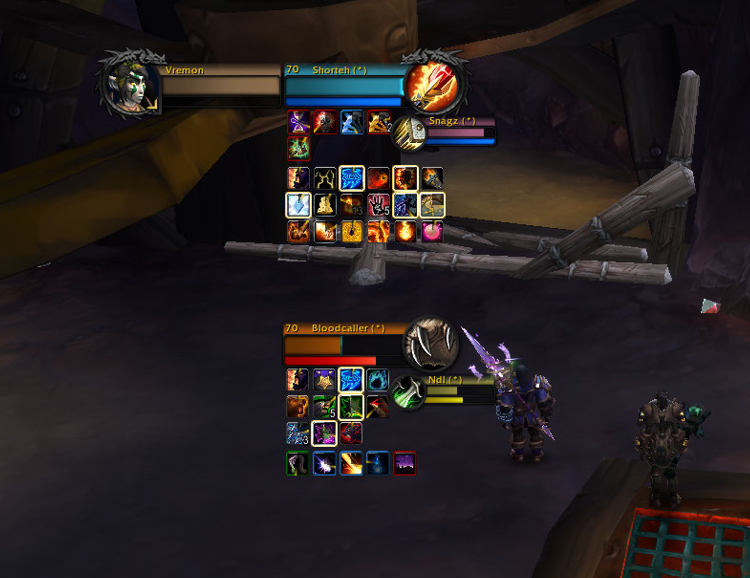
Vremon UI for The War Within Expansion is a Blizzard Default Clean UI
An extremely lightweight quality of life AddOn that everyone can change it in their own unique way by keeping the blizzard default UI style that doesn’t enter in conflict with any other AddOns you have.
The AddOn memory usage is very small and do not lower your FPS or block your game.
AddOn Option Panel can be opened by typing in GameChat /vrm
Thanks for the support and help : plusmouse SDPhantom Fizzlemizz Imedia
These are the options that the addon provide:
-VremonUI Nameplates Neat Simple Design (check images to see how it looks)
-VremonUI Nameplates CastBar (check images to see how it looks)
-Hide Nameplate Highlight Target
-Hide Nameplates Names
-Hide Realm-Name on Nameplate Players Name
-Nameplate Name Text Font
-Nameplate CastBar Text Font
-Nameplate Name ClassColor
-Hide Nameplates Tooltip Debuffs for better combat view
-Click Through Nameplates Debuffs this give fluency in selecting your nameplate target
-Nameplate HealthBar Texture (change nameplates texture )
-Show Arena Nameplate Names as numbers in order (1,2,3) instead of enemy player name
-Nameplate CastBar Shield (change the Shield Texture to be more neat)
-Increase Camera View Distance
-Friendly Nameplates HealthBar Color(make the nameplates HealthBar to be a single color)
-Cleaned Target/Focus/Player Frames
-BlackGate Skin(recolor most of the interface and texture game to black)
-Hide PlayerFrame Portrait Hit Indicator Damage/Healing Numbers received from players
-Hide UIError Red Text such as:You have no target etc.
-Hide Keybindings Name and Macros Name on ActionButtons
-Hide Party Text above CompactPartyFrameTitle
-Hide Arena Title Text above CompactArenaFrameTitle
-Hide Honor/Reputation/Xp Bar
-Disable Nameplates Transparency
friendly nameplates have same color which is purple so it’s not confused with enemy nameplates
-Enable Target of Target Repositioned, uncheck to get default blizzard position
- Enable to Modify Rows and Resize Buffs/Debuffs on Target/Focus Frame
resized and the spacebetween number of BuffsDebuffs per first 2 rows to 4
-Show for all Classes Highlight Border Buffs:Stealable/Dispellable/Purgeable
-Show ClassColored HealthBar for Target/Focus Frame
-Show ClassColored HealthBar for PlayerFrame
-Show Elite Dragon texture on Player/Target Frame
-Show Nameplates NameToIcon(Totems,Priest/Warlock/DeathKnight Pets,Warrior War Banner)
important totems /pets/ objects have their icon above nameplates to be more easily seen and killed
-Show CompactCleanText Damage/Healing Numbers above Nameplates,uncheck for default
rescaled Damage/Healing Done Combat Text position on Nameplates to be pleasant to play with
-Hide Dots/Hots Numbers Text Damage that appear above Nameplates
-Show ClassColor Reputation Background Name on Target/Focus Frame, uncheck to get default blizzard reputation color
-Show or Hide Background Name ReputationTexture on TargetFrame/Focus Frame/PlayerFrame
-Clean Loss of Control, that shows what CC you receive in middle of your screen
- Check Images to see the changes listed above and if you like them, try it out
- If you have any questions, help or suggestions, message me Vremon#21671 or http://twitch.tv/vremon
用户评价
暂无 / 5,0 条评价相关推荐
继续看看这些内容
