插件中文资料库
中文说明、玩家点评、适用场景和替代推荐,方便快速判断是否适合你。
- 界面布局、头像框、姓名板和动作条优化
 Details! Mythic+ Scoreboard
 Ludius Plus
 YuXuanToolbox
Dynamic Immersive HUD 插件下载与使用指南
本页整理了 Dynamic Immersive HUD 的功能用途、适用人群、安装方法和常见问题,方便玩家快速判断是否需要安装。
适合谁用
Dynamic Immersive HUD 是一款 地图与小地图 / 背包与库存 / 聊天与通讯 / HUD界面 / 其他插件 类插件,适合需要优化界面、提升操作效率或补充游戏信息提示的魔兽世界玩家。
基本信息
- 插件作者:Judreu
- 插件分类:地图与小地图 / 背包与库存 / 聊天与通讯 / HUD界面 / 其他插件
- 适配版本:12.0.1
- 累计下载:40
安装方法
- 点击上方下载按钮获取 Dynamic Immersive HUD插件文件。
- 解压后将插件文件夹放入 World of Warcraft/_retail_/Interface/AddOns 目录。
- 重启游戏或在角色界面点击插件,确认 Dynamic Immersive HUD 已启用。
- 如果插件不生效,请检查版本是否匹配,或关闭同类冲突插件后重试。
使用建议
Dynamic Immersive HUD 安装后建议先在角色界面确认已启用,进入游戏后根据插件提供的命令、小地图按钮或设置面板进行调整。如遇到报错,可先单独启用该插件排查冲突。
Dynamic Immersive HUD 常见问题
Dynamic Immersive HUD 适合需要 地图与小地图 / 背包与库存 / 聊天与通讯 / HUD界面 / 其他插件 类功能的玩家,特别是希望提升游戏便利性、界面管理或战斗信息获取效率的用户。
下载后解压到 Interface/AddOns 目录,然后重启游戏并在角色界面启用插件。
常见原因是目录多套一层、游戏版本不匹配、依赖插件缺失或同类插件冲突。
可以查看本页的替代插件推荐和相关插件区域,按下载量和分类选择同类工具。
插件 AI 问答
可以问:这个插件正式服能用吗、和 DBM 冲突吗、怎么设置、有没有替代插件。
Dynamic Immersive HUD 是一款魔兽世界插件,主要用于界面框架、头像、动作条或冷却显示优化。建议根据自己的版本和插件环境先测试兼容性。
插件用途
Dynamic Immersive HUD 主要面向需要聊天与通讯功能的玩家,用来改善游戏体验、减少重复操作或补充默认界面没有直接提供的信息。
适用场景
- 界面框架、头像、动作条或冷却显示优化
使用建议
安装后建议先在角色选择界面或插件管理器中确认已启用,再进入游戏测试是否与现有整合包、WA 和其他插件冲突。如遇报错,可以先禁用同类插件排查。
📖 Description
Transform your World of Warcraft experience with Dynamic Immersive HUD - the intelligent interface addon that revolutionizes how you interact with your UI. Say goodbye to cluttered screens and hello to immersive gameplay that adapts to your needs. This mod show hud & hide hud dynamically.
🎯Why Choose Dynamic Immersive HUD?
Unlike basic interface hiding addons, Dynamic Immersive HUD thinks for you. It knows when you need your interface and when you don't, creating a seamless gaming experience that enhances immersion without sacrificing functionality.
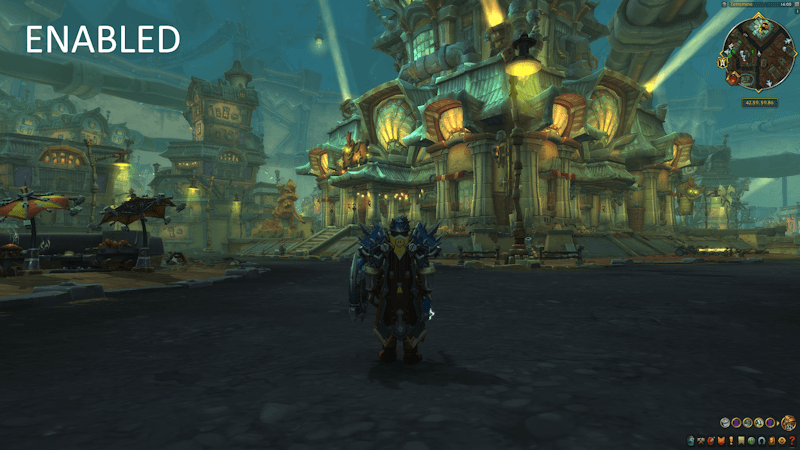
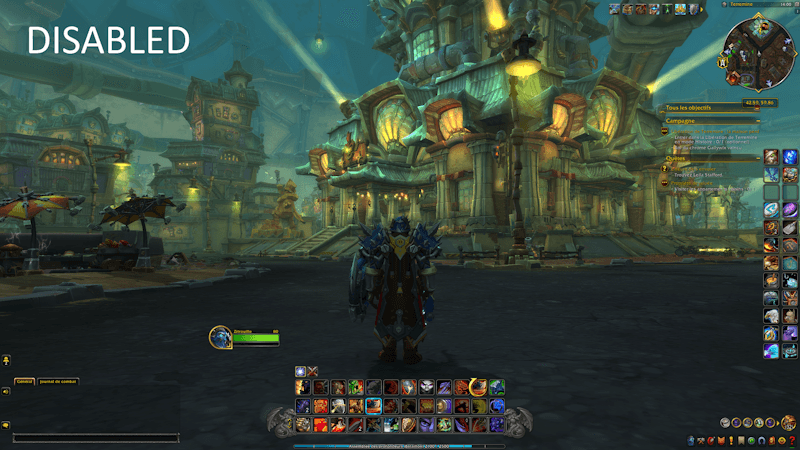
✨ Core Features
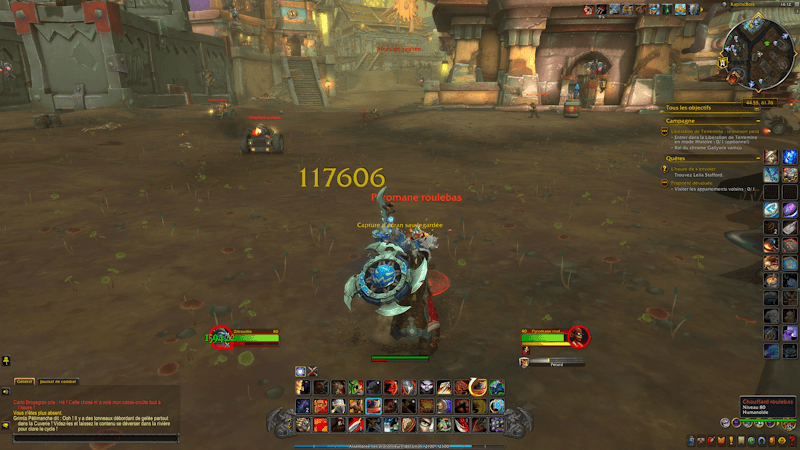
🚀 Combat Intelligence
- Instant Response: Interface appears immediately when combat starts
- Smart Fade: Elegantly hides after combat with customizable timing
- Never Miss Actions: Full functionality during critical moments
- Override Protection: Prevents accidental hiding during fights
👆 Revolutionary Hover System
Transform your screen edges into smart reveal zones:
- 💬 Left Edge: Hover to show/hide chat with smooth animations
- ⚔️ Bottom Edge: Reveal action bars and main interface elements
- 🎯 Right Edge: Display side action bars and quest tracker
- 🔧 Fully Customizable: Adjustable zones, delays, and sensitivity
💬 Intelligent Chat Management
Never miss important communications:
- Auto-Display: Whispers, party, guild, raid messages trigger temporary chat
- Smart Timing: 8-second display with smooth fade transitions
- Message Filtering: Only important chat types trigger display
- Manual Override: Full control when you need it
🎒 Merchant-Aware Bag System
- Auto-Open: Bags appear when talking to vendors
- Context Sensitive: Knows when you're shopping vs. adventuring
- Manual Compatibility: Works alongside your preferred bag addons
- Instant Response: No delays when you need to access items
🎮 Perfect For
📸 Content Creators
- Clean Screenshots: No UI clutter in your captures
- Streaming: Professional-looking streams with smart UI management
- Video Production: Cinematic recordings without manual hiding
🎭 Roleplay Communities
- Immersive Experience: Focus on the world, not the interface
- Smart Chat: Never miss roleplay messages or important communications
- Flexible Control: Quick toggles for screenshots and events
🏆 Competitive Players
- Combat Ready: Full interface instantly available when needed
- Distraction-Free: Clean view for better situational awareness
- Performance Optimized: Minimal impact on game performance
🌟 Casual Gamers
- Set and Forget: Works automatically without configuration
- User Friendly: Simple controls with powerful features
- Enhancement: Improves gameplay without complexity
⌨️ Simple Yet Powerful Controls
Intelligent Hover
Move mouse to screen edges → Reveal hidden elements
Stay in zone → Keep elements visible
Move away → Smooth auto-hide
Comprehensive Commands
/hideui         → Toggle everything
/hideui bars    → Action bars only
/hideui chat    → Chat only
/hideui show    → Show all elements
/hideui reset   → Fix any issues
🔧 Advanced Customization
Keybind Flexibility
- Custom Binding: Use WoW's keybind interface in Options->Shortcuts->Add-ons
- Conflict Detection: Smart handling of existing bindings
- Multiple Options: Separate controls for different elements
⚠️ Compatibility Notes:
- May conflict with complete UI replacements
- Some TukUI overlap (both manage similar elements)
- Automatically detects and warns about conflicts
🚀 Easy Installation & Setup
Install
- Download from CurseForge
- Extract to
World of Warcraft/_retail_/Interface/AddOns/ - Restart WoW or type
/reload
First Use
- Hover screen edges to experience smart reveals
- Enter combat to see automatic display
- Customize keybinds if desired in Options->Shortcuts->Add-ons
No Configuration Required
- Works perfectly with default settings
- Smart detection adapts to your screen resolution
- Automatic optimization for different UI setups
📊 Performance & Quality
Lightweight Design
- Minimal Memory: Optimized for efficiency
- Smart Timers: Automatic cleanup prevents memory leaks
- Event-Driven: Only active when needed
- Performance Monitoring: Built-in optimization
Reliability
- Extensive Testing: Tested across multiple setups
- Error Handling: Graceful handling of edge cases
- Addon Compatibility: Thorough testing with popular addons
- Regular Updates: Active maintenance and improvements
🆘 Support & Community
Getting Help
- In-Game: Use
/hideui resetfor immediate issue resolution - Comments: Leave feedback on this CurseForge page
- Bug Reports: Detailed issue reporting welcome
- Feature Requests: Community-driven development
Quick Troubleshooting
- Not hiding? Check if you're in combat or try
/hideui reset - Hover issues? Verify mouse position and try
/reload - Keybind problems? Check Key Bindings > AddOns section
🎯 What Users Say
"Finally, an addon that gets it right! The combat detection is flawless and the hover system feels natural."
"Perfect for screenshots and streaming. My viewers love the clean look!"
"The chat system is genius - never miss guild messages but keep the screen clean."
🔮 Continuous Development
Current Version: 2.0.1
- Improved performance optimization
- Better addon compatibility
- Refined hover system
Coming Soon
- In-game options panel
- Custom hover zones
- Profile system
- Advanced timing controls
Transform your WoW experience today. Download Dynamic Immersive HUD and discover what truly immersive gameplay feels like.
📋 Technical Details
Compatibility: World of Warcraft 11.0.2 (The War Within)
File Size: ~50KB
Language: English (with multi-language notes)
Dependencies: None required
Performance Impact: Minimal
Categories: Interface Enhancements, UI, Immersion, Combat, Screenshots
CurseForge: https://www.curseforge.com/wow/addons/dynamic-immersive-hud用户评价
暂无 / 5,0 条评价相关推荐
继续看看这些内容
