插件中文资料库
中文说明、玩家点评、适用场景和替代推荐,方便快速判断是否适合你。
- 日常任务、练级和满级玩法辅助
- 界面体验优化和信息展示增强
- 副本前先测试兼容性,确认不报错后再长期使用
 BagSync
 GroupFinder
 FollowerLocationInfo
RealLifeReminder 插件下载与使用指南
本页整理了 RealLifeReminder 的功能用途、适用人群、安装方法和常见问题,方便玩家快速判断是否需要安装。
适合谁用
RealLifeReminder 是一款 其他插件 类插件,适合需要优化界面、提升操作效率或补充游戏信息提示的魔兽世界玩家。
基本信息
- 插件作者:Xactly
- 插件分类:其他插件
- 适配版本:4.4.2,3.4.5,1.15.8,5.5.3,2.5.5,12.0.1
- 累计下载:0
安装方法
- 点击上方下载按钮获取 RealLifeReminder插件文件。
- 解压后将插件文件夹放入 World of Warcraft/_retail_/Interface/AddOns 目录。
- 重启游戏或在角色界面点击插件,确认 RealLifeReminder 已启用。
- 如果插件不生效,请检查版本是否匹配,或关闭同类冲突插件后重试。
使用建议
RealLifeReminder 安装后建议先在角色界面确认已启用,进入游戏后根据插件提供的命令、小地图按钮或设置面板进行调整。如遇到报错,可先单独启用该插件排查冲突。
RealLifeReminder 常见问题
RealLifeReminder 适合需要 其他插件 类功能的玩家,特别是希望提升游戏便利性、界面管理或战斗信息获取效率的用户。
下载后解压到 Interface/AddOns 目录,然后重启游戏并在角色界面启用插件。
常见原因是目录多套一层、游戏版本不匹配、依赖插件缺失或同类插件冲突。
可以查看本页的替代插件推荐和相关插件区域,按下载量和分类选择同类工具。
插件 AI 问答
可以问:这个插件正式服能用吗、和 DBM 冲突吗、怎么设置、有没有替代插件。
RealLifeReminder 是一款魔兽世界插件,主要用于倒计时、提醒和战斗预警。建议根据自己的版本和插件环境先测试兼容性。
插件用途
RealLifeReminder 主要面向需要其他插件功能的玩家,用来改善游戏体验、减少重复操作或补充默认界面没有直接提供的信息。
适用场景
- 倒计时、提醒和战斗预警
使用建议
安装后建议先在角色选择界面或插件管理器中确认已启用,再进入游戏测试是否与现有整合包、WA 和其他插件冲突。如遇报错,可以先禁用同类插件排查。
RealLifeReminder
A comprehensive real-life management tool for WoW players. Never lose track of time, forget important tasks, or neglect your health while gaming again.
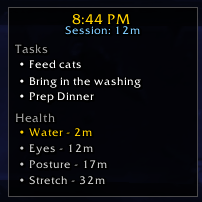
RealLifeReminder provides a sleek, draggable widget that displays the current time, session tracking, tasks, alarms, and health reminders - all in one place. Compatible with WoW Retail, Classic Era, and Cataclysm Classic.
Features
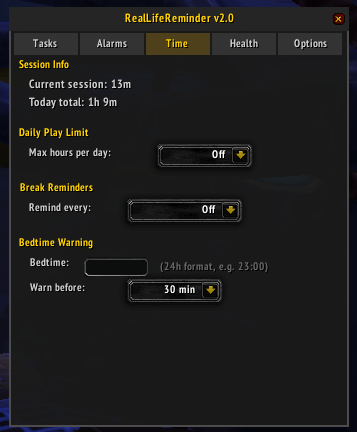
Time Management
- Real-time clock - Always visible 12-hour clock display
- Session tracker - See how long you've been playing this session
- Daily play time - Tracks total play time per day (persisted across sessions)
- Play limit warnings - Set a daily hour limit and get alerts when approaching/exceeding it
- Break reminders - Automatic reminders to take breaks at configurable intervals
- Bedtime warnings - Get notified when it's approaching your configured bedtime
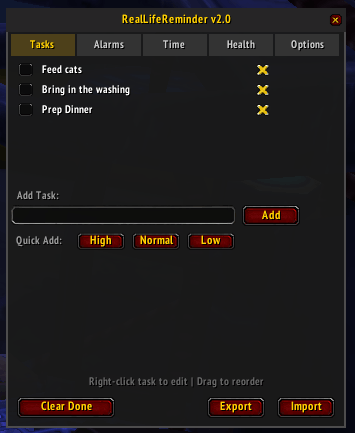
Task System
- Priority levels - Color-coded High (red), Normal (white), and Low (gray) priorities
- Due dates - Set optional due times; tasks turn red when overdue
- Recurring tasks - Daily or weekly tasks that automatically reset
- Right-click to edit - Modify task text, priority, due date, or recurrence
- Drag to reorder - Organize tasks by dragging them in the list
- Export/Import - Save and share task lists as encoded strings
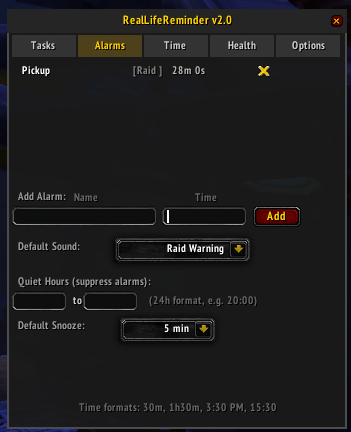
Alarm System
- Flexible time input - Set alarms using countdown (30m, 1h30m) or clock time (3:30 PM, 15:30)
- Multiple sounds - Choose from 6 different alert sounds
- Snooze function - Snooze triggered alarms for 5, 10, 15, 30, or 60 minutes
- Quiet hours - Suppress alarms during specified times (great for raid time)
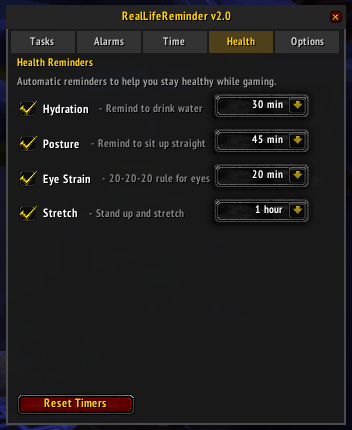
Health Reminders
- Hydration - Reminders to drink water
- Posture - Reminders to sit up straight
- Eye strain - 20-20-20 rule reminders (look away every 20 minutes)
- Stretch - Reminders to stand up and stretch
- Each reminder has configurable intervals and can be shown on the widget
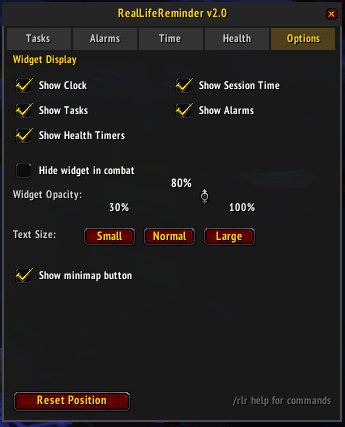
Widget Customization
- Draggable - Position anywhere on screen
- Hide in combat - Automatically hides during combat
- Opacity slider - Adjust transparency (30-100%)
- Section toggles - Show/hide clock, session, tasks, alarms, and health timers independently
- Text size - Small, Normal, or Large display options
- Minimap button - Quick access to toggle panel and widget
Slash Commands
/rlr Toggle the main settings panel
/rlr add <task> Quickly add a new task
/rlr alarm <name> <time> Set an alarm (e.g., /rlr alarm Raid 8:30 PM or /rlr alarm Break 30m)
/rlr tasks List all tasks in chat
/rlr alarms List all active alarms in chat
/rlr session Display current session and daily play time
/rlr size <small|normal|large> Change widget text size
/rlr clear Remove all completed tasks
/rlr export Export tasks to a shareable string
/rlr import <string> Import tasks from an export string
/rlr help Show all available commands
You can also use /reallife instead of /rlr.
Usage Tips
- Left-click the widget to open the settings panel
- Drag the widget to reposition it
- Right-click a task in the panel to edit it
- Drag tasks in the panel to reorder them
- Left-click the minimap button to toggle the panel
- Right-click the minimap button to toggle the widget
Panel Tabs
- Tasks - Add, manage, and organize your tasks
- Alarms - Set alarms and configure sound/quiet hours
- Time - Session stats, play limits, break reminders, bedtime settings
- Health - Enable and configure health reminder intervals
- Options - Widget display settings, opacity, text size, minimap button
Stay healthy, stay organized, and never miss raid time again!
CurseForge: https://www.curseforge.com/wow/addons/reallifereminder用户评价
暂无 / 5,0 条评价相关推荐
继续看看这些内容
