插件中文资料库
中文说明、玩家点评、适用场景和替代推荐,方便快速判断是否适合你。
- 任务路线、地图标记和野外探索
 Copy Anything
 Details! Mythic+ Scoreboard
 Myslot
AzerothGPS 插件下载与使用指南
本页整理了 AzerothGPS 的功能用途、适用人群、安装方法和常见问题,方便玩家快速判断是否需要安装。
适合谁用
AzerothGPS 是一款 地图与小地图 / 任务与升级 类插件,适合需要优化界面、提升操作效率或补充游戏信息提示的魔兽世界玩家。
基本信息
- 插件作者:kooki3z
- 插件分类:地图与小地图 / 任务与升级
- 适配版本:1.60.1
- 累计下载:0
安装方法
- 点击上方下载按钮获取 AzerothGPS插件文件。
- 解压后将插件文件夹放入 World of Warcraft/_retail_/Interface/AddOns 目录。
- 重启游戏或在角色界面点击插件,确认 AzerothGPS 已启用。
- 如果插件不生效,请检查版本是否匹配,或关闭同类冲突插件后重试。
使用建议
AzerothGPS 安装后建议先在角色界面确认已启用,进入游戏后根据插件提供的命令、小地图按钮或设置面板进行调整。如遇到报错,可先单独启用该插件排查冲突。
AzerothGPS 常见问题
AzerothGPS 适合需要 地图与小地图 / 任务与升级 类功能的玩家,特别是希望提升游戏便利性、界面管理或战斗信息获取效率的用户。
下载后解压到 Interface/AddOns 目录,然后重启游戏并在角色界面启用插件。
常见原因是目录多套一层、游戏版本不匹配、依赖插件缺失或同类插件冲突。
可以查看本页的替代插件推荐和相关插件区域,按下载量和分类选择同类工具。
插件 AI 问答
可以问:这个插件正式服能用吗、和 DBM 冲突吗、怎么设置、有没有替代插件。
Basically a car GPS, but for Azeroth. Tell it where you want to go and it draws the way there along the actual roads and trails, with turn-by-turn directions, distances and an ETA.
Want the full rundown of every feature, option and command? Because it's a lot! It's all in the AzerothGPS guide.
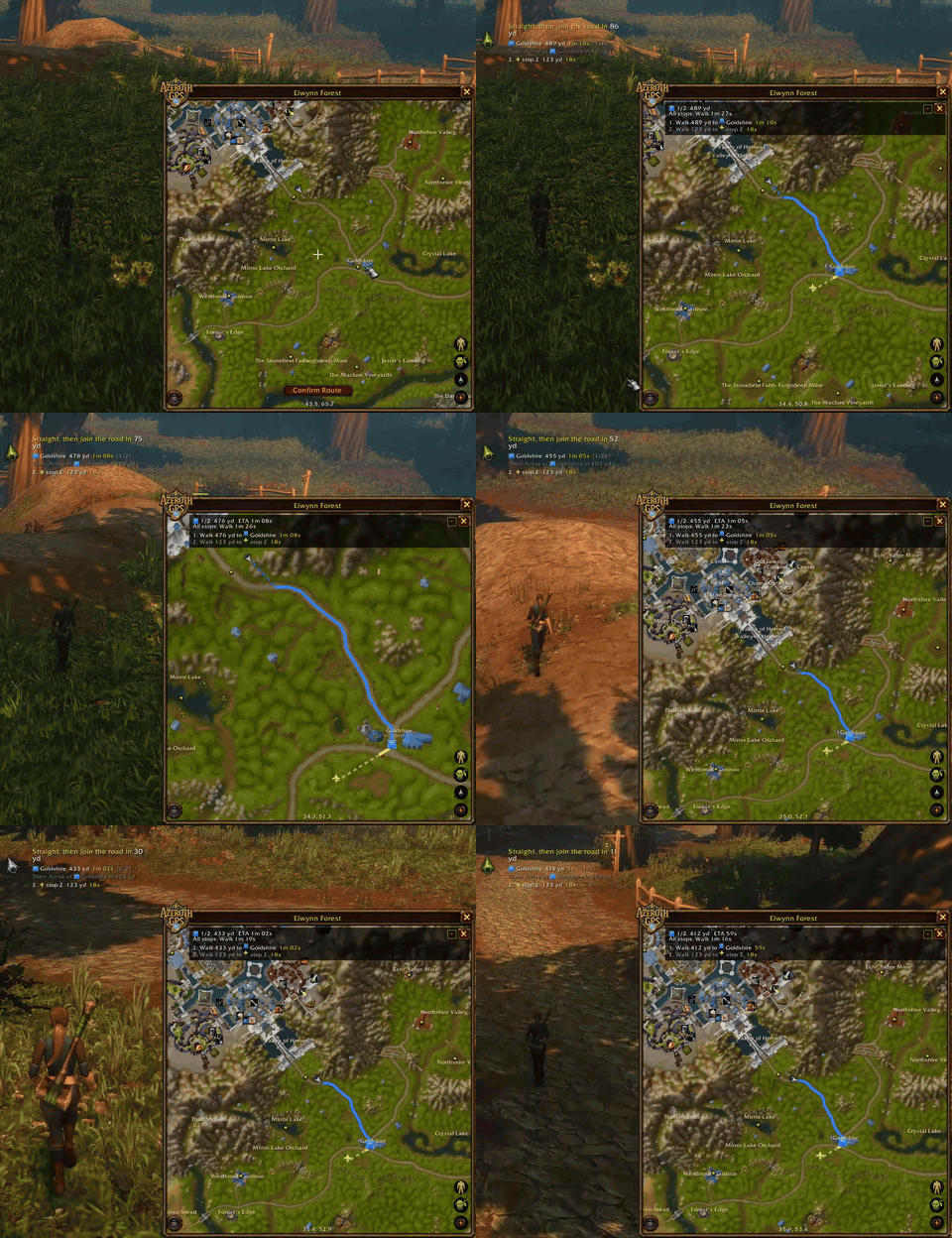
Double-click where you want to go, confirm, and follow the arrow.
It knows the terrain
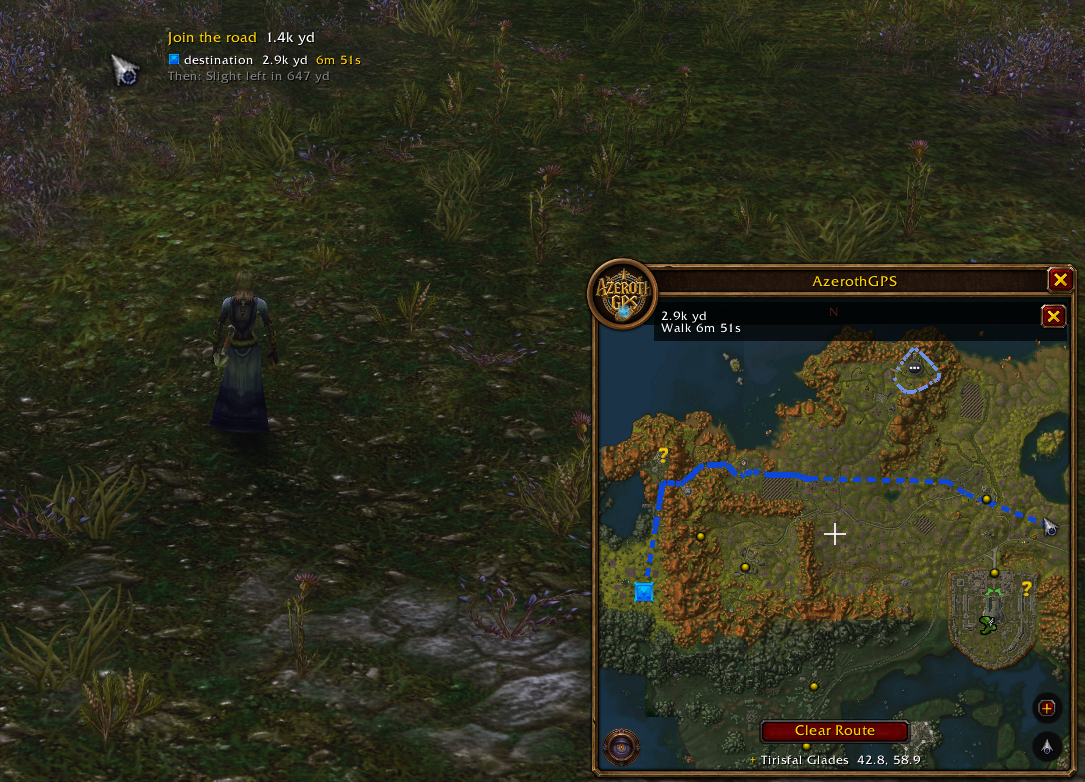
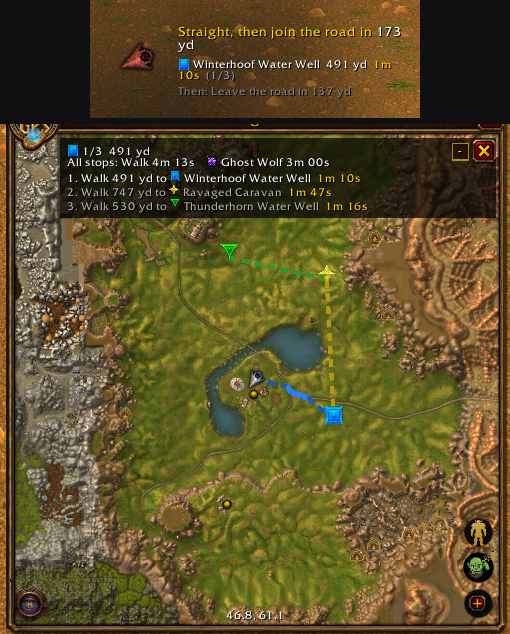
No more running straight at a mountain and wondering why you're stuck. When cliffs or ridges are in the way, the route goes around them and in through the pass. It sticks to the roads where that makes sense, and when you're off the road it joins up where you're headed, not back at the closest bit behind you. Take your own shortcut and it just adjusts. Got a bunch of places to hit? Add as many stops as you like and it sorts them into the fastest order.
Your quest log, routed
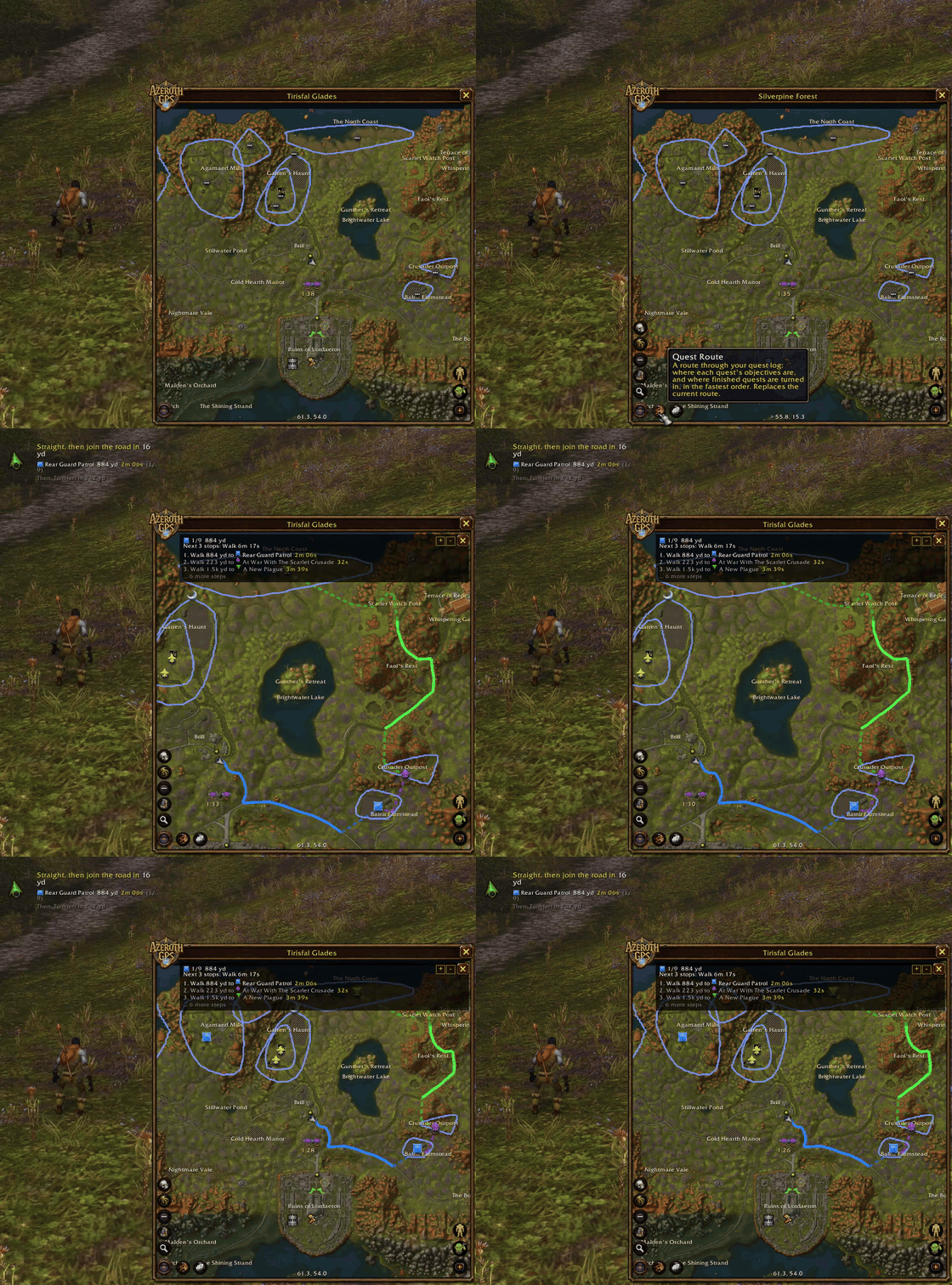
Quest areas show up on the map just like on your minimap. One click and it routes you through your whole quest log: every objective and every turn-in, in the fastest order. A stop in a quest area waits until you've finished that quest's objectives, then the route moves on.
Stays out of your way
- Size and opacity: make it as big or as see-through as you want (unlock the size and drag the corner). A bigger map shows more of the world, not just the same bit blown up.
- Moving and fighting: it can fade while you run, go click-through, or dim or hide in combat.
- Show/hide key: bind whatever key you like.
- Older PC? Options → Performance lets you turn down how often the map redraws and the route gets recalculated. There's a one-click low-end preset, and it shows you live how much time AzerothGPS is actually taking.
Farming, on every character
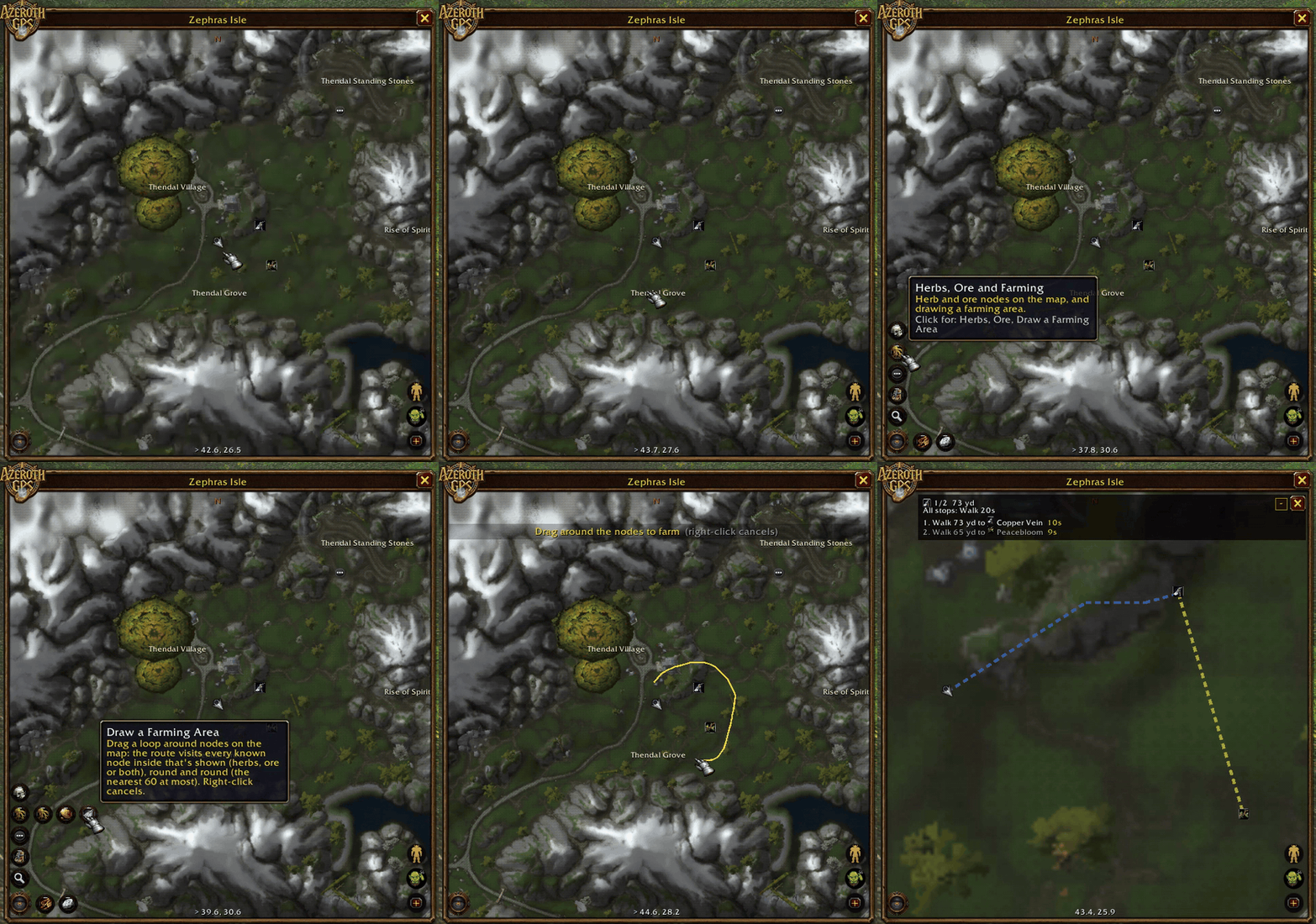
Every herb and ore node you gather, hover over on the minimap, or right-click without the profession ("Requires Herbalism") gets remembered across all your characters. Draw around a spot and it routes a loop through every node in it.
Spot a mistake? Fix it
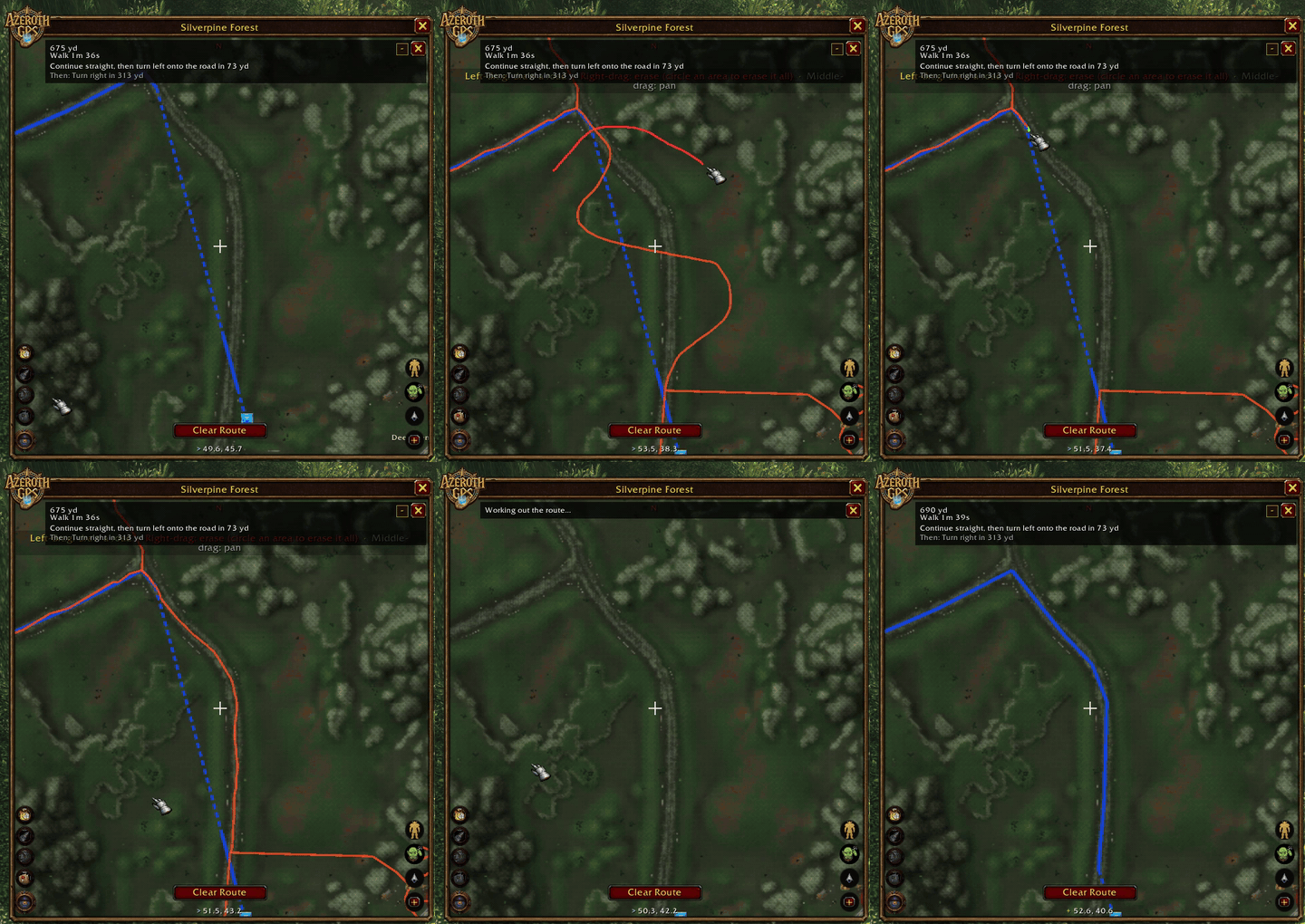
If a route misses a trail or walks you into a wall, draw the fix right on the map and routes use it straight away. Send it by following directions in "Help improve" menu (/reload, then Copy Map Data…) and if it checks out, it ships in the next version for everybody.
Also in there
- Every way to get around: flight paths (plus a detour to pick up ones you pass but haven't learned), boats and zeppelins with countdowns to their next arrival (on board, an "arrives in" countdown just like a flight's; Shift-click a dock to paste its times in chat), the Deeprun Tram, your hearthstone, class teleports and engineer teleporters. You can hearth or teleport with one click right from the directions. Don't fancy a certain flight or boat? Right-click it and the route skips it. If that leaves no way there, it tells you and offers to put it back.
- Cities and caves: every capital's streets (stairs called out), Undercity's floors, 353 caves and mines, and the lifts: Thunder Bluff's, Undercity's, the Great Lift down to Thousand Needles and Freewind Post's.
- Dungeons and raids: floor-by-floor maps, bosses in order, and a boss route. Dungeons with wings get an icon per wing, each with its own bosses and route: Scarlet Monastery's Graveyard, Library, Armory and Cathedral, Dire Maul's East, West and North, Stratholme's two gates, Maraudon's Orange and Purple.
- Keeping you alive: routes steer around the other faction's towns and zones way above your level. If the only way there runs through one, it asks before it shows you that route.
- Your own pins: Shift-click the map to drop a pin with any icon from the game and a name. Double-click it later to route there, on the right floor in Undercity, caves and the capitals; a pin in a dungeon takes you to its entrance. Search finds your pins by name, and the city places you know from the guards ("Inn Ir" for Ironforge's inn).
- Your group on the map: party and raid members show up as round class icons in their class color, handy for keeping track of your raid in open-world PvP. They don't need the addon.
- Turn-by-turn directions with ETAs at your actual speed, on foot, mounted or in travel form.
- Map pins and sharing: Ctrl-click for the game's map pin and Shift-click it into chat, just like the world map. TomTom
/wayimport, and share your route as a chat link: friends with AzerothGPS click it to get your stops (asked first, never pushed at them). - Display only: it never moves your character, clicks anything for you or automates anything. It just shows you the way.
Getting started
- The map sits at the bottom of your screen (type
/agps showif it's hidden). - Double-click the map to add a stop, then click Confirm Route (or just wait 5 seconds).
- Follow the line on the map, or the arrow.
- Using flight paths? Open the flight map at any flight master once so it knows which ones you have.
Come say hi
- Discord: questions, ideas and news on the AzerothGPS Discord. Come hang out.
- Bugs and bad routes: send them in with the report form or post in the Discord. Include the zone and your start and destination coordinates (they're at the bottom of the map).
- Map fixes: draw them with the road or wall tools, type
/reload(that saves every edit), then Copy Map Data… (Options → Help improve) and paste it into the report form or the Discord.
AzerothGPS is a fan-made addon and is not affiliated with or endorsed by Blizzard Entertainment. World of Warcraft and Azeroth are trademarks of Blizzard Entertainment, Inc.
CurseForge: https://www.curseforge.com/wow/addons/azerothgps用户评价
暂无 / 5,0 条评价相关推荐
继续看看这些内容