插件中文资料库
中文说明、玩家点评、适用场景和替代推荐,方便快速判断是否适合你。
- 任务路线、地图标记和野外探索
- 界面布局、头像框、姓名板和动作条优化
 Details! Mythic+ Scoreboard
 BagSync
 FredStats
RufusUI 插件下载与使用指南
本页整理了 RufusUI 的功能用途、适用人群、安装方法和常见问题,方便玩家快速判断是否需要安装。
适合谁用
RufusUI 是一款 动作条 / 地图与小地图 / 背包与库存 / 增益与减益 / 单位框架 类插件,适合需要优化界面、提升操作效率或补充游戏信息提示的魔兽世界玩家。
基本信息
- 插件作者:Avriam
- 插件分类:动作条 / 地图与小地图 / 背包与库存 / 增益与减益 / 单位框架
- 适配版本:1.60.1
- 累计下载:2
安装方法
- 点击上方下载按钮获取 RufusUI插件文件。
- 解压后将插件文件夹放入 World of Warcraft/_retail_/Interface/AddOns 目录。
- 重启游戏或在角色界面点击插件,确认 RufusUI 已启用。
- 如果插件不生效,请检查版本是否匹配,或关闭同类冲突插件后重试。
使用建议
RufusUI 安装后建议先在角色界面确认已启用,进入游戏后根据插件提供的命令、小地图按钮或设置面板进行调整。如遇到报错,可先单独启用该插件排查冲突。
RufusUI 常见问题
RufusUI 适合需要 动作条 / 地图与小地图 / 背包与库存 / 增益与减益 / 单位框架 类功能的玩家,特别是希望提升游戏便利性、界面管理或战斗信息获取效率的用户。
下载后解压到 Interface/AddOns 目录,然后重启游戏并在角色界面启用插件。
常见原因是目录多套一层、游戏版本不匹配、依赖插件缺失或同类插件冲突。
可以查看本页的替代插件推荐和相关插件区域,按下载量和分类选择同类工具。
插件 AI 问答
可以问:这个插件正式服能用吗、和 DBM 冲突吗、怎么设置、有没有替代插件。
紧凑的玩家框体在左上角显示生命值和法力值。方形小地图和动作条沿屏幕边缘排列,让你在探索时保持屏幕中央区域清爽。
RufusUI 为 WoW Forever 中各职业的玩家带来可自定义的界面和专业技能指南。其武器指南可帮助你在升级过程中规划装备提升。
快速上手
打开小地图按钮或输入 /rufus。在“概览”中,选择英语或巴西葡萄牙语并设置窗口大小。在左侧选择一个类别以调整其设置。
查找你的下一把武器
输入 /rufus weapons,为你的职业和专精选择一条升级路线。当前路线涵盖法师、战斗盗贼、敏锐盗贼和增强萨满。选择联盟或部落,即可查看你当前装备的武器、当前推荐以及按等级划分的下一件升级装备。浏览任务、地下城、世界掉落或制造,然后将鼠标悬停在物品上查看其属性。
了解接下来该制造什么
打开工程学,查看下一个配方、材料数量以及值得保留的物品。技能达到 150 时,联盟工程师可以查看在哪里学习专家级工程学,以及接下来需要制作多少个青铜框架。专业技能还包括急救,以及钓鱼和烹饪的合并指南。右键点击受支持的钓鱼地点,可显示路径点箭头。
界面与战斗
自定义单位框体和施法条,在暴雪团队框架上追踪控制效果,并调整资源条位置。调整小地图,并在统一背包窗口中整理你的物品。Alt + 右键点击可将物品标记为垃圾。打开商人时按住 Shift 可跳过自动出售和修理。
兼容性
专为 WoW Forever 打造,并提供 ClassicUI Forever、Leatrix Plus 和 Leatrix Maps 的兼容性设置。RufusUI 包含自己的界面样式。
CurseForge:https://www.curseforge.com/wow/addons/rufusui
RufusUI for WoW Forever
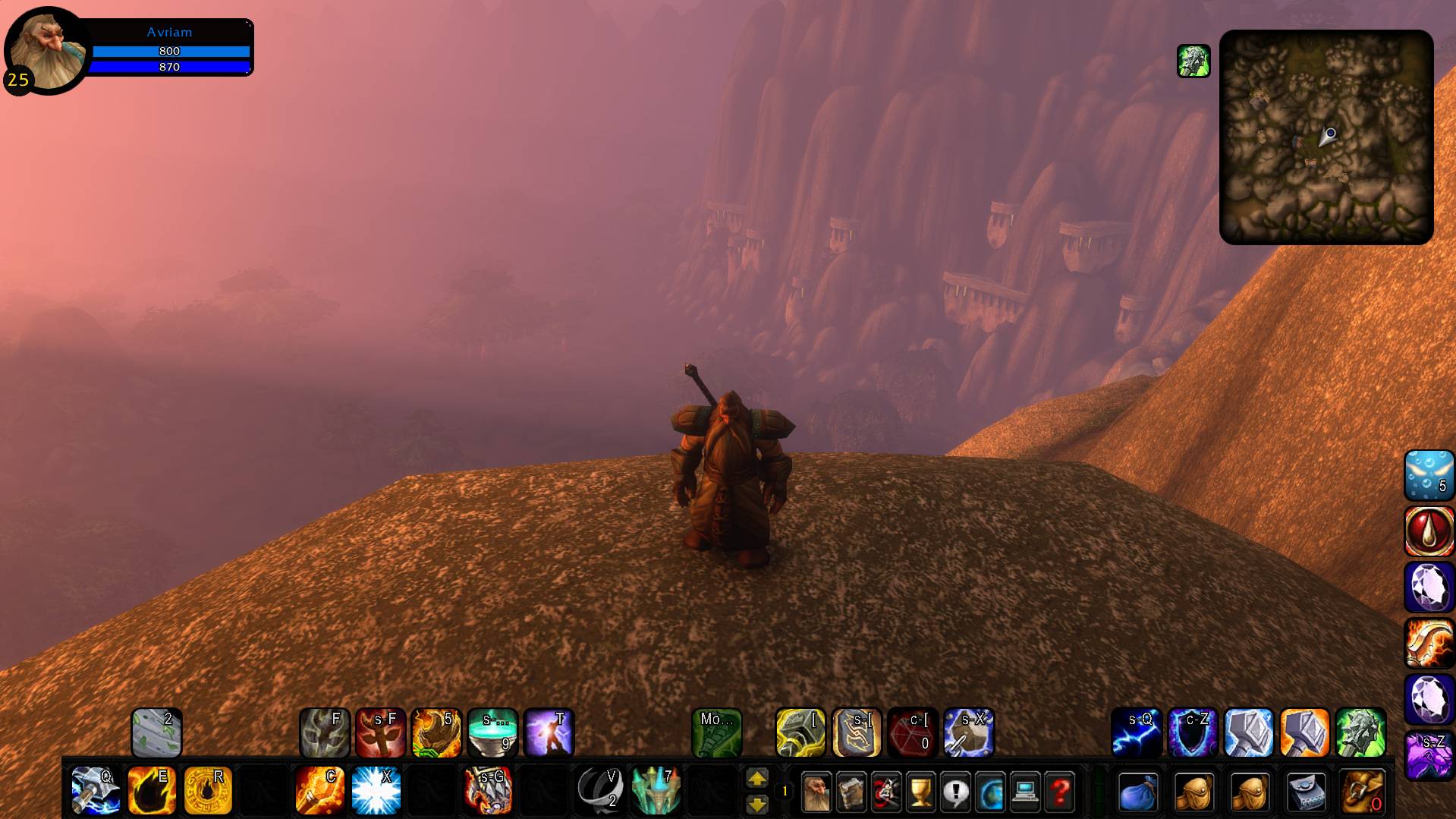
The compact player frame shows health and mana at the top left. The square minimap and action bars sit along the edges, leaving the center clear while you explore.
RufusUI brings a customizable interface and profession guides to players across classes in WoW Forever. Its weapon guides help you plan upgrades as you level.
Getting started
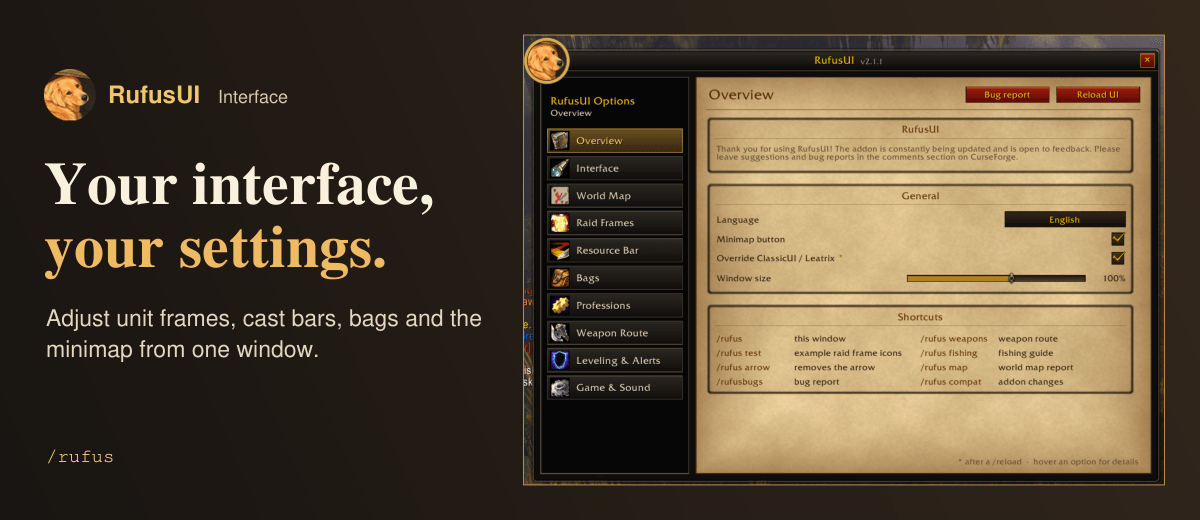
Open the minimap button or type /rufus. In Overview, choose English or Brazilian Portuguese and set the window size. Select a category on the left to adjust its settings.
Find your next weapon
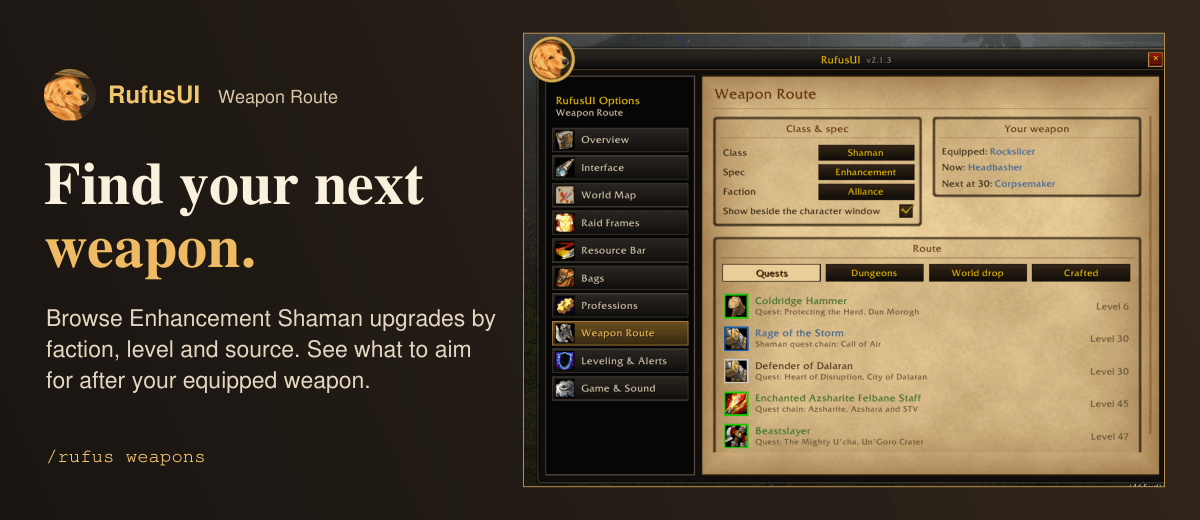
Type /rufus weapons to choose a leveling route for your class and specialization. Current routes cover Mage, Combat Rogue, Subtlety Rogue, and Enhancement Shaman. Choose Alliance or Horde to see your equipped weapon, the current recommendation, and the next upgrade by level. Browse Quests, Dungeons, World drop, or Crafted, then hover over an item to inspect its stats.
Know what to craft next
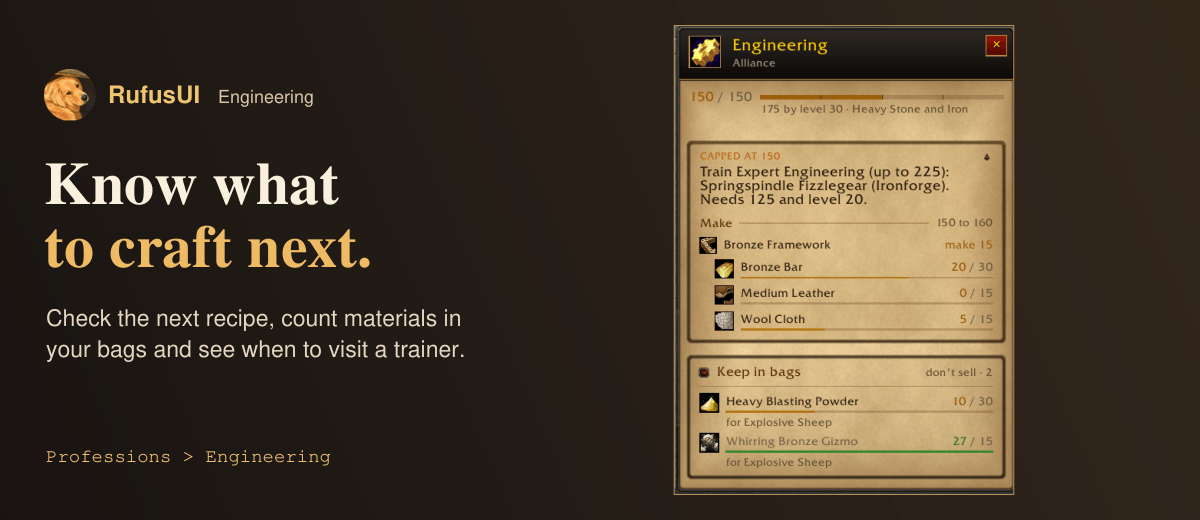
Open Engineering to see the next recipe, material counts, and items worth keeping. At skill 150, an Alliance engineer can see where to train Expert Engineering and how many Bronze Frameworks to make next. Professions also includes First Aid and a combined Fishing and Cooking guide. Right-click a supported fishing location for a waypoint arrow.
Interface and combat
Customize unit frames and cast bars, track crowd control on Blizzard raid frames, and position the resource bar. Adjust the minimap and organize your inventory in a unified bag window. Alt + right-click marks an item as junk. Hold Shift when opening a vendor to skip automatic selling and repairs.
Compatibility
Built for WoW Forever, with compatibility settings for ClassicUI Forever, Leatrix Plus, and Leatrix Maps. RufusUI includes its own interface styling.
CurseForge: https://www.curseforge.com/wow/addons/rufusui用户评价
暂无 / 5,0 条评价相关推荐
继续看看这些内容