插件中文资料库
中文说明、玩家点评、适用场景和替代推荐,方便快速判断是否适合你。
- 界面布局、头像框、姓名板和动作条优化
 GroupFinder
 GuildApplicantTracker
 KeystoneLoot
ZbGuildManager 插件下载与使用指南
本页整理了 ZbGuildManager 的功能用途、适用人群、安装方法和常见问题,方便玩家快速判断是否需要安装。
适合谁用
ZbGuildManager 是一款 公会 类插件,适合需要优化界面、提升操作效率或补充游戏信息提示的魔兽世界玩家。
基本信息
- 插件作者:jtrack3d
- 插件分类:公会
- 适配版本:7.3.0
- 累计下载:45
安装方法
- 点击上方下载按钮获取 ZbGuildManager插件文件。
- 解压后将插件文件夹放入 World of Warcraft/_retail_/Interface/AddOns 目录。
- 重启游戏或在角色界面点击插件,确认 ZbGuildManager 已启用。
- 如果插件不生效,请检查版本是否匹配,或关闭同类冲突插件后重试。
使用建议
ZbGuildManager 安装后建议先在角色界面确认已启用,进入游戏后根据插件提供的命令、小地图按钮或设置面板进行调整。如遇到报错,可先单独启用该插件排查冲突。
ZbGuildManager 常见问题
ZbGuildManager 适合需要 公会 类功能的玩家,特别是希望提升游戏便利性、界面管理或战斗信息获取效率的用户。
下载后解压到 Interface/AddOns 目录,然后重启游戏并在角色界面启用插件。
常见原因是目录多套一层、游戏版本不匹配、依赖插件缺失或同类插件冲突。
可以查看本页的替代插件推荐和相关插件区域,按下载量和分类选择同类工具。
插件 AI 问答
可以问:这个插件正式服能用吗、和 DBM 冲突吗、怎么设置、有没有替代插件。
ZbGuildManager 是一款魔兽世界插件,主要用于界面框架、头像、动作条或冷却显示优化。建议根据自己的版本和插件环境先测试兼容性。
插件用途
ZbGuildManager 主要面向需要公会功能的玩家,用来改善游戏体验、减少重复操作或补充默认界面没有直接提供的信息。
适用场景
- 界面框架、头像、动作条或冷却显示优化
使用建议
安装后建议先在角色选择界面或插件管理器中确认已启用,再进入游戏测试是否与现有整合包、WA 和其他插件冲突。如遇报错,可以先禁用同类插件排查。
Blizzard Broke Editing Guilds:
Blizzard has moved all guild editing functions into the "restricted to Blizzard" list. This add-on can only search without LUA errors. I will monitor the situation to see if it is corrected, but unless they remove that restriction, my add-on's major capabilities for managing a guild are no longer useful. I'm not sure I'll continue development.
I believe the rumored reason they did this was to protect player from unscrupulous WeakAuras that people write to damage guilds. Again, bad-actors is why we can't have nice things.
ZbGuildManager provides easier roster management. It uses the public notes to store main to alt relationship information. Some features need guild permissions such as set note or promote/demote.
Features:
Manage Players
- Indicate Mains to Alts relationship (Format currently supported by Alts).
- Activity Graph based on player (not character) activity (tooltip % information)
- Easily see absent and remove absent players.
- Last player logon (not last characters) - So you don't accidentally boot an alt of an active player.
- Set ranks (promote/demote) on a player, but still allow unique individual permissions.
- Ability to view main characters or all characters.
Roster
- Search for a character and see it's relationship to other characters.
- Loads minimal data until called upon.
- Export CSV data to Excel or Google sheets for more analysis.
- Copy special character names from roster.
To activate: /zb show or minimap icon.
Known Issues / Planned Work
- Auto-set main if setting alt and main isn't set.
- Add in-game tool-tip / instruction.
- Add "options" like
- Disable main/alt handling, it's still useful as a guild listing, activity and search.
- More international translations.
- Handles the 31-character note limitation. Long server names may cause the "Alts" add-on to miss-fire.
Note Format
Store the following information in character public notes (like alts) such that players can see mains/alts and use the "Alts" add-on.
- Mains will contain their join date "MM-DD-YY" format
- Alts will contain their main's name "(name-server)" format. I may add other formats in the future.
- If alts the length of (name-server) is greater than note max (31 characters) it will truncate server name to fit.
Blizzard API does not provide a guild join date. Note: Sometimes you can find an approximate join date information using WoWProgress.com if you use this site, otherwise you may have to guess or just use current data.
Getting Setup
When you first start up the app and you have "Edit Public Note" privileges, you will see the Unassociated list on the left. This is the list of players that do not have a public note indicating their main or their join date.
- To assign a main, you select the character and click the "Set Main / Join Date" button. This will ask you what day the player joined the guild. Once set, the character is considered a "main".
- To assign an alt, you use the search for and/or click the "main" character in the "main panel" (center). Then, that member's panel will appear to the right of the main panel. You should have 3 panels up: the unassociated on the left, the selected main in the middle and the details on the right. If you select the "alt" on the left and click "Set Alt" you should see the "Alt" move/appear in the right panel. The notes have been updated.
Once your guild is all setup. The Left panel will only appear when new members join the guild.
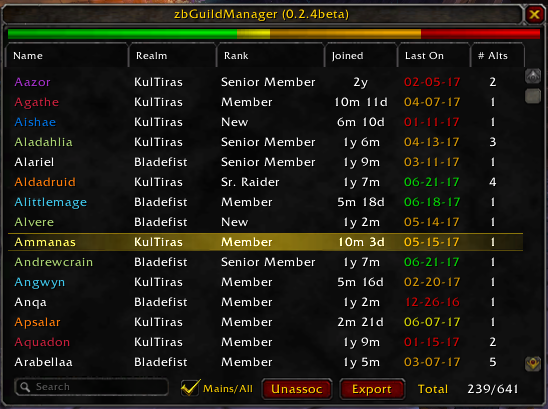
Main panel
- View mains or all characters
- Bar colors indicate what percent of guild is active.
- Sort by Name, Rank, Seniority, Join Date, # of Alts
- Search by Name or Alt Name (shows main's that match)
- Selecting brings up the Secondary (Alt) character panel
- Textual form of length in guild (actual date on Secondary Panel).
- Colors the last-on date based on how long since last logged in (all associated characters, not main). Green < 2 weeks. Yellow < 4 weeks. Orange < 19 weeks. Red > 19 weeks.
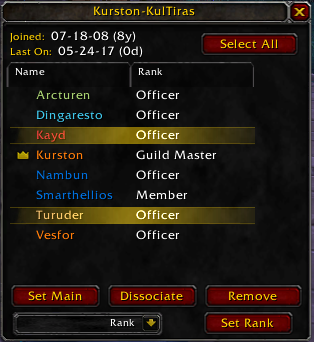
Secondary (Alts) Characters' Panel
- Main is indicated with the "Star" icon.
- Select individually or use "Select All"
- Applying guild ranks to all or single characters easily.
- Remove all selected characters.
- Adjust notes to set a different character as the main character.
Unassociated Characters Panel
- Appears when loading and a player has no public note.
- Allows you to disposition a character as either new main or secondary (alt).
Options
Date Display Formats (See the [esc] -> Interface -> Add-on's panel to set: MM/DD/YY, MM-DD-YY, YY-MM-DD.
More Details
If you have edit note privileges it will minimally store locally the main names and join dates for up to 3 months for players that have left guild. This supports the case where an individual leaves the guild on their main. You would lose the date they originally joined because it is stored in the main's note. The application will recover the date from the saved copy unless they are gone for good.
Future Ideas
- Perhaps adding "Player Notes". This would be larger than the provided 31 characters provided by Blizzard. However, this would require storing locally instead of notes.
用户评价
暂无 / 5,0 条评价相关推荐
继续看看这些内容
