插件详情
插件中文资料库
中文说明、玩家点评、适用场景和替代推荐,方便快速判断是否适合你。
玩家一句话点评
Fox Guild Calendar 适合需要聊天与通讯、界面增强或玩法辅助的玩家,建议结合自己的职业和版本先测试再长期使用。
适用场景
- 界面布局、头像框、姓名板和动作条优化
 GuildApplicantTracker
 Tae's Guild Tithe
 GuildLayers
Fox Guild Calendar 插件下载与使用指南
本页整理了 Fox Guild Calendar 的功能用途、适用人群、安装方法和常见问题,方便玩家快速判断是否需要安装。
适合谁用
Fox Guild Calendar 是一款 聊天与通讯 类插件,适合需要优化界面、提升操作效率或补充游戏信息提示的魔兽世界玩家。
基本信息
- 插件作者:urstory
- 插件分类:聊天与通讯
- 适配版本:1.15.8
- 累计下载:29
安装方法
- 点击上方下载按钮获取 Fox Guild Calendar插件文件。
- 解压后将插件文件夹放入 World of Warcraft/_retail_/Interface/AddOns 目录。
- 重启游戏或在角色界面点击插件,确认 Fox Guild Calendar 已启用。
- 如果插件不生效,请检查版本是否匹配,或关闭同类冲突插件后重试。
使用建议
Fox Guild Calendar 安装后建议先在角色界面确认已启用,进入游戏后根据插件提供的命令、小地图按钮或设置面板进行调整。如遇到报错,可先单独启用该插件排查冲突。
Fox Guild Calendar 常见问题
这个插件适合哪些玩家?
Fox Guild Calendar 适合需要 聊天与通讯 类功能的玩家,特别是希望提升游戏便利性、界面管理或战斗信息获取效率的用户。
下载后怎么安装?
下载后解压到 Interface/AddOns 目录,然后重启游戏并在角色界面启用插件。
为什么插件不显示或不生效?
常见原因是目录多套一层、游戏版本不匹配、依赖插件缺失或同类插件冲突。
有没有类似插件可以替代?
可以查看本页的替代插件推荐和相关插件区域,按下载量和分类选择同类工具。
插件 AI 问答
可以问:这个插件正式服能用吗、和 DBM 冲突吗、怎么设置、有没有替代插件。
Fox Guild Calendar 是一款魔兽世界插件,主要用于界面框架、头像、动作条或冷却显示优化。建议根据自己的版本和插件环境先测试兼容性。
插件用途
Fox Guild Calendar 主要面向需要聊天与通讯功能的玩家,用来改善游戏体验、减少重复操作或补充默认界面没有直接提供的信息。
适用场景
- 界面框架、头像、动作条或冷却显示优化
使用建议
安装后建议先在角色选择界面或插件管理器中确认已启用,再进入游戏测试是否与现有整合包、WA 和其他插件冲突。如遇报错,可以先禁用同类插件排查。
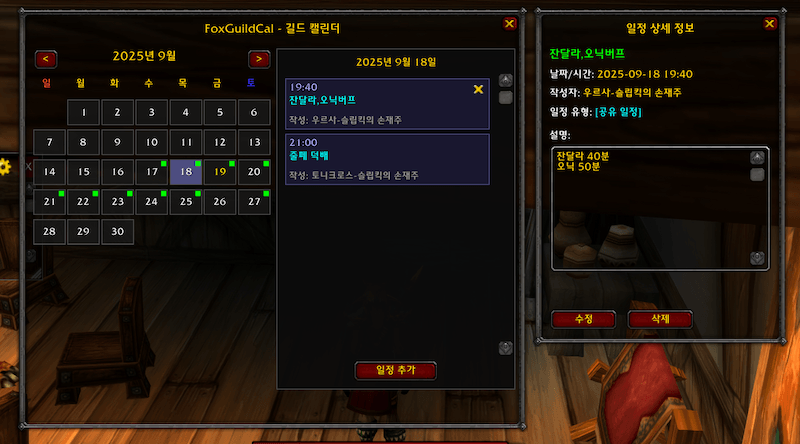
# FoxGuildCal - WoW Classic Guild Calendar Addon
## Overview
FoxGuildCal is a comprehensive calendar addon for World of Warcraft Classic that allows guild members to share and manage events. It features both personal and shared event systems with automatic synchronization between guild members.
## Features
### 📅 Calendar System
- **Monthly Calendar View**: Clean and intuitive monthly calendar interface
- **Dual Event Types**:
- **Shared Events** (Green dots): Synchronized across all guild members
- **Personal Events** (Gold dots): Account-wide personal reminders
- **Visual Indicators**: Different colored dots show event types at a glance
- **Today Highlighting**: Current date highlighted in yellow
### 🔄 Synchronization
- **Automatic Guild Sync**: Events automatically synchronize between guild members
- **Smart Sync System**: Intelligent retry mechanism for reliable data transfer
- **Conflict Resolution**: Newer events automatically override older versions
- **Manual Sync Option**: Force synchronization through options menu
### 📝 Event Management
- **Create Events**: Add events with title, time, and description
- **Event Details**: Click any event to view full details
- **Edit Events**: Modify your own events anytime
- **Delete Events**: Remove events you created
- **Event Types**: Toggle between personal and shared when creating
### 🎯 User Interface
- **Minimap Button**: Quick access to calendar
- **Movable Window**: Drag calendar window anywhere on screen
- **Event List Panel**: Side panel shows all events for selected day
- **Tooltip Support**: Hover over minimap button to see today's events
## Commands
- `/fox` or `/foxcal` - Toggle calendar window
- `/fox sync` - Manually synchronize with guild members
- `/fox help` - Show help information
## Installation
1. Download the FoxGuildCal addon
2. Extract to `World of Warcraft\_classic_\Interface\AddOns\`
3. Ensure folder is named `FoxGuildCal`
4. Restart WoW or type `/reload` in game
## Usage
### Creating an Event
1. Click the minimap button or use `/fox` command
2. Select a date on the calendar
3. Click "Add Event" button
4. Fill in event details:
- Title (required)
- Time (optional)
- Description (optional)
- Check/uncheck "Guild Shared Event" for event type
5. Click Save
### Viewing Events
- **Calendar View**: Colored dots indicate events on each day
- Green dot = Shared guild event
- Gold dot = Personal event
- Both dots = Both event types on same day
- **Day View**: Click any date to see all events in the side panel
- **Event Details**: Click any event in the list for full information
### Managing Events
- Only event creators can edit or delete their events
- Personal events are visible across all your characters
- Shared events sync automatically with guild members
## Event Types
### Shared Events (Guild)
- Visible to all guild members with the addon
- Automatically synchronized
- Perfect for raids, meetings, and guild activities
- Shown with green indicators
### Personal Events
- Private to your account only
- Visible across all your characters
- Great for personal reminders and notes
- Shown with gold indicators
## Troubleshooting
### Events Not Syncing
- Ensure you're in a guild
- Check if other guild members have the addon
- Try manual sync with `/fox sync`
- Wait a few seconds after logging in for initial sync
### Calendar Not Opening
- Check if addon is enabled in character selection
- Try `/reload` command
- Ensure no Lua errors with `/console scriptErrors 1`
### Wrong Date Issues
- Fixed in latest version
- Dates now properly save to selected day
- Month navigation resets to day 1
## Technical Details
- **SavedVariables**: `FoxGuildCalDB`
- **Addon Communication**: Uses addon message system for guild sync
- **Storage**: Events stored per guild and account-wide for personal
- **Sync Protocol**: Custom protocol with conflict resolution
---
# FoxGuildCal - WoW 클래식 길드 캘린더 애드온
## 개요
FoxGuildCal은 월드 오브 워크래프트 클래식용 종합 캘린더 애드온으로, 길드원들이 일정을 공유하고 관리할 수 있습니다. 개인 일정과 공유 일정 시스템을 모두 지원하며 길드원 간 자동 동기화 기능을 제공합니다.
## 주요 기능
### 📅 캘린더 시스템
- **월간 캘린더 뷰**: 깔끔하고 직관적인 월간 캘린더 인터페이스
- **이중 일정 유형**:
- **공유 일정** (녹색 점): 모든 길드원과 동기화
- **개인 일정** (황금색 점): 계정 전체 개인 메모
- **시각적 표시**: 다른 색상의 점으로 일정 유형을 한눈에 구분
- **오늘 날짜 강조**: 현재 날짜는 노란색으로 표시
### 🔄 동기화
- **자동 길드 동기화**: 길드원 간 일정 자동 동기화
- **스마트 동기화 시스템**: 안정적인 데이터 전송을 위한 지능형 재시도 메커니즘
- **충돌 해결**: 최신 일정이 자동으로 이전 버전을 덮어씀
- **수동 동기화 옵션**: 옵션 메뉴를 통한 강제 동기화
### 📝 일정 관리
- **일정 생성**: 제목, 시간, 설명을 포함한 일정 추가
- **일정 상세정보**: 모든 일정을 클릭하여 전체 내용 확인
- **일정 수정**: 본인이 작성한 일정은 언제든 수정 가능
- **일정 삭제**: 본인이 생성한 일정 삭제
- **일정 유형**: 생성 시 개인/공유 선택 가능
### 🎯 사용자 인터페이스
- **미니맵 버튼**: 캘린더에 빠르게 접근
- **이동 가능한 창**: 캘린더 창을 화면 어디든 드래그 가능
- **일정 목록 패널**: 선택한 날짜의 모든 일정을 사이드 패널에 표시
- **툴팁 지원**: 미니맵 버튼에 마우스를 올려 오늘의 일정 확인
## 명령어
- `/fox` 또는 `/foxcal` - 캘린더 창 열기/닫기
- `/fox sync` - 길드원과 수동 동기화
- `/fox help` - 도움말 정보 표시
## 설치 방법
1. FoxGuildCal 애드온 다운로드
2. `World of Warcraft\_classic_\Interface\AddOns\` 폴더에 압축 해제
3. 폴더 이름이 `FoxGuildCal`인지 확인
4. WoW 재시작 또는 게임 내에서 `/reload` 입력
## 사용 방법
### 일정 생성하기
1. 미니맵 버튼 클릭 또는 `/fox` 명령어 사용
2. 캘린더에서 날짜 선택
3. "일정 추가" 버튼 클릭
4. 일정 세부사항 입력:
- 제목 (필수)
- 시간 (선택)
- 설명 (선택)
- 일정 유형을 위해 "길드 공유 일정" 체크/해제
5. 저장 클릭
### 일정 보기
- **캘린더 뷰**: 색상 점으로 각 날짜의 일정 표시
- 녹색 점 = 공유 길드 일정
- 황금색 점 = 개인 일정
- 두 점 모두 = 같은 날에 두 유형의 일정 존재
- **일간 뷰**: 날짜를 클릭하여 사이드 패널에서 모든 일정 확인
- **일정 상세정보**: 목록의 일정을 클릭하여 전체 정보 확인
### 일정 관리
- 일정 작성자만 해당 일정을 수정하거나 삭제 가능
- 개인 일정은 모든 캐릭터에서 표시됨
- 공유 일정은 길드원과 자동 동기화
## 일정 유형
### 공유 일정 (길드)
- 애드온을 사용하는 모든 길드원에게 표시
- 자동으로 동기화됨
- 레이드, 모임, 길드 활동에 적합
- 녹색 표시로 구분
### 개인 일정
- 본인 계정에만 비공개
- 모든 캐릭터에서 표시
- 개인 메모와 알림에 적합
- 황금색 표시로 구분
## 문제 해결
### 일정이 동기화되지 않을 때
- 길드에 가입되어 있는지 확인
- 다른 길드원이 애드온을 사용하는지 확인
- `/fox sync`로 수동 동기화 시도
- 로그인 후 초기 동기화를 위해 몇 초 대기
### 캘린더가 열리지 않을 때
- 캐릭터 선택 화면에서 애드온이 활성화되었는지 확인
- `/reload` 명령어 시도
- `/console scriptErrors 1`로 Lua 오류 확인
### 날짜 오류 문제
- 최신 버전에서 수정됨
- 이제 선택한 날짜에 정확히 저장됨
- 월 이동 시 1일로 초기화
## 기술 세부사항
- **저장 변수**: `FoxGuildCalDB`
- **애드온 통신**: 길드 동기화를 위한 애드온 메시지 시스템 사용
- **저장소**: 길드별 일정 및 계정 전체 개인 일정 저장
- **동기화 프로토콜**: 충돌 해결 기능이 있는 커스텀 프로토콜
## 버전 기록
### v1.0.0
- 초기 릴리즈
- 기본 캘린더 기능
- 길드 일정 동기화
### v1.1.0
- 개인 일정 시스템 추가
- 계정 전체 개인 일정 지원
- 시각적 구분 (녹색/황금색 점)
- 한글 입력 문제 수정
- 날짜 버그 수정
## 크레딧
개발자: 우르사 [ 와우 20주년 클래식 기념서버 하드코어 - 얼라이언스 - Fox and Wolf 길드][
WoW Classic 전용 애드온
## 라이선스
이 애드온은 WoW 애드온 정책에 따라 무료로 배포됩니다.
## 지원
버그 리포트나 제안사항이 있으시면 애드온 페이지에 댓글을 남겨주세요.
用户评价
暂无 / 5,0 条评价免费插件下载后可以评价;付费插件 / WA 购买后可以评价;委托订单完成后可以评价。
暂无评价。
相关推荐
继续看看这些内容
