插件中文资料库
中文说明、玩家点评、适用场景和替代推荐,方便快速判断是否适合你。
- 界面布局、头像框、姓名板和动作条优化
 Details! Mythic+ Scoreboard
 BagSync
 LaoLiHelper_UI美化系统自带框架
Prat 3.0 插件下载与使用指南
本页整理了 Prat 3.0 的功能用途、适用人群、安装方法和常见问题,方便玩家快速判断是否需要安装。
适合谁用
Prat 3.0 是一款 聊天与通讯 类插件,适合需要优化界面、提升操作效率或补充游戏信息提示的魔兽世界玩家。
基本信息
- 插件作者:QTartemis
- 插件分类:聊天与通讯
- 适配版本:3.4.5,3.80.1,5.5.4,2.5.6,1.15.9,12.1.5,1.60.1
- 累计下载:41
安装方法
- 点击上方下载按钮获取 Prat 3.0插件文件。
- 解压后将插件文件夹放入 World of Warcraft/_retail_/Interface/AddOns 目录。
- 重启游戏或在角色界面点击插件,确认 Prat 3.0 已启用。
- 如果插件不生效,请检查版本是否匹配,或关闭同类冲突插件后重试。
使用建议
Prat 3.0 安装后建议先在角色界面确认已启用,进入游戏后根据插件提供的命令、小地图按钮或设置面板进行调整。如遇到报错,可先单独启用该插件排查冲突。
Prat 3.0 常见问题
Prat 3.0 适合需要 聊天与通讯 类功能的玩家,特别是希望提升游戏便利性、界面管理或战斗信息获取效率的用户。
下载后解压到 Interface/AddOns 目录,然后重启游戏并在角色界面启用插件。
常见原因是目录多套一层、游戏版本不匹配、依赖插件缺失或同类插件冲突。
可以查看本页的替代插件推荐和相关插件区域,按下载量和分类选择同类工具。
插件 AI 问答
可以问:这个插件正式服能用吗、和 DBM 冲突吗、怎么设置、有没有替代插件。
Prat 3.0 是一款魔兽世界插件,主要用于界面框架、头像、动作条或冷却显示优化。建议根据自己的版本和插件环境先测试兼容性。
插件用途
Prat 3.0 主要面向需要聊天与通讯功能的玩家,用来改善游戏体验、减少重复操作或补充默认界面没有直接提供的信息。
适用场景
- 界面框架、头像、动作条或冷却显示优化
使用建议
安装后建议先在角色选择界面或插件管理器中确认已启用,再进入游戏测试是否与现有整合包、WA 和其他插件冲突。如遇报错,可以先禁用同类插件排查。
In loving memory of Jon Akthar (Sylvanaar)
Hello WoW community, I'm LuciferCatnip, Sylvanaar was my coworker and my mentor. It goes without saying that Jon was an amazingly talented individual. He always seemed to know everything… but he once said to me "It's not about knowing the answers, it's about asking the right questions", he always challenged me to ask me the right questions until I would arrive at the answer on my own terms. Jon was also a champion of the open source movement, and so with special thanks to Gil from Curseforge as well as Sylvanaar's family, there's no better way to honor Sylvanaar's legacy than to keep his project going strong in the community.
If you'd like to help maintain Prat, please reach out to MysticalOS or LuciferCatnip directly. Thank you so much.
About
Prat-3.0 is a chat enhancement addon for World of Warcraft.
It is made up of 30+ smaller "modules" which each provide additional functionality, and can be enabled or disabled individually.
In game, type /prat for a menu. Or use the icon on one of the many data broker hosts.
Prat has just about every feature you can think of, and then some. Really. When I get some more time, I'll try and put together a full list (Even I have lost count)
(Thanks to Dreamsight for this partial list)
- Sync your chat settings across your account (Beta)
- Machine learning powered spam filter (Beta)
- Change arrows, buttons, mouse scroll for chat scroll, scroll speed
- you can add player color per channel, color per level, color per class
- timestamps (styled)
- Whether to show timestamp (what format the timestamp should be in)
- Whether to show players level
- You can select the option for channel "stickys" (last channel you used you auto use when hitting enter, that sort of thing – or last thing someone said)
- Change the looks of the chat's editbox - as well as where it appears (you can even undock it and move it to where you'd like it to be)
- Chat fading, fading delay
- You can change the font to a list of fonts, add an outline to it, monochrome it (if you don’t mind messing with files a bit you could probably even add other fonts to that list)
- Change the chat frame/chat box appearance
- Keep chat history between game sessions
- Set channel abbreviations
- Set brackets and color(or something instead of brackets)round player/lvl
- Alt invite option (press keyboard “alt” button and click on the player’s name to auto inv them)
- Raid icon
- Invite links - click them to invite the person
- URL copying
- Full chat copying + copy button
- Click timestamp to copy line
- Configurable alerts when your name or other word is mentioned
- Enables tell target /tt which whispers your target
- Alias options - make macros into short commands
- See names of players Alt characters
- Change chat sounds (incoming and outgoing as well as per channel)
- Achievements info and grats
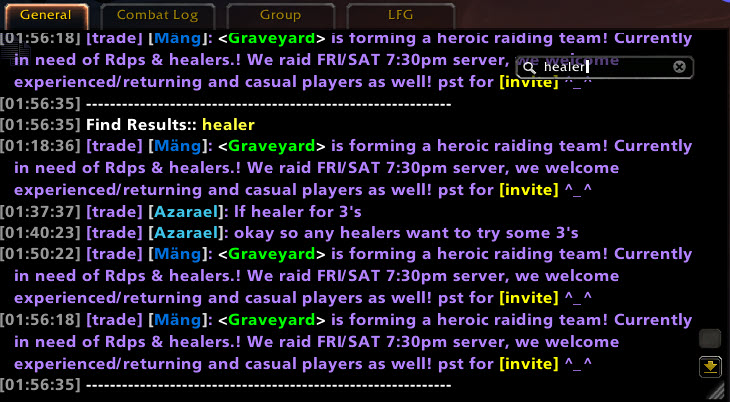
- Full chat search and search box
- Customizable filters for advanced users
- Show item icon next to item links and player class icon next to player names
- Icon-only options for newcomers chat
- Optional flashing or font color change for chat tabs when a new message comes in.
You can enable/disable all Prat modules - don't have to have the ones you don't use running
While trying to reduce resource utilization, it is also important to note that some people prefer the features, and don't care that an addon uses 500k more.
用户评价
暂无 / 5,0 条评价相关推荐
继续看看这些内容
